AI comic generator pages work when they focus on storytelling across panels, not just one strong frame. Most creators here want characters, scenes, and pacing that can carry a strip, manga page, or short narrative sequence. This page helps you compare comic ideas that feel usable for multi-panel storytelling, dialogue moments, and visual continuity instead of one-off illustration output.

Video
GLOBAL LOCK: vertical 3:4 Adobe Firefly Boards style promo card, static held frame, red brand treatment over a gloomy downtown city block. Main image shows a tall monolithic concrete tower tinted deep Firefly red, torn open by two vertical cracks, with a masked cyberpunk antihero figure emerging from the fissure. Character design: short white hair, white or silver face mask with dark eye slits, dark tactical armor or jacket, menacing upright posture. Preserve Firefly square 'Fi' logo at top left, bold white headline stacked center reading 'From Idea to Branded Mockup' with a red capsule beneath reading 'in minutes', smaller white subhead explaining how AI-first Firefly Boards help visualize concepts without leaving the flow, lower-left hashtags for Adobe Firefly ambassadors and Firefly Boards, and a small swipe cue at lower right. Rainy traffic, buses, taxis, and pedestrians anchor scale at street level.
[00:00-00:11] Hold on the same branded hero frame throughout with only subtle export shimmer. The red building, cracked facade, cyberpunk figure, overcast clouds, and downtown traffic remain static while the large white headline and red capsule emphasize the message that Firefly Boards turns an idea into a branded mockup in minutes.
Video
A vertical creator tutorial video about achieving AI character consistency across generations and workflows. A female presenter speaks directly to the camera against a clean lavender-purple background while holding a handheld microphone and explaining a multi-step process labeled with numbered sections like #1, #2, #3, and #4. As she talks, large overlays appear showing reference portraits, facial expressions, hat variations, prompt text, interface screenshots, parameter panels, model settings, and examples from different AI tools. The video walks through how to build a consistent character, refine realism, preserve facial identity, manage textures, and combine different generation tools into one repeatable system. The mood is educational, structured, creator-friendly, and optimized for short-form AI workflow teaching.
Video
GLOBAL LOCK: a soft 2D hand-drawn cartoon animation with clean outlines, pastel suburban color palette, gentle Studio Ghibli-inspired slice-of-life mood, an elderly man with gray-blue hair and a full beard, casual vest and shirt, a small vintage blue compact car, quiet suburban streets, dashboard flower ornament, police station / driver's license renewal office setting, smooth simple character motion, daytime lighting, no photorealism, no 3D look.

[00:00-00:05] Start outside a modest suburban house where the elderly man steps out from the porch and heads toward his small blue vintage car, calm neighborhood in the background, warm everyday cartoon atmosphere.

[00:05-00:10] Cut inside and around the car as he drives through the neighborhood, hands on the wheel, the dashboard visible with a small pink flower ornament, soft windshield reflections and passing houses establishing a slow everyday commute.

[00:10-00:16] Show exterior driving angles of the blue car moving down a quiet residential street, then approaching a police or civic-services building, keeping the animation style simple, gentle, and readable.

[00:16-00:22] Move closer to the front of the car and dashboard as he parks and reaches forward, then transition to the building entrance where he walks toward a public service counter, preserving the same cozy cartoon look.

[00:22-00:30] End in a driver's license renewal office where the elderly man speaks face-to-face with a clerk across the counter under a sign reading driver's license renewal, holding on a calm conversational exchange and mild facial reactions in a clean storybook-style cartoon frame.

NEGATIVE PROMPT: photorealism, 3D CGI, anime action style, dark noir lighting, futuristic city, luxury sports car, young protagonist, messy sketch lines, heavy shadows, horror, text-heavy graphic design, warped anatomy, crowded background, high-speed chase, dramatic explosions.
Video
GLOBAL LOCK: vertical 9:16 AI creator tutorial reel, one consistent young adult male host with light skin, slim build, black backwards baseball cap, black hoodie, seated at a desk with a black microphone and red accent light, dark studio background with magenta-blue edge lighting, intercut with viral cartoon-short examples, Instagram proof screens, GPT directories, prompt text blocks, and dark AI image/video creation interfaces. The showcase content features nostalgic cartoonized characters rendered like soft toy figurines or stylized animated dolls in warm cozy interiors, with cinematic warm light, childlike proportions, and storybook emotion. Same male speaker throughout, dry close-mic narration, clear subtitle words, brisk step-by-step educational pacing.

[00:00-00:05] Open with a fast collage of viral cartoon-short examples and bold poster text promising viewers they can create cartoon shorts with AI. Show multiple nostalgic character variants in cozy rooms, including plush-like toy characters and recognizable archetypes reimagined as warm cinematic cartoon figures. Intercut the host talking directly to camera to establish the tutorial structure.

[00:05-00:10] Continue with example panels and proof-of-performance imagery, including Instagram account screens and posts with strong view counts. The host explains that nostalgic cartoon-style shorts can attract millions of views because they combine familiar characters with emotionally soft, cinematic rendering. Subtitle words highlight viral, nostalgic, millions, and views.

[00:10-00:16] Shift into the planning stage. Show logos and GPT search interfaces while the host explains that the first step is to use ChatGPT and specialized GPTs to generate the exact prompts for the cartoon style. The workflow emphasizes browsing GPTs rather than freehand guessing, keeping the method systematic and repeatable.

[00:16-00:24] Demonstrate a structured prompt-building phase. White screens show GPTs being explored and selected, then detailed prompt text appears, including “locked prompt” style blocks for cartoon nostalgia, environment, and subject direction. The host explains that the prompt needs to lock the style, room, and emotional tone before generating images.

[00:24-00:32] Move into the image-generation tools. Show a dark all-in-one creation interface and brand or model selections such as OpenArt, NanoBanana, or Flux-type image models. The host explains that you should first create still images in a clean stylized aesthetic before attempting motion.

[00:32-00:40] Demonstrate configuration choices like 9:16 framing, 2K output, and image guidance or generation settings. Show the first generated cartoon images: toy-like or puppet-like characters in cozy warm-lit interiors. The host explains that these stills become the visual basis for the final short-form animation.

[00:40-00:48] Transition into the AI video stage with dark model panels and Kling AI visible. The host explains how to take the generated image, upload it into the video model, and preserve the character identity while adding subtle motion. The tutorial remains practical and interface-focused rather than abstract.

[00:48-00:56] End on the final cartoon outputs: a pair of cozy character figures together, then a seated single character, then a warm window-side close-up with soft cinematic light. Return to the host full-screen for a CTA encouraging viewers to follow or comment for the workflow, making the clip feel like a complete creator-growth tutorial.

NEGATIVE PROMPT: broken doll anatomy, uncanny facial distortion, unreadable prompt text, muddy lighting, low-resolution textures, duplicated host, inconsistent cartoon style, warped hands, unstable eye placement, flat plastic shading, robotic narration, clipping, harsh sibilance, watermark, jittery transitions, aspect-ratio drift.

SPEECH PACK:
- Hook: Here’s how to create viral cartoon shorts with AI.
- Beat 1: Start in ChatGPT and use GPTs to build exact locked prompts for the cartoon style you want.
- Beat 2: Generate the still images first, then set the format to 9:16 and keep the output clean and cinematic.
- Beat 3: Move those images into Kling or your video model to animate them without breaking the character style.
- CTA: Follow for more, or comment if you want the workflow.
Video
GLOBAL LOCK:
The subject is a female presenter, Caucasian appearance, mid-20s, with long straight brown hair parted in the middle. She wears a long-sleeved top with a blue-to-grey vertical gradient texture. The background is a clean, futuristic studio with soft, diffused lighting and blurred digital displays. The animation style for the cartoon segments is high-quality 3D stylized (Pixar-esque), featuring an old man with a large nose, white hair, and a blue beard, wearing a grey vest over a white shirt. The environment is a sunny suburban neighborhood with a red vintage-style car. Speech is clear, professional, and instructional.

[00:00–00:05]
Visual: Split screen. Top half shows the old man walking out of a wooden house onto a porch. Bottom half shows a police station exterior with a red car parked in front. Large yellow and white text overlay: "Biggest Hack to make AI cartoons in 2026 (using ONE prompt)".
Action: The old man walks toward the camera.
Speech: "I think I just found the biggest cheat code to make AI cartoons in 2026 with just one prompt."

[00:05–00:10]
Visual: MCU of the female presenter speaking. Rapid montage overlays: a Ghibli-style house, a boy running with a goose, a Ghibli train scene, and a Japanese Ukiyo-e style illustration.
Action: Presenter gestures with hands.
Speech: "Step one: Start with your source image. You can take any style of animation, like Ghibli, Pixar, or Ukiyo."

[00:10–00:15]
Visual: Screen recording of the Seedance 2.0 website showing a basketball player, then a black screen with yellow/white text showing the prompt: "'A man walks out of his house toward the parked car. [cut] The man gets into the car. [cut] Man turns on the engine...'"
Speech: "Then head to Seedance 2.0 and use the following prompt."

[00:15–00:22]
Visual: MCU of the presenter. Inset videos show the old man walking down stairs, then a close-up of him driving the red car, then a close-up of a yellow flower in a vase on the dashboard.
Action: Presenter explains the syntax.
Speech: "The word 'cut' here is used to jump from one scene to another within the same prompt. This way, you don't have to use multiple prompts for multiple scenes."

[00:22–00:30]
Visual: MCU of the presenter. A grid of four screenshots appears: the house, the man driving, the flower, and the car driving away.
Action: Presenter points to the screenshots.
Speech: "After that, take a few screenshots of the character and key details like the flower from the generated video. This is how we maintain character and shot consistency."

[00:30–00:35]
Visual: Black screen with the second "Master Prompt" text. Then, a sequence of the red car arriving at the police station, the man getting out with the flower, and a close-up of the old man's face looking hopeful.
Speech: "Upload them in Seedance and use this prompt to create the following shots of your cartoon."

[00:35–00:42]
Visual: A brief shot of a video editing timeline (CapCut). Then back to the MCU of the presenter. Text overlay: "Comment 'AI'".
Action: Presenter smiles and gestures toward the text.
Speech: "Then combine your clips and choose a background music that fits the story. If you want the full tutorial, comment 'AI' and I'll send it to you."

NEGATIVE PROMPT:
Visual: Low resolution, blurry textures, inconsistent character features (beard color changing), flickering lighting, distorted hands or faces in animation, watermark, messy UI, robotic presenter movements.
Speech: Monotone voice, robotic cadence, background noise, poor lip-sync, unnatural pauses, muffled audio.

SPEECH PACK:
[00:00–00:05]
Transcript: "I think I just found the biggest cheat code to make AI cartoons in 2026 with just one prompt."
TAKE_A: (Excited, high energy) "I think I just found the BIGGEST cheat code... to make AI cartoons in 2026... with just ONE prompt!"
TAKE_B: (Informative, steady) "I think I just found the biggest cheat code to make AI cartoons in 2026 with just one prompt."

[00:05–00:15]
Transcript: "Step one: Start with your source image. You can take any style of animation, like Ghibli, Pixar, or Ukiyo. Then head to Seedance 2.0 and use the following prompt."
TAKE_A: "Step one: Start with your source image. You can take ANY style... Ghibli, Pixar, or Ukiyo. Then head to Seedance 2.0..."

[00:15–00:30]
Transcript: "The word 'cut' here is used to jump from one scene to another within the same prompt. This way, you don't have to use multiple prompts for multiple scenes. After that, take a few screenshots of the character and key details like the flower from the generated video. This is how we maintain character and shot consistency."
TAKE_A: "The word 'CUT' here... is used to jump from one scene to another. This way, you don't need multiple prompts. After that? Take screenshots... that's how we keep consistency."

[00:30–00:42]
Transcript: "Upload them in Seedance and use this prompt to create the following shots of your cartoon. Then combine your clips and choose a background music that fits the story. If you want the full tutorial, comment 'AI' and I'll send it to you."
TAKE_A: "Upload them... use this prompt. Then combine your clips. Want the full tutorial? Comment 'AI'!"
Video
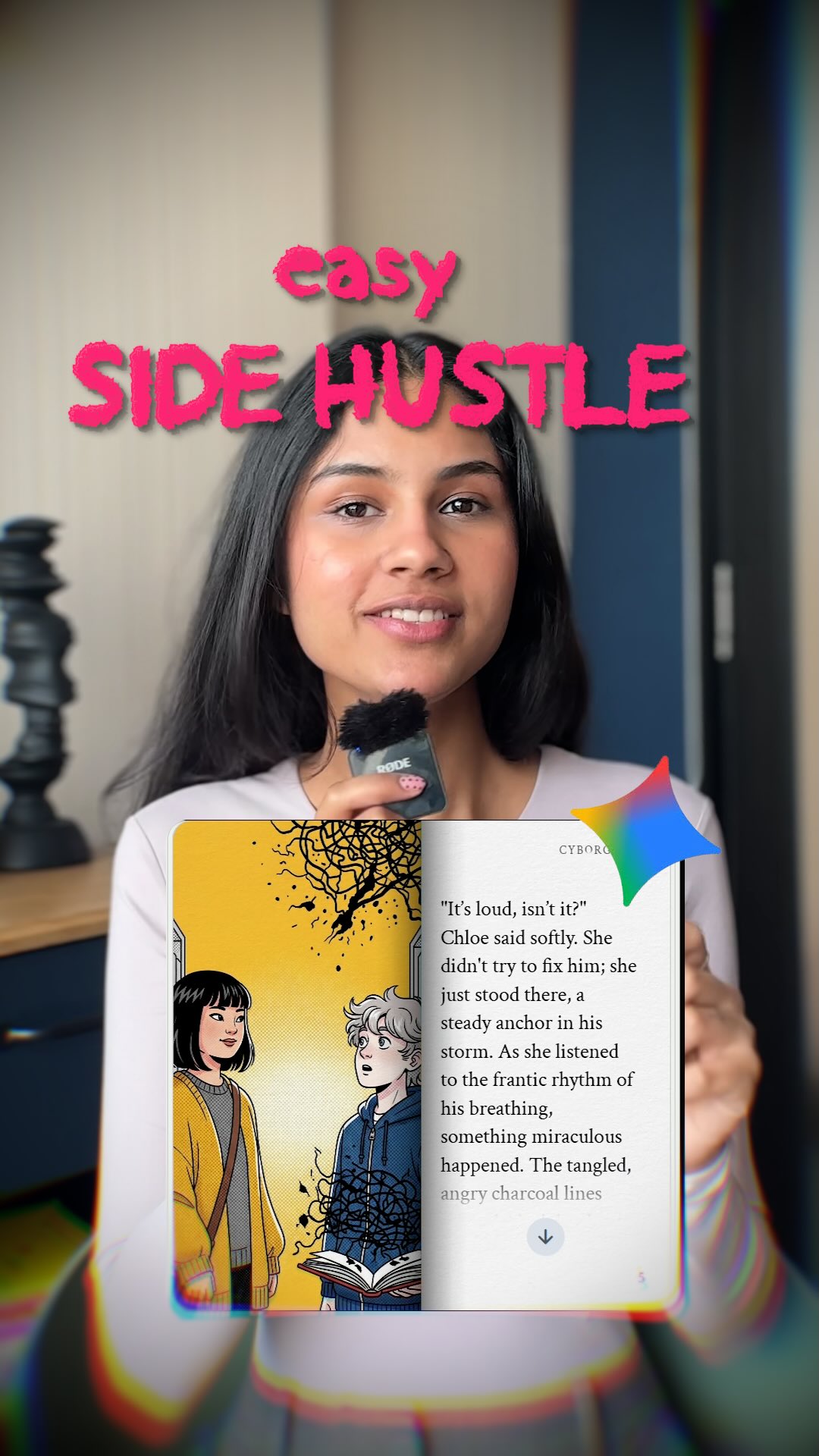
GLOBAL LOCK: A young South Asian woman with long, straight dark hair and a friendly, articulate expression. She wears a light pink/beige long-sleeved ribbed top. The setting is a bright, modern indoor room with a neutral off-white wall. In the background, a minimalist black abstract sculpture sits on a wooden desk. Lighting is soft, even, and frontal, creating a clean UGC aesthetic. Audio is crisp with a close-mic signature, as she holds a small black wireless lavalier microphone.

[00:00–00:02]
Subject: Medium shot of the woman holding the microphone near her mouth.
Action: She speaks directly to the camera with an enthusiastic expression.
Text Overlay: Large, stylized pink and white text reads "SIDE HUSTLE you NEVER thought of".
Camera: Static MS, eye-level.
Lighting: Soft indoor lighting.

[00:02–00:04]
Environment: Screen recording of a Google search page.
Action: A cursor moves and clicks on a search result for "Gemini Storybook — for the story".
Text Overlay: Green text "Go to this" appears at the top.
Camera: Direct screen capture.

[00:04–00:06]
Environment: Digital interface showing a 10-panel storyboard titled "THE LIBRARY OF WHISPERS".
Action: The screen scrolls slightly to show the different panels (P1 to P10) featuring indie-style illustrations of a girl in a library.
Text Overlay: Green text "Plan an entire storyboard".
Camera: Direct screen capture.

[00:06–00:09]
Environment: AI tool interface showing an upload area.
Action: A cursor drags a white square icon into an upload box. Then, a character sheet titled "OUTFIT DETAILS" is shown, featuring a girl in a green cardigan and brown corduroy pants.
Text Overlay: Green text "your inputs like images characters or sketches".
Camera: Direct screen capture.

[00:10–00:12]
Environment: Text prompt box in an AI interface.
Action: The text "Create a 10-page comic titled The Library of Whispers..." is visible. The cursor clicks a "Send/Generate" arrow icon.
Text Overlay: Green text "an entire storyline Hit generate".
Camera: Direct screen capture.

[00:13–00:16]
Subject: Medium shot of the woman holding a smartphone vertically.
Action: The phone screen displays a digital comic book cover. She uses her thumb to "flip" a digital page, revealing a beautifully illustrated page with text.
Text Overlay: Green text "and boom! a comic book without any".
Camera: Static MS, focusing on the phone in her hand.

[00:17–00:19]
Subject: Medium shot of the woman speaking to the camera.
Action: She gestures with her hands while explaining the customization options.
Text Overlay: Green text "involved customize for any".
Camera: Static MS.

[00:20–00:25]
Environment: Close-up of a digital comic book page.
Action: The page features a yellow background with two characters (a girl with dark hair and a boy with white hair). The text on the page discusses "identifying feelings and thoughts."
Text Overlay: Green text "educational I made one for EQ which will identify between and thoughts".
Camera: Direct screen capture/Close-up of the art.

[00:26–00:28]
Environment: Amazon Kindle Direct Publishing (KDP) dashboard.
Action: The screen shows the "Manage. Publish." section with buttons for "Kindle eBook" and "Series page".
Text Overlay: Green text "After this you can sell them as ebooks".
Camera: Direct screen capture, dark mode UI.

[00:29–00:32]
Subject: Medium shot of the woman speaking her final call to action.
Action: She smiles and gestures towards the screen.
Text Overlay: Green text "And for cool as such" followed by a stylized logo "the CYBORG girl" in pink.
Camera: Static MS.
Speech: "And for cool AI hacks as such, follow the Cyborg Girl for more."

NEGATIVE PROMPT: blurry, low resolution, inconsistent facial features, flickering lighting, robotic movements, distorted text in overlays, messy background, poor lip-sync, harsh shadows, over-saturated colors, watermark, low-quality audio, background noise.

SPEECH PACK:
[00:00-00:02] "Here's a side hustle you never thought of."
TAKE_A: (Energetic, fast-paced) "Here's a side hustle you NEVER thought of!"
TAKE_B: (Intriguing, lower pitch) "Check out this side hustle... you probably never thought of."
TAKE_C: (Friendly, casual) "So, here is a side hustle you've never thought of before."

[00:13-00:16] "And boom! You just made a comic book without any manpower involved."
TAKE_A: (Excited, emphasizing 'boom') "And BOOM! You just made a comic book, no manpower needed."
TAKE_B: (Satisfied, calm) "And just like that, you've got a comic book without any manual work."
TAKE_C: (Punchy) "Boom! A full comic book, zero manpower involved."

[00:29-00:32] "And for cool AI hacks as such, follow the Cyborg Girl for more."
TAKE_A: (Warm, inviting) "For more cool AI hacks like this, follow the Cyborg Girl!"
TAKE_B: (Direct, authoritative) "Follow the Cyborg Girl for more AI hacks just like this one."
TAKE_C: (Smiling, upbeat) "Want more AI hacks? Follow the Cyborg Girl!"
Video
Kallaway
GLOBAL LOCK:
Subject Identity: A consistent male creator (@kallaway), mid-20s, light skin, short dark hair, wearing a black hoodie and a black baseball cap with a subtle white logo.
Environment: Indoor studio with soft, warm key lighting. Background is slightly out of focus, showing a shelf with ambient warm lights and a dark wall.
AI Content Style: Photorealistic, cinematic, high-fidelity textures, 4k resolution.
UI Style: Dark mode interface, node-based "Freepik Spaces" layout with blue and purple accents.
Speech Style: Energetic, direct-to-camera, fast-paced delivery, crisp audio with slight room resonance.

[00:00–00:04]
Subject: Creator in MCU, pointing upwards.
Overlay: A square frame showing an AI-generated man with blonde hair, orange circular sunglasses, and large headphones in a neon-lit urban alley.
Action: Creator speaks enthusiastically; the overlay transitions from the man to a top-down view of a rainy street.
Camera: Static MCU.
Lighting: Warm studio light on creator; neon glow in the overlay.
Speech: "You can now turn a single image into a complete cinematic world using AI."
Sync: High lip-sync strictness.

[00:04–00:07]
Subject: Creator in MCU, gesturing with hands.
Overlay: Large white text "Angles" and "FREEP!K" appears.
Action: Creator introduces the tool.
Camera: Slight zoom-in on creator.
Speech: "If you make content, this is a huge hack. It’s called Angles by Freepik."

[00:07–00:15]
Subject: Screen recording of Freepik Spaces interface.
Action: A cursor drags a thumbnail of a woman in a park into a workspace. A "Camera Angle" node is added. Sliders for "Rotate", "Vertical", and "Closeup" are visible.
Camera: Screen capture with dynamic pans to follow the cursor.
Lighting: UI dark mode.
Speech: "Start by taking any image and drop it into Freepik Spaces. You can then add a Camera Angle node..."

[00:15–00:23]
Subject: Screen recording showing the "Rotate" slider moving to -45 degrees.
Action: The system processes, and a new image of the same woman appears from a side angle.
Camera: Zoom in on the "Rotate" slider and the resulting image.
Speech: "...and specify how you want the angle to change. Just drag the rotate, vertical, and closeup sliders."

[00:23–00:35]
Subject: A grid of 10 different camera angle nodes, all showing the same woman in a black coat.
Action: The creator's face appears in a small bubble at the bottom, explaining the "Level 2" workflow. The grid shows angles from top-down, side, and low-angle.
Camera: Wide shot of the node workspace.
Speech: "But that's just level one. Because with Spaces, we can build out ten different camera angle nodes that all run at the same time."

[00:35–00:47]
Subject: Montage of AI-generated characters.
1. A young Asian man in a blue shirt looking up in a traditional market.
2. An elderly man in a garden.
3. A woman in a white top standing in a busy NYC street with yellow taxis.
Action: Fast cuts between these high-quality cinematic shots.
Camera: Various (Low angle, MCU, WS).
Lighting: Natural daylight, golden hour.
Speech: "For one, if you want to make a video with the same subject that has continuous motion, you can now use these new angle shots as the starting and ending frames."

[00:47–01:03]
Subject: A woman in a black hoodie in a cinematic urban setting at night.
Action: A montage showing her from multiple angles (front, side, top-down) while maintaining perfect facial consistency. Transition to the creator explaining character consistency.
Camera: Rapid cuts, matching the beat of the music.
Speech: "Most creative storytelling requires character consistency. This workflow solves for character consistency because you're building a world library of different shots."

[01:03–01:08]
Subject: Creator in MCU, pointing down.
Overlay: "FREEP!K" logo and "Angle node" text.
Action: Final CTA.
Camera: Static MCU.
Speech: "If you want to try this out, check out Freepik and use the Angle node in Spaces."

NEGATIVE PROMPT:
Visual: blurry faces, inconsistent features, distorted limbs, flickering UI, low resolution, watermarks (except Freepik), messy nodes, unnatural skin texture, jittery camera movement.
Speech: robotic tone, muffled audio, background noise, lip-sync lag, monotone delivery, harsh "S" sounds, long silences.

SPEECH PACK:
[00:00-00:04]
TAKE_A: "You can now turn a single image into a complete cinematic world using AI." (Excited, high energy)
TAKE_B: "Turn any single image into a full cinematic universe with this AI tool." (Authoritative)
TAKE_C: "Imagine turning one photo into a whole cinematic world. Now you can." (Mysterious/Intriguing)

[00:47-01:03]
TAKE_A: "Most creative storytelling requires character consistency. This workflow solves it." (Problem-solving tone)
TAKE_B: "Consistency is key for storytelling. This tool builds your character library instantly." (Professional)
TAKE_C: "Stop worrying about inconsistent AI faces. This is the solution for world-building." (Direct)

TRANSCRIPT:
00:00: "You can now turn a single image into a complete cinematic world using AI."
00:04: "If you make content, this is a huge hack. It’s called Angles by Freepik."
00:07: "Start by taking any image and drop it into Freepik Spaces."
00:10: "You can then add a Camera Angle node and specify how you want the angle to change."
00:14: "Just drag the rotate, vertical, and closeup sliders."
00:17: "And this will create an angle preset."
00:19: "With just one click, you can convert your base image into the new angle with the exact same character and scene."
00:24: "But that's just level one."
00:25: "Because with Spaces, we can build out ten different camera angle nodes that all run at the same time."
00:29: "And then all we have to do is press go on the starting image and we get ten different angles of the same character and world automatically."
00:35: "Now this is super valuable for two reasons."
00:37: "For one, if you want to make a video with the same subject that has continuous motion..."
00:41: "...you can now use these new angle shots as the starting and ending frames."
00:44: "It is almost impossible to control motion in AI video better than this."
00:48: "But the best part about this workflow is the speed you unlock at world building."
00:51: "Most creative storytelling requires character consistency."
00:54: "If you can't hold the character constant, it just doesn't sell the story as well."
00:57: "This workflow solves for character consistency because you're building a world library of different shots that you can use as starting points."
01:03: "If you want to try this out, check out Freepik and use the Angle node in Spaces."
Video
GLOBAL LOCK: 
Subject is a Caucasian male in his mid-30s with a dark, well-groomed beard and mustache. He consistently wears a white baseball cap with a small logo and a white t-shirt. The AI-generated versions must maintain his facial structure and beard while changing costumes. The overall style is high-end cinematic photorealism with 8k textures, dramatic lighting, and professional color grading. The video follows a 3-panel vertical split-screen format: Top (Sketch), Middle (AI Video), Bottom (Live Action).

[00:00–00:03] 
SUBJECT: The subject is a medieval knight wearing a brown leather chest plate with a white deer emblem, green undershirt, and leather bracers. He is holding a wooden longbow, drawing the string back to his cheek with a focused expression.
ENVIRONMENT: A grand medieval castle courtyard with stone walls, flags, and a blurred crowd in the background.
ACTION: Drawing the bowstring, aiming, and holding the tension.
CAMERA: Medium shot, 50mm lens, slight side profile.
LIGHTING: Bright, natural sunlight with soft shadows.
SPEECH: "This new method of creating AI videos is absolutely insane." (Warm, energetic tone).

[00:04–00:08] 
SUBJECT: The subject is a master potter wearing a tan canvas apron over a white shirt. His hands are covered in wet clay.
ENVIRONMENT: A rustic, sun-drenched pottery studio with wooden shelves and ceramic pots.
ACTION: Shaping a spinning clay vase on a wooden pottery wheel. The clay is smooth and wet.
CAMERA: Close-up on hands and face, shallow depth of field.
LIGHTING: Warm, golden hour light coming from a side window.
SPEECH: "So you can now play yourself as a consistent character moving through any scene."

[00:09–00:12] 
SUBJECT: The subject is a gallery visitor in a striped shirt and white cap, holding a black picture frame that contains a vibrant floral oil painting.
ENVIRONMENT: A dark, modern art gallery with grey walls and red security laser beams crisscrossing the room.
ACTION: Holding the frame up, looking at the camera with a surprised, excited expression.
CAMERA: Medium shot, centered composition.
LIGHTING: Moody, low-key lighting with red accent lights from the lasers.
SPEECH: "And the crazy part is that you no longer need Hollywood level budgets for this."

[00:13–00:15] 
SUBJECT: The subject is a scuba diver with long flowing hair (no cap), wearing a white t-shirt.
ENVIRONMENT: A vibrant underwater coral reef with colorful fish, bubbles, and caustic light rays filtering through the surface.
ACTION: Swimming forward with a breaststroke motion, looking around in awe.
CAMERA: Wide shot, tracking the movement.
LIGHTING: Cool blue underwater lighting with shimmering highlights.
SPEECH: "You can record all of this from your own home."

[00:16–00:18] 
SUBJECT: The subject is a world-class DJ wearing a white cap and professional headphones.
ENVIRONMENT: A massive concert stage overlooking a cheering crowd of thousands. Neon lights and stage fog.
ACTION: One hand on a DJ controller, the other hand raised to the crowd in a "pumping" motion.
CAMERA: Over-the-shoulder shot looking out at the crowd.
LIGHTING: High-contrast, flashing concert lights (purple, blue, white).
SPEECH: "So I'm going to show you exactly how you could achieve the same results for yourself."

[00:19–00:21] 
SUBJECT: The subject is a professional chef in a white chef's coat and tall hat.
ENVIRONMENT: A busy, high-end restaurant kitchen with stainless steel surfaces and other chefs in the background.
ACTION: Tossing pasta in a frying pan, creating a large, controlled burst of orange flame.
CAMERA: Medium shot, dynamic movement.
LIGHTING: Bright kitchen lighting with the warm glow of the fire reflecting on the subject's face.
SPEECH: "...with a few subscriptions and a simple sketch."

[00:22–00:59] 
SUBJECT: The subject is an 18th-century opera singer in a lavish blue and gold velvet frock coat with white lace cuffs and a powdered wig (beard remains).
ENVIRONMENT: A grand, ornate opera house with red velvet seats, gold-leaf balconies, and a spotlight on the stage.
ACTION: Standing center stage, arms outstretched in a dramatic singing pose, then performing a theatrical twirl.
CAMERA: Starts as a wide shot of the theater, then punches in to a medium shot of the singer.
LIGHTING: Dramatic theatrical spotlighting, high contrast.
SPEECH: Detailed tutorial narration explaining the sketch-to-video process. (Clear, instructional, engaging).

NEGATIVE PROMPT: 
Visual: Cartoonish, low resolution, blurry, distorted facial features, inconsistent beard, flickering lights, floating objects, extra limbs, text/watermarks in the AI panel, jittery motion.
Speech: Robotic, flat tone, muffled audio, background noise, lip-sync mismatch, stuttering, unnatural pauses.

SPEECH PACK:
[00:00–00:03] "This new method of creating AI videos is absolutely insane."
TAKE_A: (Excited/High Energy) "This NEW method of creating AI videos is absolutely INSANE!"
TAKE_B: (Awestruck/Lower Pitch) "This... new method of creating AI videos... it's absolutely insane."

[00:04–00:08] "So you can now play yourself as a consistent character moving through any scene."
TAKE_A: (Informative/Smooth) "So you can now play YOURSELF as a consistent character, moving through ANY scene."
TAKE_B: (Fast-paced/Direct) "You can now play yourself as a consistent character in any scene you want."

[00:22–00:30] "To get started, you need to do a basic sketch mapping out the scene."
TAKE_A: (Instructional/Clear) "To get started, you just need a basic sketch... mapping out the whole scene."

PROSODY NOTES: 
- Use emphasis on "INSANE," "ANY," and "HOLLYWOOD."
- Maintain a rhythmic pace that matches the visual cuts.
- Ensure lip-sync is high-priority for the tutorial sections where the creator's face is visible in the bottom panel.
Video
GLOBAL LOCK: Subject is Natalia Dyer, an American actress with an oval face, high cheekbones, large expressive brown eyes, and fair skin with natural warmth. Her hair is dark brown, long, and wavy, styled into two thick, loose braids falling over her shoulders. She wears a dark, high-collared cloak/coat. Her expression is neutral, serene, and slightly melancholic, looking directly at the camera. The camera is a static Medium Close-Up (MCU) with a cinematic 35mm lens feel. High-fidelity skin textures and realistic lighting are mandatory.

[00:00–00:01]
Subject is centered in a grand, atmospheric gothic cathedral. Background features intricate stone arches and stained glass windows. Lighting: Misty, volumetric light beams (God rays) filter through the windows, creating a teal and orange contrast. Subject's face is softly lit by the ambient glow. Motion: Subtle dust motes dancing in the light beams.

[00:01–00:02]
Subject is centered in a vast golden hour meadow. Background features tall, dry grass and a distant horizon under a setting sun. Lighting: Warm, intense amber backlighting creating a soft rim light on her hair and cloak. A subtle lens flare peeks from the corner. Motion: Very slight swaying of the grass in the background.

[00:02–00:03]
Subject is centered in a dense autumn forest. Background is filled with vibrant orange and red maple leaves. Lighting: Dappled sunlight filtering through the canopy, creating soft patches of light on her face. Shallow depth of field with a creamy bokeh effect on the leaves. Motion: A few leaves slowly falling in the background.

NEGATIVE PROMPT: 
Facial distortion, changing eye color, changing hair style, inconsistent facial features, cartoonish look, plastic skin, extra limbs, blurry face, text, watermark, logo, flickering lighting, sudden jumps in subject position, robotic movement, oversaturated colors, low resolution.
cyborggirll: Easy Side Hustle Creator Thumbnail Breakdown
[Subject] A young woman content creator speaking directly to camera in a casual indoor setup, long straight dark hair, warm natural makeup, light-colored top, holding a compact handheld microphone near her mouth, friendly confident expression, framed as a social-media educator or creator explaining a quick online income idea. [Environment] Home-office or apartment interior with softly blurred neutral walls and furniture, vertical mobile-video composition, bold hot-pink headline text at the top reading like a viral hook, a floating app or AI-story interface card overlaid in the lower center foreground, subtle rainbow lens-distortion edges and creator-thumbnail styling, no complex background distractions. [Composition/Camera] Vertical short-form content cover image, speaker centered in medium close-up, direct eye contact with the viewer, top text occupying the upper third, interface overlay card anchored in the lower middle, microphone visible as the authority prop, clean hierarchy optimized for Reels/TikTok/Shorts thumbnail scanning. [Lighting] Soft indoor daylight or window light, flattering even illumination on the face, gentle background blur, crisp readable text and UI overlay, no hard shadows, no dramatic studio contrast, social-first clarity. [Style/Rendering] Viral side-hustle video thumbnail, creator-economy promo cover, bright and legible social-media design, realistic influencer portrait mixed with app-demo overlay, slight chromatic aberration and hype-thumbnail polish, optimized for fast comprehension and click-through appeal. [Detail constraints] Keep exactly one female creator centered on camera with a handheld mic, preserve the hot-pink “easy side hustle” style headline, the overlaid app/story card, and the subtle rainbow distortion around the edges; do not add extra people, cluttered desk objects, heavy logos, fantasy effects, unrelated charts, or outdoor scenery. Negative prompt: extra people, podcast studio crowd, unreadable text, messy background, dark moody lighting, overdesigned infographic clutter, multiple UI cards, gamer setup, low-resolution blur, exaggerated makeup, duplicated microphone, cyberpunk neon, business suit corporate set, outdoor scene, stage audience, fantasy elements, text walls. Suggested parameters: aspect ratio 4:5, lens 50mm equivalent, shallow depth of field, steps 24-34, CFG 5-6.5, sampler DPM++ 2M Karras, seed 421876. Delta prompt strategy: 1. If the creator loses prominence, add “centered female speaker in medium close-up holding a microphone to camera.” 2. If the thumbnail loses virality, add “bold hot-pink hook text across the top in a short-form content style.” 3. If the app card disappears, add “floating AI-story or reading-app interface overlay in the lower center foreground.” 4. If the scene becomes too formal, add “casual creator economy video cover, approachable and social-first.” 5. If lighting gets too dramatic, add “soft even indoor daylight optimized for creator thumbnails.” 6. If the background gets busy, add “neutral blurred room with minimal distractions.” 7. If the image becomes generic vlog content, add “side-hustle explainer thumbnail with clear monetization hook.” 8. If colors flatten, add “pink headline text and subtle rainbow edge distortion for high click visibility.” 9. If the microphone vanishes, add “small handheld mic visible near the speaker’s mouth.” 10. If the design gets cluttered, add “single speaker, single overlay card, clear text hierarchy, no extra graphics.”
Video
GLOBAL LOCK: The video is a high-quality screen recording of a desktop browser. The interface is ChatGPT in "Dark Mode" (dark charcoal background, light gray text). The font is the standard ChatGPT sans-serif. The cursor is a standard white pointer. All text overlays are in a bold, white, all-caps sans-serif font, positioned in black "letterbox" bars at the top and bottom of the frame. The overall vibe is clean, instructional, and tech-focused.

[00:00–00:03]
Visual: A static screen recording of the ChatGPT interface. A large text overlay at the top reads "STEP 1: CREATE YOUR CHARACTER PROMPT USING CHATGPT". The GPT name "Midjourney V7 - Photorealistic Image Prompts" is visible at the top of the chat.
Action: The screen is still, establishing the scene.
Audio: Low-fi tech beat starts, steady and rhythmic.

[00:03–00:07]
Visual: The cursor clicks into the "Ask anything" input box at the bottom. The text "give me a front view shot of portrait shot of woman in her 20s, model, with crazy facial features and should look very unique and easily recognizable, front view shot, looking into the camera, flat studio lighting" is typed out rapidly.
Action: Rapid typing animation.
Audio: Subtle keyboard clicking sounds synced to the typing.

[00:07–00:11]
Visual: The AI begins to respond. The text "Here's your photorealistic Midjourney prompt based on your description: Prompt: A front view portrait shot of a woman in her 20s, fashion model, with highly unique and exaggerated facial features..." streams onto the screen.
Action: Text "streaming" effect where words appear one by one from left to right.
Audio: The music continues; the typing sounds stop as the AI generates.

[00:11–00:14]
Visual: The cursor moves up and highlights the generated prompt text in a light blue selection box. A bottom text overlay appears: "Head to ChatGPT and search for GPTs to find 'Midjourney V7...'. Describe your character, and the GPT will generate the perfect prompt for you to copy." A small white hand icon with a clicking animation appears in the bottom right corner.
Action: Smooth cursor movement and text selection.
Audio: Music swells slightly for the conclusion.

NEGATIVE PROMPT: Handheld camera shake, blurry screen, light mode UI, messy desktop icons, low resolution, watermark, robotic voiceover, stuttering text generation, inconsistent font styles, bright colors, distracting background elements.

SPEECH PACK:
(Note: This video has no spoken dialogue, only text-to-be-read. The "Speech" here refers to the rhythmic delivery of the text overlays.)

Segment 1 [00:00-00:03]: "STEP 1: CREATE YOUR CHARACTER PROMPT USING CHATGPT"
TAKE_A: Bold, authoritative, slow pacing.
TAKE_B: Fast, energetic, "hack" style.
TAKE_C: Neutral, instructional.

Segment 2 [00:11-00:14]: "Head to ChatGPT and search for GPTs to find 'Midjourney V7...'"
TAKE_A: Informative, helpful tone.
TAKE_B: Urgent, "do this now" tone.
TAKE_C: Calm, step-by-step guidance.
Video

GLOBAL LOCK: A vertical 4:5 comedic-cinematic martial arts prompt demo staged on the stone stairway of a genuine ancient Shinto shrine at harsh midday. The active video sits in a centered widescreen window with black borders, and the lower section of the overall layout contains a yellow “Prompt” label, a block of small yellow prompt text, and a glowing yellow call-to-action reading Comment AI for prompts. Keep this prompt-demo layout visible for the entire clip.

Character lock from source context: the main human figure is a Japanese martial arts student positioned on the right or center-right side of the stairway. The student wears traditional black martial arts clothing: a black gi top with flowing black hakama pants, barefoot, holding a wooden bokken with both hands. The second character is a lean orange tabby cat wearing a small dark gray gi. The cat is positioned lower and to the left or center-left on the steps, always facing the student. The tone is serious in staging but lightly absurd in concept.

[00:00-00:03] Open on a locked wide shot of the shrine stairway under strong Japanese midday sun. Real moss textures appear between the granite steps. A large torii gate sits at the top of the frame, flanked by cedar trees casting deep shadow. The martial arts student is already in motion, raising the bokken overhead while the orange tabby cat in a dark gi crouches several steps below.

[00:00-00:05] The student strikes downward in a controlled two-handed cut toward the cat’s position. The cat sidesteps or darts to the side with feline agility, remaining low and compact. The action should feel precise and slightly comedic without becoming slapstick. Keep the fixed camera wide so the shrine geometry and scale remain legible.

[00:05-00:08] Hold the duel in the middle section of the stairs. The student recovers stance and points or lowers the bokken forward. The cat moves laterally across the steps in quick, grounded bursts, still wearing the little gray gi. The contrast between strict martial posture and tiny animal opponent should carry the charm.

[00:08-00:11] Continue with one or two more controlled exchanges. The student’s momentum carries him slightly past the cat as he overcommits to the strike. The cat evades again, staying balanced and nimble. The stone steps, torii gate, and cedar-lined shadows should remain unchanged, reinforcing the single-shot realism.

[00:11-00:13] End with the student pausing and breathing in recovery while the cat settles back into position on the steps, facing him. The frame should read like a ritual standoff reset after a brief encounter rather than a climactic finish. Preserve the playful seriousness.

Camera and composition: one locked wide shot, no zoom, no camera movement, no angle changes. The entire idea depends on the fixed observational framing. The shrine stairway should dominate the composition, with the torii gate acting as the top anchor and the duel occupying the middle third.

Lighting and grade: hard midday sunlight with strong contrast, bright granite whites, crisp shadows, and natural cedar-tree darkness in side areas. The grade should feel grounded and filmic, with slightly vintage realism rather than glossy modern HDR. The scene should evoke a Fujifilm 16mm or 1970s film-stock texture without becoming overly stylized.

Audio direction: if audio is present, use restrained natural ambience such as cicadas, distant birds, dry footfalls on stone, cloth movement, and light wooden bokken swishes. No dialogue is needed. The sound should keep the scene grounded and slightly solemn, letting the absurdity arrive visually.

Invariants to lock: centered widescreen clip inside black border, yellow Prompt header and prompt paragraph below, yellow Comment AI for prompts CTA, ancient shrine stairs, visible torii gate, black-clad martial arts student with bokken, orange tabby cat in gray gi, fixed single-shot composition.

Variables allowed to drift: exact cat step pattern, timing of the bokken swing, small student foot placement changes, amount of midday shadow on the stairs, and the cat’s tail position. These may vary as long as the basic duel structure remains intact.

NEGATIVE PROMPT: avoid cartoon cat behavior, exaggerated anime action streaks, fantasy magic, modern urban background, multiple camera angles, or removal of the prompt-demo layout. Do not dress the human in colorful costume or armor. Keep the cat small, lean, orange, and plausibly moving like a real feline despite the surreal gi concept.
Video
GLOBAL LOCK: A vertical 9:16 prompt-showcase video with a cinematic letterboxed scene on top and a full English prompt block visible below throughout. The upper visual is a narrow Osaka back alley in authentic 1970s Japan, with hand-painted kanji shop signs, overhead wires, concrete walls, and a bicycle partly visible along the side. A stocky grey-and-white tabby cat in a rumpled dark robe sits on a wooden pallet in the foreground, eating from a small paper takeout box with chopsticks like a stoic alley sensei. Behind the cat, four young Japanese men in white karate gis with black belts approach in a tense line. The tone should feel like a low-budget Japanese martial arts film with deadpan humor, afternoon amber light, and handheld realism. The lower prompt text remains readable the whole time under a “Prompt” label and a call-to-action footer.

[00:00-00:05] Open on the full alley composition. The cat sits on the pallet calmly eating from the paper box with chopsticks, almost ignoring the four karate-clad men approaching behind. The alley should feel cramped, textured, and period-authentic, while the full detailed prompt remains visible below the image.

[00:05-00:10] Let the cat slowly register the challengers. It pauses, lowers the takeout box, and looks toward the men with complete indifference. The four men hold their confrontational stance but do not attack yet. Keep the retro low-budget film tone and the full prompt block present.

[00:10-00:15] Turn the chopsticks into the setup for combat. The cat rises or tightens its posture, holding the chopsticks like tiny improvised weapons while the men hesitate in the background. The humor should come from the cat's total calm authority and the alley's gritty seriousness, not from cartoon exaggeration.

NEGATIVE PROMPT: anime cat battle, neon cyberpunk alley, comedic cartoon faces, no prompt text, glossy modern action film, oversized weapons, cat doing impossible martial arts flips, clean futuristic street, multiple camera angles, random food gags overpowering the scene.

SHOT PROMPTS: grey-and-white alley sensei cat eating takeout; 1970s Osaka back street martial arts showdown; cat lowering takeout box before fight; chopsticks as tiny weapons; Seedance retro kung fu cat prompt showcase.

SPEECH PACK: No dialogue required. The clip should feel like a silent or music-backed prompt demo emphasizing mood, timing, and retro film texture.
Video
GLOBAL LOCK: A blonde female creator in a vertical talking-head tutorial explains why Midjourney still stands out compared with every other image generator she has tested. She appears in a clean indoor creator setup with a clip-on lav mic, speaking directly to camera. The edit repeatedly cuts to example images demonstrating many different creative categories: editorial portraits, lifestyle photography, cinematic fantasy creatures, poster design, product shots, business scenes, thumbnails, nail beauty macro, illustrated covers, and branded commercial visuals. Bright yellow all-caps caption fragments appear over the presenter to emphasize key claims. The tone is opinionated, fast, educational, and highly creator-oriented.

[00:00-00:06]
Open with the presenter stating that she has tested every major image generator. Intercut quick example visuals: polished editorial portraits, high-style fashion or business shots, and surreal fantasy imagery. The hook establishes a comparison-based tutorial.

[00:06-00:12]
The presenter continues in direct-to-camera mode while examples flash on screen showing poster-style graphics, clean product imagery, lifestyle travel scenes, and stylized character art. The message is that no other tool matches Midjourney’s breadth and quality.

[00:12-00:18]
Cut through more categories: beauty close-ups, cinematic environments, realistic portraits, thumbnails, branded compositions, and bold poster designs. The creator points out use cases like thumbnails, products, and business visuals.

[00:18-00:24]
The tutorial emphasizes practical strengths: consistency, versatility, and premium-looking results. More examples appear, including animals, commercial-style food or product shots, and polished people imagery. The pacing remains sharp and category-driven.

[00:24-00:27]
End with the presenter delivering a summary and call-to-action style close, while the final frames reinforce the Midjourney comparison point and encourage saving or following for more creator-tool advice.

NEGATIVE PROMPT:
male presenter, no example images, no yellow caption phrases, blurry screenshots, no variety of styles, no portrait examples, no poster or product visuals, flat stock imagery, watermark, text glitches

SPEECH PACK:
One female English-speaking creator voice.
TRANSCRIPT INTENT: Explain that after testing many image generators, Midjourney still outperforms others across multiple visual categories such as portraits, products, thumbnails, posters, and stylized scenes.
DELIVERY: Fast, assertive, expert-review cadence with short emphasized claims and creator-focused framing.
SYNC: Talking-head segments require tight lip-sync; image example sections can run under voiceover and caption emphasis.
Video
GLOBAL LOCK: vertical prompt-demo social post with split layout, top half showing a moonlit cedar forest training scene outside Nara at genuine midnight, bottom half a persistent black prompt card with yellow-white text and bright yellow CTA reading 'Comment AI for prompts'. Top sequence uses only real full-moon illumination through tall cedar trunks, cool blue-black shadows, strong 1970s Japanese cinema mood. Main subject is a brown tabby cat in black training clothes performing strikes against tree trunks and moving through patches of moonlight. Secondary subject is a 50-year-old Japanese trainer wrapped in a dark blanket sitting cross-legged on a broad flat boulder, holding a small oil lamp with the wick turned very low. No artificial light, only moonlight and the tiny lamp glow.
[00:00-00:04] Establish the genuine midnight cedar forest with full moon visible through the canopy, then reveal the tabby cat in dark training clothes darting among the trunks and striking bark in a fast, disciplined martial-arts rhythm above the static prompt card.
[00:04-00:08] Cut to the older Japanese trainer seated on a flat stone wrapped in a blanket, small lamp glowing beside him, posture calm and observant, deep forest blackness behind, prompt text fixed below.
[00:08-00:12] The cat returns into frame near the trainer, tail raised, movement slowed after practice, moonlit fur flickering as clouds pass the moon, the trainer remains still and silent, bottom prompt panel unchanged.
[00:12-00:15] Final hold on the quiet aftermath: trainer on the boulder, tabby settling beside him in the cedar darkness, moonlight and tiny lamp providing the only illumination while the prompt card and comment CTA remain visible until the end.
Video
GLOBAL LOCK: 
Subject: Black male, mid-20s, athletic build, long dark dreadlocks, wearing a red and white patterned trucker hat, black wrap-around sunglasses, and a black crewneck t-shirt. 
Environment: High-tech studio with multiple computer monitors displaying code and creative interfaces, vibrant purple, blue, and red LED accent lighting, professional microphone on a boom arm. 
AI Footage Style: Photorealistic, cinematic action movie aesthetic, high contrast, vibrant "Miami Vice" color palette (teals, oranges, pinks), urban cityscapes with palm trees and modern architecture. 
Speech: Energetic, authoritative male voice, fast-paced but clear delivery, close-mic studio sound with slight compression.

[00:00–00:02]
Subject: Medium close-up of the creator in the studio, speaking with expressive hand gestures.
Action: Talking directly to the camera, leaning forward slightly.
Lighting: Warm key light on face, cool blue/purple rim light on hair.
Speech: "Everybody's talking about AI, but nobody is showing you..."

[00:02–00:05]
Subject: AI-generated man (matching global traits) riding a sleek black sport motorcycle.
Environment: A wide sun-drenched boulevard in a coastal city like Miami, lined with tall palm trees and glass skyscrapers. White and blue police cars with flashing lights are in pursuit behind him.
Action: High-speed motorcycle chase, the rider leans into a turn, camera is low to the ground tracking the bike.
Lighting: Harsh midday sun, lens flares, high saturation.
Speech: "...how to actually build a full AI world that stays consistent."

[00:05–00:06]
Subject: AI-generated man (matching global traits) in mid-air.
Environment: Bright blue sky with scattered white clouds.
Action: Skydiving, arms spread wide, wind whipping through clothes and hair.
Camera: Wide shot, dynamic movement following the fall.
Speech: "Consistent."

[00:06–00:07]
Subject: A group of three young men (diverse ethnicities) sitting on a city bus.
Environment: Interior of a modern public bus, palm trees visible through the window.
Action: They are talking and laughing, looking at a phone.
Camera: Medium shot, handheld feel.
Speech: "So here's..."

[00:07–00:08]
Subject: AI-generated man on a motorcycle.
Environment: City street at a busy intersection.
Action: The motorcycle skids and crashes into the side of a police car, smoke and debris flying.
Camera: Action tracking shot, fast motion.
Speech: "...the exact process."

[00:08–00:14]
Subject: Creator in studio (bottom half) with a digital overlay of a Pinterest board.
Environment: Pinterest UI showing a grid of aesthetic images: luxury cars, urban architecture, sunset cityscapes, and fashion.
Action: Creator points toward the screen as the UI scrolls.
Speech: "First go to Pinterest. Grab reference images that follow the same aesthetic and lock that style in with a proper prompt."

[00:14–00:15]
Subject: Close-up of creator's face, smiling and nodding.
Speech: "This is your visual library."

[00:15–00:21]
Subject: Screen recording of a node-based AI interface (ComfyUI).
Environment: Dark mode software UI with interconnected boxes (nodes) and text fields.
Action: A mouse cursor moves between nodes, highlighting "Image Describer" and "Prompt Enhance" sections.
Speech: "Now here's where most people mess up. Take those references and build out your world type: environments, locations, the overall look."

[00:21–00:25]
Subject: Montage of AI-generated urban scenes.
Environment 1: A modern glass apartment building reflecting a sunset sky.
Environment 2: A city street with police cars parked under palm trees at dusk.
Environment 3: A dark, narrow alleyway with brick walls and overhead power lines at twilight.
Action: Slow cinematic pans.
Speech: "Generate multiple places inside that world so you always have references to pull from."

[00:25–00:27]
Subject: Creator in studio, hands clasped, looking serious but helpful.
Speech: "But even with all that, if a new image feels like it doesn't belong..."

[00:27–00:28]
Subject: AI-generated motorcycle chase (same as 00:02).
Action: Quick flash of the high-speed action.
Speech: "...it's probably the color grading."

[00:28–00:29]
Subject: POV through a sniper rifle scope.
Environment: Looking down at a busy city street from a high vantage point.
Action: The crosshairs center on a person walking near a motorcycle.
Speech: "Fix it..."

[00:29–00:31]
Subject: Creator in studio, gesturing with one hand.
Speech: "...with this color correction prompt from Nano Banana..."

[00:31–00:34]
Subject: Digital overlay showing a text prompt: "transfer the color grade and overall colors of the shot..."
Action: A split-screen comparison shows an "Inconsistent Look" (dull) snapping into a "Consistent Look" (vibrant).
Speech: "...and it snaps right back into place."

[00:34–00:37]
Subject: Creator in studio, smiling, pointing at the viewer.
Action: Text overlay appears: "COMMENT 'WORLD' FOR THE GUIDE".
Speech: "Comment 'WORLD' and I'll send you the full guide."

NEGATIVE PROMPT: 
Visual: blurry, low resolution, distorted faces, extra limbs, flickering lights, inconsistent clothing, cartoonish style, watermarks, text on AI footage, jittery motion, warped architecture.
Speech: robotic voice, background noise, muffled audio, lip-sync mismatch, stuttering, unnatural pauses, harsh "S" sounds (sibilance).

SPEECH PACK:
[00:00–00:05] "Everybody's talking about AI, but nobody is showing you how to actually build a full AI world that stays consistent."
TAKE_A: (Energetic, fast)
TAKE_B: (Serious, authoritative)
TAKE_C: (Conversational, friendly)

[00:05–00:08] "So here's the exact process."
TAKE_A: (Punchy, direct)

[00:08–00:15] "First go to Pinterest. Grab reference images that follow the same aesthetic and lock that style in with a proper prompt. This is your visual library."
TAKE_A: (Instructional, clear)

[00:15–00:25] "Now here's where most people mess up. Take those references and build out your world type: environments, locations, the overall look. Generate multiple places inside that world so you always have references to pull from."
TAKE_A: (Explanatory, emphasizing "mess up")

[00:25–00:34] "But even with all that, if a new image feels like it doesn't belong, it's probably the color grading. Fix it with this color correction prompt from Nano Banana and it snaps right back into place."
TAKE_A: (Problem-solving tone)

[00:34–00:37] "Comment 'WORLD' and I'll send you the full guide."
TAKE_A: (Inviting, clear CTA)
AI Comic Generator

AI comic generator content becomes valuable when it understands that comics are about sequence. A beautiful single frame can still fail if the character changes from panel to panel or if the scene logic collapses between shots. The strongest examples on this page should help you compare continuity, panel clarity, and whether the visual style feels strong enough to carry a short story instead of only one striking image.

This matters for more than aspiring comic artists. Teachers, meme creators, webcomic builders, and social storytellers all need panels that work together. If you compare examples here, focus on how well a character holds identity across frames and whether the pacing feels readable once dialogue or captions are added.

FAQ

What is an AI comic generator best for?

It is best for multi-panel storytelling, comic strips, manga-style pages, and visual narratives where continuity matters more than a single polished frame.

What makes comic generation harder than normal image generation?

Consistency across panels is the main challenge. The character, angle, and scene need to feel connected so the story still reads as one sequence.

Can this help with manga or webcomic ideas?

Yes. Many creators use comic workflows to test pacing, character scenes, and layout ideas before turning them into larger story projects.

What should I compare on this page?

Look for continuity, panel readability, and whether the art still supports dialogue and story beats instead of collapsing into disconnected images.

AI Comic Generator: Panel Story Ideas & Character Workflows | Alici.AI