AI Illustration Generator

AI illustration generator pages work best when they stay tied to real illustration jobs, not broad art talk. Creators here often need visual stories, editorial art, children book scenes, or flat design images that feel deliberate and repeatable. This page helps you compare illustration ideas that support ongoing projects, clearer style direction, and better consistency across more than one image.

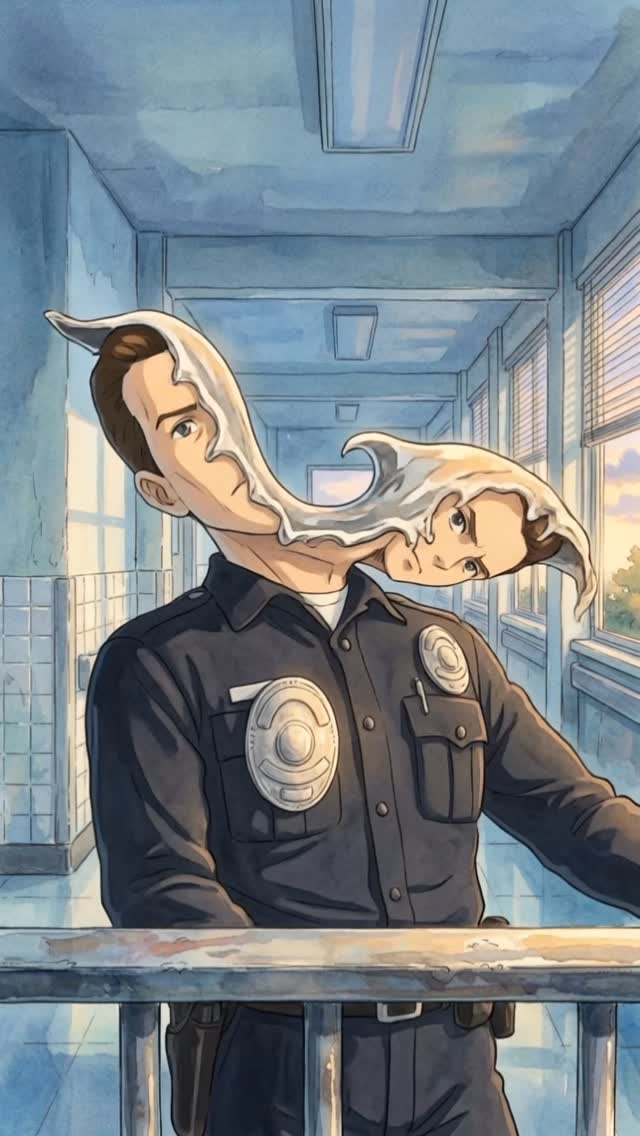
s1mple.ai: Surreal Liquid Head Police Officer AI Art
[Subject] A surreal uniformed officer standing in a sunlit institutional hallway, with a dark navy police-style shirt, metallic chest badges, and a calm body posture, while the head transforms into a flowing pale liquid ribbon that stretches sideways and resolves into two connected face forms. [Environment] A blue-toned corridor with tiled lower walls, long ceiling light fixtures, large windows on the right, warm daylight entering from outside, and a metal railing cutting across the foreground, evoking a school, hospital, or civic-building hallway. [Composition/Camera] Vertical mid-body portrait, camera positioned slightly below face level, subject centered but with the liquid head distortion extending dramatically to the right, foreground railing adding depth, corridor perspective lines guiding the eye toward the surreal deformation. [Lighting] Soft daylight mixed with cool interior ambient light, gentle reflections on the floor and badges, even illumination across the uniform, pale luminous highlights on the liquid face ribbon, warm window light balancing the cool hallway palette. [Style/Rendering] Surreal concept illustration with painterly anime-influenced realism, dreamlike institutional atmosphere, clean line structure, soft watercolor-like shading, uncanny visual metaphor, polished poster presentation. [Detail constraints] Preserve the officer uniform as grounded and readable, keep the liquid head transformation smooth and ribbon-like rather than gory, maintain the corridor perspective and windows as contextual anchors, ensure the surreal effect feels uncanny but elegant, and avoid horror clutter or excessive visual noise.

Negative prompt: gore, blood, horror splatter, zombie effect, messy distortion, extra limbs, broken anatomy, low detail hallway, cluttered background, harsh shadows, warped badges, muddy colors, low-resolution painterly blur, duplicated faces without flow connection

Suggested parameters: aspect ratio 2:3, stylize medium, high detail, surreal realism, painterly editorial mood, clean uncanny atmosphere

Delta prompt strategy:
1. If the surreal effect feels weak, increase the pale liquid ribbon stretching the head into two connected face forms.
2. If the image turns horror-heavy, remove gore and keep the transformation smooth, clean, and dreamlike.
3. If the hallway loses clarity, reinforce blue walls, windows, ceiling fixtures, and linear perspective.
4. If the uniform becomes generic, sharpen the police-style shirt, chest badges, and duty-belt details.
5. If the composition feels static, preserve the forward torso while letting the head distortion sweep laterally across the frame.
6. If colors become muddy, separate cool blue interior tones from warm daylight near the windows.
7. If the surreal ribbon lacks elegance, smooth the edges and create graceful flowing curvature between the faces.
8. If the image reads too realistic, add subtle painterly softness while preserving strong structural drawing.
9. If the foreground feels empty, keep the metal railing to anchor depth and realism.
10. If the mood becomes too literal, emphasize uncanny metaphor and poetic visual distortion over narrative explanation.
Video
GLOBAL LOCK: Retro sci-fi action-drama illustrated as painterly cinematic concept art with consistent late-20th-century dystopian thriller energy. Keep the main human lead as a white-presenting adult male in his 30s to early 40s with fair skin, strong jawline, short brown hair styled upward, athletic build, and a stern, protective posture. Keep the teenage boy slim, youthful, and slightly awkward, the red-haired mother tough and alert, the chrome humanoid machine perfectly metallic and expressionless, and the police officer as a surreal shape-shifting impostor whose face splits into a white liquid duplicate floating beside his head. Preserve the American Southwest setting with bars, alleys, concrete flood channels, desert highways, industrial firelight, institutional blue hallways, and motel-town streets. Maintain warm sunlit exterior tones, cool blue interior fluorescents, bright orange fire glow, silver chrome reflections, moderate painted texture, clean action readability, dramatic close-ups, and a mix of 35mm, 50mm, and 85mm cinematic framing. Speech style is sparse and trailer-like, with one or two short lines per beat, tense cadence, dry close-mic sound, and visible lip sync only where characters are front-facing in close-up.

[00:00-00:04] Night battlefield under a moonlit sky, a chrome endoskeleton warrior stands amid explosions and smoke, full-body wide shot with a low camera angle, burning debris behind it, hard orange backlight from fire, cold blue moon fill, drifting smoke and embers, no speech, only apocalyptic tension.

[00:04-00:08] Interior roadside bar or garage with warm practical lights and Pepsi signage, shirtless muscular man faces a woman at close conversational distance, medium close-up with shallow depth of field, tense eye contact, muted amber color grade, slight camera push-in, no speech or a low murmur that feels interrupted.

[00:08-00:12] Surprised close-up of the same male lead, 85mm portrait lens, eyes wide, a white liquid shape creeps into frame from the right edge, skin rendered with smooth painterly highlights, lips barely part as if about to say something, high lip-sync strictness if any whispered word is included.

[00:12-00:16] Wooden doorway confrontation, a heavy bearded man points a shotgun outward from inside a dim rustic room, reverse-shot structure from the visitor’s perspective, warm tungsten light inside, cooler dusk outside, angry expression, fast emotional escalation, cut sharply on the aiming gesture.

[00:16-00:20] Police officer stands behind a metal railing in a blue institutional corridor, daylight windows on the right, his face splits into a white liquid double that floats off to one side, medium shot and then close-up, uncanny identity distortion locked to the character description, dry fluorescent lighting, no comedy, pure body-horror unease.

[00:20-00:24] The police impostor faces a silver chrome humanoid in a workshop or station-like interior, alternating close two-shots and profile shots, the officer studies the machine while the machine remains unreadable, polished reflections on metal surfaces, low conversational tension, spoken line if used should be controlled, cold, and clipped.

[00:24-00:28] Exterior small-town alley with an ATM and pale morning sunlight, a teenage boy stands with another teen beside a red dirt bike, medium-wide framing, concrete walls and utility lines create depth, naturalistic golden daylight, hesitant body language, short casual dialogue possible with loose teenage cadence.

[00:28-00:32] The boy meets the red-haired mother, then they launch on the bike through a yard and into open road, camera alternates between side tracking and rear chase framing, dust and wind motion emphasized, warm sun, hopeful but urgent energy, no visible speech once the ride begins.

[00:32-00:36] Domestic kitchen interior with the red-haired mother alone, plaid sleeveless shirt, checking space around her with alert suspicion, then transition to a long concrete flood channel where a motorcycle races toward camera. Use medium shots indoors, wide vanishing-point exterior frames outside, bright noon light, pacing accelerates.

[00:36-00:40] A chrome humanoid emerges from a wall of fire in a blazing industrial doorway, centered heroic composition, flames licking around perfect metal anatomy, then cut to the main group lined up together like a defensive unit. Keep the contrast high, metal glossy, and fire glow intense, no speech, only mythic escalation.

[00:40-00:44] Return to the blue hallway where the police impostor’s face peels into a vertical white liquid split, then cut to a car interior crossing desert country with the teenage boy in the back seat and the stern protector driving. Tight close-up on the melting face, then side-profile car shots with golden late-afternoon light, minimal dialogue with deliberate pauses.

[00:44-00:48] Reveal a robotic hand behind glass, a Black male observer studies the mechanical fingers, then another man exposes his own cybernetic arm in a bright interior. Macro mechanical details, articulated joints, cables, metal knuckles, cool clinical light, slow deliberate hand motion, no speech or a single stunned reaction word.

[00:48-00:52] Mechanical hand flexes in close-up, then the police figure charges forward in front of fire, furious and no longer convincingly human. Close, aggressive framing, rapid motion, hot industrial glow, smoke, clenched teeth, voice if present should be forceful and urgent with hard consonants.

[00:52-00:56] Leather-jacketed hero loads a shotgun in a workshop, chest-up framing and insert shots of the weapon, then he appears in full figure, bandolier across his body, locked in battle stance. Use crisp action inserts, fiery orange backlight, metallic set dressing, and a hard determined facial expression.

[00:56-00:58] Final desert tag: a black-clad woman in sunglasses holds a rifle near a rugged vehicle and Joshua trees, medium-wide hero shot in harsh dry sunlight, wind moving clothes slightly, no speech, end on a survivalist future-war note.

NEGATIVE PROMPT: low-detail faces, inconsistent identities, duplicated limbs, broken fingers, warped firearms, unreadable props, incorrect police uniform details, cartoon slapstick tone, muddy chrome reflections, flicker between shots, temporal jitter, random text or logos, floating objects without narrative purpose, soft mushy anatomy, deformed motorcycles, broken perspective, accidental modern smartphones, robotic lip movement, off-timing mouth shapes, slurred dialogue, metallic synthetic voice, harsh sibilance, clipped peaks, pumping compression, over-denoised speech, and mismatched room tone between cuts.

SPEECH PACK:
[00:08-00:12] Speaker A, closest audible: "What the hell is that?" Safe paraphrase: "He sees something impossible entering frame." TAKE_A: shocked, breath catches before "hell". TAKE_B: lower, more controlled disbelief. TAKE_C: whispered panic. Lips visible: yes, high sync.
[00:20-00:24] Speaker B, closest audible: "You are not him." Safe paraphrase: "The officer realizes the machine is not human." TAKE_A: flat and clinical. TAKE_B: suspicious and tense. TAKE_C: almost whispered. Lips visible: partial, medium sync.
[00:24-00:28] Speaker C, closest audible: "Come on, let's go." Safe paraphrase: "The teens move toward the bike." TAKE_A: rushed. TAKE_B: nervous. TAKE_C: urgent whisper. Lips visible: partial, medium sync.
[00:32-00:36] Speaker D, closest audible: "Get inside." Safe paraphrase: "A protective instruction before the chase escalates." TAKE_A: firm. TAKE_B: louder warning. TAKE_C: clipped command. Lips visible: low to medium sync.
[00:40-00:44] Speaker A, closest audible: "He's still behind us." Safe paraphrase: "They realize the threat remains active during the drive." TAKE_A: tense low voice. TAKE_B: controlled urgency. TAKE_C: breathy fear. Lips visible: partial, medium sync.
[00:48-00:52] Speaker B, closest audible: "Run!" Safe paraphrase: "Immediate danger forces escape." TAKE_A: shouted. TAKE_B: raw panic. TAKE_C: hoarse command. Lips visible: yes, high sync.
Video
GLOBAL LOCK: A high-definition screen recording of a web browser. The interface is the Freepik website in dark mode. The cursor is a standard white arrow. The subject identity is a consistent AI-generated character: a blonde woman with a friendly, professional appearance, light skin tone, and casual-chic wardrobe. The environment is the Freepik AI Image Generator workspace. The lighting is the digital glow of the UI. The color grade is clean, high-contrast, and modern. The speech is a warm, enthusiastic female voiceover, recorded with a close-mic, dry studio signature.

[00:00–00:02]
The browser is on the Freepik homepage. The cursor moves smoothly toward the "AI Suite" menu item in the top navigation bar.
Speech: "This is Nano Banana Pro."
Lip-sync: N/A (Screen recording)

[00:02–00:05]
The cursor clicks "AI Suite" and then selects "AI Image Generator." The page transitions quickly to the generator workspace.
Speech: "I spent the last two days testing it."

[00:05–00:08]
The user clicks the model selection dropdown. The list scrolls down to reveal "Google Nano Banana Pro." The cursor selects it.
Speech: "It is mind-blowing."

[00:08–00:10]
The user clicks the "Character" tab. A grid of faces appears. The cursor selects the first character, a blonde woman labeled "@johanne."
Speech: "Look at how it handles character consistency."

[00:10–00:13]
The cursor clicks into the prompt box. Text appears rapidly as if pasted: "@johanne - Hyper-realistic studio podcast scene featuring the man sitting across from a bearded neuroscientist in a dim, moody podcast studio..." The user then clicks the "9:16" aspect ratio icon.
Speech: "You just drop in your prompt, pick your ratio..."

[00:13–00:15]
The "Generate" button is clicked. After a brief loading animation, a 2x2 grid of four cinematic, high-quality images appears, showing the character in a professional podcast setting with warm, moody lighting.
Speech: "...and the results are professional grade. Comment 'AI' to try it."

NEGATIVE PROMPT: Visual artifacts, blurry UI text, shaky camera, external glare on screen, messy browser tabs, slow loading times, robotic voiceover, harsh sibilance, background noise, inconsistent character features, low-resolution AI results.

SPEECH PACK:
[00:00–00:05]
TAKE_A: "This is Nano Banana Pro. I spent the last two days testing it." (Enthusiastic, fast-paced)
TAKE_B: "Check out Nano Banana Pro. I've been playing with this for two days straight." (Casual, conversational)
TAKE_C: "You need to see Nano Banana Pro. Two days of testing and I'm hooked." (Authoritative, punchy)

[00:05–00:15]
TAKE_A: "It is mind-blowing. The character consistency is perfect. Just paste your prompt and hit generate. Comment AI for the link." (Clear, instructional)
TAKE_B: "It's honestly mind-blowing. Look at that consistency! Set your ratio, hit generate, and boom. Comment AI to get access." (Excited, high energy)
TAKE_C: "Mind-blowing results. It keeps the character perfectly. One click and you're done. Comment AI and I'll send it over." (Direct, CTA-focused)
Video
GLOBAL LOCK: 
The video features a female creator with long dark brown hair, fair skin, wearing a white short-sleeved button-up shirt. She is in a studio with warm lighting and purple/pink bokeh lights in the background. The illustrations interspersed throughout follow a "Retro Kitsch" style: hand-drawn oil pastel/wax crayon texture, monochromatic vibrant palette dominated by cherry red, magenta, and bright fluoro-pink, with white stippled highlights and sparse gold accents. Naive art aesthetic with visible sketchy strokes.

[00:00–00:03]
Subject: Two side-by-side vertical illustrations. Left: A "Pink Diner" with people at a counter. Right: A "Modern Art Gallery" with people looking at pink paintings.
Action: Static graphics with bold yellow text "Your branding doesn't look generic" appearing.
Camera: Static split-screen.
Lighting: Bright, saturated pink tones.
Speech: "Your branding doesn't look generic because you lack creativity."

[00:03–00:04]
Subject: Female creator in white shirt, centered.
Action: Speaking directly to camera, slight head tilt. Text "It's your System" appears in bold yellow.
Camera: Medium close-up, static.
Lighting: Soft key light on face, purple/pink background glow.
Speech: "It's your system."

[00:04–00:10]
Subject: Rapid montage of pink kitsch illustrations: a retro radio on a shelf, a collection of patterned hats, a set of backpacks, a vintage alarm clock, pants hanging on a line, a cliffside with crashing waves.
Action: Fast cuts every 0.5 seconds.
Camera: Full-screen static graphics.
Lighting: High saturation, vibrant pink/magenta.
Speech: "Most people are still paying agencies, waiting weeks for revisions, and ending up with something that looks like every other brand on the feed."

[00:10–00:13]
Subject: Female creator speaking.
Action: Hand gestures emphasizing "Meanwhile, you could build...". Text "Meanwhile you could build" appears.
Camera: Medium close-up.
Lighting: Studio setting, warm/purple mix.
Speech: "Meanwhile, you could build the entire visual system yourself."

[00:13–00:16]
Subject: Screen recording of the Higgsfield web interface.
Action: Mouse cursor navigates to "Nano Banana Pro" in a list of models.
Camera: Screen capture.
Lighting: UI dark mode.
Speech: "Open Higgsfield, go into Nano Banana Pro..."

[00:16–00:20]
Subject: A prompt box showing: "Hand-drawn oil pastel illustration of [INSERT SUBJECT]. Monochromatic vibrant palette featuring cherry red, magenta, and bright fluoro-pink...". Then, illustrations of a pink brick house and a plush pink armchair appear.
Action: Text "Instantly you generate" appears over the images.
Camera: Static graphic overlays.
Lighting: Vibrant pink.
Speech: "...and drop in a structured brand prompt. Instantly you generate a full aesthetic."

[00:20–00:26]
Subject: Montage showing style variations: a watercolor landscape of mountains, a stack of old books, a detailed hiking backpack, a desert sunset with cacti, a floral armchair in a room.
Action: Images swap to show different textures and subjects while maintaining a "hand-drawn" feel.
Camera: Full-screen graphics.
Lighting: Varied (natural watercolor tones, warm desert oranges, muted library browns).
Speech: "And if you don't like one pattern, you can easily swap it, change the texture, replace the background, keep the identity structure, shift the world around it."

[00:26–00:27]
Subject: Female creator speaking.
Action: Confident expression. Text "The system stays consistent" appears.
Camera: Medium close-up.
Speech: "The system stays consistent."

[00:27–00:33]
Subject: Final rapid montage of pink illustrations: a girl in a flower field, a peacock with ornate feathers, a pink wooden chair, a collection of sunglasses, a pink city skyline, a pink record player.
Action: Fast cuts synced to speech.
Camera: Full-screen graphics.
Lighting: Return to high-saturation pink/magenta.
Speech: "You're not guessing your style, you're defining it. Everything is generated inside Nano Banana Pro, but the control stays with you."

[00:33–00:36]
Subject: Female creator speaking.
Action: Direct eye contact, final CTA. Text "Comment Brand" in yellow.
Camera: Medium close-up.
Speech: "Comment Brand and I'll send you the exact master prompt."

NEGATIVE PROMPT:
Visual: Photorealistic textures (except for talking head), 3D render look, dull colors, messy lines, inconsistent character features in talking head, flickering background lights, text/logos inside illustrations.
Speech: Robotic tone, background noise, muffled audio, lip-sync mismatch on key words like "System" or "Brand", long pauses.

SPEECH PACK:
[00:00–00:04] "Your branding doesn't look generic because you lack creativity. It's your system."
[00:04–00:10] "Most people are still paying agencies, waiting weeks for revisions, and ending up with something that looks like every other brand on the feed."
[00:10–00:16] "Meanwhile, you could build the entire visual system yourself. Open Higgsfield, go into Nano Banana Pro..."
[00:16–00:20] "...and drop in a structured brand prompt. Instantly you generate a full aesthetic."
[00:20–00:27] "And if you don't like one pattern, you can easily swap it, change the texture, replace the background, keep the identity structure, shift the world around it. The system stays consistent."
[00:27–00:33] "You're not guessing your style, you're defining it. Everything is generated inside Nano Banana Pro, but the control stays with you."
[00:33–00:36] "Comment Brand and I'll send you the exact master prompt."

Delivery: Energetic, authoritative, fast-paced (approx. 160 WPM).
TAKE_A: Professional and crisp.
TAKE_B: More casual and "insider secret" tone.
TAKE_C: High energy, emphasizing "System" and "Control".
Video
GLOBAL LOCK: A blonde female creator in a vertical talking-head tutorial explains why Midjourney still stands out compared with every other image generator she has tested. She appears in a clean indoor creator setup with a clip-on lav mic, speaking directly to camera. The edit repeatedly cuts to example images demonstrating many different creative categories: editorial portraits, lifestyle photography, cinematic fantasy creatures, poster design, product shots, business scenes, thumbnails, nail beauty macro, illustrated covers, and branded commercial visuals. Bright yellow all-caps caption fragments appear over the presenter to emphasize key claims. The tone is opinionated, fast, educational, and highly creator-oriented.

[00:00-00:06]
Open with the presenter stating that she has tested every major image generator. Intercut quick example visuals: polished editorial portraits, high-style fashion or business shots, and surreal fantasy imagery. The hook establishes a comparison-based tutorial.

[00:06-00:12]
The presenter continues in direct-to-camera mode while examples flash on screen showing poster-style graphics, clean product imagery, lifestyle travel scenes, and stylized character art. The message is that no other tool matches Midjourney’s breadth and quality.

[00:12-00:18]
Cut through more categories: beauty close-ups, cinematic environments, realistic portraits, thumbnails, branded compositions, and bold poster designs. The creator points out use cases like thumbnails, products, and business visuals.

[00:18-00:24]
The tutorial emphasizes practical strengths: consistency, versatility, and premium-looking results. More examples appear, including animals, commercial-style food or product shots, and polished people imagery. The pacing remains sharp and category-driven.

[00:24-00:27]
End with the presenter delivering a summary and call-to-action style close, while the final frames reinforce the Midjourney comparison point and encourage saving or following for more creator-tool advice.

NEGATIVE PROMPT:
male presenter, no example images, no yellow caption phrases, blurry screenshots, no variety of styles, no portrait examples, no poster or product visuals, flat stock imagery, watermark, text glitches

SPEECH PACK:
One female English-speaking creator voice.
TRANSCRIPT INTENT: Explain that after testing many image generators, Midjourney still outperforms others across multiple visual categories such as portraits, products, thumbnails, posters, and stylized scenes.
DELIVERY: Fast, assertive, expert-review cadence with short emphasized claims and creator-focused framing.
SYNC: Talking-head segments require tight lip-sync; image example sections can run under voiceover and caption emphasis.
Video
GLOBAL LOCK: Subject is Natalia Dyer, an American actress with an oval face, high cheekbones, large expressive brown eyes, and fair skin with natural warmth. Her hair is dark brown, long, and wavy, styled into two thick, loose braids falling over her shoulders. She wears a dark, high-collared cloak/coat. Her expression is neutral, serene, and slightly melancholic, looking directly at the camera. The camera is a static Medium Close-Up (MCU) with a cinematic 35mm lens feel. High-fidelity skin textures and realistic lighting are mandatory.

[00:00–00:01]
Subject is centered in a grand, atmospheric gothic cathedral. Background features intricate stone arches and stained glass windows. Lighting: Misty, volumetric light beams (God rays) filter through the windows, creating a teal and orange contrast. Subject's face is softly lit by the ambient glow. Motion: Subtle dust motes dancing in the light beams.

[00:01–00:02]
Subject is centered in a vast golden hour meadow. Background features tall, dry grass and a distant horizon under a setting sun. Lighting: Warm, intense amber backlighting creating a soft rim light on her hair and cloak. A subtle lens flare peeks from the corner. Motion: Very slight swaying of the grass in the background.

[00:02–00:03]
Subject is centered in a dense autumn forest. Background is filled with vibrant orange and red maple leaves. Lighting: Dappled sunlight filtering through the canopy, creating soft patches of light on her face. Shallow depth of field with a creamy bokeh effect on the leaves. Motion: A few leaves slowly falling in the background.

NEGATIVE PROMPT: 
Facial distortion, changing eye color, changing hair style, inconsistent facial features, cartoonish look, plastic skin, extra limbs, blurry face, text, watermark, logo, flickering lighting, sudden jumps in subject position, robotic movement, oversaturated colors, low resolution.
Video
GLOBAL LOCK:
Subject is a Caucasian male, mid-20s, with short brown hair and a light beard, wearing a tan "VANS" trucker hat and a plain white t-shirt. He is positioned in the bottom third of the frame in a talking-head format. The top two-thirds of the frame is a digital workspace. The environment for the subject is a cozy room with warm, out-of-focus background lighting. The digital workspace is a clean, modern software UI with a white background. The video has a high-energy, fast-paced UGC tutorial style. Speech is enthusiastic, clear, and direct-to-camera.

[00:00–00:03]
The top 2/3 shows a rapid succession of Taylor Swift posters. First, a red and black vintage-style poster with "TAYLOR" in large block letters. Then, a collage-style poster with denim textures and "TAYLOR SWIFT" in a stylized font. The subject at the bottom is talking excitedly, gesturing with his hands.

[00:04–00:06]
The top 2/3 switches to Post Malone posters. One is a gritty, black-and-white screen-print with a red star over his eye and "POST" in red spray-paint font. The next is a profile shot with "F-1 Trillion" text in pink. The subject continues his energetic narration.

[00:07–00:14]
The top 2/3 shows a breakdown of a Leonardo DiCaprio poster. A portrait of DiCaprio appears on the left, a text prompt on the right. A progress bar fills, and a "Wolf of Wall Street" poster is revealed, featuring a screen-print texture and yellow/black color scheme. The subject points upwards toward the visuals.

[00:15–00:25]
The top 2/3 shows the "Lovart" website interface. A cursor clicks "New Project." The subject explains the tool. The cursor types "Create me a poster for Ed Sheeran" into a chat box. A model selection menu pops up, and "Nano Banana Pro" is selected.

[00:26–00:37]
The top 2/3 shows an Ed Sheeran poster being generated. It features him with a guitar against a sunset background. The subject demonstrates iterations: the text at the bottom changes to "NEW YEAR'S EVE" and "LAS VEGAS SPHERE." The style then shifts to a high-contrast green and black screen-print.

[00:38–00:42]
The entire frame transitions to a real-world scene. A man in a tan jumpsuit, seen from behind, is taping a large white poster onto a red brick wall. The poster features a black circular logo and the text "COMMENT AI." The subject appears in a small bubble at the bottom, saying "type AI in the comments."

NEGATIVE PROMPT:
Visual: blurry face, distorted hands, flickering UI elements, inconsistent hat logo, low resolution, messy background, unnatural eye movements.
Speech: robotic tone, monotone delivery, background noise, muffled audio, lip-sync mismatch, stuttering, long pauses.

SPEECH PACK:
[00:00–00:06]
TAKE_A: "Google Nano Banana Pro is mind-blowing when it comes to creating graphic design work. You can take any character and create any poster design."
TAKE_B: "Nano Banana Pro is a total game-changer for design. Take any celeb, any style, and boom—instant professional posters."
TAKE_C: "This new AI model is insane for graphics. One reference photo is all you need to make these incredible celebrity posters."

[00:07–00:14]
TAKE_A: "With one reference image of their face and a basic prompt. So I'm going to show you exactly how you can get the best results."
TAKE_B: "Just one photo and a simple sentence. I'll show you the secret to getting these high-end results every single time."
TAKE_C: "Reference photo plus a basic prompt equals this. Let me walk you through the process for the best output."

[00:15–00:25]
TAKE_A: "To get started you want to go to Lovart, which is a dedicated AI design tool. You can now write in a basic prompt, then select Google Nano Banana Pro."
TAKE_B: "Head over to Lovart—it's built for designers. Type your idea, pick the Nano Banana Pro model, and you're ready."
TAKE_C: "Step one: open Lovart. It’s an AI design powerhouse. Enter your prompt, choose the Google model, and watch the magic."

[00:26–00:42]
TAKE_A: "Once you hit generate, it will use its own prompt enhancer. Now you can iterate, change text or backgrounds. Type AI in the comments for the link!"
TAKE_B: "Hit generate and let the AI enhance your prompt. Tweak the text, swap the background, it's that easy. Comment AI for access!"
TAKE_C: "Generate, iterate, and perfect. Change anything you want in seconds. If you want to try this, just type AI below!"
Video
GLOBAL LOCK: a soft 2D hand-drawn cartoon animation with clean outlines, pastel suburban color palette, gentle Studio Ghibli-inspired slice-of-life mood, an elderly man with gray-blue hair and a full beard, casual vest and shirt, a small vintage blue compact car, quiet suburban streets, dashboard flower ornament, police station / driver's license renewal office setting, smooth simple character motion, daytime lighting, no photorealism, no 3D look.

[00:00-00:05] Start outside a modest suburban house where the elderly man steps out from the porch and heads toward his small blue vintage car, calm neighborhood in the background, warm everyday cartoon atmosphere.

[00:05-00:10] Cut inside and around the car as he drives through the neighborhood, hands on the wheel, the dashboard visible with a small pink flower ornament, soft windshield reflections and passing houses establishing a slow everyday commute.

[00:10-00:16] Show exterior driving angles of the blue car moving down a quiet residential street, then approaching a police or civic-services building, keeping the animation style simple, gentle, and readable.

[00:16-00:22] Move closer to the front of the car and dashboard as he parks and reaches forward, then transition to the building entrance where he walks toward a public service counter, preserving the same cozy cartoon look.

[00:22-00:30] End in a driver's license renewal office where the elderly man speaks face-to-face with a clerk across the counter under a sign reading driver's license renewal, holding on a calm conversational exchange and mild facial reactions in a clean storybook-style cartoon frame.

NEGATIVE PROMPT: photorealism, 3D CGI, anime action style, dark noir lighting, futuristic city, luxury sports car, young protagonist, messy sketch lines, heavy shadows, horror, text-heavy graphic design, warped anatomy, crowded background, high-speed chase, dramatic explosions.
Video
Create a vertical 9:16 minimal premium design-poster visual for an AI creative workflow, featuring a bright yellow tennis ball floating just above an outstretched human hand against a clean blue sky. The hand should rise from the lower portion of the frame wearing a white wristband, with the ball suspended in crisp sunlight so it feels like a polished 3D object hovering in space. Bold yellow Lovart text repeats in the upper left, while repeated Design text appears in the lower right like confident editorial poster typography. The overall result should feel like a high-end animated 3D poster concept for designers: simple, modern, vector-friendly, and easy to manipulate as a motion design asset. No clutter, no subtitles, no extra objects, no cartoon style.
Video
GLOBAL LOCK: 
Subject: A Caucasian male in his late 20s with a dark beard and medium-length brown hair. 
Wardrobe: A cream-colored t-shirt and a tan "Vans" trucker hat with a red logo. 
Environment: A professional studio setup with a dark background featuring a glowing cyan/blue retro-futuristic perspective grid. 
Layout: A vertical 9:16 split-screen. The top 60% is a digital UI canvas (Krea AI interface). The bottom 40% is a talking-head overlay of the subject. 
Lighting: Soft three-point lighting on the subject; high-contrast digital glow on the UI. 
Color Grade: Saturated, clean, tech-focused palette with vibrant primary colors in the AI outputs. 
Speech: Natural, energetic UGC-style commentary, medium pace, crisp audio with slight room resonance.

[00:00–00:03]
Subject: Close-up of the talking head at the bottom, smiling and gesturing.
UI: Rapid montage of three split-screens: a green frog drawing becoming a 3D frog, a man in a hat becoming a realistic portrait, and an orange fish drawing becoming a photoreal goldfish.
Action: Subject points upward toward the UI.
Camera: Static for the overlay; fast cuts for the UI examples.
Speech: "This is one of the world's first real-time AI video creation tools..."

[00:03–00:10]
Subject: Subject gestures with his hands, explaining the process.
UI: A green canvas with a red circle on a thin green stem. As the mouse cursor moves the red circle, the bottom AI window shows a red flower blooming and shifting in real-time.
Action: Mouse cursor drags the red circle; the flower follows the movement perfectly.
Lighting: Bright, natural daylight feel in the AI flower window.
Speech: "...that allows you to move any element in your canvas and it will turn it into an AI video for you directly in front of your eyes."

[00:11–00:17]
Subject: Subject looks directly at the camera, nodding.
UI: A white background with a brown rectangular shape. The AI window shows a cup of tea. A red horizontal line is added, and the AI window reflects a tea-filled cup on a wooden surface.
Action: Adding geometric shapes to the canvas; AI updates the tea cup instantly.
Speech: "Now this is a brand new model from Krea and they've given me early access to show you exactly what's possible..."

[00:18–00:21]
Subject: Subject looks slightly to the side toward the UI.
UI: A photo of a living room is uploaded as a background. The tea cup is now composited into the living room scene in the AI window.
Action: Dragging an image file into the UI; AI blends the cup into the new environment.
Speech: "...you can upload images into the background as well to help sell realism in some scenes."

[00:22–00:27]
Subject: Subject holds hands up in a "wait" gesture.
UI: A black canvas with a teal rectangle and an orange circle. The AI window shows a glowing humanoid figure. A red triangle is added, and the AI window transforms it into a man sitting by a campfire.
Action: Abstract shapes are manipulated; the AI output shifts from a "glow" to a realistic campfire scene.
Speech: "Now don't get me wrong, there is a long way to go with this tech and it's not actually available yet but it will be very soon."

[00:28–00:31]
Subject: Subject points to the camera for the CTA.
UI: A blue and grey background with a yellow oval. The AI window shows a yellow Lamborghini sports car with headlights on.
Action: The yellow oval is moved; the car's perspective shifts in the AI window.
Text Overlay: "Follow for creative AI content" appears at the bottom of the UI.
Speech: "If you want to stay up to date with all the latest AI tech and trends, make sure you drop a follow."

NEGATIVE PROMPT: 
Visual: blurry face, distorted hands, flickering background grid, low resolution, watermark on creator, inconsistent hat logo, robotic movement, lag between mouse and AI output.
Speech: robotic voice, background noise, muffled audio, lip-sync delay, monotone delivery, harsh "S" sounds, clipping audio.

SPEECH PACK:
[00:00–00:03] "This is one of the world's first real-time AI video creation tools..."
TAKE_A: (Excited) This is one of the world's FIRST real-time AI video creation tools!
TAKE_B: (Informative) Check this out, it's one of the first real-time AI video tools ever made.
TAKE_C: (Fast) This is a world-first: real-time AI video creation.

[00:03–00:10] "...that allows you to move any element in your canvas and it will turn it into an AI video for you directly in front of your eyes."
TAKE_A: ...allowing you to move ANY element on your canvas and watch it turn into AI video right before your eyes!
TAKE_B: ...you just move things on the canvas and it generates the video instantly. It's magic.

[00:28–00:31] "If you want to stay up to date with all the latest AI tech and trends, make sure you drop a follow."
TAKE_A: Want more AI tech? Drop a follow to stay updated!
TAKE_B: Make sure you follow if you want to see the latest in creative AI.
Video
A vertical creator tutorial video about achieving AI character consistency across generations and workflows. A female presenter speaks directly to the camera against a clean lavender-purple background while holding a handheld microphone and explaining a multi-step process labeled with numbered sections like #1, #2, #3, and #4. As she talks, large overlays appear showing reference portraits, facial expressions, hat variations, prompt text, interface screenshots, parameter panels, model settings, and examples from different AI tools. The video walks through how to build a consistent character, refine realism, preserve facial identity, manage textures, and combine different generation tools into one repeatable system. The mood is educational, structured, creator-friendly, and optimized for short-form AI workflow teaching.
Video
GLOBAL LOCK:
Subject: A Caucasian woman in her late 20s, blonde hair tied in a neat ponytail, wearing a leopard-print (cheetah pattern) blouse.
Environment: A cozy home studio/office background with dark grey walls, wooden bookshelves filled with books, green indoor plants, and soft dual-tone lighting (warm orange light from one side, cool blue light from the other).
Camera: MCU (Medium Close-Up) framing, eye-level, 35mm lens feel with shallow depth of field.
Style: Professional UGC creator aesthetic, high-quality video, crisp audio.
Speech: Direct-to-camera delivery, energetic and authoritative tone.

[00:00–00:05]
Visual: Rapid montage of extreme macro close-ups (ECU). First, a human eye with visible iris patterns and eyelashes. Second, an ear with a gold hoop earring showing skin texture. Third, a wrist with a simple black line tattoo showing skin pores and fine hairs.
Action: Static macro shots.
Lighting: Bright, natural daylight feel for the macros.
Text Overlay: "most AI" -> "look fake" -> "because" -> "is trained".
Speech: "Most AI images look fake for one reason. Because AI is trained to remove flaws."

[00:05–00:11]
Visual: The woman (Subject) in the MCU studio setting, gesturing with her hands. Floating icons of AI tools (ChatGPT, Freepik, Ideogram, Nano Banana) appear around her.
Action: Subject talks directly to the camera, moving hands to emphasize points.
Lighting: Studio setup (Orange/Blue).
Text Overlay: "need" -> "AI tools" -> "to prompt".
Speech: "But we don't need better AI tools. We just need to prompt the model to create images that actually look real."

[00:11–00:21]
Visual: Transition to a black screen with white text titled "Master Prompt". The text scrolls or highlights specific sections. Then, a split screen showing the woman talking in a small window and the prompt text in a larger window.
Action: Subject continues talking while the prompt text is displayed.
Lighting: Studio setup for the talking head.
Text Overlay: "to create" -> "that actually" -> "look real".
Speech: "The key to realistic AI images is using a prompt with a specific structure. This prompt should force skin detail, including visible pores, uneven tone, and natural imperfections."

[00:21–00:30]
Visual: Montage of AI-generated faces with high realism. A man's face with stubble and pores, a woman's face with freckles and slight redness. Then, a screen recording of the Freepik interface showing a gallery of realistic portraits.
Action: Fast cuts between the portraits and the UI.
Lighting: Varied, matching the generated images.
Text Overlay: "most people start" -> "make" -> "image".
Speech: "Most people start their prompt with 'make a realistic image of'. I start by telling the model how the camera behaves."

[00:30–00:42]
Visual: Screen recording of a prompt being typed into a text box. Keywords like "iPhone 14 Pro", "handheld framing", and "imperfect composition" are highlighted in yellow.
Action: Scrolling through the prompt text.
Lighting: Digital UI.
Text Overlay: "model that" -> "camera behaves" -> "casual hand" -> "imperfect composition".
Speech: "Casual handheld framing, slightly imperfect composition, and a smartphone camera perspective. This alone already breaks the AI look."

[00:42–00:52]
Visual: The woman back in the MCU studio setting. She gestures toward floating app icons for "Enhancor" and "Higsfield". A screen recording shows a "Skin Enhancer" tool being used on a photo of a woman with goggles.
Action: Subject explains the final step.
Lighting: Studio setup.
Text Overlay: "But Most People Stop There" -> "Final Step" -> "Most Creators Are Gatekeeping".
Speech: "But most people stop there. I use a final step that most creators are gatekeeping. I run each image through a final skin enhancement step using Enhancor or Higsfield."

[00:52–01:00]
Visual: The woman in MCU, pointing down toward a text box that says "Comment GUIDE". A final zoom-out effect or a slight blur transition.
Action: Subject smiles and points.
Lighting: Studio setup.
Text Overlay: "Prompt Structure" -> "Workflow" -> "Comment GUIDE".
Speech: "If you want my exact prompt structure and the full workflow, just comment GUIDE and I'll send it over."

NEGATIVE PROMPT:
Smooth skin, plastic texture, perfect symmetry, airbrushed look, 6 fingers, distorted eyes, watermark, logo, blurry background (unless specified), robotic voice, lip-sync lag, harsh sibilance, flickering lights, low resolution.

SPEECH PACK:
[00:00-00:05] "Most AI images look fake for one reason. Because AI is trained to remove flaws."
[00:05-00:11] "But we don't need better AI tools. We just need to prompt the model to create images that actually look real."
[00:11-00:21] "The key to realistic AI images is using a prompt with a specific structure. This prompt should force skin detail, including visible pores, uneven tone, and natural imperfections."
[00:21-00:30] "Most people start their prompt with 'make a realistic image of'. I start by telling the model how the camera behaves."
[00:30-00:42] "Casual handheld framing, slightly imperfect composition, and a smartphone camera perspective. This alone already breaks the AI look."
[00:42-00:52] "But most people stop there. I use a final step that most creators are gatekeeping. I run each image through a final skin enhancement step."
[00:52-01:00] "If you want my exact prompt structure and the full workflow, just comment GUIDE and I'll send it over."
Video
GLOBAL LOCK: The video is a high-quality screen recording of a desktop browser. The interface is ChatGPT in "Dark Mode" (dark charcoal background, light gray text). The font is the standard ChatGPT sans-serif. The cursor is a standard white pointer. All text overlays are in a bold, white, all-caps sans-serif font, positioned in black "letterbox" bars at the top and bottom of the frame. The overall vibe is clean, instructional, and tech-focused.

[00:00–00:03]
Visual: A static screen recording of the ChatGPT interface. A large text overlay at the top reads "STEP 1: CREATE YOUR CHARACTER PROMPT USING CHATGPT". The GPT name "Midjourney V7 - Photorealistic Image Prompts" is visible at the top of the chat.
Action: The screen is still, establishing the scene.
Audio: Low-fi tech beat starts, steady and rhythmic.

[00:03–00:07]
Visual: The cursor clicks into the "Ask anything" input box at the bottom. The text "give me a front view shot of portrait shot of woman in her 20s, model, with crazy facial features and should look very unique and easily recognizable, front view shot, looking into the camera, flat studio lighting" is typed out rapidly.
Action: Rapid typing animation.
Audio: Subtle keyboard clicking sounds synced to the typing.

[00:07–00:11]
Visual: The AI begins to respond. The text "Here's your photorealistic Midjourney prompt based on your description: Prompt: A front view portrait shot of a woman in her 20s, fashion model, with highly unique and exaggerated facial features..." streams onto the screen.
Action: Text "streaming" effect where words appear one by one from left to right.
Audio: The music continues; the typing sounds stop as the AI generates.

[00:11–00:14]
Visual: The cursor moves up and highlights the generated prompt text in a light blue selection box. A bottom text overlay appears: "Head to ChatGPT and search for GPTs to find 'Midjourney V7...'. Describe your character, and the GPT will generate the perfect prompt for you to copy." A small white hand icon with a clicking animation appears in the bottom right corner.
Action: Smooth cursor movement and text selection.
Audio: Music swells slightly for the conclusion.

NEGATIVE PROMPT: Handheld camera shake, blurry screen, light mode UI, messy desktop icons, low resolution, watermark, robotic voiceover, stuttering text generation, inconsistent font styles, bright colors, distracting background elements.

SPEECH PACK:
(Note: This video has no spoken dialogue, only text-to-be-read. The "Speech" here refers to the rhythmic delivery of the text overlays.)

Segment 1 [00:00-00:03]: "STEP 1: CREATE YOUR CHARACTER PROMPT USING CHATGPT"
TAKE_A: Bold, authoritative, slow pacing.
TAKE_B: Fast, energetic, "hack" style.
TAKE_C: Neutral, instructional.

Segment 2 [00:11-00:14]: "Head to ChatGPT and search for GPTs to find 'Midjourney V7...'"
TAKE_A: Informative, helpful tone.
TAKE_B: Urgent, "do this now" tone.
TAKE_C: Calm, step-by-step guidance.
Video
Gizem Akdag
GLOBAL LOCK:
Subject is a single woman, slender build, long dark hair. The environment is a surreal, immersive forest made of dense, cascading moss-like foliage that hangs in thick, vertical sculptural volumes. The color palette is dominated by deep muted greens and earthy browns. The lighting is cinematic, late afternoon sun. High-quality editorial photography style, ultra-detailed textures, 4k resolution.

[00:00–00:07]
A wide shot of a woman standing in a surreal landscape of dense, hanging moss. She is wearing a simple tan/beige outfit. The lighting is soft and diffused, coming from the top. The camera is static. The mood is calm and introspective.

[00:08–00:11]
The woman's outfit transforms into a vivid, saturated rich red flowing dress. The dress is massive and billows dramatically to the right as if caught by a strong wind. The fabric has dynamic movement and high volume. The background remains the same muted green moss forest. The contrast between the red dress and green background is sharp and striking.

[00:12–00:14]
The scene's lighting shifts dramatically to high-contrast chiaroscuro. Brilliant golden god rays and volumetric light shafts pierce through the foliage from the top right. Deep, crushed shadows in the background. The red dress pops intensely. Floating particles and leaves are visible in the light beams. The camera zooms in slightly on the subject.

NEGATIVE PROMPT:
Visual: distorted anatomy, extra limbs, blurry face, low resolution, plastic skin texture, flat lighting, messy foliage, text, watermark, logo, flickering shadows, inconsistent dress movement.
Audio/Speech: N/A (No speech in reference).

SPEECH PACK:
(No speech present in the original video. The video relies on visual text overlays and background music.)
Video
GLOBAL LOCK: Vertical 9:16 UGC tutorial reel with a persistent two-layer presentation style: the upper 60 to 70 percent of the frame shows demonstrations, screenshots, typed prompts, and generated image results; the lower portion shows the same male creator speaking directly to camera in a rounded-corner selfie window for most of the video. The creator is a white male in his late 20s to mid 30s, medium-length wavy dark brown hair, short beard and mustache, expressive eyebrows, average build, casual creator aesthetic. Keep his delivery energetic, friendly, and persuasive. Wardrobe changes are intentional by section: white tee and cream Vans cap at the opening studio desk, blue polo and backward cap for the main explainer section, yellow suit jacket and black top hat for the final gag CTA. Upper-frame design alternates between a white studio opening, black presentation slides branded "Google Nano Banana" with a banana emoji, product-demo image canvases, and dark Freepik interface screens on a soft orange-blue gradient background. The reel should feel like an AI creator tutorial ad: quick but readable, clean text overlays, obvious prompt boxes, high contrast UI, fast social pacing, light jump cuts, and consistent bottom talking-head commentary. Speech style is single-speaker direct-to-camera tutorial English with crisp articulation, upbeat cadence, short persuasive sentences, and creator-economy CTA energy. Audio should sound like a close phone or lav mic in a quiet room, lightly compressed, dry, intelligible, and synced to the speaker window.

[00:00-00:04.50] Open on a bright white studio setup. The upper frame shows the colorful Google wordmark above the title "Nano Banana" with a banana emoji. Centered below it, the creator sits behind a white table in a cream Vans cap and light shirt, leaning toward a turquoise striped cup-shaped microphone or tumbler. Softbox lights are visible on both sides, making the setup feel like a casual creator studio. In the lower portion of frame, a separate rounded-corner selfie video of the same man begins speaking directly to camera. He introduces the tool with immediate enthusiasm. Lips are fully visible in the lower video; lip-sync strictness high for the first spoken hook.

[00:04.50-00:10.00] Cut to a black presentation layout branded "Google Nano Banana" at the top. The upper demo area shows a bright outdoor image of the creator on a Grand Canyon style cliff-edge walkway, arms stretched, backpack on, huge sky and canyon behind him. A prompt box appears under the image and begins typing "Make it into a youtube thumbnail". The lower selfie speaker remains on screen in the blue polo and backward cap, gesturing with one hand while explaining the edit. The tone is excited, helpful, and a little amazed. Keep the typed prompt animation readable and central.

[00:10.00-00:14.50] The same canyon image updates into a louder thumbnail treatment with giant curved yellow "GRAND CANYON" text behind the creator’s head. Emphasize the before-and-after value clearly: same base photo, more clickable YouTube-style packaging. The lower speaker continues talking in sync with hand gestures. Audio remains a crisp tutorial voice, no music overpowering the speech.

[00:14.50-00:20.50] Transition to a luxury product-edit example. In the upper frame, a prompt card reads "Replace the bottle" with a small reference thumbnail, then the output becomes a glossy Dior Sauvage-style perfume bottle on swirling golden light trails over a dark brown-black studio background. Maintain premium ad aesthetics, reflective glass, centered bottle, and luminous streaks. The lower talking-head explains the edit use case, likely referencing product replacement or image transformation. Speech stays fast, punchy, and creator-friendly.

[00:20.50-00:24.00] Briefly show another generated image example in the upper area, including a polished portrait-style output that demonstrates broader image editing capability beyond product swaps. Keep the cut quick and social-first, serving as visual proof rather than a full tutorial pause. The bottom speaker window continues uninterrupted, preserving continuity.

[00:24.00-00:31.50] Move into the software walkthrough. The upper frame now shows the Freepik dark UI over a soft gradient backdrop, starting with an AI Suite menu containing categories like image tools, video tools, audio tools, and design tools. Then zoom into the model panel where "Google Nano Banana" is selected, with image reference slots, style/composition/effects/character/object controls, and a beta disclaimer about aspect ratio. The creator in the lower window counts features with his fingers while describing how to access the workflow. Keep the UI readable enough for social tutorial viewing, but still fast-paced.

[00:31.50-00:36.50] Continue the interface demo with more dark UI panels, prompt fields, thumbnails, and settings sections scrolling or cutting through the workflow. The creator keeps speaking in direct, practical language, as if walking viewers through where to click and how to upload references. Camera on the lower speaker remains static, head-and-shoulders, neutral indoor room with door and wall behind him.

[00:36.50-00:43.00] End with a comedic CTA transformation. The upper frame shows a prompt reading "Give him a sign to hold" while the creator appears dressed like a theatrical ringmaster or showman in a yellow jacket and tall black top hat on a sunlit balcony. He holds a handmade cardboard sign that reads "Comment AI and I'll send you the link!" The lower talking-head still speaks beneath, landing the call to action. The final beat should feel playful, persuasive, and optimized for comments. Lip-sync remains visible in the lower window; key sync accents should land on the CTA words "comment AI" and "send you the link".

NEGATIVE PROMPT: extra fingers, warped hands during gesturing, drifting facial hair, inconsistent eye color, duplicated selfie windows, unreadable UI, misspelled "Google Nano Banana", broken prompt boxes, random logos, muddy text, incorrect YouTube thumbnail lettering, deformed perfume bottle glass, floating product shadows, overexposed softboxes, messy background clutter, cinematic bokeh that hides the tutorial content, abrupt framing jumps, desynced speech, robotic cadence, slurred consonants, harsh sibilance, echoey room tone, loud background music, clipping, pumping compression, lip-sync mismatch, subtitle blocks covering the demo.

SHOT PROMPTS:
SHOT_1 [00:00-00:04.50]: White studio opener, Google Nano Banana title, creator at desk with Vans cap and turquoise cup, bottom selfie explainer starts.
SHOT_2 [00:04.50-00:10.00]: Black branded demo screen, Grand Canyon reference photo, typed prompt box for YouTube thumbnail conversion, bottom speaker explains.
SHOT_3 [00:10.00-00:14.50]: Thumbnail result reveal with giant GRAND CANYON text, same split-screen layout, energetic creator commentary.
SHOT_4 [00:14.50-00:20.50]: Product-edit demo, perfume bottle replacement prompt, luxury golden-light result, bottom speaker continues.
SHOT_5 [00:20.50-00:24.00]: Quick alternate polished image result proving editing range.
SHOT_6 [00:24.00-00:31.50]: Freepik AI Suite walkthrough, dark UI menus, Google Nano Banana model selected, image reference slots and controls visible.
SHOT_7 [00:31.50-00:36.50]: More UI steps, prompt/settings panels, creator explains workflow and uploads.
SHOT_8 [00:36.50-00:43.00]: Final joke CTA, top hat outfit, cardboard sign asking viewers to comment AI for the link, bottom talking-head closes the pitch.

SPEECH PACK:
Timecoded transcript (best-effort, inferred from visible overlays and tutorial cadence):

[00:00-00:04.50]
TAKE_A: "Please use this if you have not already. It is a game changer."
TAKE_B: "If you are not using this yet, you need to. It is a total game changer."
TAKE_C: "This tool is a game changer, and you should absolutely be using it already."
Prosody: fast hook, confident, slightly urgent, friendly creator tone.

[00:04.50-00:10.00]
TAKE_A: "You can take an image like this and ask Nano Banana to turn it into something more clickable."
TAKE_B: "Watch this. I can upload a photo and prompt Nano Banana to make it into a YouTube thumbnail."
TAKE_C: "Here is a simple example. Drop in an image and tell it to make a YouTube-ready thumbnail."
Prosody: explanatory, upbeat, demonstration-first.

[00:10.00-00:14.50]
TAKE_A: "It keeps the subject but gives you a much stronger thumbnail treatment."
TAKE_B: "Same image, better packaging. That is why this is so useful for creators."
TAKE_C: "This is the kind of upgrade that makes basic content feel publish-ready."
Prosody: impressed, selling practical value.

[00:14.50-00:20.50]
TAKE_A: "You can also do product swaps, like replacing the bottle and turning it into a premium ad."
TAKE_B: "It is not just thumbnails. You can replace products and restyle the entire scene."
TAKE_C: "This works for product creatives too. Swap the object and it rebuilds the shot around it."
Prosody: persuasive, slightly faster, feature-stack delivery.

[00:20.50-00:24.00]
TAKE_A: "And it is not limited to one type of image either."
TAKE_B: "You can use the same workflow across different visual styles."
TAKE_C: "That flexibility is what makes the tool stand out."
Prosody: transitional, concise.

[00:24.00-00:31.50]
TAKE_A: "Inside Freepik, open the AI Suite, choose Google Nano Banana, and upload your image references."
TAKE_B: "If you want to try it, go into AI Suite, pick the Nano Banana model, then add your reference image here."
TAKE_C: "This is where it lives in Freepik. Select the model, drop your images in, and start prompting."
Prosody: instructional, practical, clear enunciation.

[00:31.50-00:36.50]
TAKE_A: "Then you can use the style, composition, effects, character, and object controls to shape the result."
TAKE_B: "From here you fine-tune the edit with the controls and prompt box."
TAKE_C: "Once the image is in, the rest is just directing the model with these tools."
Prosody: matter-of-fact, tutorial rhythm.

[00:36.50-00:43.00]
TAKE_A: "Want to try it? Comment AI and I will send you the link with unlimited generations on Freepik."
TAKE_B: "If you want access, comment AI and I will send you the link."
TAKE_C: "Comment AI for the link and I will send it over."
Prosody: bright CTA, direct ask, strong emphasis on "comment AI".
Video
GLOBAL LOCK: 
Subject is a Caucasian male in his mid-30s with a dark, well-groomed beard and mustache. He consistently wears a white baseball cap with a small logo and a white t-shirt. The AI-generated versions must maintain his facial structure and beard while changing costumes. The overall style is high-end cinematic photorealism with 8k textures, dramatic lighting, and professional color grading. The video follows a 3-panel vertical split-screen format: Top (Sketch), Middle (AI Video), Bottom (Live Action).

[00:00–00:03] 
SUBJECT: The subject is a medieval knight wearing a brown leather chest plate with a white deer emblem, green undershirt, and leather bracers. He is holding a wooden longbow, drawing the string back to his cheek with a focused expression.
ENVIRONMENT: A grand medieval castle courtyard with stone walls, flags, and a blurred crowd in the background.
ACTION: Drawing the bowstring, aiming, and holding the tension.
CAMERA: Medium shot, 50mm lens, slight side profile.
LIGHTING: Bright, natural sunlight with soft shadows.
SPEECH: "This new method of creating AI videos is absolutely insane." (Warm, energetic tone).

[00:04–00:08] 
SUBJECT: The subject is a master potter wearing a tan canvas apron over a white shirt. His hands are covered in wet clay.
ENVIRONMENT: A rustic, sun-drenched pottery studio with wooden shelves and ceramic pots.
ACTION: Shaping a spinning clay vase on a wooden pottery wheel. The clay is smooth and wet.
CAMERA: Close-up on hands and face, shallow depth of field.
LIGHTING: Warm, golden hour light coming from a side window.
SPEECH: "So you can now play yourself as a consistent character moving through any scene."

[00:09–00:12] 
SUBJECT: The subject is a gallery visitor in a striped shirt and white cap, holding a black picture frame that contains a vibrant floral oil painting.
ENVIRONMENT: A dark, modern art gallery with grey walls and red security laser beams crisscrossing the room.
ACTION: Holding the frame up, looking at the camera with a surprised, excited expression.
CAMERA: Medium shot, centered composition.
LIGHTING: Moody, low-key lighting with red accent lights from the lasers.
SPEECH: "And the crazy part is that you no longer need Hollywood level budgets for this."

[00:13–00:15] 
SUBJECT: The subject is a scuba diver with long flowing hair (no cap), wearing a white t-shirt.
ENVIRONMENT: A vibrant underwater coral reef with colorful fish, bubbles, and caustic light rays filtering through the surface.
ACTION: Swimming forward with a breaststroke motion, looking around in awe.
CAMERA: Wide shot, tracking the movement.
LIGHTING: Cool blue underwater lighting with shimmering highlights.
SPEECH: "You can record all of this from your own home."

[00:16–00:18] 
SUBJECT: The subject is a world-class DJ wearing a white cap and professional headphones.
ENVIRONMENT: A massive concert stage overlooking a cheering crowd of thousands. Neon lights and stage fog.
ACTION: One hand on a DJ controller, the other hand raised to the crowd in a "pumping" motion.
CAMERA: Over-the-shoulder shot looking out at the crowd.
LIGHTING: High-contrast, flashing concert lights (purple, blue, white).
SPEECH: "So I'm going to show you exactly how you could achieve the same results for yourself."

[00:19–00:21] 
SUBJECT: The subject is a professional chef in a white chef's coat and tall hat.
ENVIRONMENT: A busy, high-end restaurant kitchen with stainless steel surfaces and other chefs in the background.
ACTION: Tossing pasta in a frying pan, creating a large, controlled burst of orange flame.
CAMERA: Medium shot, dynamic movement.
LIGHTING: Bright kitchen lighting with the warm glow of the fire reflecting on the subject's face.
SPEECH: "...with a few subscriptions and a simple sketch."

[00:22–00:59] 
SUBJECT: The subject is an 18th-century opera singer in a lavish blue and gold velvet frock coat with white lace cuffs and a powdered wig (beard remains).
ENVIRONMENT: A grand, ornate opera house with red velvet seats, gold-leaf balconies, and a spotlight on the stage.
ACTION: Standing center stage, arms outstretched in a dramatic singing pose, then performing a theatrical twirl.
CAMERA: Starts as a wide shot of the theater, then punches in to a medium shot of the singer.
LIGHTING: Dramatic theatrical spotlighting, high contrast.
SPEECH: Detailed tutorial narration explaining the sketch-to-video process. (Clear, instructional, engaging).

NEGATIVE PROMPT: 
Visual: Cartoonish, low resolution, blurry, distorted facial features, inconsistent beard, flickering lights, floating objects, extra limbs, text/watermarks in the AI panel, jittery motion.
Speech: Robotic, flat tone, muffled audio, background noise, lip-sync mismatch, stuttering, unnatural pauses.

SPEECH PACK:
[00:00–00:03] "This new method of creating AI videos is absolutely insane."
TAKE_A: (Excited/High Energy) "This NEW method of creating AI videos is absolutely INSANE!"
TAKE_B: (Awestruck/Lower Pitch) "This... new method of creating AI videos... it's absolutely insane."

[00:04–00:08] "So you can now play yourself as a consistent character moving through any scene."
TAKE_A: (Informative/Smooth) "So you can now play YOURSELF as a consistent character, moving through ANY scene."
TAKE_B: (Fast-paced/Direct) "You can now play yourself as a consistent character in any scene you want."

[00:22–00:30] "To get started, you need to do a basic sketch mapping out the scene."
TAKE_A: (Instructional/Clear) "To get started, you just need a basic sketch... mapping out the whole scene."

PROSODY NOTES: 
- Use emphasis on "INSANE," "ANY," and "HOLLYWOOD."
- Maintain a rhythmic pace that matches the visual cuts.
- Ensure lip-sync is high-priority for the tutorial sections where the creator's face is visible in the bottom panel.

AI Illustration Generator

AI illustration generator content becomes useful when it respects illustration as applied image-making. The creator searching this topic usually has a purpose: a story scene, an article visual, a set of branded illustrations, or a children book direction that needs more than one image in the same style. That is why the best examples on this page should help you compare usefulness and consistency, not only whether a single frame looks attractive in isolation.

Illustration work usually lives inside a larger system. An image may need to sit beside text, repeat a character, or carry a certain tone across multiple scenes. When you compare examples here, focus on style repeatability, clarity of composition, and whether the output feels ready to support a real project instead of being only a decorative one-off.

FAQ

What is an AI illustration generator best for?

It is best for editorial visuals, children book scenes, flat design sets, and project-based illustration where consistency matters across several images.

How is this different from AI art?

Illustration is usually more purpose-driven. It often needs to communicate clearly inside a story, article, app, or branded system rather than only exist as standalone art.

Why does consistency matter here?

Because many illustration projects need multiple images in the same voice. A strong starting style is only useful if it can carry through a series.

What should I compare on this page?

Look for repeatable style, composition clarity, and whether the image feels practical for an ongoing creative or editorial project.

AI Illustration Generator: Editorial, Book and Style Ideas | Alici.AI