How dreamfall.art Made This Flower Collection AI Portrait — and How to Recreate It
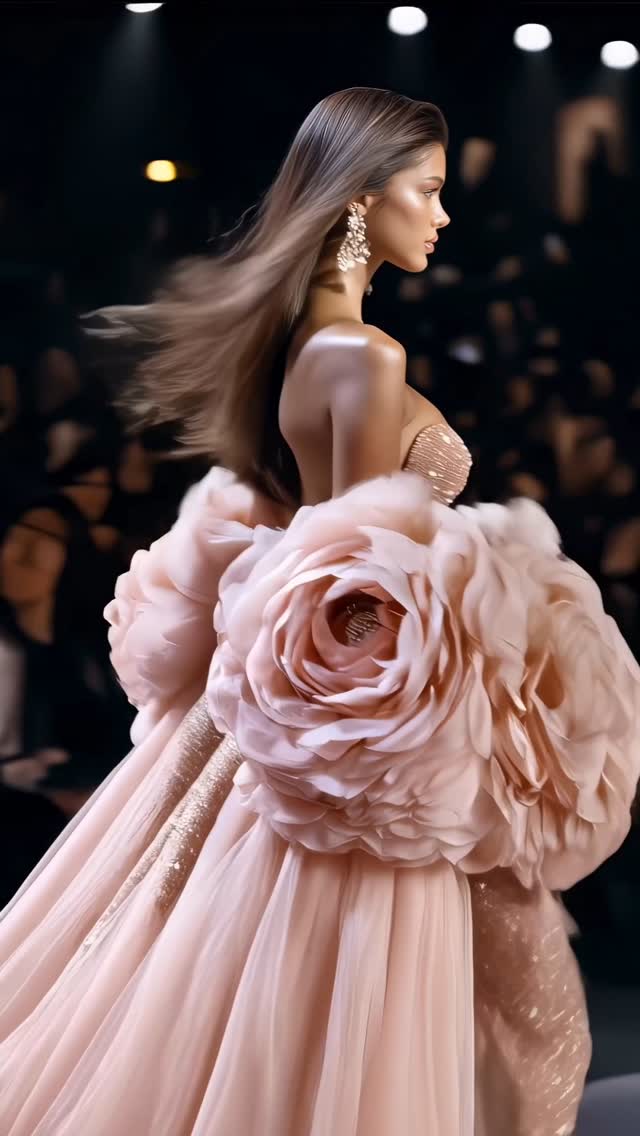
This image is basically a masterclass in viral fashion visuals: one model, one dominant concept, and a silhouette so bold you can recognize it at thumbnail size. The dress doesn’t look like “a dress with flowers.” It looks like a flower that became couture.
That’s the trick: when the concept is unmistakable, your audience doesn’t need context. They stop first, then they ask questions later.
Why it catches fire
The first reason is silhouette. Oversized petals around the torso create a clear shape language—big, symmetrical, and theatrical. The second reason is luxury cues: runway lighting, telephoto compression, and crystal earrings signal “high fashion,” even if the viewer can’t name a brand.
And the third reason is texture discipline. The petals have a believable satin sheen and fine fabric detail. When the material looks physical, the whole image feels less like “AI art” and more like “a photo from a show I missed.”
| Signal |
Evidence (from this image) |
Mechanism |
Replication Action |
| Thumbnail silhouette |
Giant petal bloom dominates the frame |
Recognizable shape drives instant pauses |
Design one exaggerated shape (bloom, wing, halo) and let it occupy 60–80% of the subject area |
| Prestige framing |
Runway setting + telephoto look |
Makes the image feel like a real fashion moment |
Prompt “runway photography” + “85–135mm lens feel” + “shallow depth of field” |
| Luxury micro-details |
Crystal chandelier earrings + jeweled center |
High-frequency detail increases perceived production value |
Add 1–2 “sparkle anchors” (brooch, earrings, beadwork) and keep them controlled |
| Material believability |
Satin sheen, petal veining, controlled highlights |
Physical texture reduces “AI weirdness” |
Specify fabric type + sheen + weave detail; avoid vague “beautiful dress” wording |
Use cases & how to transfer it
- AI fashion concept portfolios: build a recognizable “collection” around one motif (petals, glass, feathers) with consistent runway framing.
- Brand-style pitches: replace petals with a brand material story (recycled plastic bloom, chrome bloom, paper bloom) to make a campaign concept.
- Creator growth posts: “collection drops” work because they create expectation—viewers come back for the next piece.
- Animation/shorts: the petal structure is perfect for subtle movement (breathing, flutter, shimmer).
Not ideal
- Everyday lifestyle feeds: the couture scale is intentionally theatrical.
- Low-detail generators: if your tool can’t hold fabric texture, the illusion collapses.
Exactly three transfer recipes
Transfer 1 — “Bloom as Bodice”
- Keep: petal structure, jeweled center, runway lighting
- Change: colorway, petal material, mood
- Slot template (EN): “runway portrait of a model wearing a sculptural {material} flower-petal bodice in {color}, jeweled center, editorial fashion photography, shallow depth of field”
Transfer 2 — “One Motif Collection”
- Keep: consistent camera + lighting across images
- Change: petal count/shape, accessories, neckline
- Slot template (EN): “collection runway series, same lighting and lens, variations on {motif}: {variation}, high-end editorial”
Transfer 3 — “Luxury Detail Anchors”
- Keep: chandelier earrings sparkle, controlled highlights
- Change: centerpiece object (brooch → clasp → gemstone collar)
- Slot template (EN): “tight runway portrait, {hero silhouette}, {sparkle anchor}, realistic fabric sheen, controlled contrast”
Aesthetic read (Observed → Recreate evidence)
The look is built on three decisions: a telephoto runway camera feel, a dark background to isolate the subject, and a single hero material that catches light like satin. The petals are large enough to read as shape first, texture second. That order is why it works on a feed.
| Observed |
How to recreate (prompt/control) |
| Strong subject isolation |
“dark runway venue, shallow depth of field, blurred background models” |
| Telephoto compression |
“85–135mm runway lens look, tight portrait framing” |
| Satin/iridescent sheen |
“metallic satin sheen, controlled specular highlights, fabric weave detail” |
| Clear centerpiece |
“jeweled brooch at flower center, crystal sparkle” |
| Hair + earrings as motion cues |
“voluminous hair flowing, chandelier earrings with dangling crystals” |
Prompt technique breakdown (lego blocks)
| Prompt chunk |
What it controls |
Swap ideas (EN, 2–3 options) |
| Silhouette motif |
Instant recognizability |
“flower bloom” / “angel wings” / “shell spiral” |
| Material + sheen |
Luxury realism |
“satin iridescence” / “brushed metal petals” / “translucent organza petals” |
| Accessory sparkle |
Micro-detail and perceived cost |
“crystal earrings” / “pearl cascade” / “diamond collar” |
| Runway context |
Prestige cue |
“dark couture runway” / “minimal white runway” / “industrial show space” |
| Lens + blur |
Editorial look |
“85mm shallow DoF” / “135mm compression” / “50mm cleaner realism” |
| Highlight control |
Avoids plastic shine |
“controlled highlights” / “soft specular” / “matte finish” |
Starter prompt (edit the slots)
High-end fashion runway portrait, model centered, telephoto lens 85–135mm, shallow depth of field, dark venue with blurred models behind. Sculptural {color} flower-petal couture bodice with iridescent satin sheen and realistic fabric veining, jeweled center brooch, chandelier crystal earrings, runway key light with controlled highlights, photoreal editorial.
Remix steps (convergence strategy)
Baseline Lock: lock (1) tight runway crop, (2) dark background + blur, (3) petal silhouette scale.
One-change rule: change only 1–2 knobs per run.
- Run 1: Nail the runway portrait (face, hair, lighting) with a simple strapless dress.
- Run 2: Add the petal structure; tune symmetry and size until the silhouette reads instantly.
- Run 3: Add material realism (satin sheen + fabric veining) and the jeweled center.
- Run 4: Add sparkle anchors (earrings) and refine highlight control so nothing looks plastic.