YouTube Thumbnail & Title Guide: How to Get More Clicks (2026)
CTR is the doorbell - retention and viewing time determine whether you can be invited into the living room
|
11 min
Key Takeaways
CTR is the "doorbell", retention and viewing time determine "whether you can be invited into the living room". Don't just look at CTR, be sure to judge it together with retention in the first 30 seconds and APV.
For small channels, don't compare with others whether they are "good" or not. Use your own channel average in the past 28 days as a baseline, and split it according to "Source x Device"; within the same layer, if it can steadily increase by 1-2 percentage points, it is already an effective improvement.
Polish the Search scene first, and then copy the method to the Home (Homepage/Browse) scene, which will be more stable.
Thumbnails are preferred for mobile phones: 3-4 words, large contrast, single focus, 150x150, self-checking and legible; the title is the "hook", do not repeat words with the picture.
One round a week: Only move one variable - Observe for 48h (sample >= 300-500 impressions) - Judgment (retain/retry/rollback) - Fixed refresh of old videos with "high impressions and low CTR".
Quick Answers: CTR Basics at a Glance
What is CTR: clicks/impressions x 100; only "impressions" that meet the criteria are counted.
What is considered a "good" CTR: There is no unified threshold; 2-10% is a common reference, and ultimately the average of your channels from the "same source + the same device" shall prevail.
Main factors affecting CTR: thumbnail (mobile readability), title (keywords + pain point hooks), audience familiarity, traffic source, device, publishing time.
How to improve: Mobile-first thumbnail + title complement each other; only change one variable at a time; observe CTR/retention/APV for 48h; copy effective practices to similar videos.
How to use this article: When you refer to "How to", first pick an action that you can do this week. Don't pile all the suggestions on the same video at once. Treat this article as a "menu", order one or two dishes every week, review it after 48 hours, and then decide which dish to change next week.
There are tons of new videos hitting YouTube every hour. For a fledgling channel, the first threshold to be clicked is CTR. Many people will ask: "Then how much should I chase?" You will see the range of "2-10%" mentioned repeatedly on the Internet. It can be used as a rough reference, but the most reliable way is to go back to your channel, establish an average by source (Search/Home/Recommended/External, etc.) and device (mobile/desktop/TV), and then compare the improvement in the same layer. There is another reality: mobile traffic usually accounts for a high proportion, and a cover that is easy to read on a mobile phone directly determines whether you can get the first click.
Don't compete with yourself: Just because you see someone else's screenshot showing "10%+ CTR" doesn't mean you have to reach that number too. The track, source, and equipment are different, and the baseline is different. Your goal is to steadily rise within your grid.
Why CTR Matters - But It's Not Everything
Let's put it bluntly: a high CTR simply "opens the door." What really puts you in front of more audiences is "someone is willing to stay." The platform will look at CTR, viewing time, retention, satisfaction and other signals together. If the title and cover make a big and beautiful promise to the audience, but the opening 20 seconds are slow to get to the point, and the audience leaves quickly - then you will see a combination of "high CTR, low retention", and distribution will tighten accordingly.
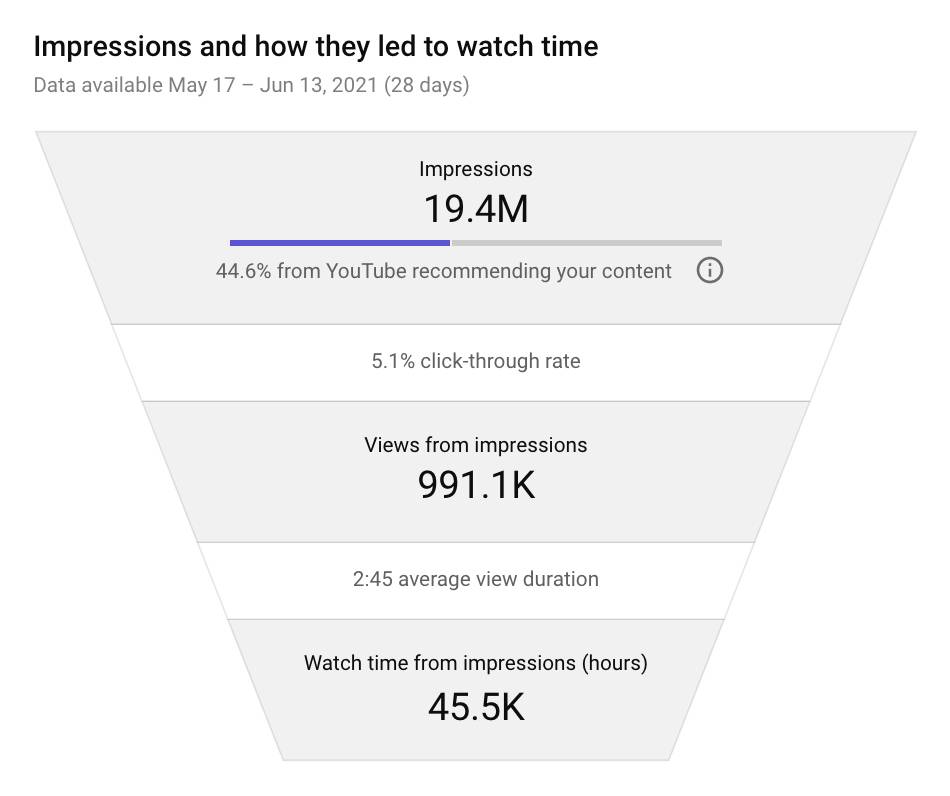
There is only one thing to remember: first give "the person who clicked in" an answer that can be understood immediately, and then expand on the details of what you want to say.
You can think of promise-delivery as a rubber band: the tighter you pull it, the easier it is to break. The title/cover raises the promise to the ceiling, but the opening is so slow that the audience's patience will be exhausted within the first 20 seconds. Loosen the rubber band a little - make the promise more specific and the opening more direct - you can often see "CTR does not drop, but retention rises" at the same time.
What Is CTR and How to Find It in YouTube Studio
The formula is just one sentence: CTR = clicks/impressions x 100. To see it, go to YouTube Studio - Analytics - Reach and check "Impressions click-through rate". For new videos, it is recommended to look at two windows: the first 48 hours to look at the trend; the last 28 days to look at the overall situation. Every time you keep an eye on CTR, put "Average view percentage (APV)" and "First 30 seconds of retention" aside and look at them together. You will avoid a lot of detours.
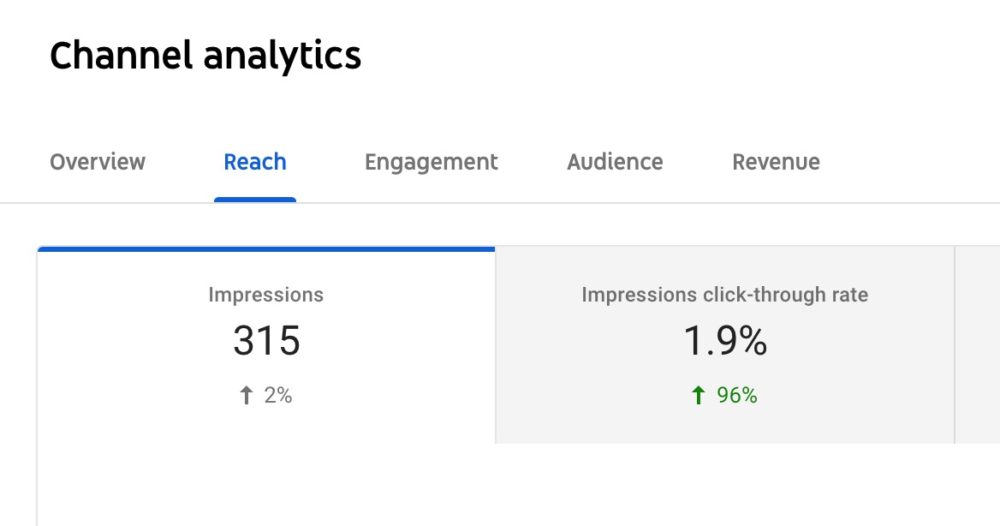
Tips: When a new video is released, don't be dazzled by the "short-term high CTR". Wait until the display gradually expands and the source structure is stable before making a judgment; if you see "the display expands quickly and the CTR has dropped somewhat", there is no need to roll back immediately - this is often a normal phenomenon of "reaching a wider range of people".
Search or Home: Where to Optimize First
If you only have two or three hours to spare, it is recommended to search first. The reason is simple: on the search page, the audience "comes with a question." As long as the title and thumbnail clearly state the question and point it to the point, the data will be relatively clean; while Home is more about "familiarity" and "temperament" and requires you to establish a stable sense of recognition in avatars, portraits, and background colors. This means that the road to Home is longer, but once you have a stable "recipe", it will be more cost-effective to spread it on the Home page.
In Search, the title puts the main keyword at the front, and then adds a specific pain point (for example, "Why doesn't the home page click on you?"). Don't repeat the long sentence of the title in the thumbnail, leave 3-4 big words with complementary information. When it comes to Home, we change our thinking: use unified portraits and stable color matching to reduce identification costs; use serial naming to allow old viewers to recognize "you" at a glance on the homepage.
If you only have 60 minutes today:
The first paragraph lasts 20 minutes. Use auto-complete + scan the 10 header titles and write 2 titles of "main keywords + pain points".
Session 2 20 minutes, 1 draft of a "mobile-first" cover (3-4 words, single focus, high contrast).
In the third period of 20 minutes, the version number is put on the shelf and recorded, and the review time point is set after 48 hours. After comparing, decide whether to copy the method to Home.
A Weekly CTR Optimization Cycle (7-Day Framework)
Imagine you run one lap in a week:
On the first day, pull out the CTR, display, retention in the first 30 seconds, and APV from the data of the past 28 days, and press "Source x Device" to get an average value for each. All subsequent evaluations will be based on this.
The next day, pick a main battleground to play first - I recommend starting with Search. Set a simple rule for "success": in the same source x device, the CTR should be at least 1 percentage point higher than the average, and the APV should not drop.
On the third day, you make two "mobile-first" thumbnail drafts: keep only 3-4 words (to avoid duplication with the title), keep a main focus, and use a contrasting background color. Don't forget a little trick - reduce the image to 150x150 and see if you can still read it at a glance.
On the fourth day, find a "hook" for the title. The structure is very simple: main keyword + pain point. For example, "The click doesn't go up? Look at the first 30 seconds." Remember, you and the drawing are "dividing labor and cooperating."
On the fifth day, I really only moved one variable. Either change the cover first, or change the title first, not both at the same time. Only after 48 hours do you know what is working.
From the sixth to the seventh day, observe three indicators for 48 hours: CTR, retention in the first 30 seconds, and APV. Sample size for a single version, try to wait until 300-500 impressions before drawing conclusions. Don't panic when encountering a situation where "CTR has increased but retention has dropped". It is usually due to "promising too much and delivering too slowly" and improve the opening rhythm. On the other hand, "CTR is low and retention is high", which is probably because the entrance is not strong enough. Go back and strengthen the title hook or create a "mode interruption" picture.
Finally, write down the "successful version" and copy it to similar videos; make a list of old videos with "high display, low CTR" and refresh a batch every week.
Think of this cycle as a "micro-project": you don't need to redo the entire channel at once, just target 1-2 featured videos each week and use their titles and covers as "training samples." After two or three weeks, you'll have 2-3 replicable recipes on your hands that "look just like you" - a lot less effort than starting from scratch and "going by feel" each time.
CTR Tactics for 4 Traffic Sources
Search: He is looking for answers. Don't tell jokes on the picture, give it "question words + self-examination words", so that people will know "what you want to solve" at a glance when they stop. The title puts the main keyword at the front and pain points at the back.
Home/Browse: He is shopping. The decisive factor is "familiarity." It's best not to move your portrait, color scheme, and logo position for a period of time to allow your brain to save effort in recognition.
Suggested/Recommended Video: He just watched a related content. Your cover can use the main color or object of the previous video to create a "sense of continuity"; the title can make up for "the points not mentioned in the previous video".
External/notifications: External entrances require "minimalist and high contrast" clarity; notification traffic is originally dominated by fans, and the CTR will be higher. It is best not to compare it with other sources.
A little exercise: Pick one of your videos at random, open the "Traffic Source" distribution, and find out the first and second place. Click in to see the CTR and APV respectively. Is there any misalignment of "one high and one low"? If so, follow the scenario method above, first strengthen the source of the "weak entrance", and then look at the changes after 48 hours.
First 30 Seconds: How to Hook Viewers Immediately
Think of the opening as an "eye-to-eye meeting." In the first 5 seconds, tell the other party: What is this video going to solve? In the next 10 seconds, give a small verifiable result, even a comparison picture or a quick glance at the final page - this is to repay the "promise of the title and cover"; then use 10-15 seconds to explain the path clearly, "I will do it in the order of A-B-C". The audience will know it and will be more willing to stay.
A common pitfall is to tell the background first, then the story, and finally get to the point. Change the order: answers first, background later.
Examples of opening variations for three themes:
Tutorial type: first show the final screen for 2-3 seconds ("this is what we want to do") - list a 3-step path - start directly with the first step.
Evaluation/comparison: Give the evaluation conclusion keywords ("more stable/faster/more economical") - mark the sample or standard - enter the first comparison.
Experience sharing: Point to the topic "Let's talk about xx today and nothing else" - Preview the 3 most critical pitfalls - Expand the first pitfall.
Mobile-First Thumbnails: What They Actually Look Like
If you only change one thing, change "readability". Pick up your phone, zoom out to 150x150 and take a look - three big words, one main focus, strong background contrast, and everything else is pushed to the back. If there is someone in the portrait, give a clear expression and don't let the background steal the show. Do not use thin or curly fonts for text, otherwise the small pictures will become blurry. Logo is allowed, but it should be small and fixed in the corner. (For a complete breakdown of official YouTube thumbnail dimensions, see our dedicated guide.)
The method of "pattern interruption" is also very straightforward: take a screenshot of the first five thumbnails of the same topic on one picture, see what colors, fonts, and layouts everyone is using, and then make an "opposite but clear" version. Note that "contrary" is not "exaggerated", it still needs to be clearly stated in the small picture. We've documented 4 proven thumbnail formulas that consistently drive clicks.

Common misunderstandings and corrections:
"The more words, the more complete the information will be." - In the small picture, most of what is left is just a mess. Choose 3-4 words and leave the half of the sentence that determines the clicks.
"Color must be gorgeous to be conspicuous" - What is truly conspicuous is "contrast". Even if it's just black and white, it's more visible than anything fancy.
"All elements matter" - When everything is big, nothing matters. Choose a "subject" first and let the rest take their place.
For more thumbnail design tips, check out our 10 thumbnail best practices guide.
How Title and Thumbnail Work Together
Don't go off topic in the title. Put the main keywords first, then the pain points. Add "action words" or "self-check words" to the picture. You can think of the two as a pair: the title says "What's the problem" and the image says "Do this first." In this way, the audience can spell out a complete promise in one screen.
Several ready-made hooks can be used in rotation, but don't pile them all together:
Results Oriented: From X% to Y%, See the Results in 48 Hours
Misdirection: Don't make this mistake, you ignored this step
Threshold orientation: 0 subscription is also available, no expensive tools are required
Counterexample rewritten (idea suggestion):
Counter example: The title says "How to increase YouTube CTR (2026)", and the image also says "Increase CTR".
Rewrite: The title "Why your CTR never goes up (2026)", and the picture reads "Capture the first 30 seconds first". The two are put together to form "problem + key action".
Beyond CTR: The CTR x APV Quality Score
Just looking at the CTR, it's easy to make it "click-and-go." A more reliable approach is to look at CTR and APV together: in the same "source x device" layer, use a "quality click score (Q) = CTR x APV" to make a rough estimate. For example, version A is 5.0% x 48% = 240, version B is 4.2% x 58% = 244, and B is more valuable. This score is not a strict statistic, it just allows you to avoid being biased by a single indicator.
60 seconds before putting it on the shelves, do a little check for yourself:
Thumbnail 150x150 Can you still read it clearly? Only 1 main focus? Do the title and image complement each other rather than duplicate them? Did I really only move one variable this round? How long is the release time before the peak of "audience online time"?
Why use "multiplication" instead of "addition" to make up a point? Because as long as one of them pulls the hips (for example, high CTR, low APV), the multiplication will be significantly smaller, and it is easier for you to see "this is not a good click". It is not a statistical model, it just helps you bundle "entrance" and "quality" together.
A common scenario:
You change the cover to a more eye-catching version, and after 48 hours the CTR goes from 3.8% to 5.1%, but the APV drops from 52% to 39%. If you only look at the CTR, it seems to be "making a lot of money"; multiply the two numbers, and you will quickly realize that these are "lively but not valuable" clicks - the next step should be to change the opening, rather than continue to pile up more exciting copywriting.
10-Minute Keyword Research for Titles
Open the search box and let the autocomplete give you five to ten phrases. Then scan the top ten videos to see what words are repeated in their titles. Divide "main keyword + pain point hook" into two candidates, choose one as version A, and save the other for the next round when only the title is changed. The description should be filled with different keywords and long tail. The key point is not to repeat the same words as the picture.
A 10-minute example:
Topic: YouTube CTR. In auto-completion, you may see "what is a good ctr", "increase ctr", "thumbnail ctr", etc.
Candidate Title A: YouTube CTR: Why 2-10% Are Misunderstood by You (2026)
Candidate Title B: Pulling the CTR Up: Start with 150x150 Readability (2026)
Graphic copy: Instead of repeating "CTR", write "Catch the first 30 seconds first" or "Don't pile on the words."
Optimizing for Different Devices
The mobile phone is the main battlefield: fewer words, greater contrast, and faces closer. When it comes to the desktop, two lines of text are acceptable, but they don't have to be cluttered. People are far away from the screen on TV, so large areas of color and very few words are used. After publishing, take a look at "Device Distribution" and "CTR/Retention of Each Device" to know which end should be prioritized for optimization in the next round.
A practical approach: First finalize the same picture for mobile phones, and then derive desktop and TV versions - instead of simply "stretching" it, place the "subject" closer to the center and shrink the auxiliary elements to the corners. This way you avoid the ambiguity that comes with "one draft takes all."
When CTR Drops as Your Channel Grows
Many times, it's not that the cover is getting worse, but that the distribution structure is changing: the proportion of Search is declining, Home is rising, the "familiarity" of new audiences has not been established, and the willingness to click is already lower. It may also be that the popularity of the topic is declining, or there is stronger competition in the same time period. Go back to the same "source x device" layer and compare apples to apples before drawing conclusions.
Determine when to "roll back" and when to "try again":
Rollback: CTR and APV are both lower than the stratified mean at the same time, and the sample size is sufficient;
Try again: When CTR rises, APV falls, or vice versa, press "Commitment-Delivery" to correct it and give it another chance;
Observation window: first look at 48 hours, then look at 7 days to avoid being biased by short-term fluctuations.
Version Management That Creators Can Actually Stick To
Include the version number in the file name (such as abc123_thumb_v2.png), and clearly note in the table "Whether the cover or the title was changed, why, and who changed it." Don't spam notifications, be careful and use the version you are most confident about. It is recommended to set Mondays and Thursdays as "replacement and review days" to avoid small changes every day that lead to samples being shredded. Pick 1-2 "promoted videos" every week, and maintain the regular maintenance rhythm for the rest.
Tips for teamwork:
Unify naming and table fields to reduce the low-level cost of "cannot find version";
At the review meeting, we first look at the layering of "source x equipment" and then discuss subjective design feelings;
Keep 2-3 "always on hand" cover templates for new people to get started quickly.
A lightweight review script (10 minutes is enough):
1) First look at the layers of Search x Mobile: display, CTR, APV, Q value (CTR x APV);
2) Answer only one question: retain/rollback/try again, why;
3) Record the "key points of review" in one sentence for easy copying or avoidance next week.
Common Mistakes to Avoid
If you only look at CTR, you will become more "clickbait" and the platform will not give you more distribution; look at retention and APV together. Change two or even three variables at a time and 48 hours later you won't know what the problem is. The long sentence of the title is written again in the picture, which takes up space and wastes information density. Thinking of "2-10% of the entire network" as a target line will lead you to the wrong comparison group. It is normal for the CTR to be high when a new video is first released. Don't panic if it falls later. Only releasing new videos and not looking back at old videos is the easiest way to miss low-cost growth.
If I only remember one sentence: let people understand it first, and then let people stay; make a grid right first, and then enlarge it.
FAQ
1) Are ad CTR and organic CTR comparable?
No. The display scenes are different and the caliber is also different.
2) Do all impressions count towards CTR?
No; it's based on Studio's "display" caliber.
3) Will the length of the film affect CTR?
It will affect the willingness to click, but the more critical thing is "did you fulfill your promise in the first 30 seconds?"
4) Which is more important, CTR or watch time? Both are indispensable.
CTR is responsible for "making people come", while viewing time and retention are responsible for "making people stay".
Next Steps: From Today to Next Week
Today, select an old video and make a "move only one variable" change (change the cover first); open a record sheet and write down the version number and time; set a schedule for review in 48 hours. Next week, copy this method to another video and expand the "successful version" into one or two new pieces of content on the same topic. You will see that the channel does not get better by a single inspirational strike, but by this small closed loop to steadily and continuously move up.
🎁
Limited-Time Creator Gift
Start Creating Your First Viral Video
Join 10,000+ creators who've discovered the secret to viral videos