Kyoto trip ⛩️⚡️🌸
But Ppl jumped off of here ? 😱⚡️🤨
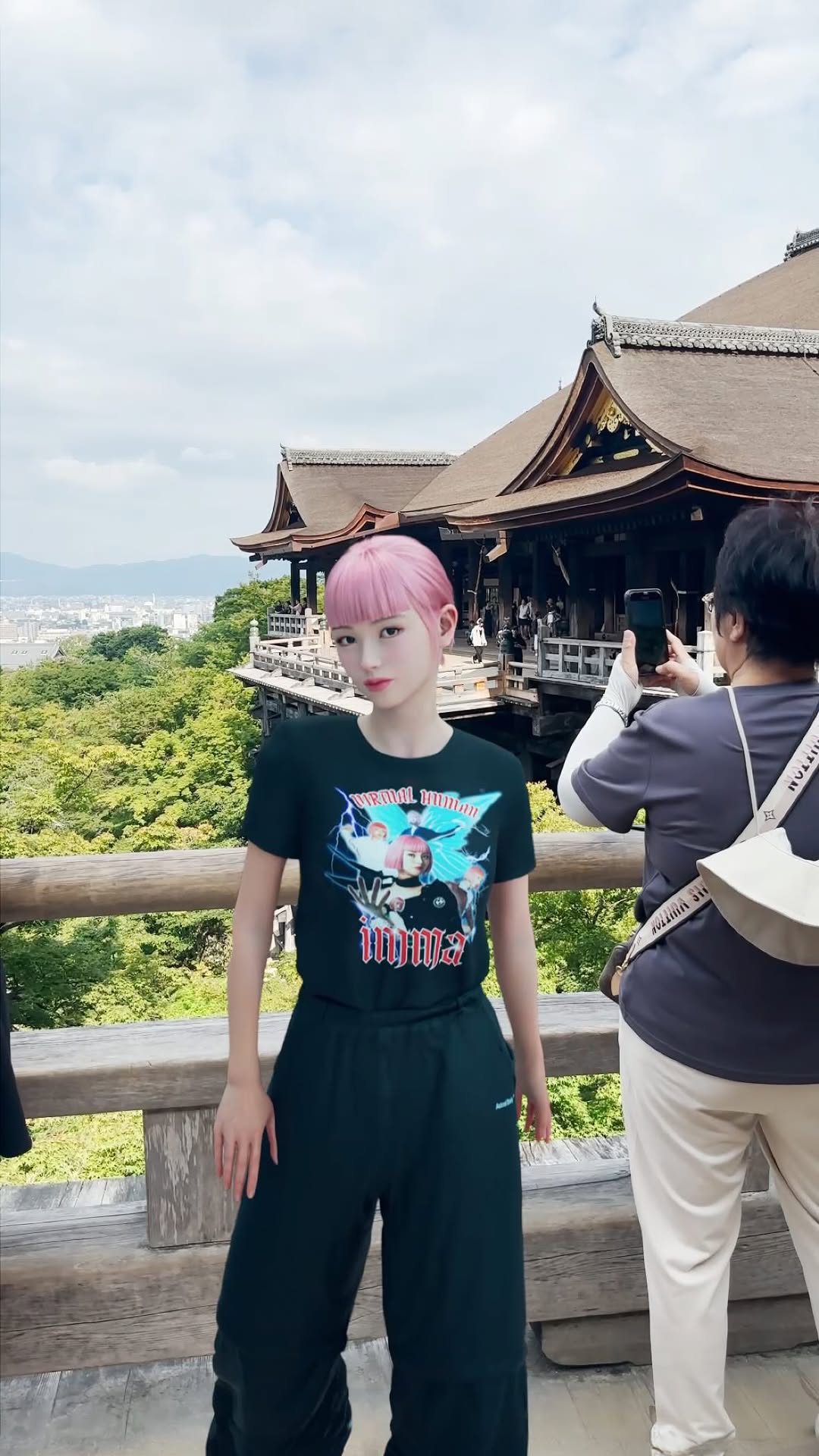
Learning about Japanese history is always interesting but sometimes… bizarre facts come out.. I started reading into one of the most famous tourist spots the kiyomizu temple when I visited Kyoto and yeah.. people jumped off here (and mostly survived!) to make a wish 😱 I’m glad I’m alive now when my wish is in a form of the Amazon wish list… 🤭
京都に行ってきて定番の清水寺にっ⛩️⚡️🌸
色々調べてると、日本の歴史って面白いことばっか見つかるよね?で、清水寺の舞台って願い事を叶えるためにここから飛び降りてた人がいるんだって?!?!😱あんな高いとこから?って思ったけど生存率高かったらしい。汗
昔の人って体どうなってんの?笑
#文章ながっ
How imma.gram Made This Kyoto Kiyomizu-dera AI Art - and How to Recreate It
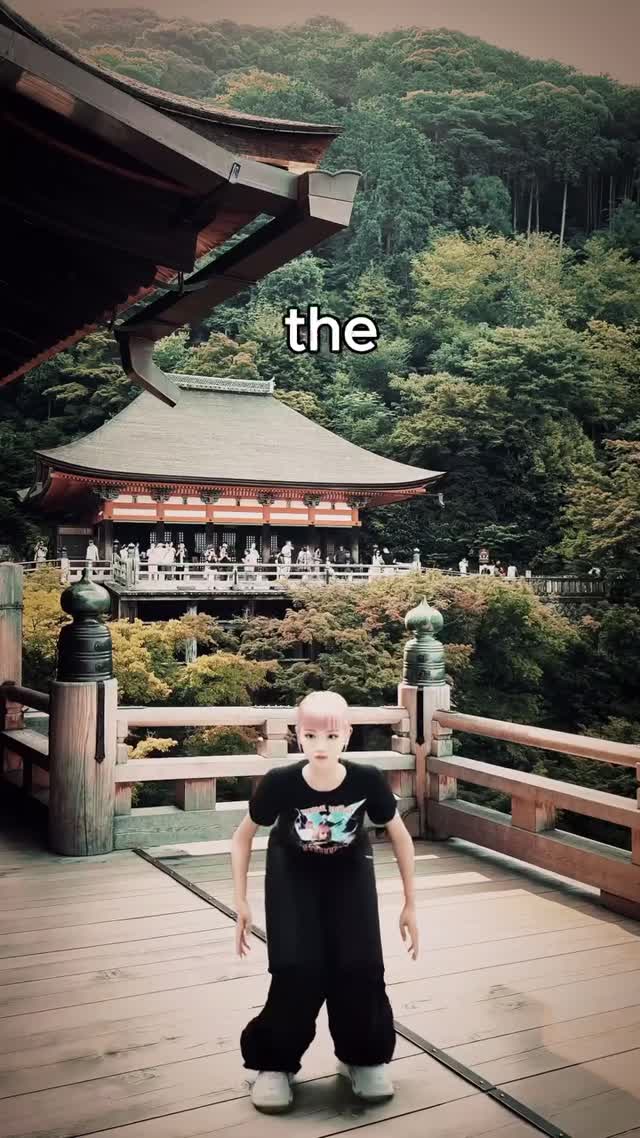
There’s a clever tension in this image: a tiny stylized avatar standing on a famous temple terrace, with one oddly incomplete word floating above—“the”. It feels like the first frame of a story you’re supposed to continue.
Why this works (and why the single word matters)
The fastest way to get attention in a travel feed is to show something recognizable. The temple terrace and forested hillside instantly signal “Kyoto” even if the viewer doesn’t know the exact spot. But recognition alone isn’t enough—everyone has seen a landmark photo. The twist is the avatar: a slightly game-like digital human, dressed in streetwear, placed small at the bottom like a character entering a level. That contrast (ancient place + digital visitor) creates curiosity without needing a complicated scene.
Then the text: “the”. It’s intentionally unfinished. That incompleteness creates a micro cliffhanger: the what? the view? the wish? the place? Viewers instinctively try to complete it, and that tiny mental action increases dwell time. It also hints this might be part of a carousel or series, which encourages people to look for “the next frame” even when they’re only seeing one image.
Finally, the composition is doing professional work. The avatar is small, so the environment becomes the hero. The deck planks and rails point toward the midground building, and the big roof eave on the left frames the shot like a natural header. It’s a travel postcard plus a character-driven narrative hook.
Signal Table
Signal
Evidence (from this image)
Mechanism
Replication Action
Recognizable place
Temple terrace architecture + forested hillside
Landmarks stop the scroll through familiarity
Use a clear location cue (architecture silhouette + landscape) before adding a twist
Digital-vs-real contrast
Stylized avatar composited into a photo-like scene
Novelty comes from mismatch, not complexity
Keep background realistic; keep subject slightly stylized for contrast
Cliffhanger typography
Single incomplete word: “the”
Open loops increase dwell time and comments
Use 1–2 word fragments (“the”, “when”, “because”) as series hooks
Environment-first framing
Subject is small; lots of headroom
Scale makes the place feel grand and cinematic
Shrink the subject; widen the lens; add leading lines toward the landmark
Use cases & transfers
Best-fit scenarios
Virtual creator travel diaries: Keep the avatar consistent; change locations. Viewers follow the character, not just the place.
Series storytelling: Use fragment text across a carousel (“the” → “things” → “I learned”).
Culture/curiosity posts: Pair a landmark with one surprising historical fact in the caption.
Brand worldbuilding: Place your mascot in “real” places to make your brand feel like a character in the world.
Not ideal
Pure informational guides: A fragment hook can feel confusing if the goal is clarity.
Hard-sell travel offers: The vibe is wonder/curiosity, not conversion.
Overly busy scenes: This format needs space; clutter kills the scale effect.
Transfers (3 recipes)
Transfer 1: Museum “level entry” shot
Keep: small avatar, wide lens, architectural framing
Change: temple terrace → museum hall; text fragment → “the rule”
Slot template: “{fragment_word} top-center text, small {avatar} bottom-center, wide-angle {architecture_scene}, filmic grade, leading lines, 9:16”
Transfer 2: Nature overlook wonder
Keep: environment-first scale, muted filmic grade
Change: background → mountain overlook; text fragment → “the silence”
Slot template: “small avatar at overlook, vast {nature_scene}, soft overcast light, single word fragment caption, cinematic scale”
Transfer 3: City alley neon contrast
Keep: stylized avatar inside a realistic photo scene
Change: Kyoto wood tones → neon alley; text fragment → “the glitch”
Slot template: “{fragment} text, stylized avatar, realistic {city_scene}, strong leading lines, filmic color grade, 9:16”
Aesthetic read: scale, framing, and filmic restraint
The image is designed like a movie establishing shot. The avatar is small to communicate scale. The roof eave creates a bold diagonal that frames the top-left, making the shot feel “composed,” not accidental. The railing posts add depth cues, and the midground building gives a clear focal target beyond the character.
Color-wise, it’s restrained: green forest, warm wood, gray roof, and a muted sky. That’s why the avatar’s pale hair and white shoes pop without needing neon. If you want travel visuals that feel premium, this is the recipe—less saturation, more structure.
Observed → Recreate (evidence table)
Observed
How to recreate it (prompt + knob)
Small subject, big environment
Use a wide lens and place the character near the bottom; keep lots of headroom
Architectural frame (roof eave)
Add “roof eave intruding from upper-left” to create a natural frame
Clear landmark midground
Ensure a recognizable building sits midframe; keep it readable (not too blurred)
{fragment_word} top-center text, small {avatar} bottom-center on {landmark_platform}, wide-angle cinematic establishing shot of {location}, strong leading lines, filmic muted grade, 9:16
Remix steps: build a travel series with a consistent character
Baseline lock (lock these first)
Lens + scale: wide shot, small avatar, environment-first
Composition: one framing element (eave/arch/branch) + clear leading lines
Text style: single-word fragment, consistent font and placement
One-change rule
Change only one variable per run: the location, the fragment word, or the avatar outfit. Keep lens, grade, and scale constant so it still feels like the same series.
Example 4-step iteration sequence
Run 1: Match architecture framing and scale; ignore avatar outfit details.
Run 2: Dial in filmic grade and forest depth; keep the landmark readable.
Run 3: Fix avatar hair and outfit silhouette; ensure it stays small in frame.
Run 4: Add the fragment word and test 5 variants for series direction.