Kyoto trip ⛩️⚡️🌸
But Ppl jumped off of here ? 😱⚡️🤨
Learning about Japanese history is always interesting but sometimes… bizarre facts come out.. I started reading into one of the most famous tourist spots the kiyomizu temple when I visited Kyoto and yeah.. people jumped off here (and mostly survived!) to make a wish 😱 I’m glad I’m alive now when my wish is in a form of the Amazon wish list… 🤭
京都に行ってきて定番の清水寺にっ⛩️⚡️🌸
色々調べてると、日本の歴史って面白いことばっか見つかるよね?で、清水寺の舞台って願い事を叶えるためにここから飛び降りてた人がいるんだって?!?!😱あんな高いとこから?って思ったけど生存率高かったらしい。汗
昔の人って体どうなってんの?笑
#文章ながっ
Case Snapshot
This short travel reel works because it combines a real-world Kyoto temple backdrop with a clearly artificial but consistent pink-haired virtual traveler. The video is only about 22 seconds long, yet it still creates a full postcard-like experience: a wooden terrace with a temple across the valley, red pagoda architecture, shrine details, a directional sign, a brief Buddha shot, bright green trees, and a final scenic look through branches toward the rooftops. The editing is simple and mobile-native. There are no heavy transitions, no overproduced cinematic tricks, and no complicated dialogue to follow. Instead, the clip relies on location recognition, clean cuts, and short centered caption words to create a playful travel rhythm. For creators, this is useful because it shows how to make an AI character feel social-media ready without needing to generate an entirely synthetic world. The real scenery does most of the trust-building. The virtual character adds novelty. That balance is important. It lets the viewer enjoy the temple view while also noticing the surreal hook: a digital traveler casually occupying a real tourist destination. The result lands somewhere between travel mood board, character experiment, and shareable “wait, is that real?” content.
What You're Seeing
A real Kyoto location is doing the heavy lifting
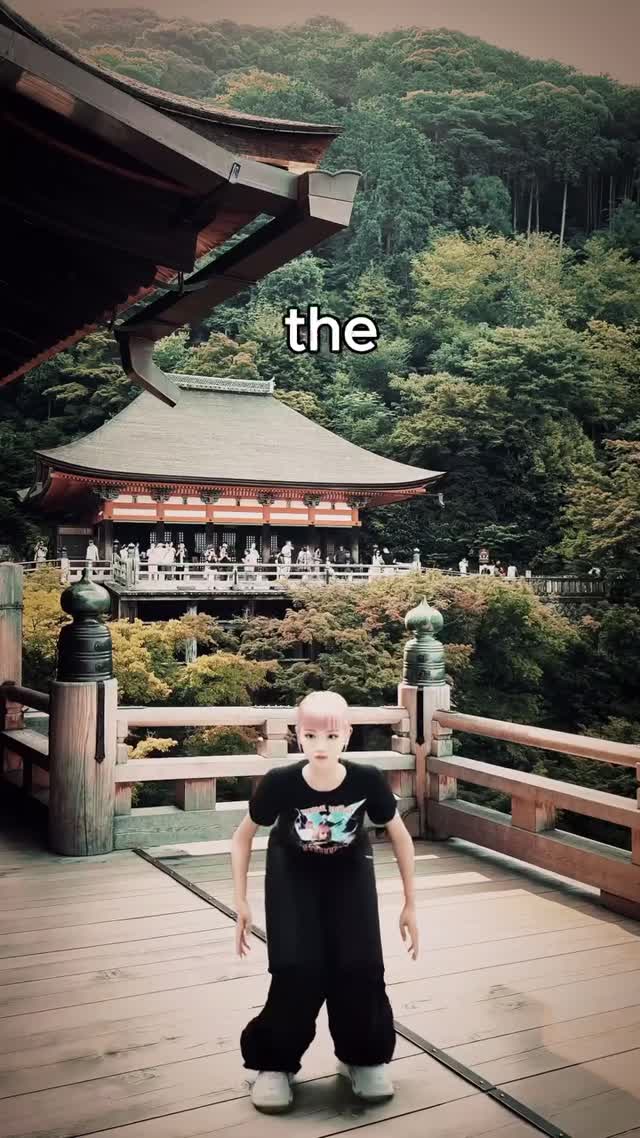
The strongest asset in this video is the location itself. You get red temple beams, layered rooftops, wooded hills, lookout railings, and a broad valley-facing platform. Even before the avatar registers, the viewer already understands they are in a recognizable Japanese sightseeing environment.
The virtual traveler is kept visually simple on purpose
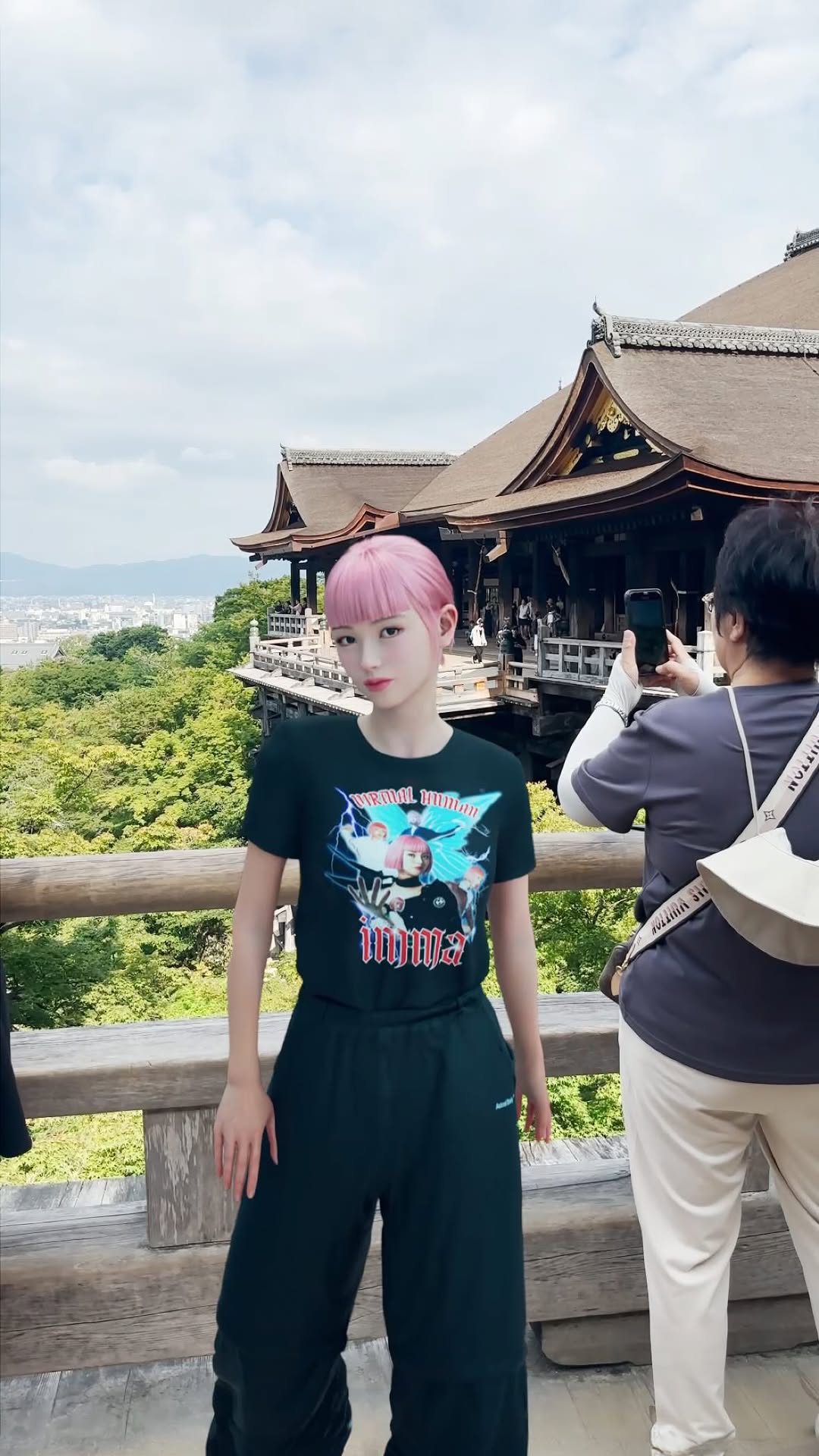
The character design is stripped down: short pink hair, black graphic T-shirt, loose black pants, white shoes. That simplicity helps the avatar survive wide shots. If the clothing or silhouette were more complicated, the compositing would feel noisier and less believable.
The video uses wide shots instead of face-driven close-ups
This matters. The creator avoids close facial scrutiny and instead places the AI figure in wider travel frames. That is a smart production decision because it keeps the focus on place, mood, and movement rather than on facial realism.
The cuts move between three types of proof
The reel alternates between scenic proof, cultural proof, and novelty proof. Scenic proof comes from the overlook and trees. Cultural proof comes from the shrine, Buddha, signs, and temple architecture. Novelty proof comes from seeing the pink-haired virtual person casually standing in those real spaces.
The captions behave like rhythmic labels, not full narration
Instead of full subtitles, the clip uses short centered words. That makes the reel feel lighter and faster. It also keeps the viewer looking at the scenery because they are never forced to read a dense block of text.
The color palette is classic travel-postcard material
You have vermilion reds, pale wood, soft gray roofs, bright summer greens, and a blue-white sky. The pink hair then becomes the only obviously synthetic color accent attached to the subject, which helps the avatar stand out immediately.
Shot-by-shot breakdown
Time range
Visual content
Shot language
Lighting & color tone
Viewer intent
00:00-00:04 (estimated)
Wide terrace shot with the pink-haired avatar and temple across the valley.
Soft daylight, green hills, muted postcard contrast.
Hook viewers with place recognition plus AI-character novelty.
00:04-00:07 (estimated)
Red temple structure and pagoda view.
Architecture insert with slight handheld drift.
Bright vermilion reds against blue sky.
Confirm the destination and raise scenic value.
00:07-00:10 (estimated)
Buddha detail and temple route signage.
Close observational shots, phone-camera realism.
Mixed shade and daylight, more documentary feel.
Add cultural specificity and location texture.
00:10-00:13 (estimated)
Avatar stands again on the overlook deck.
Wide static-or-lightly handheld framing.
Balanced daylight with clear wood and foliage tones.
Reinforce the virtual traveler concept.
00:13-00:16 (estimated)
View drops through dense green trees below the terrace.
Quick scenic pan/tilt.
High-sun greens and bright highlights.
Create a reaction beat and sense of height.
00:16-00:19 (estimated)
Charm counter and then tourists photographing the overlook.
Social proof inserts mixed with travel observation.
Natural mixed light, casual tourist realism.
Show the place as active, real, and worth visiting.
00:19-00:22 (estimated)
Quiet ending through trees toward temple roofs and pagoda.
Framed landscape finish.
Soft sky, layered gray roofs, green foreground leaves.
Leave the viewer with calm scenic aftertaste.
Why It Went Viral
The familiar location lowers skepticism fast
Putting an AI character inside a known travel environment is smart because the real scenery gives the viewer something solid to trust. The temple railings, red structures, tourist traffic, and layered roofs all read as real immediately. That makes the pink-haired character feel more interesting rather than more suspicious.
The novelty is clear in one glance
You do not need a long explanation to understand the hook. A pink-haired digital-looking traveler standing on a famous temple deck is already enough. That kind of one-glance contrast is useful on short-form platforms because it gives you a curiosity gap without confusing the viewer.
The format is lightweight enough to replay
The reel is short, scenic, and easy to scan. There is no dense tutorial voiceover. There are no subtitles demanding full attention. People can replay it quickly to re-check the location, the compositing, or the scenery. That replay friendliness helps on platforms that reward completion and repeated viewing.
The scenery keeps changing even though the concept stays simple
The creator does not milk one shot for too long. You move from terrace to pagoda to shrine detail to trees to crowd-facing overlook. The concept stays stable, but the visual evidence keeps refreshing. That prevents novelty fatigue.
The video taps into multiple audience motivations at once
Travel lovers come for Kyoto. AI creators come for the compositing idea. Anime or virtual-influencer audiences may come for the stylized avatar. Casual scrollers come for the “is this edited or real?” tension. One reel serving multiple curiosity types is usually stronger than a reel serving only one.
Platform view: why this format travels well
From the platform side, this clip has a strong first-frame contrast, low caption burden, and high share value. It is easy to send to a friend with a message like “look at this AI character in Kyoto.” That matters because shareability is often stronger than pure aesthetic quality on travel-adjacent short video.
Five testable viral hypotheses
Observed evidence: the first shot already shows a temple vista plus the avatar. Mechanism: the hook lands instantly because both place and novelty are visible. How to replicate it: combine your destination reveal and your character reveal in the opening frame.
Observed evidence: the avatar is mostly shown in wide shots. Mechanism: wide shots reduce uncanny-valley pressure. How to replicate it: put AI characters in medium-wide and full-body compositions when compositing into real footage.
Observed evidence: captions are short single words. Mechanism: low reading cost improves casual retention. How to replicate it: use minimal caption beats instead of paragraph subtitles for mood-driven travel edits.
Observed evidence: the reel rotates through overlook, architecture, shrine details, and social context. Mechanism: the viewer keeps getting new proof that the location is real and interesting. How to replicate it: capture one scenic shot, one architecture shot, one cultural detail shot, and one crowd-context shot.
Observed evidence: the ending resolves into quiet nature and rooftops. Mechanism: a calm scenic ending increases “save for later trip inspiration” energy. How to replicate it: do not waste the ending on a random joke shot; close with the strongest postcard frame.
How to Recreate It
1. Start with a place people already recognize
This format improves when the background has instant cultural readability. Temples, train stations, markets, neon streets, historic alleys, and famous lookouts all work better than anonymous scenery.
2. Keep the AI character silhouette clean
Use one hair color, one simple outfit, and one readable full-body shape. The more complex the styling, the harder it is to integrate the character into live-action travel footage.
3. Generate for wide-shot consistency, not close-up perfection
The goal is not a flawless portrait reel. The goal is a believable presence in space. Build prompts around scale, posture, clothing, and shadow logic so the avatar feels anchored to the ground and railings.
4. Capture or source real travel footage with obvious spatial cues
Railings, stairs, rooflines, signs, and trees all help sell depth. Those objects give the viewer more clues that the character is sharing the same world as the environment.
5. Use only a few shot categories
This reel stays efficient: scenic wide, architecture insert, detail insert, social proof shot, scenic ending. That is enough. You do not need twenty shot types to make a strong travel short.
6. Make your captions mood-led, not lecture-led
If the point is atmosphere and novelty, keep the captions spare. A few centered words are enough to guide emotion without covering the frame.
7. Let the real location carry texture
Do not overgrade the footage or overanimate the avatar. The point is the contrast between realistic architecture and the stylized subject. If both become too synthetic, the hook disappears.
8. Put the weirdest idea in the first shot
In this case, the weird idea is simple: digital girl in a real Kyoto temple scene. Front-load that contrast so viewers instantly know why the video deserves their attention.
9. End with a save-worthy frame
Travel clips get saved when the final image feels like a postcard. Trees framing the temple roofs and pagoda is a much stronger ending than a random transition out.
10. Use this format for accounts with location or character hooks
This style is ideal for AI influencer accounts, travel creators experimenting with digital characters, destination pages, or creators testing mixed-reality storytelling.
HowTo checklist
Pick a destination with immediately recognizable visual cues.
Lock one AI traveler outfit and hairstyle.
Plan 5-7 travel shots before generating anything.
Composite the avatar into the widest and clearest shots first.
Add one or two cultural detail shots for specificity.
Use minimal captions that do not block the scenery.
Keep the edit short enough for replay.
Finish on the strongest scenic image in the sequence.
Growth Playbook
Three opening hook lines
I dropped a virtual traveler into Kyoto and the result looks weirdly real.
This is what happens when an AI character visits one of the most beautiful temple views in Japan.
Travel content gets a lot more interesting when the tourist is not fully human.
Four caption templates
Hook: Kyoto already looks unreal. Value: Then I placed a pink-haired virtual traveler inside the scene and let the real location do the rest. Question: Which city should this character visit next? CTA: Comment one destination.
Hook: Mixed-reality travel reels do not need heavy VFX. Value: One consistent avatar, one famous location, and a few strong scenic cuts can already create shareable contrast. Question: Would you rather see temple, market, or train-station versions of this idea? CTA: Tell me below.
Hook: This is a simple formula for AI travel content. Value: Use a real place for trust and an AI subject for novelty. Question: Which shot sold the idea most for you, the overlook or the pagoda? CTA: Save this as a reference.
Hook: The best AI travel clips are easy to understand in one second. Value: This one works because the place is real, the character is consistent, and the captions stay light. Question: Should the next one be more cinematic or more vlog-like? CTA: Vote in the comments.
Hashtag strategy
Keep the hashtag stack intentional. Use one broad travel layer, one AI-character layer, and one niche mixed-reality layer.