0:00 / 0:00
▶
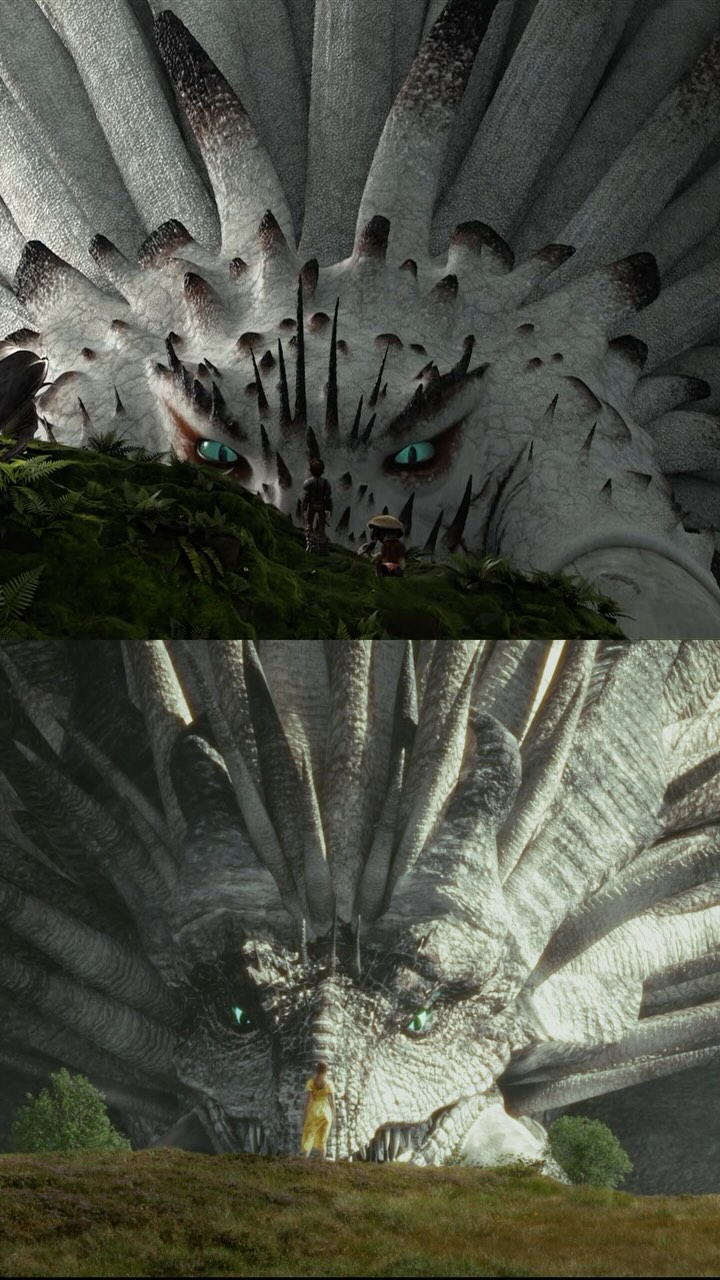
In this high-production-value case study, creator Maria Kallevik demonstrates the power of "re-imagining" beloved IP through high-end VFX. The video showcases a live-action recreation of the How to Train Your Dragon Bewilderbeast scene, set against the stunning backdrop of the Norwegian mountains. By blending personal nostalgia (childhood trampoline clips) with professional-grade 3D modeling in Blender and seamless sound design via Artlist, Maria positions herself as a top-tier technical creator. The aesthetic is a mix of warm, intimate "talking head" segments and cold, epic cinematic shots characterized by desaturated greens, misty atmospheres, and massive scale contrasts. This "Indie vs. Studio" narrative—claiming to beat Universal Pictures to the punch—serves as a powerful hook for both fans of the franchise and aspiring filmmakers.
The video is a masterclass in pacing, alternating between the creator's direct-to-camera explanation and technical "behind-the-scenes" (BTS) reveals. Maria is framed in a medium close-up for the talking segments, using soft, warm indoor lighting that creates a friendly, accessible persona. This contrasts sharply with the VFX shots: wide, sweeping vistas of the Norwegian highlands under overcast skies, providing a natural, "filmic" look that grounds the CGI dragon.
| Time Range | Visual Content | Shot Language | Lighting & Color | Viewer Intent |
|---|---|---|---|---|
| 00:00–00:01 | Maria talking to camera | MCU, static | Warm, shallow DOF | Establish hook & identity |
| 00:01–00:03 | Giant white dragon reveal | Wide shot, low angle | Cold, misty, desaturated | The "Wow" factor / Proof of skill |
| 00:05–00:09 | Childhood clips & movie footage | UGC & Cinematic cuts | Varied / Nostalgic | Build emotional connection |
| 00:10–00:13 | Maria filming in mountains | Wide, tripod in frame | Natural daylight | Authenticity / "Real life" proof |
| 00:14–00:22 | Blender 3D modeling UI | Screen recording | Technical UI | Educational value / Process reveal |
| 00:23–00:28 | Compositing & layers | Screen recording / Overlays | Technical | Demonstrate complexity |
| 00:29–00:40 | Artlist plugin & sound design | UI close-ups | Dark mode UI | Tool recommendation / Workflow |
| 00:43–00:45 | Side-by-side comparison | Split screen | Movie vs. Recreation | Final payoff / Satisfaction |
The core of this video's success lies in its David vs. Goliath narrative. By stating she created this "before Universal," Maria taps into a psychological trigger: the admiration for the underdog. Fans of the How to Train Your Dragon franchise are currently anticipating a live-action remake, and Maria provides a "first look" that feels authentic and high-quality. This exploits the Recency and Hype surrounding the IP while showcasing a level of skill that rivals major studios.
The video doesn't just show the result; it shows the work. For the "indie creator" audience, seeing the Blender interface and the Artlist workflow provides immense educational value. It demystifies the "magic" of VFX, making it feel attainable yet impressive. This encourages saves (for future reference) and shares (to show others "how it's done").
From a platform perspective, the video uses a rapid-fire editing rhythm. The first 3 seconds contain three distinct visual shifts: talking head → epic dragon → close-up interaction. This prevents "scroll-past" behavior. The use of a specific tool (Artlist) also suggests a potential partnership or affiliate play, which the platform's algorithm often favors when content is high-quality and provides clear utility to other creators.
Choose a cinematic scene from a popular movie that hasn't been done in "live action" or has a highly anticipated remake. Your goal is to provide the "fan-made" version that looks professional.
Find a real-world location that matches the movie's environment. In this case, the Norwegian mountains provide the scale needed for a giant dragon. Use a tripod to ensure your "plate" (background) is steady for VFX integration.
Wear simple, timeless clothing (like Maria's white dress) that doesn't distract from the VFX. If using AI for character generation, use a "Reference Image" of yourself to maintain facial consistency across shots.
Don't build from scratch if you don't have to. Maria mentions "buying this dragon." Use marketplaces like Sketchfab or TurboSquid to find high-quality base models, then modify them in Blender to match your specific needs.
Match the lighting of your 3D model to the lighting of your real-world footage. If it was an overcast day in the mountains, your 3D dragon should have soft, diffused shadows. Use HDRI maps from your filming location for perfect reflections.
Add "Atmosphere." This is the secret to realism. Add mist, fog, and "depth" layers between the camera, the subject, and the dragon. This "sandwiches" the CGI into the real world.
Use a dedicated sound library. Layer "environmental" sounds (wind, birds) with "creature" sounds (growls, heavy breathing). Sync the audio peaks to the visual movements of the dragon.
Structure your final video to show the "Before and After" or a "Side-by-Side." This is the most shareable part of the content. Include a CTA to your longer-form content (YouTube) for the deep dive.
Option 1: The Technical Tease
Hook: Stop waiting for the big studios. 🎬
Value: I spent 2 weeks in Blender and the Norwegian mountains to bring [Character] to life. Here’s the workflow.
Question: Which movie should I tackle next?
CTA: Full breakdown link in bio! #VFX #Blender3D
Option 2: The Nostalgia Trip
Hook: 10-year-old me is screaming right now. 🐉
Value: [Movie Name] was my entire childhood. Recreating this scene felt like a dream.
Question: What was your favorite movie growing up?
CTA: Check out the side-by-side at the end! #Nostalgia #Filmmaking
Blender for 3D, Premiere Pro for editing, and high-quality sound libraries like Artlist.
Use an HDRI image taken at your filming location to light your 3D scene.
You likely missed the "atmospheric" layers like fog and color grading to blend the two.
Instagram Reels tend to favor high-aesthetic, cinematic "eye candy" like this.
Label it as a "Fan Recreation" or "Parody" and focus on the educational/transformative aspect.