
▶
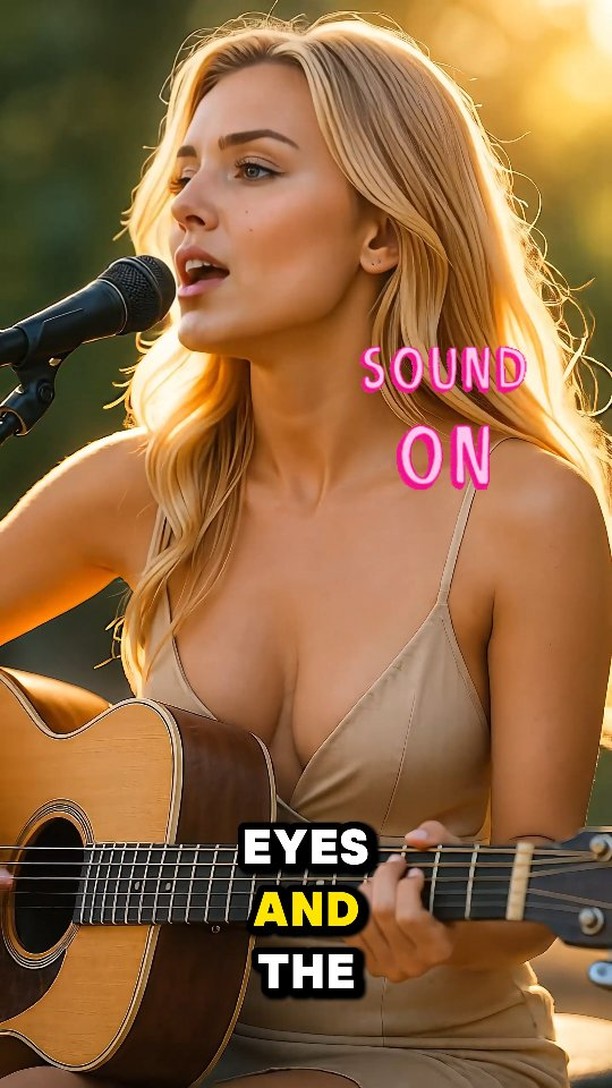
Letting the words and melody speak for my heart 💕 ‘Woman in Love’ — Dana Winner.
Letting the words and melody speak for my heart 💕 ‘Woman in Love’ — Dana Winner.
This case study analyzes a high-performance cinematic AI-generated music reel featuring a blonde female protagonist performing a soulful cover of "Woman in Love." The video leverages the "AI Influencer" aesthetic—characterized by hyper-realistic skin textures, perfect golden hour lighting, and high-emotional resonance. By combining a nostalgic ballad with a visually stunning, idealized subject, the creator captures the "beauty premium" while showcasing the technical prowess of modern AI video tools. This specific piece demonstrates how to bridge the gap between "uncanny valley" and "aspirational aesthetic," resulting in over 47,000 likes and significant engagement from a global audience.
The video features a medium shot of a young blonde woman with a sun-kissed complexion, wearing a minimalist beige spaghetti-strap dress. She is positioned outdoors during golden hour, with soft, warm light creating a glowing rim around her hair and shoulders. She holds an acoustic guitar and sings into a professional studio microphone. The background is a soft-focus (bokeh) greenery, suggesting a park or garden setting. The editing is minimal, focusing on the emotional delivery of the song, with dynamic text overlays highlighting the lyrics in a bold yellow-and-white font.
| Time Range | Visual Content | Shot Language | Lighting & Tone | Viewer Intent |
|---|---|---|---|---|
| 00:00–00:03 | Subject starts singing "The road is narrow..." | Medium Close-Up (MCU), static. | Golden hour, warm highlights. | Hook: Immediate visual and auditory beauty. |
| 00:03–00:07 | Subject closes eyes, head tilts slightly. | MCU, slight handheld sway. | Soft shadows, high contrast. | Reinforce persona: Emotional depth. |
| 00:07–00:11 | Subject hits a higher note, mouth opens wider. | MCU, focus on lip-sync. | Warm, saturated yellows. | Climax: Technical "wow" factor of AI sync. |
| 00:11–00:14 | Subject looks away from the mic, strumming continues. | MCU, shallow depth of field. | Consistent golden glow. | Loop effect: Natural ending to a phrase. |
This video succeeds by tapping into nostalgia and the "Idealized Human" archetype. The song choice, "Woman in Love," is a timeless classic that resonates with an older, affluent demographic on Instagram while remaining catchy for younger viewers. Psychologically, the video uses the "Halo Effect"—the subject is so aesthetically perfect (thanks to AI) that viewers naturally attribute positive qualities to the performance, increasing watch time and shareability. The "Sound On" prompt in neon pink acts as a secondary hook, forcing the user to engage with the audio, which is the emotional core of the piece.
From an algorithmic standpoint, Instagram prioritizes high-retention aesthetic content. The 0–3 second hook is purely visual: a beautiful face in perfect lighting. Because the video is a music performance, it encourages "looping"—users often listen to the full phrase multiple times to check the lip-sync or simply enjoy the melody. The high save rate likely stems from users wanting to reference the "AI look" or the specific lighting setup for their own content. The caption is short and emotional, reducing the cognitive load for the viewer and encouraging them to focus entirely on the sensory experience.
Template 1 (Emotional):
Letting the music speak today. 💕 [Song Name] always hits different. What’s your favorite classic ballad? 👇 #AIArt #MusicLovers
Template 2 (Technical/Curiosity):
Can you tell if this is real or AI? 🤖 The technology is getting insane. Check the lip-sync on that last note! 😱 #AIInfluencer #TechTrends
Midjourney for the base image and Kling AI or Luma for the video motion.
"Golden hour," "Cinematic," and "Photorealistic."
Usually due to lack of a "Character Reference" (cref) in the initial image generation phase.
Add subtle film grain and ensure the lighting is "motivated" by a visible source like the sun.
Instagram favors this specific "polished/beautiful" aesthetic more than TikTok's raw UGC vibe.