0:00 / 0:00
▶
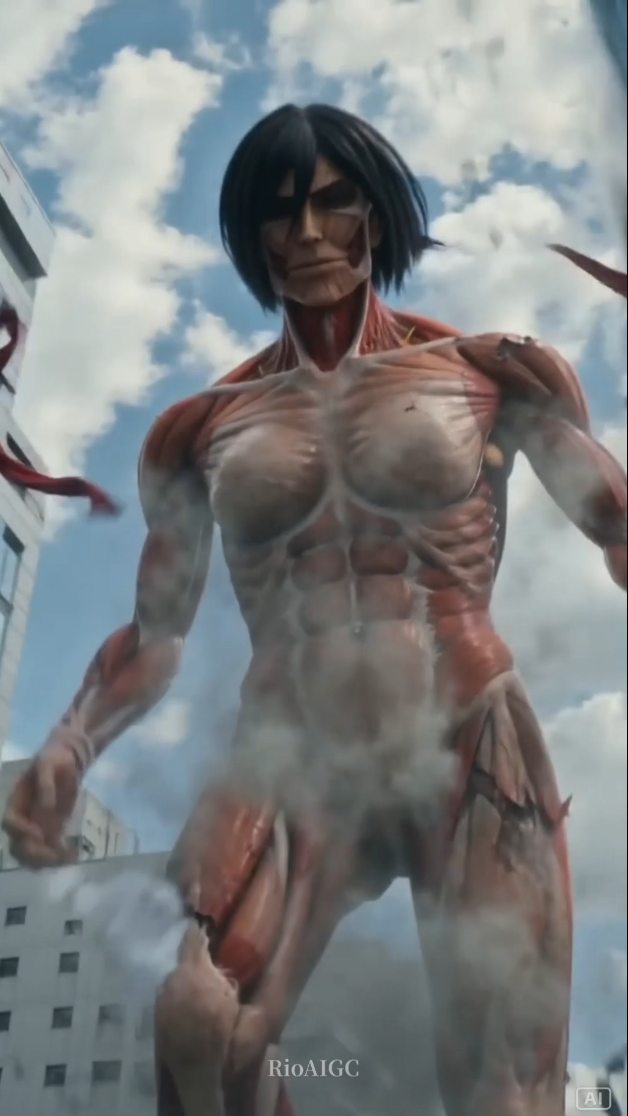
This viral case study examines a high-fidelity AI-generated video by @rioaigc featuring Mikasa Ackerman from Attack on Titan. The video reimagines a popular "fan theory" scenario: Mikasa transforming into a Titan. By blending cinematic urban realism with iconic anime tropes, the creator achieves a "live-action" aesthetic that feels both grounded and supernatural. Key elements include the low-angle "colossal" perspective, the signature red scarf physics, and a seamless transition from a human-scale street shot to a city-leveling giant. This content taps into the massive Attack on Titan fandom while showcasing the cutting-edge capabilities of AI video generation in handling complex anatomical textures like exposed muscle tissue.
The video opens with a medium shot of Mikasa in a modern-day Tokyo-style intersection. She is wearing her iconic white button-down, black cargo pants, and a long red scarf that flutters realistically in the wind. The lighting is bright, naturalistic daylight, casting soft shadows against the surrounding glass skyscrapers. As she bites her hand—the series' signature transformation trigger—the camera pushes in, followed by a series of rapid cuts showing her clothes tearing and her body expanding into a skinless, muscular Titan form. The final sequence is a dynamic tracking shot of the Titan running through the city, with steam rising from its body and debris flying, creating a sense of immense weight and power.
| Time Range | Visual Content | Shot Language | Lighting & Tone | Viewer Intent |
|---|---|---|---|---|
| 00:00–00:02 | Mikasa standing on a crosswalk, scarf blowing. | Low-angle Medium Shot | Bright daylight, high contrast | Establish character & setting (Hook) |
| 00:02–00:03 | Close-up of Mikasa biting her thumb/hand. | Extreme Close-up (ECU) | Naturalistic, focused | Signal the iconic "Transformation" event |
| 00:04–00:06 | Clothes ripping, muscle tissue expanding. | Medium Shot, rapid cuts | High-energy, steam effects | Visual payoff / "The Reveal" |
| 00:07–00:10 | Titan Mikasa stands tall among skyscrapers. | Extreme Low-angle (Worm's eye) | Cinematic, blue sky backdrop | Emphasize scale and awe |
| 00:11–00:15 | Titan Mikasa running toward the camera. | Tracking Wide Shot | Dynamic, motion-blurred | Action climax & loop potential |
The primary driver of this video's success is the "What If" scenario. In the original Attack on Titan series, Mikasa is a human soldier who never becomes a Titan. By visualizing this popular fan concept with high-end AI realism, the creator provides a "forbidden" visual payoff that fans have debated for years. This triggers immediate engagement: fans comment to discuss the lore, share it with fellow enthusiasts, and save it as a high-quality reference for fan art.
From a platform perspective, the video excels due to its pacing and visual fidelity. The first 3 seconds use a highly recognizable character and a specific action (the hand bite) that acts as an "intent-based hook." If you know the show, you must stay to see the transformation. The transition from human to giant is handled with enough detail (ripping fabric, steam, muscle fibers) to satisfy the "oddly satisfying" or "high-effort" content signals that Instagram and TikTok algorithms favor. The use of epic, familiar-sounding orchestral music further cements the emotional resonance, increasing the likelihood of the video being shared to Stories.
Start by defining your "Human" base. Use a tool like Midjourney to create a consistent character. For Mikasa, focus on the "short black bob," "red scarf," and "white shirt." Set the scene in a "modern Tokyo street intersection" to ground the fantasy.
Generate a specific image of the character performing the transformation trigger. In this case, it's the hand bite. Ensure the facial expression is determined and the lighting matches the first shot.
Create the Titan version. Use prompts like "colossal humanoid," "exposed red muscle tissue," "no skin," and "glowing blue eyes." Maintain the character's hair style to ensure the viewer recognizes it as the same person.
Use a video AI like Runway Gen-2 or Luma Dream Machine. Use the "Image-to-Video" feature. Upload the human keyframe and the Titan keyframe. Use the "End Frame" feature to guide the AI through the transformation morph.
For the running sequence, use a prompt that emphasizes camera movement: "low angle tracking shot, giant humanoid running through city, camera shaking, dust and debris."
Layer in "heavy thuds" for footsteps, "hissing steam" for the transformation, and an orchestral "epic" track. Sound is 50% of the "giant" feel.
Apply a cinematic LUT (Look Up Table) in CapCut or Premiere Pro. Aim for a "film" look with slightly crushed blacks and vibrant reds to make the scarf and muscles pop.
Use a "Before vs. After" or "What if..." text overlay on the cover image to pique curiosity immediately.
Option 1 (The Fan Engagement):
"Mikasa as the Female Titan... would the story have ended differently? 👇 Let’s debate in the comments! #AttackOnTitan #AIGenerated #AnimeTheory"
Option 2 (The Tech Showcase):
"Testing the limits of AI video with this Mikasa transformation. The muscle detail is insane! 🤯 Created with [Tool Name]. #AIVideo #DigitalArt #MikasaAckerman"
Midjourney for the base character images and Luma Dream Machine for the high-motion transformation sequences.
"Anatomical muscle tissue," "low-angle perspective," and "cinematic lighting."
Use a "Character Reference" (Cref) in Midjourney or a LoRA in Stable Diffusion to lock the facial features.
Add realistic camera shake, film grain, and motion blur in post-production to mask AI "smoothness."
Instagram Reels currently favors high-aesthetic "cinematic" AI, while TikTok favors "story-driven" or "lore" AI content.