AI Headshot Generator

AI headshot generator pages work when they stay grounded in professional use, not beauty filters. Most people here want a portrait that can pass on LinkedIn, a company bio, or a job application without feeling fake or overprocessed. This page helps you compare headshot ideas that prioritize natural identity, cleaner presentation, and enough polish to feel credible in real work settings.

Video
GLOBAL LOCK: 
Subject identity must transition from high-profile celebrities to a consistent female creator. 
Celebrity segment: Chris Hemsworth (Caucasian male, short blonde hair, beard, black suit), Sydney Sweeney (Caucasian female, blonde hair, red lipstick, black dress), Timothée Chalamet (Caucasian male, curly brown hair, black blazer), Zendaya (African-American/Caucasian female, slicked back hair, silver choker). 
Creator segment: Caucasian female, mid-20s, wavy light brown hair, wearing a beige/cream blazer over a ribbed tan top. 
Environment: High-end studio backgrounds (dark green, white, grey) for celebrities; modern, bright office/indoor setting for creator. 
Lighting: Professional studio lighting with soft key and rim lights. 
Color Grade: High saturation and contrast for hooks; neutral, warm tones for tutorial. 
Speech: Energetic, clear female voiceover, direct-to-camera delivery.

[00:00–00:02]
Extreme close-up of Chris Hemsworth, sharp focus on eyes, studio lighting against a dark green textured background. Rapid cut to Sydney Sweeney, front-facing, bright red lipstick, white background. Camera is static. High-contrast color grading.

[00:02–00:04]
Extreme close-up of Timothée Chalamet, neutral expression, curly hair detail visible. Rapid cut to Zendaya, split-screen effect showing a "before and after" lighting change on her face. Text overlay "Photographers are officially cooked" in yellow and white.

[00:04–00:07]
A 4-way grid appears featuring the previous four celebrity portraits. The grid is static, then zooms in slightly. The text overlay remains at the bottom.

[00:07–00:10]
Screen recording of the Google Gemini mobile interface. A thumb taps the "+" icon, selects a selfie of a woman in a beige blazer, and types the text "selfie of yourself". The UI is in dark mode. The movement is smooth and functional.

[00:10–00:12]
The screen recording shows the AI processing and then reveals a stunning, professional headshot of the woman. The woman has wavy brown hair and is wearing a professional beige suit in a blurred modern office background.

[00:12–00:14]
Cut to the real-life creator (matching the AI headshot's identity). She is in a medium close-up, gesturing with her hands, speaking directly to the camera. Her expression is enthusiastic. Background is a bright, out-of-focus indoor space.

[00:14–00:16]
The creator continues speaking. A large text overlay appears: Comment "Photo". She points towards the camera/text. The cut is clean. The audio is crisp with a slight room resonance.

NEGATIVE PROMPT: 
Blurry faces, distorted eyes, inconsistent hair textures between cuts, robotic voice, laggy screen recording, messy background, low lighting, oversaturated skin tones, visible AI artifacts on hands or clothing, text flickering.

SPEECH PACK:
[00:05–00:16]
"Photographers are officially cooked, because you can go to Google's Gemini, upload any basic selfie of yourself and get this stunning professional headshot. It's that simple. If you want to try this, comment 'Photo' and I'll send you the prompt."

TAKE_A (Energetic/Fast): "Photographers are officially COOKED! Go to Google Gemini, upload a selfie, and boom—professional headshot. Simple. Comment 'Photo' for the prompt!"
TAKE_B (Informative/Steady): "Photographers are officially cooked. You can now use Google Gemini to turn any basic selfie into a stunning professional headshot. If you want to try it, just comment 'Photo' and I'll send the prompt."
TAKE_C (Casual/Friendly): "So, photographers are officially cooked. Just go to Gemini, upload your selfie, and get a pro headshot instantly. Want the prompt? Comment 'Photo' below!"

Prosody: Emphasis on "COOKED", "Gemini", and "PHOTO". Short pause after "headshot".
Sync: High lip-sync strictness for the final 4 seconds. Phrase boundaries aligned to cuts at 00:12.
Video
GLOBAL LOCK: A vertical 9:16 creator-marketing Reel, approximately 33 seconds, built around one recurring host and a dark-mode AI character-generation interface. Keep three visual layers consistent across the whole video: (1) the host, a white male in his late 20s to early 30s with side-parted brown hair, slim build, expressive face, clean-shaven, wearing a fitted off-white knit sweater and speaking into a matte-black desktop microphone, lit by a warm amber key and soft vignetted studio background; (2) stylized portrait outputs of the same handsome male AI character, usually white, early 20s to early 30s, chiseled jaw, thick dark hair, slim-athletic build, shown in different fashion/editorial presets such as city streetwear, convenience-store candid, studio portrait, tank-top fashion, foggy road noir, cowboy desert, and black-and-white urban scenes; (3) Higgsfield.ai interface captures in dark mode featuring the Character section, Higgsfield Soul 2.0 highlighted in the left model list, a grid of example source faces, preset tiles labeled Editorials, Fashion, Street Photography, Double exposure, a bright lime-green Generate button with a coin cost indicator, and an Animate button on selected outputs. The pacing must stay aggressive and social-native with a new visual beat every one to two seconds, strong contrast between warm host footage and colder generated sample cards, crisp UI sharpness, black/charcoal backgrounds, neon-lime accent labels, and one energetic male speaker throughout with close-mic, dry, high-intelligibility audio. Lips are visible during all host sections and sync must feel tight.

[00:00-00:03] Start on a dark background with bold white uppercase text reading STOP DOING THIS, flanked by red X marks. Under the headline, show generic AI male portrait samples: first a black-coat city street shot, then a casual black sweater portrait, then another generic urban fashion image. The host appears in a rounded rectangle at the bottom, urgently raising one hand toward camera as if interrupting the viewer. Audio: same male host delivers a sharp pattern-break hook telling viewers to stop making the same boring AI character photos.

[00:03-00:07] Cut between the host in warm studio close-up and more bland sample outputs: a crouched white-sweater studio pose, a convenience-store fashion portrait with bomber jacket and bow tie, another convenience-store variation. The host points upward with both index fingers while speaking quickly. Camera on the host remains static medium close-up with 35mm to 50mm lens feel, shallow depth, warm amber falloff. Audio: one speaker, emphatic, corrective tone, lips fully visible.

[00:07-00:11] Introduce stronger preset-driven examples. Show a clean editorial portrait card labeled Editorials, then a Fashion preset with a white ribbed tank top, then Street Photography over a bright outdoor male portrait, then Double exposure with a grayscale silhouette overlay. Each sample occupies the upper two-thirds while the host continues in the lower panel. The transition rhythm should feel like flipping through creative options rather than a tutorial menu. Audio: host pivots from criticism to the better alternative.

[00:11-00:14] Briefly isolate the Higgsfield.ai logo on a dark bar, then cut to the platform interface. Show the Character tab area with Soul 2.0 in the model list highlighted and the host below continuing to explain. Use dark graphite UI, lime-green badges, and readable white text. Audio: same speaker names the tool and frames it as an easier route to ultra-realistic character creation.

[00:14-00:18] Show a grid of source reference portraits inside the character workflow: multiple male selfies and studio shots, the cursor hovering over them as if choosing a base identity. Host remains bottom-center, speaking calmly but with momentum. Emphasize that one character identity can be turned into many outputs. Audio: host explains consistency and customization, crisp consonants, no background reverb.

[00:18-00:21] Cut to a full-height preset card of a standing male figure against a white seamless with a lime Presets label, then to the generation composer showing a dark prompt box, a character token or preset mention, and a lime Generate button with a coin cost. Cursor movement should imply that generation is about to happen. Audio: host explains that the system can create polished images in a couple of clicks.

[00:21-00:24] Reveal generated outputs in different environments: a dark cinematic portrait of a bespectacled man, a convenience-store streetwear shot with Presets badge, and an outdoor coastal portrait with Animate highlighted in lime. The host gestures with one hand as if listing options. Color shifts between cool storefront daylight, neutral portrait lighting, and warm natural outdoor scenes while the UI frame stays dark.

[00:24-00:28] Expand the sample range further with a foggy road full-body shot in a long black coat, a desert cowboy standing in front of a stepped stone structure, and a top-down tank-top fashion portrait. These three outputs should feel dramatically different in location and styling while keeping premium realism and the same polished character aesthetic. Audio: same male narrator sells variety, speed, and realism for creators.

[00:28-00:31] Tighten into darker cinematic portraits: a serious close-up male face against a charcoal backdrop, then a black-and-white street portrait with overlaid CTA text Comment "AI", then a fashion portrait with the same CTA treatment. Keep typography large, bold, white, and lime-yellow, centered over the images. The host points upward from the bottom frame to reinforce the CTA timing.

[00:31-00:33] End on another fast CTA repetition using the strongest portrait samples while the host lands the final line. Maintain the warm studio box below, sharp microphone silhouette, and dark premium brand palette. Audio: one male speaker, punchy final comment-gate instruction, no fade, no music swell overpowering the words.

NEGATIVE PROMPT: avoid identity drift between generated male portraits, avoid uncanny skin texture, avoid distorted eyes or asymmetrical jawlines, avoid over-smoothed plastic faces, avoid broken hands in host gestures, avoid unreadable UI labels, avoid cluttered text overlays beyond STOP DOING THIS and Comment "AI", avoid fake logos, avoid low-resolution preset cards, avoid inconsistent sweater color on the host, avoid muddy shadows on the warm studio shot, avoid robotic speech, lip-sync mismatch, clipped peaks, harsh sibilance, or over-compressed voice.
Video
GLOBAL LOCK: A vertical AI tutorial video combining a talking-head presenter and step-by-step static visual slides. The presenter is a young woman with long dark brown hair, fair skin, and a fitted white sweater, seated in front of a soft pink-lilac studio background. The tutorial is built around Google Gemini and shows how to use prompt packs for different photo-enhancement tasks: restoring and colorizing old family photos, turning a casual portrait into a passport-style headshot, improving male portrait accuracy using face-shape and hairstyle references, and combining multiple prompt blocks into one reusable master prompt. The overall design uses a teal-green slide background, floating image cards, arrows, and large numbered sections like #3, #4, and #5. Keep the educational tone, slide-driven pacing, and Gemini branding consistent throughout. Speech should be clear, direct, and creator-oriented, with close dry mic sound and paced social-video caption timing.

[00:00–00:04] Open with the presenter promising to show prompt sets for Google Gemini. She appears in a small talking-head frame over a teal instructional background while stacked text blocks and the Gemini logo appear beside her. The tone is straightforward and valuable, like a creator giving away useful workflow templates.

[00:00–00:04] The opening line should sound like a practical tutorial intro, emphasizing that the viewer will get prompts they can reuse. Sync should align with words such as “show you,” “prompts,” and “Google Gemini.”

[00:04–00:10] Transition into a slide showing old family photographs transforming into restored or colorized versions. Use card-like images of black-and-white family portraits rotating or swapping into cleaner, modernized images. The presenter explains that Gemini can help enhance old photos and restore image quality. Keep visual arrows and before/after relationships obvious.

[00:10–00:15] Move to a passport-photo conversion section. Show a casual female portrait as input and a clean, centered passport-style headshot as the result. The presenter explains how one of the prompts can convert an ordinary image into a more formal ID / passport-ready format. Use neutral backgrounds and clear face centering to emphasize the transformation.

[00:15–00:21] Introduce a face-structure and hairstyle guidance section for male portraits. Show diagrams of head shapes, hair reference charts, a celebrity-like sports portrait, and improved portrait outputs of the same male subject in different styles. The presenter explains that adding face shape and hair references improves likeness and overall accuracy. The comparison should feel systematic and instructional rather than purely aesthetic.

[00:21–00:27] Shift to another numbered section focused on prompt construction. Show a stylish woman’s portrait, a separate prompt block, and then a refined final output. The presenter explains how to combine image references and descriptive instructions to sharpen the final look. Text overlays and slide panels should imply that several separate prompt fragments are being organized into one effective workflow.

[00:27–00:35] End with full text-slide examples showing long prompt paragraphs and a final note that the creator has combined all prompts into one. Large text urges viewers to comment “Gemini” to receive the full set. The presenter may no longer be visible in these last frames; instead, the tutorial closes with readable document-like slides and a strong CTA focused on reuse and download.
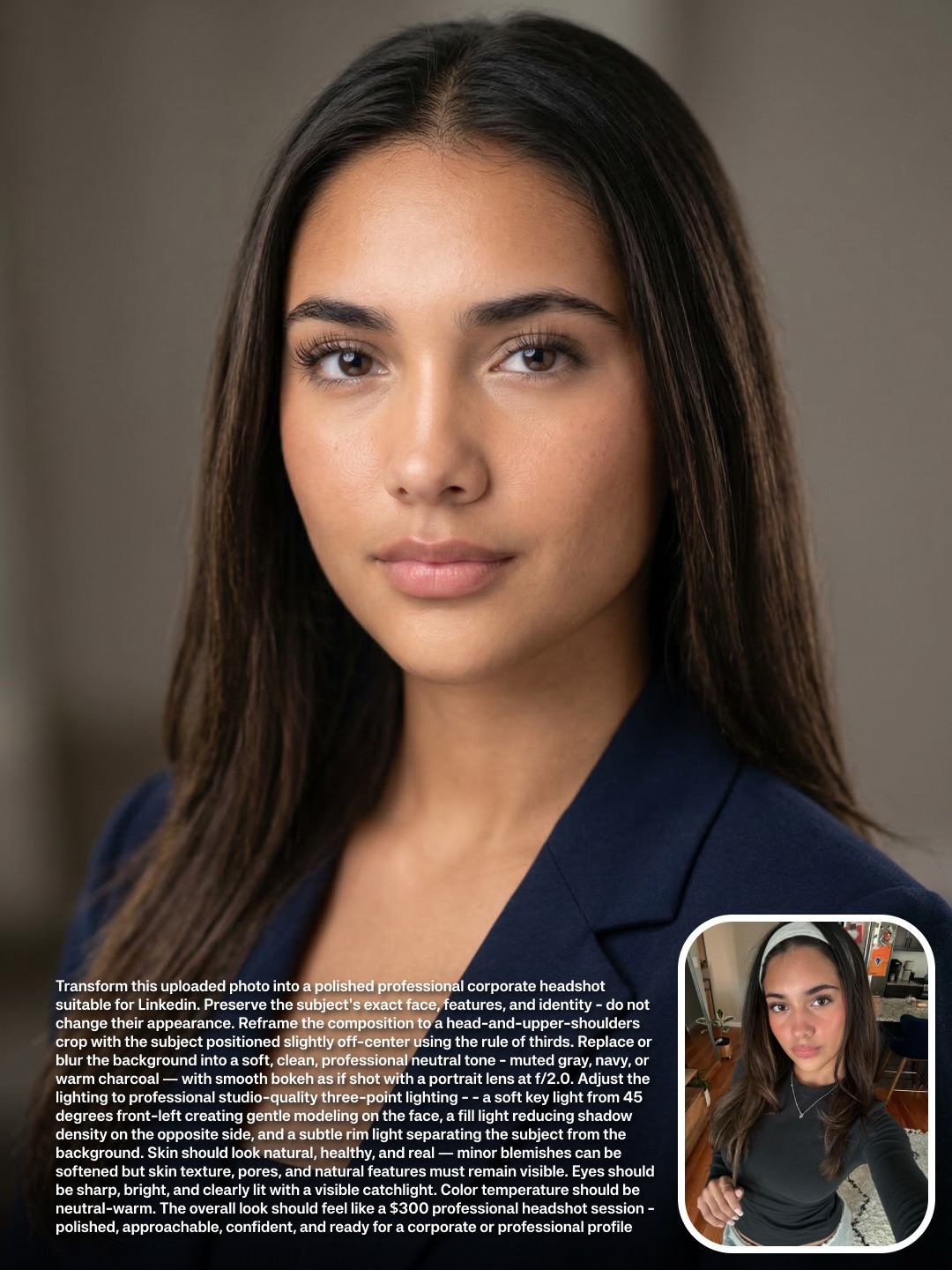
skaigenerated: Corporate Headshot Selfie to LinkedIn Transform AI Art
[Subject] A polished professional corporate headshot of a young adult woman with long straight dark brown hair parted at the center, natural brows, warm brown eyes, minimal makeup, smooth but believable skin, calm approachable expression, closed lips, and a tailored navy blazer over a neutral top, presented as an executive-style business portrait suitable for LinkedIn or company profile use.

[Environment] Clean neutral indoor portrait setting with softly blurred taupe-beige background, no office clutter, no visible furniture details, no personal items, no casual selfie context, designed to feel like a premium but understated studio-quality business environment.

[Composition/Camera] Head-and-shoulders crop, front-facing with slight natural turn, eyes near the upper third, centered but subtly balanced professional framing, vertical portrait orientation, background fully softened, composition optimized for profile-photo use and business directory thumbnails.

[Lighting] Soft three-point corporate portrait lighting with a flattering frontal key, gentle fill to reduce harsh shadow, soft separation from the background, neutral white balance, no dramatic contrast, no beauty-glam specular excess, and no harsh flash.

[Style/Rendering] High-end corporate headshot photography, polished but realistic retouching, executive portrait aesthetic, clean skin texture, sharp eyes, soft depth of field, understated professionalism, no fashion editorial exaggeration, no influencer styling.

[Detail constraints] Preserve natural facial identity, realistic hairline, balanced skin texture, navy blazer styling, and neutral corporate portrait tone; do not add jewelry emphasis, dramatic makeup, glamour lighting, selfie perspective, exaggerated retouching, or decorative studio props.
Video
GLOBAL LOCK: 
Subject identity must be consistent within each character segment. 
Character 1: Young Caucasian male, early 20s, messy brown hair, light blue knitted beanie, white cotton t-shirt. 
Character 2: Caucasian male, early 30s, short brown hair, light stubble/beard, green baseball cap with "A's" logo, green knit sweater over a white collared shirt. 
Character 3: Mixed-race female, short blonde buzzcut, freckles across nose and cheeks, gold hoop earrings, grey wool sleeveless turtleneck. 
Environment: Minimalist studio, neutral off-white or light grey background. 
Lighting: High-end editorial studio lighting, soft shadows, natural skin highlights. 
Color Grade: Clean, neutral, high-contrast editorial look, slight film grain. 
Camera: High-resolution digital cinema camera, shallow depth of field, sharp focus on skin textures. 
Speech: No speech, rhythmic percussive background music.

[00:00–00:01]
Character 1 (Beanie) in a Medium Close-up (MCU). He looks directly into the lens with a neutral, slightly bored expression. The lighting is soft and even. Static shot. Text overlay "I can spot AI from a mile away" appears centered in white.

[00:01–00:02]
Character 1 (Beanie) in an Extreme Close-up (ECU) focusing on the nose and mouth. Visible skin pores, natural lip texture, and slight imperfections. Subtle micro-movement of the lips. Text overlay remains.

[00:02–00:03]
Character 1 (Beanie) in an ECU focusing on the cheek and jawline. Clear view of small moles and fine peach fuzz hair. Soft side lighting emphasizes the skin's 3D texture. Text overlay remains.

[00:03–00:04]
Character 2 (Green Cap) in a Medium Close-up (MCU). He has a slight, confident smirk, looking at the camera. He is wearing a silver watch and a ring. Static shot. Text overlay remains.

[00:04–00:05]
Character 2 (Green Cap) in an ECU focusing on the left eye and temple. The iris has intricate, realistic patterns. Individual eyelashes and eyebrow hairs are sharp. Skin texture around the eye shows natural fine lines. Text overlay remains.

[00:05–00:06]
Character 2 (Green Cap) in an ECU focusing on the mouth and beard. Individual beard hairs are distinct with varying colors (brown/blonde). Natural lip lines and skin moisture. Text overlay remains.

[00:06–00:07]
Character 3 (Grey Turtleneck) in a Medium Close-up (MCU). She has her hands placed gently on her chest, showcasing gold rings. She looks directly at the camera with a serene expression. Soft light from the side creates a gentle glow on her skin. Text overlay remains.

[00:07–00:09]
Character 3 (Grey Turtleneck) in an ECU focusing on the eye and freckled cheek. High density of natural-looking freckles. Sharp focus on the eye's reflection. The skin looks hydrated and real. Text overlay remains until the end.

NEGATIVE PROMPT: 
Smooth plastic skin, "AI glow," distorted features, blurry textures, over-saturation, cartoonish look, extra fingers, floating jewelry, inconsistent lighting, flickering, low resolution, watermark, text (other than the specified overlay), robotic movement, perfect symmetry.

SPEECH PACK:
(No speech present in this video. The audio is a rhythmic, percussive beat.)
- Audio Style: Minimalist, bass-heavy, percussive "stomp" track.
- Sync: Visual cuts occur exactly on the primary downbeats.
- Room Tone: Clean, silent studio environment.
Video
GLOBAL LOCK:
Subject is a Caucasian male in his early 30s, dark wavy hair, well-groomed medium-length beard, expressive brown eyes. He maintains a consistent facial structure across all shots. The visual style is a mix of high-end editorial photography and UGC tutorial footage. Lighting is cinematic with soft key lights and motivated rim lighting. Color grade is professional with deep blacks and vibrant but natural skin tones. Speech is clear, energetic, and instructional, delivered with a warm, authoritative tone.

[00:00–00:01]
Subject: MCU of the man wearing a dark suit, white dress shirt, black tie, and a white baseball cap with a green brim.
Action: Talking directly to the camera. A vertical white rectangular mask moves across his face, revealing a slightly different version of the same scene.
Camera: Static MCU, eye-level.
Lighting: Soft studio lighting, neutral background.
Speech: "This is how you can create..."

[00:01–00:04]
Subject: Rapid montage of AI-generated images. 
1. Man in a dark suit and sunglasses driving a green car at night, "AI MAG" text overlay.
2. Man in a checkered blazer and paisley tie in front of a brick wall.
3. Man in a white short-sleeve shirt with multiple pens in his pocket, standing in a white studio.
Action: Static editorial poses.
Camera: Various (MS, MCU).
Lighting: Cinematic, high contrast, nighttime car lighting, studio softbox.
Grade: Magazine editorial style.

[00:05–00:08]
Subject: A 3x4 grid of 12 different AI portraits of the same man in various outfits (boxing gloves, red car, street style, suit).
Action: Static images.
Overlay: Large bold text "UNLIMITED GENERATIONS" in orange and blue.
Camera: Flat grid layout.
Lighting: Varied per image.

[00:09–00:14]
Environment: Screen recording of the Higgsfield.ai website interface. A cursor moves to click "Image" then "Soul ID Character".
Action: UI navigation.
Speech: "On Higgsfield.ai, go to image and select Soul ID Character..."

[00:15–00:20]
Subject: Picture-in-picture of the man talking (wearing a tan cap and beige shirt) over a screen recording of the "Make Your Own Character" page.
Action: Explaining the process while gesturing.
Speech: "...where you can actually create your own custom character of yourself by uploading a bunch of photos."

[00:21–00:24]
Subject: Montage of AI images with text prompts.
1. Man in a suit drinking from a glass (trippy lens effect).
2. Man in a tan suit with a "Micky Mouse Bag" in a city street.
3. Man in a white tank top and jeans in front of a "Tokyo Red Car".
Action: Posing.
Camera: Full body and MS.
Lighting: Bright daylight, stylized urban lighting.

[00:25–00:34]
Environment: Screen recording of the "Lipsync Studio" interface. Subject's PIP continues.
Action: Selecting "Video", then "Lipsync Studio", uploading an image of himself at the beach, and dragging an audio file named "voiceover.wav".
Speech: "Now you can go to video at the top of the page and select the Lipsync Studio where you can upload your photo and audio..."

[00:35–00:38]
Subject: CU of the man at a tropical beach. He is shirtless, wearing black swimming goggles on his head.
Action: He is lip-syncing perfectly to the audio, smiling slightly.
Environment: Bright blue ocean water with small waves in the background.
Camera: CU, static.
Lighting: Bright, direct sunlight with natural shadows.
Speech: "...and it will combine those two together with the best lip-sync models."

NEGATIVE PROMPT:
Visual: robotic movement, distorted facial features, inconsistent beard growth, blurry textures, flickering background, extra fingers, warped UI elements, low resolution, watermarks.
Speech: robotic monotone, lip-sync delay, muffled audio, background hiss, unnatural pauses, slurred consonants, popping sounds.

SPEECH PACK:
[00:00-00:08]
Transcript: "This is how you can create 25 magazine-ready images of yourself using AI and then you can even lip-sync on top of them with this brand new feature."
TAKE_A: (Energetic, fast-paced) "This is how you can create TWENTY-FIVE magazine-ready images of yourself using AI... and then you can even LIP-SYNC on top of them with this brand new feature!"

[00:09-00:20]
Transcript: "On Higgsfield.ai, go to image and select Soul ID Character where you can actually create your own custom character of yourself by uploading a bunch of photos."
TAKE_A: (Instructional, clear) "On Higgsfield dot A-I, go to image and select Soul I-D Character... where you can actually create your own custom character of yourself... by uploading a bunch of photos."

[00:25-00:38]
Transcript: "Now you can go to video at the top of the page and select the Lipsync Studio where you can upload your photo and audio and it will combine those two together with the best lip-sync models."
TAKE_A: (Helpful, concluding) "Now you can go to video at the top of the page and select the Lipsync Studio... where you can upload your photo and audio... and it will combine those two together with the best lip-sync models."
Video
GLOBAL LOCK:
Subject: A Caucasian woman in her late 20s, blonde hair tied in a neat ponytail, wearing a leopard-print (cheetah pattern) blouse.
Environment: A cozy home studio/office background with dark grey walls, wooden bookshelves filled with books, green indoor plants, and soft dual-tone lighting (warm orange light from one side, cool blue light from the other).
Camera: MCU (Medium Close-Up) framing, eye-level, 35mm lens feel with shallow depth of field.
Style: Professional UGC creator aesthetic, high-quality video, crisp audio.
Speech: Direct-to-camera delivery, energetic and authoritative tone.

[00:00–00:05]
Visual: Rapid montage of extreme macro close-ups (ECU). First, a human eye with visible iris patterns and eyelashes. Second, an ear with a gold hoop earring showing skin texture. Third, a wrist with a simple black line tattoo showing skin pores and fine hairs.
Action: Static macro shots.
Lighting: Bright, natural daylight feel for the macros.
Text Overlay: "most AI" -> "look fake" -> "because" -> "is trained".
Speech: "Most AI images look fake for one reason. Because AI is trained to remove flaws."

[00:05–00:11]
Visual: The woman (Subject) in the MCU studio setting, gesturing with her hands. Floating icons of AI tools (ChatGPT, Freepik, Ideogram, Nano Banana) appear around her.
Action: Subject talks directly to the camera, moving hands to emphasize points.
Lighting: Studio setup (Orange/Blue).
Text Overlay: "need" -> "AI tools" -> "to prompt".
Speech: "But we don't need better AI tools. We just need to prompt the model to create images that actually look real."

[00:11–00:21]
Visual: Transition to a black screen with white text titled "Master Prompt". The text scrolls or highlights specific sections. Then, a split screen showing the woman talking in a small window and the prompt text in a larger window.
Action: Subject continues talking while the prompt text is displayed.
Lighting: Studio setup for the talking head.
Text Overlay: "to create" -> "that actually" -> "look real".
Speech: "The key to realistic AI images is using a prompt with a specific structure. This prompt should force skin detail, including visible pores, uneven tone, and natural imperfections."

[00:21–00:30]
Visual: Montage of AI-generated faces with high realism. A man's face with stubble and pores, a woman's face with freckles and slight redness. Then, a screen recording of the Freepik interface showing a gallery of realistic portraits.
Action: Fast cuts between the portraits and the UI.
Lighting: Varied, matching the generated images.
Text Overlay: "most people start" -> "make" -> "image".
Speech: "Most people start their prompt with 'make a realistic image of'. I start by telling the model how the camera behaves."

[00:30–00:42]
Visual: Screen recording of a prompt being typed into a text box. Keywords like "iPhone 14 Pro", "handheld framing", and "imperfect composition" are highlighted in yellow.
Action: Scrolling through the prompt text.
Lighting: Digital UI.
Text Overlay: "model that" -> "camera behaves" -> "casual hand" -> "imperfect composition".
Speech: "Casual handheld framing, slightly imperfect composition, and a smartphone camera perspective. This alone already breaks the AI look."

[00:42–00:52]
Visual: The woman back in the MCU studio setting. She gestures toward floating app icons for "Enhancor" and "Higsfield". A screen recording shows a "Skin Enhancer" tool being used on a photo of a woman with goggles.
Action: Subject explains the final step.
Lighting: Studio setup.
Text Overlay: "But Most People Stop There" -> "Final Step" -> "Most Creators Are Gatekeeping".
Speech: "But most people stop there. I use a final step that most creators are gatekeeping. I run each image through a final skin enhancement step using Enhancor or Higsfield."

[00:52–01:00]
Visual: The woman in MCU, pointing down toward a text box that says "Comment GUIDE". A final zoom-out effect or a slight blur transition.
Action: Subject smiles and points.
Lighting: Studio setup.
Text Overlay: "Prompt Structure" -> "Workflow" -> "Comment GUIDE".
Speech: "If you want my exact prompt structure and the full workflow, just comment GUIDE and I'll send it over."

NEGATIVE PROMPT:
Smooth skin, plastic texture, perfect symmetry, airbrushed look, 6 fingers, distorted eyes, watermark, logo, blurry background (unless specified), robotic voice, lip-sync lag, harsh sibilance, flickering lights, low resolution.

SPEECH PACK:
[00:00-00:05] "Most AI images look fake for one reason. Because AI is trained to remove flaws."
[00:05-00:11] "But we don't need better AI tools. We just need to prompt the model to create images that actually look real."
[00:11-00:21] "The key to realistic AI images is using a prompt with a specific structure. This prompt should force skin detail, including visible pores, uneven tone, and natural imperfections."
[00:21-00:30] "Most people start their prompt with 'make a realistic image of'. I start by telling the model how the camera behaves."
[00:30-00:42] "Casual handheld framing, slightly imperfect composition, and a smartphone camera perspective. This alone already breaks the AI look."
[00:42-00:52] "But most people stop there. I use a final step that most creators are gatekeeping. I run each image through a final skin enhancement step."
[00:52-01:00] "If you want my exact prompt structure and the full workflow, just comment GUIDE and I'll send it over."
Video
A) MISE EN PLACE
2) Segment the video into scenes/shots:
- [00:00-00:03] Shot 1: ECU face, talking.
- [00:03-00:05] Shot 2: CU face, holding product.
- [00:06-00:09] Shot 3: MS, head turn, dramatic shadow.
- [00:10-00:12] Shot 4: CU, applying product.
- [00:13-00:15] Shot 5: WS, sitting on floor.
- [00:16-00:18] Shot 6: CU, touching neck.
- [00:19-00:21] Shot 7: MS, sitting on stool, talking.
- [00:22-00:24] Shot 8: MS, holding hair up.
- [00:25-00:27] Shot 9: CU, wind in hair.

3) Extract visual evidence:
- Keyframes: 00:01 (talking face), 00:04 (holding product), 00:07 (shadow face), 00:11 (applying product), 00:14 (full body), 00:17 (touching neck), 00:20 (sitting talking), 00:23 (holding hair), 00:26 (wind in hair).

4) Extract speech evidence:
- Speaker: 1 female voice (Speaker A).
- Transcript:
  [00:00-00:03] "What if I told you I'm not even real."
  [00:03-00:05] "But the product I'm holding is Hailey Bieber's Rhode lip balm."
  [00:06-00:09] "Everything you're seeing was created with AI, no camera, no studio."
  [00:10-00:12] "Just one image and a few prompts."
  [00:13-00:15] "Every reflection, every highlight, every detail was generated in seconds."
  [00:16-00:18] "Real product, unreal possibilities."
  [00:19-00:21] "You don't need a full setup anymore."
  [00:22-00:24] "Just imagination."
  [00:25-00:27] "Comment guide to learn how."
- Lip visibility: Full visibility in shots 1 and 7. Partial/implied in others.
- Sync strictness: High for shots 1 and 7.

5) Invariants list (LOCK THESE):
- Visuals: Asian woman, mid-20s, flawless glowing skin, dark brown hair, fitted white ribbed sleeveless turtleneck tank top, small silver hoop earrings. Cinematic studio lighting, 85mm lens feel, photorealistic texture.
- Speech: Female voice, warm, confident, commercial beauty tone, close-mic studio sound, dry room.

6) Variables list (TWEAK THESE):
- Visuals: Lighting direction (soft beauty vs. hard directional), hair state (tied back vs. loose), background color (black, grey, white), pose, camera framing (ECU to WS).
- Speech: Pacing, emphasis on key words ("real", "AI", "seconds").

B) SHOTLIST
[00:00-00:03]
- framing: ECU, eye level.
- lens: 85mm, shallow DoF.
- camera movement: Static.
- subject: Looking directly at lens, speaking.
- environment: Dark studio background.
- lighting: Soft beauty lighting, high contrast.
- speech: Speaker A, on-camera. "What if I told you I'm not even real." High lip-sync strictness.

[00:03-00:05]
- framing: CU, eye level.
- lens: 85mm, shallow DoF.
- camera movement: Slight drift.
- subject: Holding a pink lip balm tube near her cheek, looking at camera.
- environment: Neutral studio background.
- lighting: Soft diffused lighting.
- speech: Speaker A, VO. "But the product I'm holding is Hailey Bieber's Rhode lip balm."

[00:06-00:09]
- framing: MS, eye level.
- lens: 50mm.
- camera movement: Slow pan following head turn.
- subject: Turns head from profile to face camera.
- environment: Dark studio background.
- lighting: Dramatic hard directional light, sharp diagonal shadow across face.
- speech: Speaker A, VO. "Everything you're seeing was created with AI, no camera, no studio."

[00:10-00:12]
- framing: CU, tight on mouth.
- lens: 100mm macro feel.
- camera movement: Static.
- subject: Applying pink lip balm to lips, eyes looking slightly down.
- environment: Neutral background.
- lighting: Bright, even beauty lighting.
- speech: Speaker A, VO. "Just one image and a few prompts."

[00:13-00:15]
- framing: WS, full body.
- lens: 35mm.
- camera movement: Static.
- subject: Sitting on floor, one leg bent, wearing black trousers with the white tank top.
- environment: Grey studio floor and wall.
- lighting: Soft overhead lighting.
- speech: Speaker A, VO. "Every reflection, every highlight, every detail was generated in seconds."

[00:16-00:18]
- framing: CU.
- lens: 85mm.
- camera movement: Slight push-in.
- subject: Touching neck and jawline with both hands.
- environment: Dark background.
- lighting: Warm rim light, deep shadows.
- speech: Speaker A, VO. "Real product, unreal possibilities."

[00:19-00:21]
- framing: MS.
- lens: 50mm.
- camera movement: Static.
- subject: Sitting on a metal stool, leaning forward, speaking to camera.
- environment: Neutral studio background.
- lighting: Neutral studio lighting, slight vignette.
- speech: Speaker A, on-camera. "You don't need a full setup anymore." High lip-sync strictness.

[00:22-00:24]
- framing: MS, slight low angle.
- lens: 50mm.
- camera movement: Static.
- subject: Arms raised, holding hair up in a high ponytail.
- environment: White studio background.
- lighting: Bright, high-key lighting.
- speech: Speaker A, VO. "Just imagination."

[00:25-00:27]
- framing: CU.
- lens: 85mm.
- camera movement: Static.
- subject: Looking intensely at camera, hair blowing.
- environment: Dark background.
- lighting: Soft dramatic lighting.
- motion cues: Wind blowing hair.
- speech: Speaker A, VO. "Comment guide to learn how."

C) STYLE BIBLE
- visual_style: Photorealistic cinematic commercial beauty portrait.
- camera_signature: 85mm portrait lens dominance, shallow depth of field, mostly static or slow, deliberate movements.
- lighting_signature: Highly variable but always professional studio quality, ranging from soft high-key beauty to dramatic low-key hard shadows.
- grade_signature: High contrast, natural skin tones, deep blacks, clean whites.
- texture_signature: Flawless skin detail, sharp focus on eyes and product.
- pacing_signature: Fast-paced cuts every 2-3 seconds.
- speech_style: Commercial beauty VO, confident, direct-to-camera hybrid.
- speaker_profile: Female, warm, articulate, modern vocal fry.
- mic_mix_profile: Close-mic, dry studio, high clarity, compressed for social media.

D) PROMPT SYNTHESIS

1. MASTER PROMPT
GLOBAL LOCK: Photorealistic cinematic commercial style. Subject: Asian woman, mid-20s, flawless glowing skin, dark brown hair, wearing a fitted white ribbed sleeveless turtleneck tank top, small silver hoop earrings. Environment: Minimalist studio setting with solid neutral backgrounds (white/grey/black). Lighting: High-end beauty lighting, varying from soft diffused to dramatic hard shadows. Camera: 85mm lens, shallow depth of field. Speech: Single female speaker, warm commercial tone, close-mic studio sound.

[00:00-00:03] ECU of the woman's face against a dark background. Soft beauty lighting. She is looking directly at the lens, speaking. Lips are moving in sync with speech.
[00:03-00:05] CU. The woman holds a pink lip balm tube next to her cheek. Soft diffused lighting. She looks at the camera. Slight camera drift.
[00:06-00:09] MS. The woman is turned slightly away in profile, then turns her head towards the camera. Dramatic lighting with a harsh diagonal shadow cutting across her face. Slow pan following the head turn.
[00:10-00:12] CU tight on the mouth. The woman is applying the pink lip balm to her lips. Eyes looking slightly down. Bright, even beauty lighting highlighting skin texture.
[00:13-00:15] WS. The woman is sitting on the floor, wearing black trousers with the white tank top. One leg bent. Grey studio background. Soft overhead lighting. Static camera.
[00:16-00:18] CU. The woman touches her neck and jawline with both hands. Warm, glowing rim light, deep shadows on the opposite side. Slight camera push-in.
[00:19-00:21] MS. The woman is sitting on a metal stool, leaning forward slightly, speaking directly to the camera. Lips moving in sync. Neutral studio lighting, slight vignette. Static camera.
[00:22-00:24] MS, slight low angle. The woman has her arms raised, holding her hair up in a high ponytail. Bright, high-key lighting, white background. Static camera.
[00:25-00:27] CU. The woman's hair is blowing in the wind. She looks intensely at the camera. Soft dramatic lighting, dark background. Static camera.

2. NEGATIVE PROMPT
Visuals: cartoon, illustration, anime, 3d render, deformed anatomy, extra fingers, mutated hands, unnatural skin texture, plastic skin, temporal jitter, flickering lighting, morphing objects, text, watermarks, logos, low resolution, blurry, out of focus.
Audio: robotic voice, unnatural cadence, harsh sibilance, plosives, clipping, background noise, room echo, lip-sync mismatch, slurred words.

4. SPEECH PACK
Speaker: Female, 20s, warm, confident, commercial beauty tone.
[00:00-00:03] "What if I told you... I'm not even real." (Pause for dramatic effect, direct eye contact).
[00:03-00:05] "But the product I'm holding... is Hailey Bieber's Rhode lip balm." (Slight emphasis on 'Rhode').
[00:06-00:09] "Everything you're seeing was created with AI... no camera... no studio." (Paced, emphasizing the negatives).
[00:10-00:12] "Just one image... and a few prompts." (Smooth, instructional tone).
[00:13-00:15] "Every reflection... every highlight... every detail... was generated in seconds." (Staccato emphasis on 'every').
[00:16-00:18] "Real product... unreal possibilities." (Contrast emphasis).
[00:19-00:21] "You don't need a full setup anymore." (Direct, conversational).
[00:22-00:24] "Just imagination." (Soft, aspirational).
[00:25-00:27] "Comment guide... to learn how." (Clear CTA, energetic).
Video
A vertical creator tutorial video about achieving AI character consistency across generations and workflows. A female presenter speaks directly to the camera against a clean lavender-purple background while holding a handheld microphone and explaining a multi-step process labeled with numbered sections like #1, #2, #3, and #4. As she talks, large overlays appear showing reference portraits, facial expressions, hat variations, prompt text, interface screenshots, parameter panels, model settings, and examples from different AI tools. The video walks through how to build a consistent character, refine realism, preserve facial identity, manage textures, and combine different generation tools into one repeatable system. The mood is educational, structured, creator-friendly, and optimized for short-form AI workflow teaching.
Video
GLOBAL LOCK: High-end editorial beauty photography style. Hyper-realistic skin textures including visible pores, fine hairs (peach fuzz), skin moisture, and natural imperfections. Soft, high-key studio lighting with large softbox sources. Neutral, clean background (off-white or light grey). Cinematic color grade with natural skin tones and soft highlight rolloff. 60fps feel with subtle, organic micro-movements. Subject identity must remain consistent within each segment.

[00:00–00:01] 
Subject: Caucasian woman, late 20s, blonde hair slicked back, green eyes, light makeup. 
Framing: Medium Close-Up (MCU), side profile, looking directly at the camera. 
Action: Neutral, confident expression, very slight breathing motion. 
Lighting: Soft rim light on the profile, bright catchlight in the eye.

[00:01–00:02] 
Subject: Extreme Close-Up (ECU) of the blonde woman's green eye. 
Action: The eye performs a slow, natural blink. Visible eyelashes with mascara, detailed iris texture. 
Camera: Macro lens, extremely shallow depth of field.

[00:02–00:03] 
Subject: ECU of the blonde woman's lips. 
Action: Lips are slightly parted, covered in clear, high-shine gloss. Subtle twitch of the lip corner. 
Texture: Visible lip lines and moisture reflections.

[00:03–00:04] 
Subject: ECU of the blonde woman's nose and cheek area. 
Action: Static macro shot. 
Texture: Extreme detail of skin pores, tiny freckles, and fine blonde hairs on the cheek.

[00:04–00:05] 
Subject: Black woman, early 20s, dark hair pulled back, prominent freckles across nose and cheeks. 
Framing: MCU, 3/4 view, her hand with dark burgundy nails is partially covering her forehead. 
Action: Direct gaze into the lens, calm and steady.

[00:05–00:06] 
Subject: ECU of the Black woman's brown eye. 
Action: Static macro shot, focus on the sharp detail of the eyelashes and the freckles on the eyelid. 
Lighting: Soft light reflecting in the pupil.

[00:06–00:07] 
Subject: ECU of the Black woman's nose and upper lip. 
Action: Subtle flare of the nostrils. 
Texture: Dense freckle patterns, natural skin sheen, visible skin grain.

[00:07–00:08] 
Subject: Mixed-race man, early 30s, short dark curly hair, light stubble. 
Framing: MCU, looking slightly off-camera to the left. 
Action: Slight head tilt, neutral masculine expression. 
Lighting: Side-lit to emphasize facial structure and stubble texture.

[00:08–00:09] 
Subject: ECU of the man's chin and lower lip. 
Action: Static macro shot. 
Texture: Individual hair follicles of the stubble, dry texture of the lips, skin pores.

[00:09–00:10] 
Subject: ECU of the man's eye and temple. 
Action: Subtle squinting motion. 
Texture: Visible crow's feet, fine lines, and skin texture around the eye.

NEGATIVE PROMPT: 
Smooth plastic skin, "uncanny valley" look, blurred textures, distorted eyes, extra limbs, cartoonish features, heavy makeup, unnatural blinking, flickering light, low resolution, watermarks, text, logos, shaky camera, over-saturated colors.

SPEECH PACK:
(No speech present in video, only rhythmic percussive audio.)
Audio Note: Sync cuts to a 120 BPM percussive "thump" or heartbeat sound. Each ECU cut should land exactly on a beat.
Video
GLOBAL LOCK: 
Subject is a Caucasian male in his mid-30s with a well-groomed brown beard and medium-length wavy brown hair. He consistently wears a white and olive-green "VANS" trucker hat and a plain, high-quality white crew-neck t-shirt. The environment for the creator's shots is a warm, indoor setting with soft ambient lighting and a neutral, slightly out-of-focus background. The AI-generated content features a cinematic, high-contrast aesthetic with vibrant colors (primarily deep reds and blacks). The speech is energetic, clear, and direct-to-camera, delivered with a "tech-enthusiast" persona.

[00:00–00:05]
Visual: A cinematic, deep red Porsche 911 is shown from multiple angles: top-down, rear view, and 3/4 side profile. The car has a metallic finish and is set against a dark, moody red background with dramatic studio lighting. Text overlay reads "Multiview Perspective Change."
Subject: The creator appears in a small, rounded-square overlay at the bottom center, pointing upwards with both index fingers.
Camera: Smooth transitions between static product shots.
Speech: "This genuinely feels like a cheat code to create high-quality AI visuals for your brand or business."
Sync: Cut to the next shot on the word "business."

[00:05–00:19]
Visual: A rapid-fire montage of the creator's face swapped into various AI-generated scenes: 
1. A close-up of the VANS hat.
2. A model holding a smartphone.
3. A bold fisheye portrait wearing colorful puffer jackets and sunglasses.
4. An "Indie Garden Polaroid" shot with sunflowers and a guitar.
5. A "Halloween Party" shot of the creator in a yellow duck costume holding a red cup.
6. An "Urban Glare Portrait" in a city street.
Subject: Creator remains in the bottom overlay, gesturing with his hands as if explaining the variety.
Motion: Fast cuts (approx. 1-2 seconds each) with slight zoom-ins.
Speech: "This is called Blueprints, and it allows you to create multiple angled shots of any scene. You can upload product reference images and you can even replicate certain styles of images with a simple VFX template they've created for you."

[00:20–00:35]
Visual: Screen recording of the Leonardo.ai interface. The cursor moves to the left sidebar, hovering over and clicking the "Blueprints (Beta)" button highlighted with a red box. It then scrolls through a gallery of templates, selecting "Product Studio Photoshoot."
Subject: Creator in the overlay, looking slightly off-camera as if watching the screen, pointing to the UI elements.
Speech: "All you have to do is upload an image of yourself, and here's how to do it. To get started on Leonardo, you can go to the Blueprints section, and they have all of these different templates."

[00:36–00:45]
Visual: The UI shows the "Upload Person Photo" step. A photo of the creator in his white t-shirt and VANS hat is uploaded. Then, a "Product Photo" of a black smartphone is uploaded. The "Generate" button is clicked. The result shows the creator holding the phone in a professional studio setting.
Subject: Creator in the overlay, nodding and smiling as the result is revealed.
Speech: "You can then select one you want and upload a reference image of your face, for example, and then hit next. Now you can upload a reference image of a product, and then boom! You can actually create images of you holding the product in that environment."

[00:46–00:51]
Visual: The UI shows a "Multiview Perspective Change" generation of the creator sitting on a park bench from different angles (back view, side view, top-down). The video ends with the creator full-screen (or large overlay) against a dark background with the text "TYPE AI COMMENTS."
Subject: The creator winks at the camera and points forward.
Speech: "But it gets crazier because you can use different templates like multiview perspective... if you want to try it out for yourself, type AI in the comments and I'll send you the link."
Sync: Final wink lands exactly on the last word.

NEGATIVE PROMPT:
Visual: blurry face, inconsistent beard length, distorted VANS logo, extra fingers, flickering background, low-resolution UI, robotic body movements, unnatural skin texture, messy hair transitions.
Speech: monotone delivery, background noise, muffled audio, robotic cadence, misaligned lip-sync, harsh "S" sounds, long pauses between sentences.

SPEECH PACK:
[00:00-00:05]
Transcript: "This genuinely feels like a cheat code to create high-quality AI visuals for your brand or business."
TAKE_A: (Energetic, emphasizing "cheat code" and "business")
TAKE_B: (Fast-paced, breathless excitement)
TAKE_C: (Confident, authoritative tone)

[00:46-00:51]
Transcript: "If you want to try it out for yourself, type AI in the comments and I'll send you the link."
TAKE_A: (Friendly, inviting, with a wink at the end)
TAKE_B: (Direct, urgent, pointing at the camera)
TAKE_C: (Casual, "by the way" style delivery)
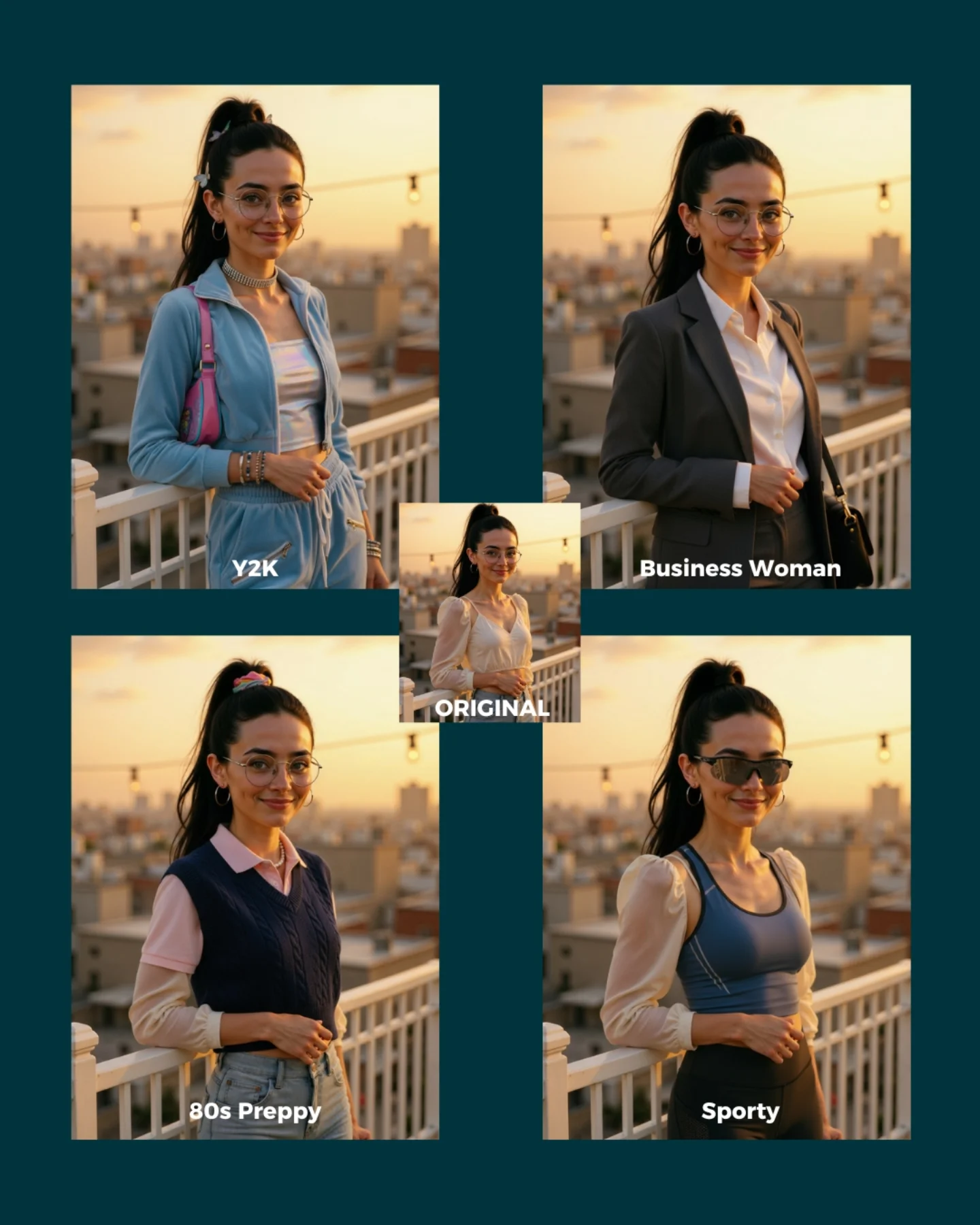
soy_aria_cruz: Nano Banana Style Remix AI
[Subject] A four-style fashion comparison cover built around the same young woman and the same rooftop pose. She appears early 20s, feminine presentation, slim build, light-medium skin tone, long dark hair in a high ponytail, round glasses, hoop earrings, and a gentle smile while standing beside a rooftop railing at golden hour. The center small panel shows the original look, while the four larger style variations reinterpret the same subject and pose. Top-left: Y2K styling with pastel blue zip jacket, white tube top, low-rise or relaxed bottoms, and a pink shoulder bag. Top-right: Business Woman styling with gray blazer, white button shirt, and structured officewear feel. Bottom-left: 80s Preppy styling with a navy sweater vest layered over a pale pink collared shirt. Bottom-right: Sporty styling with dark sunglasses, blue athletic tank, and activewear-inspired silhouette. [Environment] Rooftop terrace or balcony with white railing, blurred urban skyline in the distance, string lights overhead, warm sunset sky, shallow depth of field, all panels sharing the same location and lighting conditions. [Composition/Camera] Graphic comparison layout on a dark teal background: four larger rectangular images arranged in a grid, one smaller centered ORIGINAL image overlapping the middle, each panel labeled with its style name. Subject angle and framing remain mostly consistent across all variants for direct style comparison. [Lighting] Warm golden-hour sunset light with soft highlights on the face and clothing, gentle background glow, even flattering illumination consistent across all panels. [Style/Rendering] Realistic AI style-remix comparison cover, polished social-media educational graphic, consistent identity preservation across wardrobe changes, clean multi-panel layout, editorial makeover-thumbnail aesthetic. [Detail constraints] Keep the same woman, same rooftop pose, same sunset environment, and same face identity across every panel; only the wardrobe/accessory styling should change between Y2K, Business Woman, 80s Preppy, and Sporty. Do not add extra people, different locations, or dramatic lighting shifts between panels. Negative prompt: different identities across panels, changing pose too much, indoor scene, crowd, night lighting, text missing, messy collage, extra props unrelated to fashion, inconsistent skyline, distorted hands, duplicate people, random outfits outside the four named styles. Suggested parameters: aspect ratio 4:5 overall cover, lens 70-85mm equivalent portrait feel, shallow depth of field, 30-40 steps, CFG 6.5-7.5, sampler DPM++ 2M Karras, seed 521744. Delta prompt strategy: 1) If identity drifts, append 'same woman, same face, same hair, same glasses in every panel'. 2) If the rooftop changes, append 'same rooftop railing and sunset skyline across all variants'. 3) If the styles blur together, append 'clear wardrobe separation between Y2K, Business Woman, 80s Preppy, and Sporty'. 4) If the layout changes, append 'four-panel style comparison with a small centered ORIGINAL image'. 5) If sunset light disappears, append 'warm golden-hour rooftop lighting consistent in every panel'. 6) If labels vanish, append 'each panel labeled with its style name'. 7) If the sporty panel loses sunglasses, append 'sporty version includes dark sunglasses and activewear tank'. 8) If the business panel loses tailoring, append 'business version uses blazer and white shirt'. 9) If the Y2K panel loses the bag, append 'Y2K version includes a pink shoulder bag'. 10) If the preppy panel loses layering, append '80s Preppy version uses sweater vest over a collared shirt'.
Video
GLOBAL LOCK: A blonde female creator in a vertical talking-head tutorial explains why Midjourney still stands out compared with every other image generator she has tested. She appears in a clean indoor creator setup with a clip-on lav mic, speaking directly to camera. The edit repeatedly cuts to example images demonstrating many different creative categories: editorial portraits, lifestyle photography, cinematic fantasy creatures, poster design, product shots, business scenes, thumbnails, nail beauty macro, illustrated covers, and branded commercial visuals. Bright yellow all-caps caption fragments appear over the presenter to emphasize key claims. The tone is opinionated, fast, educational, and highly creator-oriented.

[00:00-00:06]
Open with the presenter stating that she has tested every major image generator. Intercut quick example visuals: polished editorial portraits, high-style fashion or business shots, and surreal fantasy imagery. The hook establishes a comparison-based tutorial.

[00:06-00:12]
The presenter continues in direct-to-camera mode while examples flash on screen showing poster-style graphics, clean product imagery, lifestyle travel scenes, and stylized character art. The message is that no other tool matches Midjourney’s breadth and quality.

[00:12-00:18]
Cut through more categories: beauty close-ups, cinematic environments, realistic portraits, thumbnails, branded compositions, and bold poster designs. The creator points out use cases like thumbnails, products, and business visuals.

[00:18-00:24]
The tutorial emphasizes practical strengths: consistency, versatility, and premium-looking results. More examples appear, including animals, commercial-style food or product shots, and polished people imagery. The pacing remains sharp and category-driven.

[00:24-00:27]
End with the presenter delivering a summary and call-to-action style close, while the final frames reinforce the Midjourney comparison point and encourage saving or following for more creator-tool advice.

NEGATIVE PROMPT:
male presenter, no example images, no yellow caption phrases, blurry screenshots, no variety of styles, no portrait examples, no poster or product visuals, flat stock imagery, watermark, text glitches

SPEECH PACK:
One female English-speaking creator voice.
TRANSCRIPT INTENT: Explain that after testing many image generators, Midjourney still outperforms others across multiple visual categories such as portraits, products, thumbnails, posters, and stylized scenes.
DELIVERY: Fast, assertive, expert-review cadence with short emphasized claims and creator-focused framing.
SYNC: Talking-head segments require tight lip-sync; image example sections can run under voiceover and caption emphasis.
Video

GLOBAL LOCK: A vertical 9:16 split-screen social proof video featuring the same white European-looking man in his late 20s to early 30s with fair neutral skin, brown side-swept hair, athletic build, clean-shaven face, fitted dark t-shirt, thin silver necklace, and dark smartwatch, seated at a round table using a space gray laptop. Keep his identity, face shape, hair, posture, laptop position, hand placement, watch, necklace, and down-looking focused expression consistent across the full sequence. The lower half of the frame is always the original source clip: a clean but ordinary bright apartment interior with white walls, hallway opening, wall-mounted TV on the left, soft daylight, and neutral consumer-camera realism. The upper half is always the AI-transformed version of the same moment, preserving pose and laptop interaction while swapping only wardrobe details slightly and dramatically changing the environment. Camera remains static, eye-level to slightly high, medium shot, portrait framing. Motion is minimal and realistic: typing, brief thinking gesture to chin, subtle head angle changes. Text overlays read “AI:” at top left, “Original:” above the lower section, and “Comment ‘AI’ for the prompts” centered between the halves. Style is crisp creator-demo proof, optimized for instant comparison and save/share behavior.

[00:00-00:01] Show the first split-screen comparison. In the upper half, place the creator in a warm wooden cabin interior with large windows, mountain view, practical lamp glow, and cozy brown timber walls while he types on the laptop. In the lower half, show the original bright apartment scene with the same seated pose and laptop placement. Keep the comparison clean and immediately readable.

[00:01-00:02] Swap only the upper half environment to a Santorini-style terrace at golden hour with blue railing, sea cliffs, and warm sunset light. The creator remains seated with matching body angle and laptop orientation. Lower half stays unchanged as the original apartment plate.

[00:02-00:03] Change the AI upper half to a Mediterranean villa interior with arched windows, cream stucco walls, sunlit floor, and olive trees visible outside. The creator briefly raises a hand toward his face in a thinking pose; mirror that motion in the original bottom half.

[00:03-00:04] Move the upper half into a high-rise luxury apartment with floor-to-ceiling windows and orange city sunset. Keep the creator’s pose, laptop, and chin-touch gesture aligned to the original. Preserve the centered comparison layout and CTA text.

[00:04-00:05] Transform the upper half into a dark wood library office with desk lamp, warm pools of light, bookshelves, and a more formal mood. The creator’s hands return to the keyboard. The original lower clip remains a plain daylight apartment with no background change.

[00:05-00:06] Hold on the same library-office transformation for an extra beat to let the comparison land. Maintain fixed camera, no zoom, and the same overlay text.

[00:06-00:07] Replace the upper half with a moody rainy-window lounge scene in teal and amber tones, soft reflections on glass, and a dim modern sofa in the back. The creator continues typing with serious concentration. Bottom half remains the bright apartment.

[00:07-00:08] Switch the upper half to a tropical outdoor workspace with wood structure, large tropical leaves, bright sun patches, and warm travel-lifestyle energy. The creator stays locked in the same seated laptop pose.

[00:08-00:09] Change the upper half to a glass house surrounded by green forest, soft daylight filtered through large panes, and minimalist modern architecture. Preserve the same shirt silhouette, watch, necklace, laptop size, and head tilt.

[00:09-00:10] Move the upper half to a luxury hotel suite at night with warm lamps, city lights outside, beige furnishings, and premium travel ambience. Keep the original lower half unchanged and clearly labeled.

[00:10-00:11] End on the final split-screen comparison with the same city-hotel AI background held long enough for viewers to read the CTA: Comment “AI” for the prompts. No extra camera motion, just a clean proof-driven finish.

NEGATIVE PROMPT: do not alter identity, face proportions, hairstyle, skin tone, build, laptop scale, or seated posture between scenes; avoid warped hands on keyboard, broken wrists, floating elbows, inconsistent necklace, or missing watch; avoid morphing furniture, flicker, unstable split line, typography corruption, or mismatched perspective between AI and original; do not change the lower original frame at all except natural motion from the source clip; no surreal lighting, extra people, extra laptops, bent table edges, or melting architecture; avoid jittery transitions, logo clutter, artifacting, blurred facial features, or unnatural eye direction.
Video
GLOBAL LOCK:
The video features a split-screen layout. The bottom 30% contains a consistent male creator: Caucasian, mid-30s, brown beard, wearing a tan "Vans" trucker hat and a black quilted vest over a white t-shirt. He is in a home office/studio setting with soft indoor lighting. The top 70% features AI-generated cinematic footage. The AI footage must maintain high subject consistency, specifically a character resembling Leonardo DiCaprio in "The Wolf of Wall Street" (short brown hair, blue pinstripe suit, red polka dot tie). The environment is a luxury office with wood paneling. Lighting is cinematic, warm, and professional.

[00:00–00:03]
Subject: A man resembling Leonardo DiCaprio in a blue pinstripe suit and red polka dot tie.
Action: He holds a crisp one-dollar bill horizontally with both hands, looking directly into the camera with a slight, confident smile.
Camera: Medium close-up, static.
Lighting: Warm, high-key office lighting, soft shadows.
Speech: Creator says "It has never been easier to create multiple camera angles..."
Sync: Creator's lips visible in the bottom frame, high sync.

[00:03–00:07]
Visual: A 3x3 grid appears showing the same man from 9 different angles (overhead, profile, low angle, etc.). Then transitions to a Nike windbreaker jacket (black, red, white) floating in a surreal dark environment filled with glowing blue and purple crystals.
Action: The jacket rotates slowly.
Camera: Close-up on the jacket texture and Nike logo.
Lighting: Dramatic, neon-blue and purple rim lighting.
Speech: "...with consistency from a single reference image."

[00:08–00:13]
Subject: Three characters: a man (DiCaprio-lookalike), a blonde woman (Margot Robbie-lookalike in a black dress), and a muscular man with a goatee (Jon Bernthal-lookalike, shirtless with a gold chain).
Action: They stand together in a modern room with wooden doors and bookshelves. They look toward the camera.
Camera: Medium wide shot, slight handheld jitter for realism.
Lighting: Naturalistic indoor light from the side.
Speech: "So in today's video, I'm going to show you the best method..."

[00:14–00:20]
Visual: Screen recording of the Higgsfield "Shots" app interface. A cursor selects an image of a woman in a black dress and clicks a yellow "Generate" button.
Action: The UI transitions to show a grid of 9 generated black-and-white images of the woman.
Camera: Screen capture.
Speech: "Let's dive in. To get started, you can upload your image into Shots..."

[00:21–00:28]
Subject: A beautiful woman with dark hair in a flowing black dress.
Action: A montage of artistic shots: her looking at the camera, her back to the camera with hair blowing, her dancing with fabric flowing around her.
Camera: Various angles (CU, MCU, Profile), slow motion.
Lighting: High-contrast black and white, dramatic shadows, bright white background.
Text Overlay: "Comment AI" in bold white letters.
Speech: "So if you want to try this out for yourself, type AI in the comments and I'll send you a link."

NEGATIVE PROMPT:
Visual: Distorted faces, extra fingers, flickering background, blurry textures, inconsistent clothing colors, morphing objects, robotic movement, low resolution, watermark.
Speech: Robotic tone, muffled audio, background noise, lip-sync delay, stuttering, unnatural pauses.

SPEECH PACK:
[00:00-00:07]
Transcript: "It has never been easier to create multiple camera angles with consistency from a single reference image."
TAKE_A: (Enthusiastic, fast-paced) "It's NEVER been easier to create multiple camera angles... with total consistency... from just ONE image."
TAKE_B: (Educational, steady) "It has never been easier to create multiple camera angles with consistency... starting from a single reference image."

[00:21-00:28]
Transcript: "So if you want to try this out for yourself, type AI in the comments and I'll send you a link."
TAKE_A: (Direct, CTA-focused) "Want to try this? Type AI in the comments and I'll DM you the link right now."
TAKE_B: (Friendly, helpful) "If you want to try this out for yourself, just comment AI below and I'll send that link over."
Video

MASTER PROMPT
GLOBAL LOCK: Vertical 9:16 creator-style AI image generation tutorial reel. Keep the visual structure consistent: dark background, stacked demo windows, rounded-corner presenter overlay near the lower half, and product screenshots or generated outputs occupying the upper area. The presenter is a bearded man in a beige baseball cap and brown hoodie speaking directly to camera with expressive hand gestures. The tutorial should open with a polished luxury ad-style image, then transition into a dark Generate Image interface with prompt and reference controls, and finish with generated lifestyle portraits and result examples. Preserve fast creator-educator pacing, practical workflow clarity, and social-media-friendly text hierarchy.

[00:00-00:10.00] Open with a strong proof-first visual: a luxury perfume bottle ad image against a rich purple satin-like backdrop. Place the presenter in a rounded picture-in-picture window at the bottom, speaking energetically to camera. The hook should feel like, "here is the kind of polished ad-style result you can create," with the upper image doing most of the persuasive work.

[00:10.00-00:28.00] Shift into the process section. Show a dark image-generation interface labeled around concepts like Generate Image, prompt box, reference styles, remix, auto prompt, or similar controls. Keep the presenter visible in the lower area while he explains how the workflow works. Include reference image boards, prompt panels, or app modules that make the system feel practical and reproducible.

[00:28.00-00:48.92] Move into the results and proof section. Show polished generated portraits or fashion-style outputs, app previews, and example result screens, including a casually dressed bearded man in a city street portrait. The presenter continues narrating while the upper content cycles through outputs, reinforcing that the workflow produces believable, commercially useful visuals. End on the strongest lifestyle result.

NEGATIVE PROMPT
Avoid cluttered multi-window chaos, unreadable UI, generic office stock footage, weak hook visuals, random unrelated outputs, corporate webinar styling, tiny text, dark muddy colors, or a tutorial sequence that explains too much before showing a compelling result.

SHOT PROMPTS
[00:00-00:10.00] Luxury perfume ad visual with presenter overlay.
[00:10.00-00:28.00] Dark Generate Image UI, prompt controls, reference boards, presenter explanation.
[00:28.00-00:48.92] Generated lifestyle portraits and result previews with presenter continuing narration.

SPEECH PACK
Timecoded transcript:
[00:00-00:48.92] Single-speaker tutorial explaining an AI image-generation workflow from polished ad example to interface steps to final outputs. Exact wording unclear; preserve concise creator-teacher delivery.

TAKE_A
[00:00-00:48.92] Fast creator-demo explanation with proof-first opening and simple step-by-step UI walkthrough.

TAKE_B
[00:00-00:48.92] Calm but confident tutorial tone emphasizing how to get polished commercial-looking results.

TAKE_C
[00:00-00:48.92] Slightly more enthusiastic creator cadence focused on workflow usefulness and output quality.

AI Headshot Generator

AI headshot generator content becomes useful when it treats credibility as the main standard. A creator searching this topic is usually not chasing artistic style. They want a portrait that reads as professional, natural, and trustworthy enough for real career or business use. That is why the best examples on this page should help you compare background neutrality, face fidelity, and overall realism before anything else.

The strongest headshot results also keep identity stable. If the final portrait looks polished but no longer feels like the real person, it becomes less useful for LinkedIn, resumes, and team pages. When you compare examples here, focus on whether the subject still feels recognizable and whether the overall finish would hold up in a business context.

FAQ

What is an AI headshot generator best for?

It is best for LinkedIn portraits, business bios, team pages, and job-search images where professional credibility matters more than visual stylization.

How is this different from an avatar or portrait tool?

Headshot workflows are about realism and trust. The goal is to look like a polished version of the real person, not a stylized character or artistic concept.

What makes a strong headshot result?

Natural lighting, believable background treatment, and strong face fidelity usually matter most. A usable headshot should still feel like the person viewers expect to meet.

What should I compare on this page?

Look for identity preservation, clean presentation, and whether the image feels credible enough for recruiters, clients, or coworkers to take seriously.

AI Headshot Generator: Professional Portrait Ideas That Look Real | Alici.AI