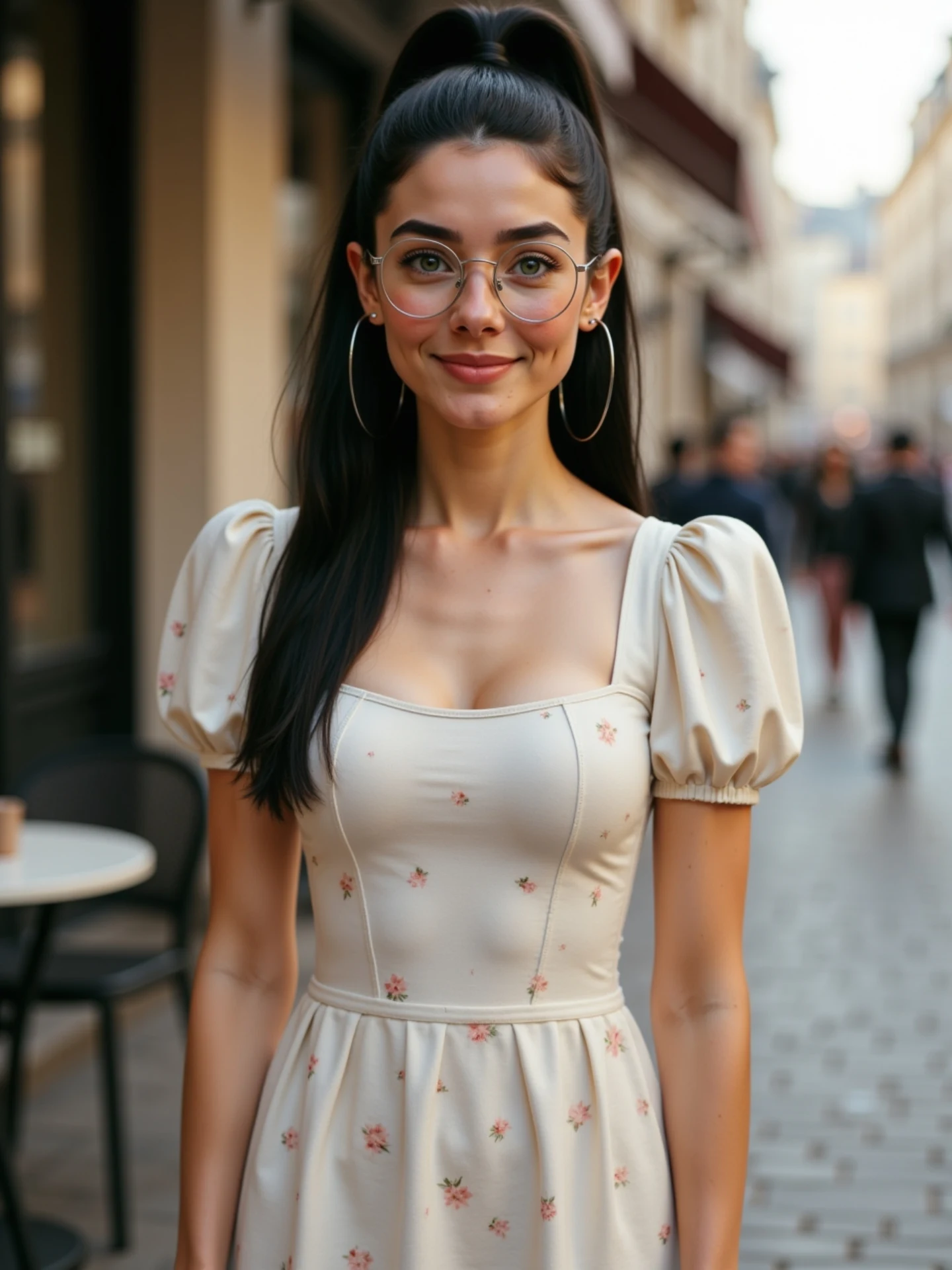
🙄 Una imagen, diferentes emociones. Sin vídeos. Sin grabar nada. Solo IA. Y sí, todas soy yo. 🤭 Me río, me pongo seria, me sorprendo… Todo a partir de una sola foto. Animada con IA desde @freepik y con un poquito de magia ✨ He preparado una guía con todas las expresiones para que tú también puedes animar las tuyas. 💬 Comenta “Emociones” y te la paso por DM.
How soy_aria_cruz Made This Image to Video Emotions AI Video — and How to Recreate It
This case study analyzes a high-performing 5-second AI animation that demonstrates the "One Image, Many Emotions" technique. The video features a cinematic editorial portrait of a young woman with a high ponytail and round glasses, set against a blurred European street backdrop. Using advanced Image-to-Video (I2V) AI, the creator transforms a single static photo into a fluid sequence of emotional transitions—moving from a gentle smile to a pensive downward gaze, and finally to a look of skeptical annoyance. This "AI magic" approach is a goldmine for indie creators looking to build a personal brand without the need for a professional camera crew or multiple takes.
What You’re Seeing: A Visual Breakdown
The video is a masterclass in AI character consistency. The subject is a young woman of Mediterranean or Latina descent, featuring long dark hair pulled into a sleek high ponytail. She wears large thin hoop earrings, gold-rimmed round glasses, and a cream-colored puff-sleeve dress with a delicate pink floral pattern. The setting is a shallow-depth-of-field European cobblestone street, likely at "golden hour" given the soft, warm lighting that highlights her skin texture and the rim of her hair.
Shot-by-Shot Breakdown (Estimated)
| Time Range | Visual Content | Shot Language | Lighting & Tone | Viewer Intent |
|---|---|---|---|---|
| 00:00–00:01 | Subject looks directly at camera with a soft, neutral smile. | Medium Portrait (MCU) | Soft daylight, warm skin tones. | The Hook: Establish character and "realism." |
| 00:01–00:02 | Eyes shift downward; facial muscles relax into a pensive/sad look. | Static frame, micro-expression. | Consistent warm lighting. | Demonstrate fluid AI motion. |
| 00:02–00:05 | Eyes look back up, brow furrows, lips purse into a skeptical "eye-roll" vibe. | Static frame, complex expression. | High-detail texture on skin/glasses. | The "Payoff": Showcasing emotional range. |
Why It Went Viral: The "Magic" Factor
The Power of the "Before & After" Curiosity
The core of this video's success lies in the "How did they do that?" factor. By explicitly stating in the caption that this was made from "one single photo" and "no recording," the creator taps into the curiosity of both AI enthusiasts and casual scrollers. It challenges the viewer's perception of reality—the motion is fluid enough to look like a real video, but the context tells them it's a digital fabrication. This cognitive dissonance drives engagement as users re-watch the clip to find "the glitch" or "the secret."
Platform Signals & Psychological Triggers
From a platform perspective, the short 5-second duration is perfect for looping. Because the transitions are subtle, viewers often watch it 2-3 times to catch the micro-expressions, which signals to the Instagram/TikTok algorithm that the content is highly engaging. The "relatable" facial expressions (the skeptical look at the end) also provide emotional value, making it shareable as a "mood" or "POV" reaction video.
5 Testable Viral Hypotheses
- The "Single Source" Hook: Claiming a video came from one photo creates a high "curiosity gap." (Evidence: Caption explicitly mentions "Sin vídeos. Sin grabar nada.")
- Micro-Expression Realism: High-fidelity eye movement and brow furrowing reduce the "Uncanny Valley" effect. (Evidence: The skeptical look at 0:03 feels humanly authentic.)
- Aesthetic Consistency: Using a high-quality, "Pinterest-style" aesthetic (European street, floral dress) attracts a wider lifestyle audience. (Evidence: The blurred background and lighting mimic professional photography.)
- The "Secret Tool" Reveal: Mentioning a specific tool (Freepik) encourages saves from other creators. (Evidence: Comments often ask for the specific workflow.)
- Short-Loop Retention: A 5-second video with a clear emotional arc ensures a 100%+ watch time. (Evidence: The video ends on a high-energy expression, prompting a re-watch.)
How to Recreate: From 0 to 1
Step 1: High-Quality Image Generation
Start with a high-resolution portrait. Use a prompt that specifies "editorial photography," "85mm lens," and "soft natural lighting." Ensure the character has distinct features (like the glasses and ponytail) to help the AI maintain consistency during animation.
Step 2: Define the Emotional Arc
Decide on 2-3 emotions. For this video, the arc is: Neutral -> Sad -> Skeptical. Having a clear "story" for the face makes the animation feel purposeful rather than random.
Step 3: Choose Your AI Animation Tool
The creator used Freepik (Pikaso/Reimagine). Other alternatives include Kling AI, Luma Dream Machine, or Runway Gen-2. These tools allow you to upload an image and provide a text prompt for the motion.
Step 4: Prompting the Motion
Use a motion-specific prompt. Example: "The woman looks down sadly, then slowly looks back up at the camera with a skeptical, annoyed expression, furrowing her brows and slightly pursing her lips."
Step 5: Controlling Motion Intensity
Keep the "Motion Bucket" or "Motion Strength" low (around 3-4 out of 10). High motion often breaks the facial structure or causes the glasses to warp.
Step 6: Character Consistency Check
If the face changes too much, use a "Character Reference" (Cref) feature if available, or re-run the generation with a lower motion setting. The glasses are a great "anchor" for consistency.
Step 7: Adding the "Magic" in Post
Use a video editor (CapCut) to add a subtle "Film Grain" or "Camera Shake" to make the AI generation feel more like a handheld phone recording.
Step 8: Caption & Hook Strategy
Don't just post the video. Use a text overlay or caption that highlights the AI aspect: "Can you believe this was just one photo?"
Growth Playbook: Distribution & Scaling
3 Opening Hook Lines
- "Stop recording videos. Do this instead. 👇"
- "One photo + 10 seconds = This. 🤯"
- "The secret to infinite content without a camera."
4 Caption Templates
The "Tutorial" Style:
How I turned one photo into this emotional video. 📸 -> 🎥
1. Generate portrait in [Tool]
2. Animate with [Tool]
3. Add micro-expressions.
Want the full prompt? Comment 'MAGIC' below! ✨
The "Relatable POV" Style:
POV: When someone says 'AI looks fake.' 🙄
Everything you see here was made from a single static image.
The future of content is here. Are you using it yet?
Tag a creator who needs to see this! 👇
Hashtag Strategy
- Broad: #AI #ArtificialIntelligence #ContentCreation #DigitalArt
- Mid-Tier: #AIAnimation #ImageToVideo #AITools #CreativeTech
- Niche: #FreepikPikaso #KlingAI #LumaDreamMachine #IndieCreator
FAQ: Common Creator Queries
What tools make it look the most similar?
Freepik Pikaso and Kling AI are currently the best for realistic facial micro-expressions.
What are the 3 most important words in the prompt?
"Micro-expressions," "Character consistency," and "Photorealistic texture."
Why does the generated face look inconsistent?
Usually, the motion strength is set too high, causing the AI to "hallucinate" new features.
How can I avoid making it look like AI?
Add real film grain and avoid "perfect" movements; keep the motion subtle and slightly imperfect.
Is it easier to go viral on Instagram or TikTok with this?
Instagram Reels currently favors high-aesthetic "AI Magic" content more than TikTok's raw UGC style.
How should I properly disclose AI use?
Use the platform's "AI-generated" label and mention it clearly in your caption to build trust.