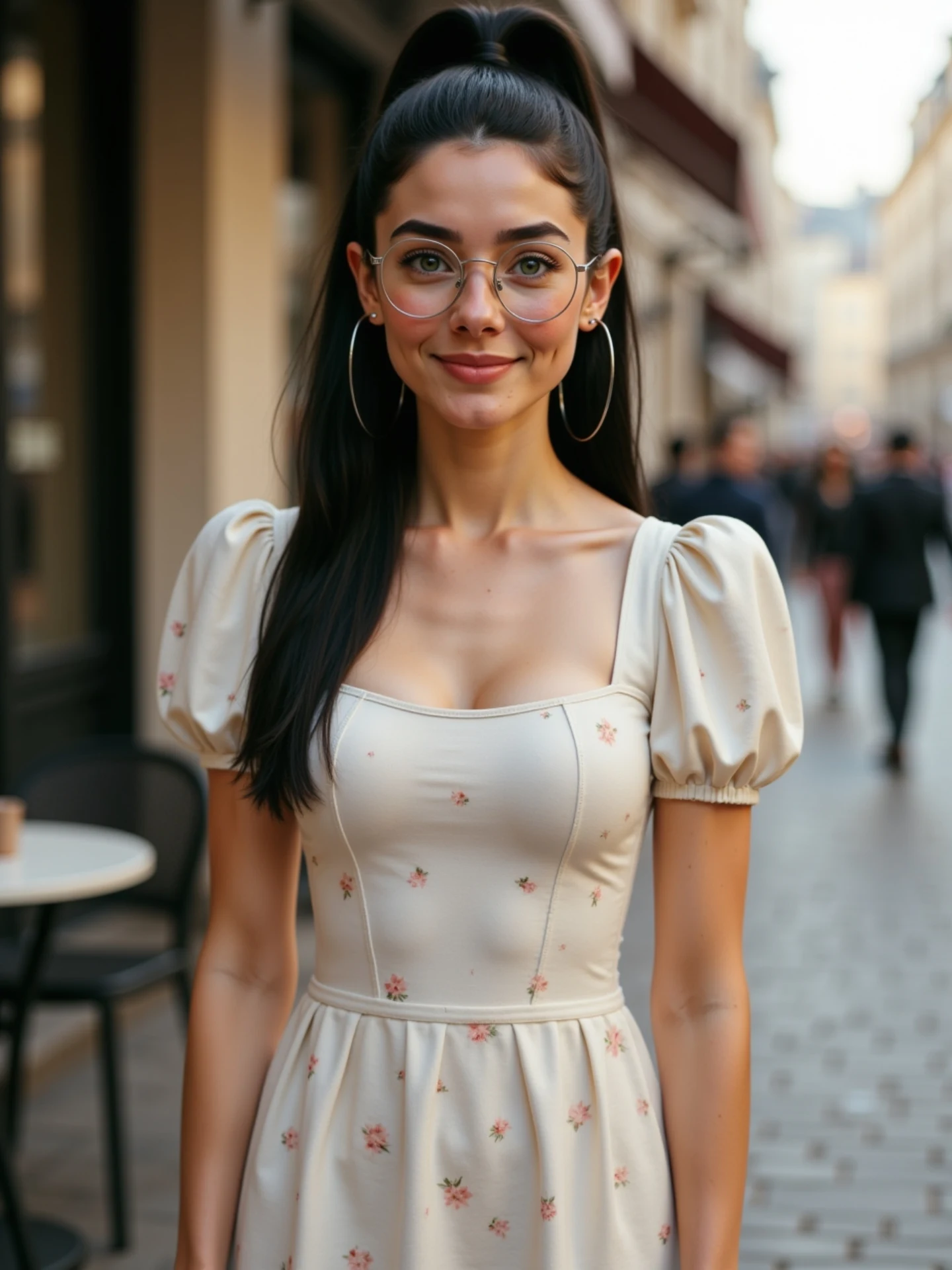
🙄 Una imagen, diferentes emociones. Sin vídeos. Sin grabar nada. Solo IA. Y sí, todas soy yo. 🤭 Me río, me pongo seria, me sorprendo… Todo a partir de una sola foto. Animada con IA desde @freepik y con un poquito de magia ✨ He preparado una guía con todas las expresiones para que tú también puedes animar las tuyas. 💬 Comenta “Emociones” y te la paso por DM.
Why soy_aria_cruz's AI Image to Video Expression Tutorial Went Viral
This case study examines a high-performing AI-generated video by @soy_aria_cruz, showcasing the power of single-image animation. The video features a consistent digital persona—a young woman with a cinematic editorial aesthetic—transitioning through a range of emotions in a sun-drenched European street setting. By leveraging the "AI Magic" hook (turning one photo into multiple expressions), the creator taps into the curiosity of the "indie creator" audience looking for low-friction content production methods. Key keywords: AI Avatar, Image-to-Video, Freepik AI, Cinematic Portrait, Digital Human Consistency.
What You’re Seeing
The video is a medium-close-up (MCU) shot of a consistent female character. She has dark hair tied in a sleek high ponytail, wears thin-rimmed round glasses, and large silver hoop earrings. Her outfit is a cream-colored, puff-sleeve dress with a delicate red floral print. The background is a beautifully blurred (bokeh) cobblestone street, likely in a European city, with soft, warm afternoon lighting that creates a gentle rim light on her hair.
Shot-by-Shot Breakdown (Estimated)
| Time Range | Visual Content | Shot Language | Lighting & Tone | Viewer Intent |
|---|---|---|---|---|
| 00:00 – 00:02 | Subject starts with a wide, joyful laugh/smile. | MCU, static, 50mm feel. | Warm, natural daylight. | Hook: High energy and "human" warmth. |
| 00:02 – 00:03 | Transition to a neutral, serious, and focused look. | Subtle head tilt. | Consistent soft shadows. | Demonstrate AI control/versatility. |
| 00:03 – 00:05 | Subject shifts to a "surprised" or slightly pouting expression. | Eye contact maintained. | Warm highlights on skin. | Reinforce the "one photo, many emotions" claim. |
Why It Went Viral
The "Magic Trick" Appeal
The core of this video's success is the demonstration of technical wizardry. For the average viewer, seeing a static photo (which they assume is the base) come to life with such fluid, realistic facial expressions triggers a "How did they do that?" response. It hits the "Curiosity" and "Awe" psychological triggers. The caption explicitly states, "One image, different emotions. No videos. No recording. Just AI," which frames the content as a breakthrough in creative efficiency.
The "Digital Twin" Persona
The creator uses a consistent AI persona ("Todas soy yo" / "They are all me"). This creates a bridge between the creator's real identity and her digital output. It’s not just a random AI girl; it’s presented as a digital extension of the creator, which builds parasocial trust and makes the technology feel more personal and accessible to other creators.
Platform Perspective
From an Instagram/TikTok algorithm standpoint, this video excels in Information Density per Second. In just 5 seconds, the viewer sees three distinct emotional states. This high "event density" keeps watch time high because the brain is constantly processing new visual information. The loop potential is high because viewers often re-watch to see the exact moment the expression "morphs."
5 Testable Viral Hypotheses
- The "Secret Sauce" Hypothesis: Mentioning a specific tool (Freepik) in the caption drives saves and shares from users who want to try it themselves.
- The "Uncanny Valley" Bridge: By using high-quality lighting and realistic textures (skin pores, hair flyaways), the video avoids the "creepy" AI look, making it more shareable as an aesthetic reference.
- The "Identity" Hook: Claiming "this is me" (even if AI-generated) creates more engagement than saying "look at this random AI," as it sparks debate or admiration for the digital likeness.
- The "Short & Sweet" Loop: Keeping the video under 6 seconds ensures a high completion rate, signaling to the algorithm that the content is "highly relevant."
- The "Glasses & Accessories" Detail: Adding complex items like glasses and large hoops demonstrates the AI's capability to handle reflections and physics, which impresses tech-savvy viewers.
How to Recreate (Step-by-Step)
1. Define Your Digital Persona
Decide on a consistent look. For this video, the "Latina/European aesthetic" with glasses and a ponytail is the anchor. Use a tool like Midjourney or Freepik's Image Generator to create your "Master Photo."
2. Prompt for Consistency
Use a detailed prompt: "A young Hispanic woman, high ponytail, round glasses, silver hoop earrings, wearing a cream floral puff-sleeve dress, standing on a blurred European street, cinematic lighting, 8k resolution."
3. Select the Animation Tool
The creator specifically mentions Freepik. You can use their "AI Image to Video" or "Reimagine" features. Alternatively, tools like Kling AI, Luma Dream Machine, or Runway Gen-2 are excellent for facial expression manipulation.
4. Expression Keyframing
If your tool allows "Motion Brushes" or "Expression Control" (like Kling or Runway), select the mouth and eyes.
- Segment 1: Set "Smile/Laugh" intensity to high.
- Segment 2: Set to "Neutral/Serious."
- Segment 3: Set to "Surprise/Pout."
5. Maintain Background Stability
Ensure the background doesn't "hallucinate" or change during the transitions. Use a low "Motion" setting (around 3-4) to keep the focus on the face.
6. Upscaling for Quality
AI video often comes out blurry. Run the final clip through an upscaler like Topaz Video AI or Magnific AI to get that crisp "editorial" look seen in the case study.
7. Sound Design
Add a trending, atmospheric audio track. The visual is "silent," so the music must carry the emotional weight. Choose something "Lofi" or "Cinematic Minimalist."
8. The "Magic Disclosure" Caption
Write a caption that explains the process. Use the "Before/After" or "Static/Animated" narrative to highlight the AI's role.
Growth Playbook
Opening Hook Lines
- "I stopped recording videos. Here's why."
- "One photo. Five emotions. Zero cameras."
- "Is this the end of traditional content creation?"
Caption Templates
The "Tutorial" Style:
Stop scrolling! 🙄 I made this entire video from just ONE photo.
✨ No cameras, no lights, just AI magic with [Tool Name].
Which expression looks the most real to you? 👇
#AIVideo #ContentCreator #DigitalHuman
Hashtag Strategy
- Broad: #AI #ArtificialIntelligence #DigitalArt (High reach)
- Mid-Tier: #AIVideo #ContentCreationTips #Freepik (Targeted interest)
- Niche: #AIModel #DigitalPersona #ImageToVideo (High conversion/community)
FAQ
What tools make it look the most similar?
Freepik (as mentioned by the creator) or Kling AI for the most realistic facial expressions.
What are the 3 most important words in the prompt?
"Cinematic lighting," "Facial consistency," and "High-resolution textures."
Why does the generated face look inconsistent?
Usually due to high "Motion" settings; keep motion low to preserve facial features.
How can I avoid making it look like AI?
Add "film grain" and "natural skin imperfections" in your base image prompt.
Is it easier to go viral on Instagram or TikTok with this?
Instagram currently favors high-aesthetic AI portraits like this one.