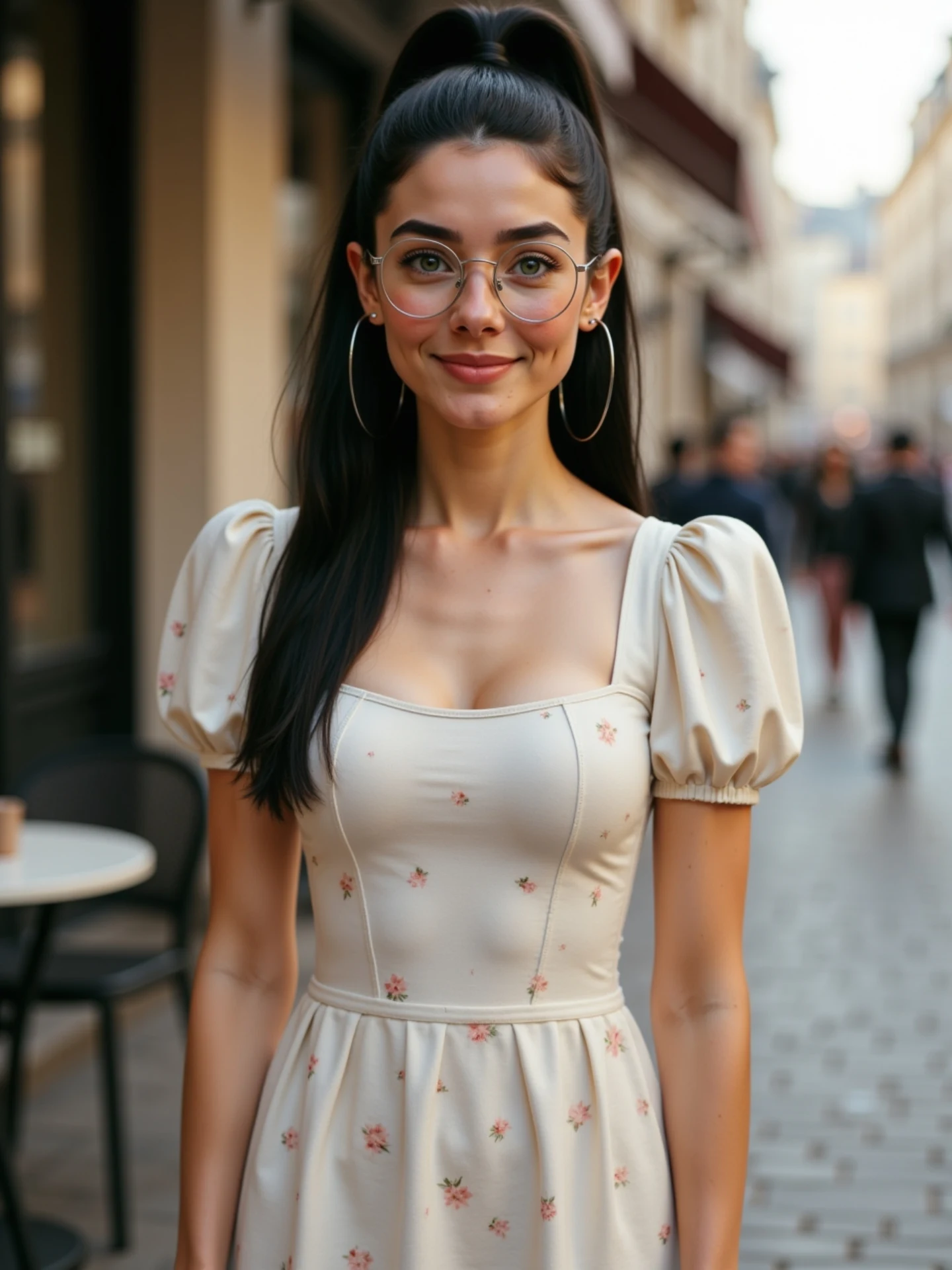
🙄 Una imagen, diferentes emociones. Sin vídeos. Sin grabar nada. Solo IA. Y sí, todas soy yo. 🤭 Me río, me pongo seria, me sorprendo… Todo a partir de una sola foto. Animada con IA desde @freepik y con un poquito de magia ✨ He preparado una guía con todas las expresiones para que tú también puedes animar las tuyas. 💬 Comenta “Emociones” y te la paso por DM.
How soy_aria_cruz Made This AI Emotion Animation AI Video and How to Recreate It
This case study analyzes a viral AI-driven video by creator @soy_aria_cruz, which demonstrates the power of "Image-to-Video" animation. The video features a cinematic editorial portrait of a young woman on a European street, transitioning through a spectrum of intense emotions—from a warm smile to deep anger and surprise—all generated from a single static image. Using tools like Freepik’s AI animator, the creator achieves high-fidelity facial consistency while showcasing the "magic" of AI, a hook that resonates deeply with audiences interested in the future of content creation.
What You’re Seeing: A Visual Breakdown
The video is a medium shot of a woman with a Mediterranean/Latina aesthetic, characterized by her high ponytail, large silver hoop earrings, and thin-rimmed round glasses. She wears a cream-colored puff-sleeve dress with a delicate floral pattern. The background is a beautifully blurred (bokeh) cobblestone street, likely in a European city like Paris or Madrid, during the "golden hour" which provides soft, directional lighting on her face.
Shot-by-Shot Breakdown (Estimated)
| Time Range | Visual Content | Shot Language | Lighting & Tone | Viewer Intent |
|---|---|---|---|---|
| 00:00–00:01 | Subject smiles warmly at the camera. | Static Medium Shot (MS) | Warm, soft natural light. | The "Hook": Establish beauty and friendliness. |
| 00:01–00:02 | Expression shifts to neutral/serious. | Static MS | Consistent bokeh background. | Transition: Building curiosity about the change. |
| 00:02–00:03 | Subject frowns deeply, brows furrowed. | Static MS | High contrast on facial muscles. | The "Climax": Demonstrating AI's range of motion. |
| 00:03–00:04 | Subject returns to a neutral, slightly surprised look. | Static MS | Soft highlight rolloff. | Resolution: Showing the loop potential. |
Why It Went Viral: The "Magic Trick" Effect
The core appeal of this video lies in the "How did they do that?" factor. By explicitly stating in the caption that "all of these are me" and "no videos were recorded," the creator taps into the curiosity surrounding AI technology. The subject matter—human emotion—is biologically hardwired to grab our attention. Watching a face morph from joy to anger in seconds triggers a micro-emotional response in the viewer, increasing retention.
From a platform perspective, Instagram's algorithm prioritizes high-quality visual aesthetics and "educational/reveal" content. The video’s short duration (4 seconds) makes it highly loopable, which signals to the algorithm that the content is engaging. The "before and after" or "static vs. animated" trope is a proven growth lever because it provides immediate value (inspiration) and encourages saves for future reference.
5 Testable Viral Hypotheses
- The "Uncanny Valley" Hook: High-fidelity AI that looks 99% real but has a slight "magic" movement creates a "stop-and-stare" effect that boosts watch time.
- The Identity Consistency Flex: Showing the same character in different states proves the creator's technical skill, leading to higher profile visits and follows.
- Emotional Mirroring: Rapidly changing facial expressions trigger the viewer's mirror neurons, making the content more memorable than a static image.
- The "Tool Reveal" Strategy: Mentioning a specific tool (Freepik) encourages comments from other creators asking for tutorials, boosting engagement metrics.
- Aesthetic Aspiration: The "European Summer" aesthetic is a perennial trend; using it as the backdrop ensures the video appeals to a broad lifestyle audience.
How to Recreate: From Static to Soulful
Follow these steps to turn your own photos into high-emotion AI animations:
- Character Selection: Generate or take a high-quality portrait. Ensure the lighting is soft and the face is clear.
- Pro Tip: Use a "Character Sheet" prompt in Midjourney to get consistent angles.
- Define the Base Image: Use a tool like Freepik or Midjourney to create your "Master Image."
- Prompt Idea: "Cinematic portrait of a woman, high ponytail, glasses, floral dress, European street background, bokeh, 8k."
- Animation Tooling: Upload your image to an AI video generator (Kling AI, Luma Dream Machine, or Runway Gen-3).
- Expression Keyframing: Use "End Frames" or "Motion Brushes." Set the first frame as the smile and the last frame as the frown.
- Maintain Consistency: If the face drifts, use a "Face Swap" tool (like InsightFaceSwap) on the generated video to lock the identity back to the original photo.
- Editing the Loop: In CapCut, trim the video to 4-5 seconds. Use a "Mirror" or "Reverse" effect to make the transition back to the start seamless.
- Color Grading: Apply a "Warm Film" filter to enhance the "Golden Hour" vibe.
- Publishing: Use a trending audio track that has a "beat drop" or a "swell" that matches the emotional shift.
Growth Playbook: Distribution & Scaling
Opening Hook Lines
- "I stopped recording videos. Here's why."
- "One photo, five different moods. All AI."
- "The secret to consistent AI characters is finally here."
Caption Templates
The "Magic Reveal" Template:
Stop scrolling! 🙄 This isn't a video.
I took ONE photo and used AI to bring it to life.
Which emotion looks the most real to you? 👇
#AIAnimation #ContentCreator #DigitalMagic
Hashtag Strategy
- Broad: #AI #ArtificialIntelligence #DigitalArt #TechTrends
- Mid-tier: #AIAnimation #ContentCreationTips #AIVideo #Freepik
- Niche: #IndieCreator #AICharacterConsistency #ImageToVideo #AITutorial
Frequently Asked Questions
What tools make it look the most similar?
Kling AI and Luma Dream Machine currently offer the best facial muscle movement for image-to-video.
What are the 3 most important words in the prompt?
"Facial expression morph," "High fidelity," and "Photorealistic."
Why does the generated face look inconsistent?
This usually happens if the motion intensity is set too high; keep motion between 3-5 for realism.
How can I avoid making it look like AI?
Add a slight film grain and natural camera shake in post-production to mask AI smoothness.
Is it easier to go viral on Instagram or TikTok with this?
Instagram Reels currently favors high-aesthetic "visual magic" like this more than TikTok's raw UGC style.