AI Character Generator

AI character generator pages work best when they feel like a design table for original worlds, not a generic portrait tool. Writers, game builders, and RPG creators usually need characters with repeatable identity, outfit logic, and visual storytelling that can survive more than one image. This page helps you compare character ideas that feel ready for worldbuilding, cast creation, and stronger visual direction.

Video
GLOBAL LOCK: A vertical 9:16 creator-marketing Reel, approximately 33 seconds, built around one recurring host and a dark-mode AI character-generation interface. Keep three visual layers consistent across the whole video: (1) the host, a white male in his late 20s to early 30s with side-parted brown hair, slim build, expressive face, clean-shaven, wearing a fitted off-white knit sweater and speaking into a matte-black desktop microphone, lit by a warm amber key and soft vignetted studio background; (2) stylized portrait outputs of the same handsome male AI character, usually white, early 20s to early 30s, chiseled jaw, thick dark hair, slim-athletic build, shown in different fashion/editorial presets such as city streetwear, convenience-store candid, studio portrait, tank-top fashion, foggy road noir, cowboy desert, and black-and-white urban scenes; (3) Higgsfield.ai interface captures in dark mode featuring the Character section, Higgsfield Soul 2.0 highlighted in the left model list, a grid of example source faces, preset tiles labeled Editorials, Fashion, Street Photography, Double exposure, a bright lime-green Generate button with a coin cost indicator, and an Animate button on selected outputs. The pacing must stay aggressive and social-native with a new visual beat every one to two seconds, strong contrast between warm host footage and colder generated sample cards, crisp UI sharpness, black/charcoal backgrounds, neon-lime accent labels, and one energetic male speaker throughout with close-mic, dry, high-intelligibility audio. Lips are visible during all host sections and sync must feel tight.

[00:00-00:03] Start on a dark background with bold white uppercase text reading STOP DOING THIS, flanked by red X marks. Under the headline, show generic AI male portrait samples: first a black-coat city street shot, then a casual black sweater portrait, then another generic urban fashion image. The host appears in a rounded rectangle at the bottom, urgently raising one hand toward camera as if interrupting the viewer. Audio: same male host delivers a sharp pattern-break hook telling viewers to stop making the same boring AI character photos.

[00:03-00:07] Cut between the host in warm studio close-up and more bland sample outputs: a crouched white-sweater studio pose, a convenience-store fashion portrait with bomber jacket and bow tie, another convenience-store variation. The host points upward with both index fingers while speaking quickly. Camera on the host remains static medium close-up with 35mm to 50mm lens feel, shallow depth, warm amber falloff. Audio: one speaker, emphatic, corrective tone, lips fully visible.

[00:07-00:11] Introduce stronger preset-driven examples. Show a clean editorial portrait card labeled Editorials, then a Fashion preset with a white ribbed tank top, then Street Photography over a bright outdoor male portrait, then Double exposure with a grayscale silhouette overlay. Each sample occupies the upper two-thirds while the host continues in the lower panel. The transition rhythm should feel like flipping through creative options rather than a tutorial menu. Audio: host pivots from criticism to the better alternative.

[00:11-00:14] Briefly isolate the Higgsfield.ai logo on a dark bar, then cut to the platform interface. Show the Character tab area with Soul 2.0 in the model list highlighted and the host below continuing to explain. Use dark graphite UI, lime-green badges, and readable white text. Audio: same speaker names the tool and frames it as an easier route to ultra-realistic character creation.

[00:14-00:18] Show a grid of source reference portraits inside the character workflow: multiple male selfies and studio shots, the cursor hovering over them as if choosing a base identity. Host remains bottom-center, speaking calmly but with momentum. Emphasize that one character identity can be turned into many outputs. Audio: host explains consistency and customization, crisp consonants, no background reverb.

[00:18-00:21] Cut to a full-height preset card of a standing male figure against a white seamless with a lime Presets label, then to the generation composer showing a dark prompt box, a character token or preset mention, and a lime Generate button with a coin cost. Cursor movement should imply that generation is about to happen. Audio: host explains that the system can create polished images in a couple of clicks.

[00:21-00:24] Reveal generated outputs in different environments: a dark cinematic portrait of a bespectacled man, a convenience-store streetwear shot with Presets badge, and an outdoor coastal portrait with Animate highlighted in lime. The host gestures with one hand as if listing options. Color shifts between cool storefront daylight, neutral portrait lighting, and warm natural outdoor scenes while the UI frame stays dark.

[00:24-00:28] Expand the sample range further with a foggy road full-body shot in a long black coat, a desert cowboy standing in front of a stepped stone structure, and a top-down tank-top fashion portrait. These three outputs should feel dramatically different in location and styling while keeping premium realism and the same polished character aesthetic. Audio: same male narrator sells variety, speed, and realism for creators.

[00:28-00:31] Tighten into darker cinematic portraits: a serious close-up male face against a charcoal backdrop, then a black-and-white street portrait with overlaid CTA text Comment "AI", then a fashion portrait with the same CTA treatment. Keep typography large, bold, white, and lime-yellow, centered over the images. The host points upward from the bottom frame to reinforce the CTA timing.

[00:31-00:33] End on another fast CTA repetition using the strongest portrait samples while the host lands the final line. Maintain the warm studio box below, sharp microphone silhouette, and dark premium brand palette. Audio: one male speaker, punchy final comment-gate instruction, no fade, no music swell overpowering the words.

NEGATIVE PROMPT: avoid identity drift between generated male portraits, avoid uncanny skin texture, avoid distorted eyes or asymmetrical jawlines, avoid over-smoothed plastic faces, avoid broken hands in host gestures, avoid unreadable UI labels, avoid cluttered text overlays beyond STOP DOING THIS and Comment "AI", avoid fake logos, avoid low-resolution preset cards, avoid inconsistent sweater color on the host, avoid muddy shadows on the warm studio shot, avoid robotic speech, lip-sync mismatch, clipped peaks, harsh sibilance, or over-compressed voice.
Video
GLOBAL LOCK: Subject is Natalia Dyer, an American actress with an oval face, high cheekbones, large expressive brown eyes, and fair skin with natural warmth. Her hair is dark brown, long, and wavy, styled into two thick, loose braids falling over her shoulders. She wears a dark, high-collared cloak/coat. Her expression is neutral, serene, and slightly melancholic, looking directly at the camera. The camera is a static Medium Close-Up (MCU) with a cinematic 35mm lens feel. High-fidelity skin textures and realistic lighting are mandatory.

[00:00–00:01]
Subject is centered in a grand, atmospheric gothic cathedral. Background features intricate stone arches and stained glass windows. Lighting: Misty, volumetric light beams (God rays) filter through the windows, creating a teal and orange contrast. Subject's face is softly lit by the ambient glow. Motion: Subtle dust motes dancing in the light beams.

[00:01–00:02]
Subject is centered in a vast golden hour meadow. Background features tall, dry grass and a distant horizon under a setting sun. Lighting: Warm, intense amber backlighting creating a soft rim light on her hair and cloak. A subtle lens flare peeks from the corner. Motion: Very slight swaying of the grass in the background.

[00:02–00:03]
Subject is centered in a dense autumn forest. Background is filled with vibrant orange and red maple leaves. Lighting: Dappled sunlight filtering through the canopy, creating soft patches of light on her face. Shallow depth of field with a creamy bokeh effect on the leaves. Motion: A few leaves slowly falling in the background.

NEGATIVE PROMPT: 
Facial distortion, changing eye color, changing hair style, inconsistent facial features, cartoonish look, plastic skin, extra limbs, blurry face, text, watermark, logo, flickering lighting, sudden jumps in subject position, robotic movement, oversaturated colors, low resolution.
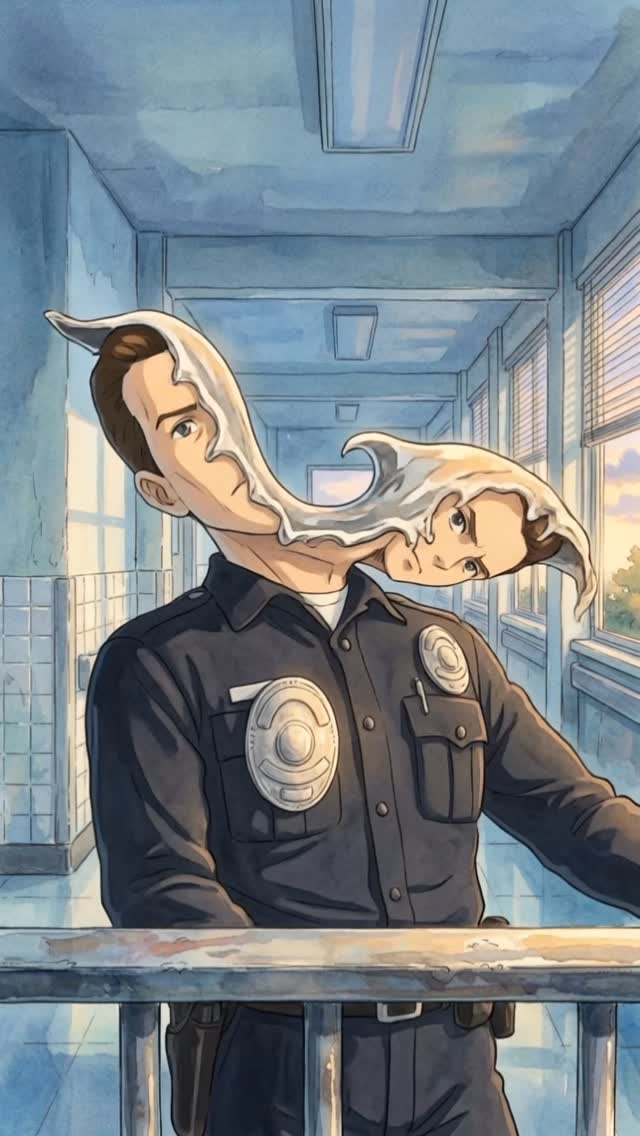
s1mple.ai: Surreal Liquid Head Police Officer AI Art
AI content creator
[Subject] A surreal uniformed officer standing in a sunlit institutional hallway, with a dark navy police-style shirt, metallic chest badges, and a calm body posture, while the head transforms into a flowing pale liquid ribbon that stretches sideways and resolves into two connected face forms. [Environment] A blue-toned corridor with tiled lower walls, long ceiling light fixtures, large windows on the right, warm daylight entering from outside, and a metal railing cutting across the foreground, evoking a school, hospital, or civic-building hallway. [Composition/Camera] Vertical mid-body portrait, camera positioned slightly below face level, subject centered but with the liquid head distortion extending dramatically to the right, foreground railing adding depth, corridor perspective lines guiding the eye toward the surreal deformation. [Lighting] Soft daylight mixed with cool interior ambient light, gentle reflections on the floor and badges, even illumination across the uniform, pale luminous highlights on the liquid face ribbon, warm window light balancing the cool hallway palette. [Style/Rendering] Surreal concept illustration with painterly anime-influenced realism, dreamlike institutional atmosphere, clean line structure, soft watercolor-like shading, uncanny visual metaphor, polished poster presentation. [Detail constraints] Preserve the officer uniform as grounded and readable, keep the liquid head transformation smooth and ribbon-like rather than gory, maintain the corridor perspective and windows as contextual anchors, ensure the surreal effect feels uncanny but elegant, and avoid horror clutter or excessive visual noise.

Negative prompt: gore, blood, horror splatter, zombie effect, messy distortion, extra limbs, broken anatomy, low detail hallway, cluttered background, harsh shadows, warped badges, muddy colors, low-resolution painterly blur, duplicated faces without flow connection

Suggested parameters: aspect ratio 2:3, stylize medium, high detail, surreal realism, painterly editorial mood, clean uncanny atmosphere

Delta prompt strategy:
1. If the surreal effect feels weak, increase the pale liquid ribbon stretching the head into two connected face forms.
2. If the image turns horror-heavy, remove gore and keep the transformation smooth, clean, and dreamlike.
3. If the hallway loses clarity, reinforce blue walls, windows, ceiling fixtures, and linear perspective.
4. If the uniform becomes generic, sharpen the police-style shirt, chest badges, and duty-belt details.
5. If the composition feels static, preserve the forward torso while letting the head distortion sweep laterally across the frame.
6. If colors become muddy, separate cool blue interior tones from warm daylight near the windows.
7. If the surreal ribbon lacks elegance, smooth the edges and create graceful flowing curvature between the faces.
8. If the image reads too realistic, add subtle painterly softness while preserving strong structural drawing.
9. If the foreground feels empty, keep the metal railing to anchor depth and realism.
10. If the mood becomes too literal, emphasize uncanny metaphor and poetic visual distortion over narrative explanation.
Video
AI content creator
GLOBAL LOCK: Retro sci-fi action-drama illustrated as painterly cinematic concept art with consistent late-20th-century dystopian thriller energy. Keep the main human lead as a white-presenting adult male in his 30s to early 40s with fair skin, strong jawline, short brown hair styled upward, athletic build, and a stern, protective posture. Keep the teenage boy slim, youthful, and slightly awkward, the red-haired mother tough and alert, the chrome humanoid machine perfectly metallic and expressionless, and the police officer as a surreal shape-shifting impostor whose face splits into a white liquid duplicate floating beside his head. Preserve the American Southwest setting with bars, alleys, concrete flood channels, desert highways, industrial firelight, institutional blue hallways, and motel-town streets. Maintain warm sunlit exterior tones, cool blue interior fluorescents, bright orange fire glow, silver chrome reflections, moderate painted texture, clean action readability, dramatic close-ups, and a mix of 35mm, 50mm, and 85mm cinematic framing. Speech style is sparse and trailer-like, with one or two short lines per beat, tense cadence, dry close-mic sound, and visible lip sync only where characters are front-facing in close-up.

[00:00-00:04] Night battlefield under a moonlit sky, a chrome endoskeleton warrior stands amid explosions and smoke, full-body wide shot with a low camera angle, burning debris behind it, hard orange backlight from fire, cold blue moon fill, drifting smoke and embers, no speech, only apocalyptic tension.

[00:04-00:08] Interior roadside bar or garage with warm practical lights and Pepsi signage, shirtless muscular man faces a woman at close conversational distance, medium close-up with shallow depth of field, tense eye contact, muted amber color grade, slight camera push-in, no speech or a low murmur that feels interrupted.

[00:08-00:12] Surprised close-up of the same male lead, 85mm portrait lens, eyes wide, a white liquid shape creeps into frame from the right edge, skin rendered with smooth painterly highlights, lips barely part as if about to say something, high lip-sync strictness if any whispered word is included.

[00:12-00:16] Wooden doorway confrontation, a heavy bearded man points a shotgun outward from inside a dim rustic room, reverse-shot structure from the visitor’s perspective, warm tungsten light inside, cooler dusk outside, angry expression, fast emotional escalation, cut sharply on the aiming gesture.

[00:16-00:20] Police officer stands behind a metal railing in a blue institutional corridor, daylight windows on the right, his face splits into a white liquid double that floats off to one side, medium shot and then close-up, uncanny identity distortion locked to the character description, dry fluorescent lighting, no comedy, pure body-horror unease.

[00:20-00:24] The police impostor faces a silver chrome humanoid in a workshop or station-like interior, alternating close two-shots and profile shots, the officer studies the machine while the machine remains unreadable, polished reflections on metal surfaces, low conversational tension, spoken line if used should be controlled, cold, and clipped.

[00:24-00:28] Exterior small-town alley with an ATM and pale morning sunlight, a teenage boy stands with another teen beside a red dirt bike, medium-wide framing, concrete walls and utility lines create depth, naturalistic golden daylight, hesitant body language, short casual dialogue possible with loose teenage cadence.

[00:28-00:32] The boy meets the red-haired mother, then they launch on the bike through a yard and into open road, camera alternates between side tracking and rear chase framing, dust and wind motion emphasized, warm sun, hopeful but urgent energy, no visible speech once the ride begins.

[00:32-00:36] Domestic kitchen interior with the red-haired mother alone, plaid sleeveless shirt, checking space around her with alert suspicion, then transition to a long concrete flood channel where a motorcycle races toward camera. Use medium shots indoors, wide vanishing-point exterior frames outside, bright noon light, pacing accelerates.

[00:36-00:40] A chrome humanoid emerges from a wall of fire in a blazing industrial doorway, centered heroic composition, flames licking around perfect metal anatomy, then cut to the main group lined up together like a defensive unit. Keep the contrast high, metal glossy, and fire glow intense, no speech, only mythic escalation.

[00:40-00:44] Return to the blue hallway where the police impostor’s face peels into a vertical white liquid split, then cut to a car interior crossing desert country with the teenage boy in the back seat and the stern protector driving. Tight close-up on the melting face, then side-profile car shots with golden late-afternoon light, minimal dialogue with deliberate pauses.

[00:44-00:48] Reveal a robotic hand behind glass, a Black male observer studies the mechanical fingers, then another man exposes his own cybernetic arm in a bright interior. Macro mechanical details, articulated joints, cables, metal knuckles, cool clinical light, slow deliberate hand motion, no speech or a single stunned reaction word.

[00:48-00:52] Mechanical hand flexes in close-up, then the police figure charges forward in front of fire, furious and no longer convincingly human. Close, aggressive framing, rapid motion, hot industrial glow, smoke, clenched teeth, voice if present should be forceful and urgent with hard consonants.

[00:52-00:56] Leather-jacketed hero loads a shotgun in a workshop, chest-up framing and insert shots of the weapon, then he appears in full figure, bandolier across his body, locked in battle stance. Use crisp action inserts, fiery orange backlight, metallic set dressing, and a hard determined facial expression.

[00:56-00:58] Final desert tag: a black-clad woman in sunglasses holds a rifle near a rugged vehicle and Joshua trees, medium-wide hero shot in harsh dry sunlight, wind moving clothes slightly, no speech, end on a survivalist future-war note.

NEGATIVE PROMPT: low-detail faces, inconsistent identities, duplicated limbs, broken fingers, warped firearms, unreadable props, incorrect police uniform details, cartoon slapstick tone, muddy chrome reflections, flicker between shots, temporal jitter, random text or logos, floating objects without narrative purpose, soft mushy anatomy, deformed motorcycles, broken perspective, accidental modern smartphones, robotic lip movement, off-timing mouth shapes, slurred dialogue, metallic synthetic voice, harsh sibilance, clipped peaks, pumping compression, over-denoised speech, and mismatched room tone between cuts.

SPEECH PACK:
[00:08-00:12] Speaker A, closest audible: "What the hell is that?" Safe paraphrase: "He sees something impossible entering frame." TAKE_A: shocked, breath catches before "hell". TAKE_B: lower, more controlled disbelief. TAKE_C: whispered panic. Lips visible: yes, high sync.
[00:20-00:24] Speaker B, closest audible: "You are not him." Safe paraphrase: "The officer realizes the machine is not human." TAKE_A: flat and clinical. TAKE_B: suspicious and tense. TAKE_C: almost whispered. Lips visible: partial, medium sync.
[00:24-00:28] Speaker C, closest audible: "Come on, let's go." Safe paraphrase: "The teens move toward the bike." TAKE_A: rushed. TAKE_B: nervous. TAKE_C: urgent whisper. Lips visible: partial, medium sync.
[00:32-00:36] Speaker D, closest audible: "Get inside." Safe paraphrase: "A protective instruction before the chase escalates." TAKE_A: firm. TAKE_B: louder warning. TAKE_C: clipped command. Lips visible: low to medium sync.
[00:40-00:44] Speaker A, closest audible: "He's still behind us." Safe paraphrase: "They realize the threat remains active during the drive." TAKE_A: tense low voice. TAKE_B: controlled urgency. TAKE_C: breathy fear. Lips visible: partial, medium sync.
[00:48-00:52] Speaker B, closest audible: "Run!" Safe paraphrase: "Immediate danger forces escape." TAKE_A: shouted. TAKE_B: raw panic. TAKE_C: hoarse command. Lips visible: yes, high sync.
Video
GLOBAL LOCK: vertical 3:4 Adobe Firefly Boards style promo card, static held frame, red brand treatment over a gloomy downtown city block. Main image shows a tall monolithic concrete tower tinted deep Firefly red, torn open by two vertical cracks, with a masked cyberpunk antihero figure emerging from the fissure. Character design: short white hair, white or silver face mask with dark eye slits, dark tactical armor or jacket, menacing upright posture. Preserve Firefly square 'Fi' logo at top left, bold white headline stacked center reading 'From Idea to Branded Mockup' with a red capsule beneath reading 'in minutes', smaller white subhead explaining how AI-first Firefly Boards help visualize concepts without leaving the flow, lower-left hashtags for Adobe Firefly ambassadors and Firefly Boards, and a small swipe cue at lower right. Rainy traffic, buses, taxis, and pedestrians anchor scale at street level.
[00:00-00:11] Hold on the same branded hero frame throughout with only subtle export shimmer. The red building, cracked facade, cyberpunk figure, overcast clouds, and downtown traffic remain static while the large white headline and red capsule emphasize the message that Firefly Boards turns an idea into a branded mockup in minutes.
Video
GLOBAL LOCK: vertical social post layout demonstrating an AI video prompt, top half shows photoreal first-person domestic-catastrophe sequence, bottom half is a persistent black text card with yellow-white prompt copy and a bright yellow CTA reading 'Send this post!'. Top sequence begins as anonymous first-person POV with tanned forearms in bright blue latex gloves pressing a chrome soap dispenser or faucet at a bathroom sink, then escalates into impossible expanding soap foam filling the sink, hallway, staircase, living room, and eventually flooding outside around a suburban house and neighborhood. Camera language is literal and progression-based, moving from POV bathroom realism to wider interior and exterior coverage. Tone is deadpan, absurd, and photoreal.
[00:00-00:03] First-person POV looking down at blue-gloved hands over a white bathroom sink beneath a mirror, pressing the chrome soap dispenser, ordinary warm-lit bathroom realism. Bottom half already displays the black prompt card explaining the scenario.
[00:03-00:05] Dense white foam erupts and swells rapidly above the sink basin, hands spread apart by the pressure, top image remains centered on the bathroom event while prompt text stays locked below.
[00:05-00:08] Cut to hallway and staircase views as the same white foam mass pushes through the house with unnatural volume and even pressure, filling corridors and rooms, furniture disappearing beneath the expansion, bottom prompt card unchanged.
[00:08-00:12] Wider interior and exterior suburban-house shots show foam bursting out windows and doors, piling around the home in thick rounded clusters under overcast daylight, still framed above the persistent prompt text block.
[00:12-00:15] Final aerial or pulled-back neighborhood-scale view reveals the foam event overtaking surrounding streets and lawns, turning the block white while the bottom prompt card and yellow 'Send this post!' CTA remain visible, ending like a shareable AI prompt concept demo.
Video
GLOBAL LOCK: A vertical social video case-study layout, approximately 15 seconds, where the upper half displays a cinematic AI-generated night scene and the lower half permanently displays the generation prompt as readable yellow or off-white text on a black panel labeled β€œPrompt.” The video content shows a woman in her 40s with Finnish heritage cues, pale eyes, and blonde hair pulled back, wearing a structured dark grey expedition jacket and dark technical trousers. She climbs a rope ladder on the exterior of a glass skyscraper at night, high above a glowing city grid. The mood is calm, determined, and cinematic rather than action-thriller. Lighting is cool blue night city light with warm office windows inside the tower. Camera alternates between closer views of her on the ladder, wider views showing scale on the building facade, and rooftop shots where she waters a tiny plant growing from a crack in the parapet with a metal watering can. The lower prompt block must remain visible and legible throughout, framing the clip as a prompt-to-video demonstration. No dialogue.

[00:00-00:03] Open with a tighter shot of the woman climbing the rope ladder against the reflective glass skyscraper at night. Her dark expedition jacket, focused upward gaze, and rope grip should feel realistic and controlled. The lower third or lower half shows the label β€œPrompt” and a dense block of prompt text on black.

[00:03-00:06] Cut wider to reveal the scale of the climb. She is small against the tall glass facade, with illuminated office windows behind her and red aircraft lights or distant city lights punctuating the dark skyline. The prompt text panel remains fixed below, functioning like a live case-study caption.

[00:06-00:10] Transition to rooftop arrival. The woman reaches the top edge and moves toward a parapet with city lights stretching behind her. A metal watering can sits nearby. She remains composed, almost ritualistic, as if this impossible rooftop gardening act is normal to her.

[00:10-00:13] Show the woman kneeling or leaning near the parapet as she lifts the watering can and pours water onto a tiny plant growing from a narrow crack in the rooftop edge. The city below glows softly out of focus. The action should feel intimate and quietly poetic after the large-scale climb.

[00:13-00:15] End on the watering action or the rooftop pause, keeping the prompt text still visible below. The final impression should be that of a complete prompt-engineering showcase: one concise narrative arc visualized clearly, with the source prompt presented as part of the content itself.

NEGATIVE PROMPT: avoid action-movie chaos, avoid broken ladder anatomy, avoid unrealistic rooftop physics, avoid extra characters, avoid unreadable prompt text, avoid modern UI overlays beyond the prompt panel, avoid daytime lighting, avoid wrong wardrobe color, avoid flickering plant scale, avoid melted glass reflections, and avoid generic heroic posing.
Video
Kallaway
GLOBAL LOCK: The subject is a male in his mid-30s with light skin, wearing a black baseball cap with a subtle logo and a black long-sleeve shirt with a white "KITH" logo on the chest. He has an energetic, expressive face. The environment transitions between various 3D generated worlds and a studio setting. Lighting is cinematic with high contrast. The color grade is warm and saturated. Speech is direct-to-camera with high-energy delivery and crisp articulation.

[00:00–00:02]
A wide, high-angle drone-style shot of a tropical island. White sand beach, turquoise water with gentle waves, and lush green palm trees. A tiny, indistinguishable human figure stands on the sand. Bright, high-noon tropical lighting.

[00:02–00:05]
The subject appears in a circular frame overlaying the beach, then transitions to a full-screen medium close-up. He is speaking enthusiastically, gesturing with his hands. The background is the same tropical beach but slightly blurred (bokeh).

[00:05–00:08]
A medium shot from the side. The subject is walking along a path lined with tropical plants and palm trees. The lighting is dappled sunlight. He is looking off-camera and smiling. Cinematic handheld camera movement.

[00:08–00:11]
Close-up talking head shot. The background is dark and out of focus with a purple and blue rim light on the subject's shoulders. He is speaking directly to the camera, emphasizing the words "world building."

[00:11–00:14]
Medium shot of the subject sitting in a brown wicker chair inside a modern, sunlit living room with white walls and wooden stairs in the background. He gestures broadly with both hands. High-key, airy lighting.

[00:14–00:17]
A close-up of the living room set, focusing on the wicker chair and a patterned pillow. The camera pans slightly. The lighting is warm and domestic.

[00:17–00:24]
A rapid montage of digital environments: a gothic cathedral with lava flowing through the center, a snowy village under the green Aurora Borealis, and a futuristic sci-fi hallway. High-fidelity textures and dramatic lighting.

[00:24–00:30]
A screen recording of a UI. A photo of a tennis court with mountains in the background is uploaded. The UI shows a "Generate" button being clicked, and the photo transforms into a 3D navigable world.

[00:30–00:36]
The subject is back in a medium shot, gesturing toward a floating window that shows the 3D tennis court world. He explains the "digital sets" concept.

[00:36–00:45]
A grid of 8 reference images showing the subject in different poses and environments. The UI demonstrates "splicing" the subject into the living room set. The subject is seen waving in the final spliced image.

[00:45–00:52]
A screen recording of a video generation tool (Google VEO 3). A prompt is typed: "Animate the reference photo. The subject holds a cup..." The video generates a realistic motion of the subject in the digital set.

[00:52–01:05]
Close-up of the subject speaking. He transitions into a medium shot in a simple white-walled room, wearing the same KITH shirt. He uses his hands to emphasize the "sauce layer" of lip-syncing.

[01:05–01:12]
A cinematic shot of a fashion model in a green tank top walking across a city crosswalk, followed by a shot of a model in a red beret sitting in a futuristic subway car. High-end editorial lighting.

[01:12–01:18]
The subject is superimposed at the bottom of the screen, pointing up at an Instagram profile (KITH). He then shows lifestyle photos of models on a tennis court being turned into 3D worlds.

[01:18–01:26]
Final talking head shot. The subject winks and points at the camera. The video ends with quick cuts of a barn interior at sunset and a woman in a futuristic pink dress in a white, crystalline room.

NEGATIVE PROMPT: visual artifacts, distorted face, inconsistent clothing logos, flickering lighting, robotic lip movement, blurry textures, unnatural hand gestures, floating objects, low resolution, watermarks, text jitter.

SPEECH PACK:
[00:00-00:05] "This is absolutely insane. You can now use AI to put yourself in a 3D world."
TAKE_A: (High energy, fast pace) "This is absolutely insane! You can now use AI to put yourself in a 3D world!"
TAKE_B: (Awe-struck, slower pace) "This... is absolutely insane. You can actually use AI to put yourself... in a 3D world."
TAKE_C: (Direct, informative) "This is insane. AI now lets you put yourself directly into any 3D world."

[00:05-00:11] "I'm talking true world building. You can control the scene, the motion, the movement."
TAKE_A: (Emphasizing 'true') "I'm talking TRUE world building. Control the scene, the motion, the movement."
TAKE_B: (Rhythmic) "True world building. You control the scene. The motion. The movement."

[00:52-01:00] "And here is the sauce layer on top. If you want to lip sync so your character talks smoothly..."
TAKE_A: (Secretive/Excited) "And here’s the sauce layer. Want to lip sync so it looks smooth? Watch this."

PROSODY NOTES: Use punchy emphasis on tool names (World Labs, Sora, Veo). Maintain a "tech-guru" personaβ€”warm but authoritative. High lip-sync strictness required for the "sauce layer" segment.
Video
GLOBAL LOCK: The video is a high-quality screen recording of a desktop browser. The interface is ChatGPT in "Dark Mode" (dark charcoal background, light gray text). The font is the standard ChatGPT sans-serif. The cursor is a standard white pointer. All text overlays are in a bold, white, all-caps sans-serif font, positioned in black "letterbox" bars at the top and bottom of the frame. The overall vibe is clean, instructional, and tech-focused.

[00:00–00:03]
Visual: A static screen recording of the ChatGPT interface. A large text overlay at the top reads "STEP 1: CREATE YOUR CHARACTER PROMPT USING CHATGPT". The GPT name "Midjourney V7 - Photorealistic Image Prompts" is visible at the top of the chat.
Action: The screen is still, establishing the scene.
Audio: Low-fi tech beat starts, steady and rhythmic.

[00:03–00:07]
Visual: The cursor clicks into the "Ask anything" input box at the bottom. The text "give me a front view shot of portrait shot of woman in her 20s, model, with crazy facial features and should look very unique and easily recognizable, front view shot, looking into the camera, flat studio lighting" is typed out rapidly.
Action: Rapid typing animation.
Audio: Subtle keyboard clicking sounds synced to the typing.

[00:07–00:11]
Visual: The AI begins to respond. The text "Here's your photorealistic Midjourney prompt based on your description: Prompt: A front view portrait shot of a woman in her 20s, fashion model, with highly unique and exaggerated facial features..." streams onto the screen.
Action: Text "streaming" effect where words appear one by one from left to right.
Audio: The music continues; the typing sounds stop as the AI generates.

[00:11–00:14]
Visual: The cursor moves up and highlights the generated prompt text in a light blue selection box. A bottom text overlay appears: "Head to ChatGPT and search for GPTs to find 'Midjourney V7...'. Describe your character, and the GPT will generate the perfect prompt for you to copy." A small white hand icon with a clicking animation appears in the bottom right corner.
Action: Smooth cursor movement and text selection.
Audio: Music swells slightly for the conclusion.

NEGATIVE PROMPT: Handheld camera shake, blurry screen, light mode UI, messy desktop icons, low resolution, watermark, robotic voiceover, stuttering text generation, inconsistent font styles, bright colors, distracting background elements.

SPEECH PACK:
(Note: This video has no spoken dialogue, only text-to-be-read. The "Speech" here refers to the rhythmic delivery of the text overlays.)

Segment 1 [00:00-00:03]: "STEP 1: CREATE YOUR CHARACTER PROMPT USING CHATGPT"
TAKE_A: Bold, authoritative, slow pacing.
TAKE_B: Fast, energetic, "hack" style.
TAKE_C: Neutral, instructional.

Segment 2 [00:11-00:14]: "Head to ChatGPT and search for GPTs to find 'Midjourney V7...'"
TAKE_A: Informative, helpful tone.
TAKE_B: Urgent, "do this now" tone.
TAKE_C: Calm, step-by-step guidance.
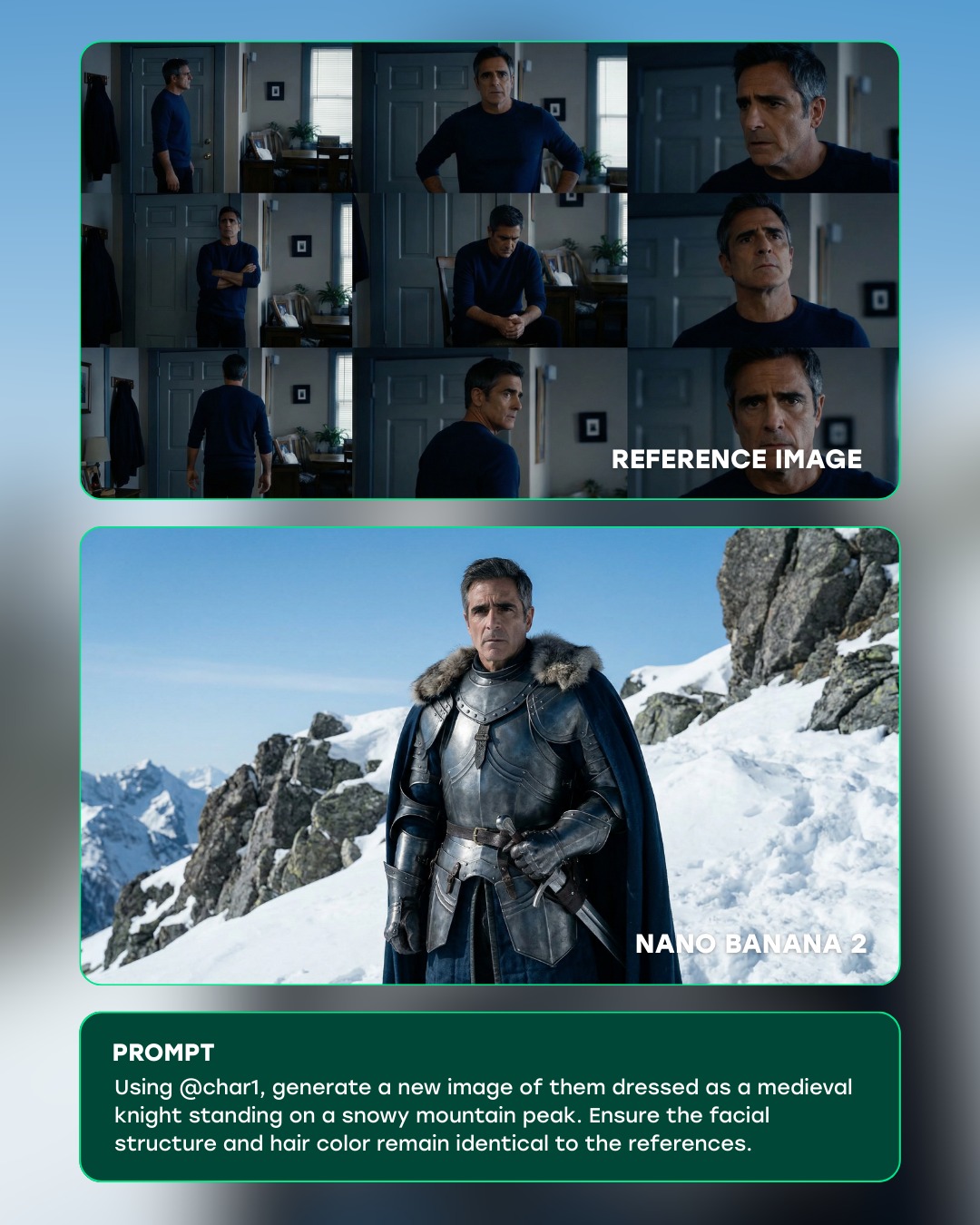
curiousrefuge: Medieval Knight Mountain Peak AI Portrait
Curious Refuge
[Subject] A three-panel AI transformation showcase featuring an older man with short salt-and-pepper hair and a serious expression, presented first as a multi-angle indoor reference sheet and then reimagined as a medieval knight in dark steel armor with a fur-trimmed cape on a snowy mountain peak.

[Environment] Clean social-post layout on a pale gradient background. Top card: a 3x3 reference collage captured inside a softly lit modern room with doors, walls, and houseplants. Middle card: cinematic fantasy result on an alpine ridge with snow, rock faces, and cold blue sky. Bottom card: a dark green prompt box displaying the instruction text used to generate the fantasy version.

[Composition/Camera] Vertical infographic composition with rounded rectangular panels and subtle teal outlines. The reference grid uses varied medium shots, side profiles, and close-ups to establish likeness. The generated knight image uses a centered waist-up portrait with the subject facing camera on a mountain slope. The prompt panel is flat, readable, and aligned beneath the output image.

[Lighting] Soft natural indoor window light in the reference sheet; crisp daylight with cool high-altitude contrast in the knight result; even graphic lighting for the text panel.

[Style/Rendering] Photoreal AI workflow board, before-and-after comparison graphic, identity-preserving character transfer demo, polished creator education asset, crisp editorial UI framing, realistic metal textures, cinematic fantasy styling.

[Detail constraints] Preserve the man''s facial structure, age, nose shape, jawline, eyebrow shape, and salt-and-pepper hair color between reference and result. Emphasize the transformation from casual navy sweater to layered medieval armor without changing identity. Keep visible labels for REFERENCE IMAGE and NANO BANANA 2. Maintain a premium tutorial-post feel rather than a meme layout.

Negative prompt: extra characters, young face swap, different hair color, beard added, fantasy helmet covering the face, messy typography, distorted hands, duplicate panels, unreadable text, low-detail armor, cartoon rendering, oversaturated lighting.

Suggested parameters: image strength 0.55, stylization 220, contrast medium, sharpness medium-high, layout guidance strong, identity preservation very high.

Delta prompt strategy:
1. If likeness drifts, restate identical facial structure and hair color from the reference sheet.
2. If armor feels generic, specify dark steel breastplate, layered pauldrons, fur collar, and heavy blue cape.
3. If the board loses its tutorial format, reinforce three stacked cards with reference, output, and prompt sections.
4. If the mountain setting becomes vague, call for snowy ridge, jagged rocks, and clear alpine sky.
5. If the model ages the subject incorrectly, specify mature middle-aged male with consistent facial lines.
6. If the prompt card disappears, require a dark green text panel with visible instruction copy.
7. If the indoor references become inconsistent, ask for a multi-angle 3x3 room collage in a navy sweater.
8. If the result becomes too stylized, request photoreal fantasy costuming with believable metal texture.
9. If labels are missing, explicitly preserve REFERENCE IMAGE and NANO BANANA 2 text overlays.
10. If composition becomes cluttered, ask for clean spacing, rounded panels, and a premium creator-post layout.
Video
A vertical creator tutorial video about achieving AI character consistency across generations and workflows. A female presenter speaks directly to the camera against a clean lavender-purple background while holding a handheld microphone and explaining a multi-step process labeled with numbered sections like #1, #2, #3, and #4. As she talks, large overlays appear showing reference portraits, facial expressions, hat variations, prompt text, interface screenshots, parameter panels, model settings, and examples from different AI tools. The video walks through how to build a consistent character, refine realism, preserve facial identity, manage textures, and combine different generation tools into one repeatable system. The mood is educational, structured, creator-friendly, and optimized for short-form AI workflow teaching.
Video
GLOBAL LOCK:
Subject is a Caucasian male in his early 30s, dark wavy hair, well-groomed medium-length beard, expressive brown eyes. He maintains a consistent facial structure across all shots. The visual style is a mix of high-end editorial photography and UGC tutorial footage. Lighting is cinematic with soft key lights and motivated rim lighting. Color grade is professional with deep blacks and vibrant but natural skin tones. Speech is clear, energetic, and instructional, delivered with a warm, authoritative tone.

[00:00–00:01]
Subject: MCU of the man wearing a dark suit, white dress shirt, black tie, and a white baseball cap with a green brim.
Action: Talking directly to the camera. A vertical white rectangular mask moves across his face, revealing a slightly different version of the same scene.
Camera: Static MCU, eye-level.
Lighting: Soft studio lighting, neutral background.
Speech: "This is how you can create..."

[00:01–00:04]
Subject: Rapid montage of AI-generated images. 
1. Man in a dark suit and sunglasses driving a green car at night, "AI MAG" text overlay.
2. Man in a checkered blazer and paisley tie in front of a brick wall.
3. Man in a white short-sleeve shirt with multiple pens in his pocket, standing in a white studio.
Action: Static editorial poses.
Camera: Various (MS, MCU).
Lighting: Cinematic, high contrast, nighttime car lighting, studio softbox.
Grade: Magazine editorial style.

[00:05–00:08]
Subject: A 3x4 grid of 12 different AI portraits of the same man in various outfits (boxing gloves, red car, street style, suit).
Action: Static images.
Overlay: Large bold text "UNLIMITED GENERATIONS" in orange and blue.
Camera: Flat grid layout.
Lighting: Varied per image.

[00:09–00:14]
Environment: Screen recording of the Higgsfield.ai website interface. A cursor moves to click "Image" then "Soul ID Character".
Action: UI navigation.
Speech: "On Higgsfield.ai, go to image and select Soul ID Character..."

[00:15–00:20]
Subject: Picture-in-picture of the man talking (wearing a tan cap and beige shirt) over a screen recording of the "Make Your Own Character" page.
Action: Explaining the process while gesturing.
Speech: "...where you can actually create your own custom character of yourself by uploading a bunch of photos."

[00:21–00:24]
Subject: Montage of AI images with text prompts.
1. Man in a suit drinking from a glass (trippy lens effect).
2. Man in a tan suit with a "Micky Mouse Bag" in a city street.
3. Man in a white tank top and jeans in front of a "Tokyo Red Car".
Action: Posing.
Camera: Full body and MS.
Lighting: Bright daylight, stylized urban lighting.

[00:25–00:34]
Environment: Screen recording of the "Lipsync Studio" interface. Subject's PIP continues.
Action: Selecting "Video", then "Lipsync Studio", uploading an image of himself at the beach, and dragging an audio file named "voiceover.wav".
Speech: "Now you can go to video at the top of the page and select the Lipsync Studio where you can upload your photo and audio..."

[00:35–00:38]
Subject: CU of the man at a tropical beach. He is shirtless, wearing black swimming goggles on his head.
Action: He is lip-syncing perfectly to the audio, smiling slightly.
Environment: Bright blue ocean water with small waves in the background.
Camera: CU, static.
Lighting: Bright, direct sunlight with natural shadows.
Speech: "...and it will combine those two together with the best lip-sync models."

NEGATIVE PROMPT:
Visual: robotic movement, distorted facial features, inconsistent beard growth, blurry textures, flickering background, extra fingers, warped UI elements, low resolution, watermarks.
Speech: robotic monotone, lip-sync delay, muffled audio, background hiss, unnatural pauses, slurred consonants, popping sounds.

SPEECH PACK:
[00:00-00:08]
Transcript: "This is how you can create 25 magazine-ready images of yourself using AI and then you can even lip-sync on top of them with this brand new feature."
TAKE_A: (Energetic, fast-paced) "This is how you can create TWENTY-FIVE magazine-ready images of yourself using AI... and then you can even LIP-SYNC on top of them with this brand new feature!"

[00:09-00:20]
Transcript: "On Higgsfield.ai, go to image and select Soul ID Character where you can actually create your own custom character of yourself by uploading a bunch of photos."
TAKE_A: (Instructional, clear) "On Higgsfield dot A-I, go to image and select Soul I-D Character... where you can actually create your own custom character of yourself... by uploading a bunch of photos."

[00:25-00:38]
Transcript: "Now you can go to video at the top of the page and select the Lipsync Studio where you can upload your photo and audio and it will combine those two together with the best lip-sync models."
TAKE_A: (Helpful, concluding) "Now you can go to video at the top of the page and select the Lipsync Studio... where you can upload your photo and audio... and it will combine those two together with the best lip-sync models."
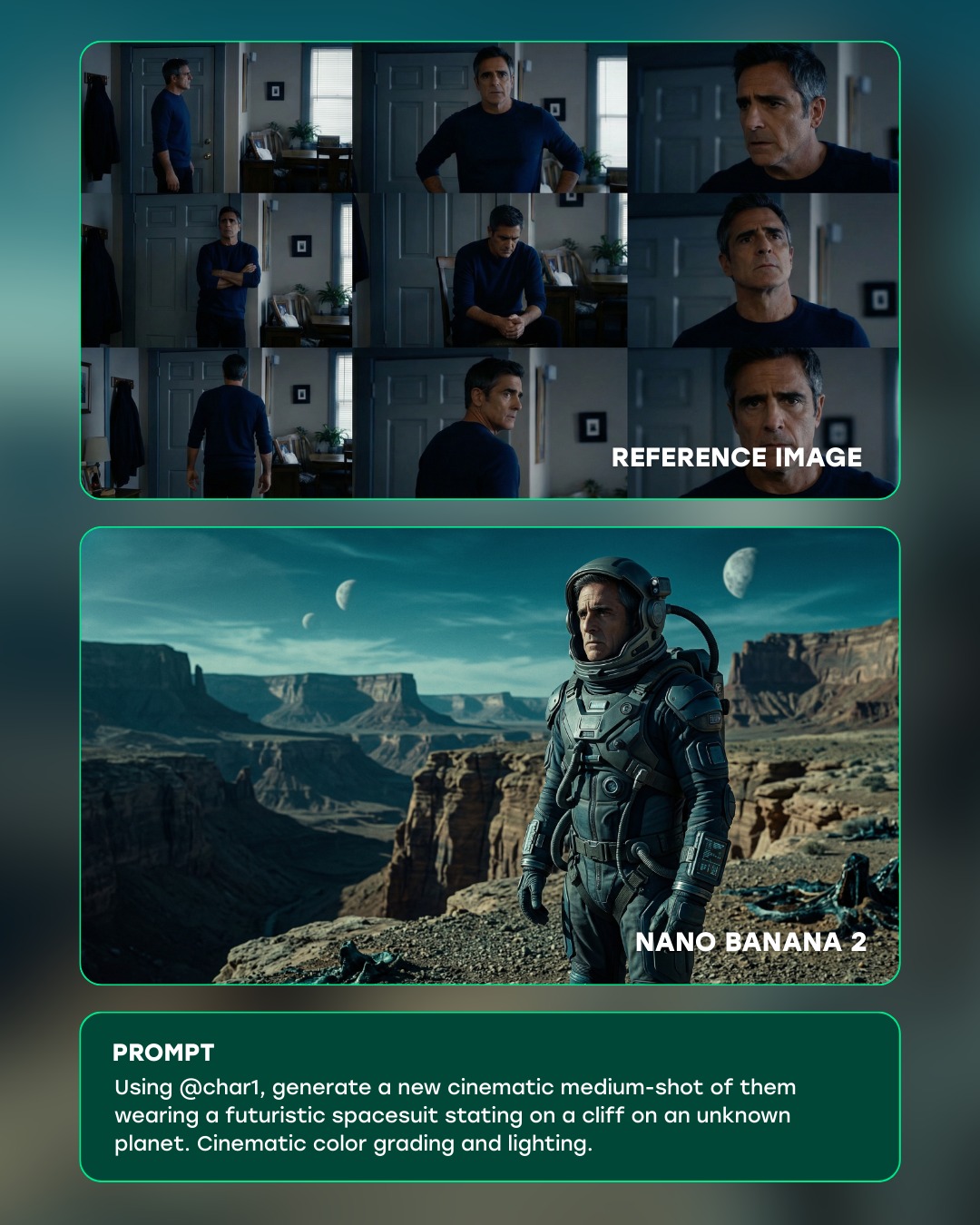
curiousrefuge: Futuristic Spacesuit Cliff Planet AI Art
Curious Refuge
[Subject] A polished social-media workflow graphic showing an AI image-generation comparison layout. In the upper panel, display a grid of reference stills featuring the same middle-aged man in a dim domestic interior, wearing a dark blue long-sleeve shirt and appearing in multiple poses and expressions. In the lower panel, show the generated cinematic result: that same man transformed into a serious astronaut standing on a rocky desert cliff in a futuristic spacesuit on an alien world. The layout should also include a prompt card at the bottom describing the transformation from reference identity into the new sci-fi shot.

[Environment] Clean teal-and-dark-green gradient UI background with rounded rectangular cards outlined in a subtle neon-teal stroke. The top card contains the labeled reference-image grid, the middle card contains the generated sci-fi scene, and the bottom card contains a dark prompt box with white text. This should feel like a premium AI tool showcase or product-demo visual, not a raw screenshot.

[Composition/Camera] Vertical infographic composition divided into three stacked sections. Top section: 3x3 reference grid with one close-up labeled β€œREFERENCE IMAGE.” Middle section: wide cinematic frame labeled β€œNANO BANANA 2,” showing the astronaut on a cliff with canyon formations and multiple moons in the sky. Bottom section: prompt text block, clearly readable, aligned like a UI instruction panel. Keep consistent rounded corners and margins between all panels.

[Lighting] Soft interface-style ambient glow around the cards, while the generated sci-fi image itself uses cinematic teal-and-sand lighting with atmospheric depth. The reference stills should remain naturalistic and lower contrast, while the output frame should look more epic, stylized, and dramatically graded.

[Style/Rendering] High-end AI product marketing graphic, clean SaaS demo design, cinematic image-generation showcase, editorial interface composition, sharp typography, polished comparison layout, and subtle futuristic UI styling.

[Detail constraints] Preserve the identity continuity between the reference man and the generated astronaut, keep the teal rounded borders intact, maintain clear hierarchy between reference, output, and prompt sections, retain the multi-moon desert canyon environment in the generated image, and avoid clutter or excessive UI chrome that would distract from the transformation concept.

Negative prompt: messy dashboard UI, unreadable text, low-resolution thumbnails, broken identity match, random icons, cluttered buttons, excessive gradients, warped astronaut anatomy, generic space background, overbusy layout, distorted typography, noisy shadows, low-detail canyon scene.

Suggested parameters: stylize 100, quality 1, aspect ratio 4:5, crisp UI layout, readable typography, cinematic output frame, subtle neon edge accents, premium product-demo finish.

Delta prompt strategy: If the layout feels chaotic, add "three clean stacked cards with rounded corners and consistent spacing." If the identity link gets lost, add "same middle-aged male facial structure preserved from reference grid to generated astronaut image." If the sci-fi output feels weak, add "cinematic medium shot of astronaut on a desert cliff with alien moons and canyon depth." If the UI looks generic, add "premium AI tool showcase with teal outlines and dark modern interface styling." If text becomes unreadable, add "large clean sans-serif labels and prompt panel with clear spacing." If the reference section dominates too much, add "reference thumbnails smaller and more subdued than the generated result." If the bottom prompt box disappears, add "dark rounded prompt card with white instructional copy." If the generated image lacks atmosphere, add "teal sky haze, canyon shadows, and cinematic color grading." If the cards lose polish, add "subtle glow edges and refined rounded-corner panel design." If the composition stops reading like a demo, add "before-and-after AI generation product mockup, not a single standalone poster."
Video
Rourke Sefton-Minns
GLOBAL LOCK:
The video features a white male creator in his mid-30s with medium-length, wavy brown hair and a groomed beard, wearing a clean white t-shirt. He is positioned in a bright home office with a professional black condenser microphone on a boom arm in the foreground. The video uses a split-screen or multi-panel layout to compare "Source Video" (the creator) with "AI Generated Results" (various celebrities and characters). The AI characters must perfectly mirror the creator's head tilt, facial expressions, lip-sync, and hand gestures. The lighting is soft, natural window light from the side. The color grade is clean and realistic.

[00:00–00:03]
The screen is split into three vertical panels. Top panel: The creator waves both hands excitedly and points to his right. Middle panel: Sabrina Carpenter in a pink feathered dress mimics the exact hand wave and pointing. Bottom panel: Billie Eilish in a black outfit and sunglasses mimics the same gestures. High-fidelity lip-sync as they all say "Hear me out."

[00:03–00:07]
The layout shifts. Top panel: Creator continues talking with expansive hand gestures. Middle panel: Taylor Swift in a red dress mimics the gestures. Bottom panel: Kim Kardashian in a black tank top mimics the gestures. The transitions between characters are sharp cuts.

[00:07–00:10]
Split screen: Creator (top) vs. Queen Elizabeth II (bottom). The creator looks to his left and then back to the camera with a skeptical expression. The Queen, wearing a crown and sash, mirrors the look perfectly.

[00:10–00:13]
Split screen: Creator (top) vs. Edna Mode from The Incredibles (bottom). The creator scratches the top of his head with his right hand. Edna Mode, with her signature bob and glasses, scratches her head in perfect sync.

[00:13–00:20]
A screen recording of a software interface (Enhancor). A cursor selects the "Wan2.2" model from a dropdown menu. The UI shows a "Source Video" of the creator and a "Character Image" of a woman. The cursor toggles "Pro Mode" on and adjusts resolution to 720p.

[00:20–00:23]
Split screen: Creator (top) vs. a woman with long brown hair in a floral dress (bottom). They are both in the same room. The creator raises his hands in a "stop" gesture; the woman mirrors him perfectly.

[00:23–00:27]
The UI returns, showing the "Photo Animate" tab being selected. A different reference photo of the same woman is used. The cursor clicks "Generate Video."

[00:27–00:35]
Final comparison. Split screen: Creator (top) vs. the woman (bottom). The creator looks around the room and then smiles at the camera while touching his hair. The woman mirrors the hair-touching and the smile, but her background is now a different indoor setting matching her reference photo. The text "AI" appears centered on the screen.

NEGATIVE PROMPT:
Visual: flickering faces, distorted limbs, extra fingers, blurry textures, face-swapping artifacts, unnatural skin smoothing, background warping, robotic movements, low resolution, watermarks.
Speech: robotic voice, mismatched lip-sync, muffled audio, background noise, unnatural pauses, clipping audio.

SPEECH PACK:
[00:00–00:07]
Transcript: "Hear me out, all of your favorite movies and animations are going to be completely acted out by someone else in the next two years."
TAKE_A: Energetic, fast-paced, direct-to-camera.
TAKE_B: Mysterious, slightly slower, emphasizing "completely."
TAKE_C: Casual, conversational, like a friend sharing a secret.

[00:07–00:13]
Transcript: "So I'm going to teach you everything you need to know about this in the next 20 seconds so that you can do this for yourself and stay ahead of the curve."
TAKE_A: Authoritative, instructional, rhythmic.
TAKE_B: Helpful, warm, encouraging.
TAKE_C: Urgent, fast-talking to fit the "20 seconds" claim.

[00:13–00:35]
Transcript: "So right now you have two options with this new AI video model called Wan 2.2. The first option is Character Swap... The second option is Photo Animate... This is absolutely mind-blowing. Comment AI for the link."
TAKE_A: Professional narrator style, clear enunciation.
TAKE_B: Enthusiastic, high energy on "mind-blowing."
TAKE_C: Calm, tech-reviewer tone, clear CTA at the end.
Video
Adriana Bubori
GLOBAL LOCK:
The presenter is a Caucasian woman in her mid-30s with long, straight blonde/light brown hair. She wears a dark brown sleeveless turtleneck top. The setting is a minimalist room with a large abstract painting in beige and blue tones behind her. She sits at a light-colored wooden table. The lighting is soft, natural, and high-key. The AI-generated model is a Caucasian woman with dark hair, green eyes, and an oval face, wearing an olive green suit. The overall color grade is warm, neutral, and editorial.

[00:00–00:03]
The presenter is in a medium close-up, speaking directly to the camera with expressive hand gestures. Large white bold text overlays: "this is how" then "consistent images" then "with a model". The camera is static.

[00:03–00:05]
Full-screen title card. Background is a solid muted brown. Large white text: "Step 1" with a small icon of a model's face, and "Generate Close-up" below it.

[00:05–00:10]
Back to the presenter in MCU. She holds up a virtual white card showing a high-detail close-up of the AI model's face. Small text labels with lines point to the face: "green eyes", "dark hair", "full lips", "oval-shaped". She is explaining the importance of facial details.

[00:10–00:15]
Full-screen title card. Muted brown background. Text: "Step 2" with an icon of a suit, and "Define Outfit" below it. Transition to a quick shot of the presenter talking with a screenshot of an AI prompt interface showing an olive green suit.

[00:15–00:18]
Full-screen title card. Muted brown background. Text: "Step 3" with a grid icon, and "Lock Identity" below it.

[00:18–00:24]
The presenter is in MCU, talking. A large grid of 9 images overlays the screen, showing the AI model in the olive green suit from various angles and with different facial expressions (smiling, serious, looking away). Text "different angles" and "different facial" overlays the grid.

[00:24–00:28]
Full-screen cinematic shots of the AI model. Shot 1: The model sitting on the floor in the olive suit, looking at the camera. Shot 2: A closer shot of the model sitting, hand on chin. Text "for any" and "you're going to generate" overlays these shots.

[00:28–00:32]
Back to the presenter in MCU. She gestures towards the camera. A black pill-shaped button with the "invideo" logo appears. Finally, a white text box with "comment MODEL" appears at the top. She is giving the final call to action.

NEGATIVE PROMPT:
Visual: blurry faces, inconsistent eye color, distorted limbs, flickering background, low resolution, messy hair, unrealistic skin texture, text watermarks, logos on clothing.
Speech: robotic tone, monotone delivery, background noise, muffled audio, lip-sync mismatch, long awkward pauses, stuttering.

SPEECH PACK:
[00:00-00:03]
Transcript: "This is how to generate consistent images with a model with AI."
TAKE_A: (Energetic, fast-paced) "This is how to generate consistent images with a model with AI!"
TAKE_B: (Authoritative, measured) "This is how... you generate consistent images... with a model... using AI."
TAKE_C: (Friendly, helpful) "Here is exactly how to get consistent images of your AI model."

[00:05-00:10]
Transcript: "First, generate a close-up of your model to capture all the facial details."
TAKE_A: "Step one: generate a close-up of your model to lock in those facial details."
TAKE_B: "First, you need a high-res close-up... to capture every single facial detail."

[00:28-00:32]
Transcript: "And you can do all of this in one single tool, InVideo. Comment MODEL and I'll send you the link."
TAKE_A: "Do it all in one tool: InVideo. Just comment MODEL for the full process!"
TAKE_B: "Everything happens in InVideo. Comment the word MODEL and I'll DM you the link right now."

PROSODY NOTES:
- Emphasis on "consistent" (00:01)
- Pause after "Step 1" (00:03)
- Rising intonation on "Comment MODEL" (00:30)
- Clear, crisp enunciation throughout.
Video
GLOBAL LOCK: A consistent female subject, Caucasian, early 20s, shoulder-length messy blonde/light-brown hair, natural makeup, wearing a simple black tank top. The environment is a minimalist studio with a dark grey, out-of-focus background. Lighting is soft-box studio style, creating gentle highlights on the face. The video is a split-screen comparison with a vertical white slider line moving across the frame.

[00:00–00:03]
The subject is framed in a medium close-up, centered. On the left side of the vertical slider, her skin appears slightly too smooth and "AI-generated." On the right side, the skin is hyper-realistic with visible pores and natural texture. The slider is positioned on the far left. The subject remains static with a neutral, calm expression, looking directly at the camera.

[00:03–00:07]
The vertical white slider line moves steadily from the left edge of the frame to the right edge. As it passes over the subject's face, the "smooth" skin on the left is replaced by "hyper-textured" skin on the right. The transition is sharp and follows the slider line exactly. The subject's hair and clothing remain perfectly consistent across the transition.

[00:07–00:10]
The slider reaches the right side of the frame, revealing the fully enhanced, realistic face. The subject maintains her neutral gaze. The lighting remains constant, emphasizing the newly revealed skin texture, fine lines, and realistic highlights on the nose and forehead. The video loops seamlessly back to the start.

NEGATIVE PROMPT: blurry, distorted facial features, inconsistent hair movement, flickering lighting, plastic-looking skin on the "after" side, unnatural eye reflections, jittery slider movement, low resolution, watermarks, text artifacts on the subject.

SPEECH PACK:
(No speech present in the original video; it relies on text overlays and background music.)
TRANSCRIPT: [Background Music Only]
TAKE_A: N/A
TAKE_B: N/A
TAKE_C: N/A
PROSODY: N/A
SYNC: N/A

AI Character Generator

AI character generator content becomes genuinely useful when it treats the character as more than a single nice image. The creator searching this topic usually has a larger project in mind: a game world, a tabletop campaign, a webcomic cast, or an original story that needs people who feel distinct from one another. That is why the strongest examples on this page should help you judge identity, role, outfit logic, and visual repeatability instead of only surface beauty.

The best character workflows also leave room for expansion. A strong starting image should make it easier to imagine alternate poses, costume variants, and side or back views later. When you compare examples here, focus on how clearly the design communicates who the character is and whether that design feels sturdy enough to carry through a bigger creative project.

FAQ

What is an AI character generator best for?

It is best for original characters in stories, games, comics, and tabletop projects where identity and visual distinction matter more than polished portrait glamour.

How is this different from an avatar generator?

An avatar usually serves a personal profile. A character generator is more about fictional design, worldbuilding, and building a cast that feels visually intentional.

Can AI help with character sheets?

Yes. Many creators use character generation to build a first strong design that can later be expanded into alternate poses, expressions, and outfit variations.

What should I compare on this page?

Look for examples with clear silhouette, role-specific styling, and enough design logic that the character could survive multiple scenes instead of only one lucky image.