AI selfie generator pages are for people who want an image that feels like a casual self-taken photo, not a formal portrait or a fully illustrated avatar. The selfie format suggests a close-up, slightly informal frame with natural or lifestyle backgrounds and a personal point of view. This page helps you compare selfie-style directions that feel more relaxed, more recognizable, and easier to use for creative experiments or profile images.

Video
WORKFLOW
A) MISE EN PLACE
1) Segment the video into scenes/shots:
- [00:00–00:05] Single continuous shot (A composite split-screen showing two distinct scenes simultaneously).

2) Extract visual evidence:
- Keyframes: 0s, 2s, 4s.
- Left Panel: Caucasian woman, early 30s, blonde hair in a messy ponytail, wearing a mustard-yellow zip-up bomber jacket over a black top. Sitting outdoors at a cafe, daylight, string lights in the blurred background. She is laughing.
- Right Panel: Same woman, identical hair and wardrobe. Sitting indoors at a bar, warm directional lighting, amber bokeh in the background. She is holding a pint glass of beer and taking a sip.
- Overlays: White sans-serif text at the top and bottom.

3) Extract speech evidence:
- No speech. Audio is likely a trending BGM track.

4) Create an "invariants list" (LOCK THESE):
- visuals: The split-screen layout (left/right). The exact appearance of the woman (facial features, blonde ponytail, mustard jacket, black shirt). The static camera framing (MCU) on both sides. The text overlays.
- speech: N/A.

5) Create a "variables list" (TWEAK THESE):
- visuals: The micro-expressions of the laugh on the left. The liquid movement inside the beer glass on the right. The subtle background motion (patrons, bokeh shimmer).

B) SHOTLIST
- shot_id: 1
- timecode_start: 00:00
- timecode_end: 00:05
- duration: 5s
- framing: Split-screen. Both sides are Medium Close-Up (MCU), eye-level camera.
- lens: 50mm equivalent feel, shallow depth of field, creamy bokeh on both sides.
- camera movement: Static on both sides.
- subject: Left: Laughing naturally, slight shoulder movement. Right: Bringing a beer glass to her lips, taking a sip, maintaining eye contact.
- environment: Left: Outdoor cafe, daytime. Right: Indoor bar, evening.
- lighting: Left: Soft, overcast natural daylight. Right: Warm, moody practical lights, directional key light on the face.
- color grade: Warm overall tint, high contrast between the cool/neutral left and the amber/orange right.
- motion cues: Left: Subtle hair movement in the breeze. Right: Liquid dynamics in the glass.
- SPEECH / AUDIO:
  - speech_present: false

C) STYLE BIBLE
- visual_style: Cinematic UGC / High-end lifestyle B-roll.
- camera_signature: Locked-off tripod feel, shallow depth of field to isolate the subject.
- lighting_signature: Motivated lighting (natural outdoors vs. practical indoors).
- grade_signature: Warm, filmic, rich skin tones, vibrant mustard yellow.
- texture_signature: Photorealistic, sharp subject with soft, pleasing background blur.
- pacing_signature: Slow, deliberate motion suitable for looping.

D) PROMPT SYNTHESIS

MASTER PROMPT
GLOBAL LOCK: A vertical 9:16 split-screen video divided exactly down the middle. On both sides, the exact same subject is featured: a 30-year-old Caucasian woman with blonde hair pulled back into a messy ponytail, wearing a distinctive mustard-yellow zip-up bomber jacket over a black t-shirt. The camera is static on both sides, framed as a Medium Close-Up (MCU) with a shallow depth of field. The top of the video features bold white sans-serif text: "STEP 5: ANIMATE YOUR VIDEOS AS B-ROLL OR TALKING HEAD VIDEOS". The bottom features text: "Animate using Google Veo 3.1 for perfect lip sync or Kling 2.6 Pro for smooth cinematic clips."

[00:00–00:05] The video plays as a continuous 5-second loop. 
ON THE LEFT SIDE: The woman is sitting at an outdoor cafe table during the day. The lighting is soft, natural daylight. The background is blurred, showing outdoor seating and string lights. She is looking directly at the camera, smiling broadly and laughing naturally, with subtle, realistic head and shoulder movements. 
ON THE RIGHT SIDE: The woman is sitting at an indoor bar. The lighting is warm, moody, and directional, casting a soft glow on her face. The background features rich, amber bokeh from pendant lights. She is holding a clear pint glass filled with beer. She slowly brings the glass to her mouth, takes a sip, and lowers it slightly, maintaining steady eye contact with the camera throughout the motion. The liquid in the glass moves realistically. Both sides play simultaneously in a photorealistic, cinematic style.

NEGATIVE PROMPT
morphing, warping, inconsistent facial features, changing clothes, different person on left and right, bad anatomy, extra fingers, distorted glass, floating objects, unnatural lighting, plastic skin texture, jittery motion, flickering text, spelling errors in text overlays.

SPEECH PACK
No speech present in the reference video.
Video
GLOBAL LOCK:
Subject is a Caucasian male in his early 30s, dark wavy hair, well-groomed medium-length beard, expressive brown eyes. He maintains a consistent facial structure across all shots. The visual style is a mix of high-end editorial photography and UGC tutorial footage. Lighting is cinematic with soft key lights and motivated rim lighting. Color grade is professional with deep blacks and vibrant but natural skin tones. Speech is clear, energetic, and instructional, delivered with a warm, authoritative tone.

[00:00–00:01]
Subject: MCU of the man wearing a dark suit, white dress shirt, black tie, and a white baseball cap with a green brim.
Action: Talking directly to the camera. A vertical white rectangular mask moves across his face, revealing a slightly different version of the same scene.
Camera: Static MCU, eye-level.
Lighting: Soft studio lighting, neutral background.
Speech: "This is how you can create..."

[00:01–00:04]
Subject: Rapid montage of AI-generated images. 
1. Man in a dark suit and sunglasses driving a green car at night, "AI MAG" text overlay.
2. Man in a checkered blazer and paisley tie in front of a brick wall.
3. Man in a white short-sleeve shirt with multiple pens in his pocket, standing in a white studio.
Action: Static editorial poses.
Camera: Various (MS, MCU).
Lighting: Cinematic, high contrast, nighttime car lighting, studio softbox.
Grade: Magazine editorial style.

[00:05–00:08]
Subject: A 3x4 grid of 12 different AI portraits of the same man in various outfits (boxing gloves, red car, street style, suit).
Action: Static images.
Overlay: Large bold text "UNLIMITED GENERATIONS" in orange and blue.
Camera: Flat grid layout.
Lighting: Varied per image.

[00:09–00:14]
Environment: Screen recording of the Higgsfield.ai website interface. A cursor moves to click "Image" then "Soul ID Character".
Action: UI navigation.
Speech: "On Higgsfield.ai, go to image and select Soul ID Character..."

[00:15–00:20]
Subject: Picture-in-picture of the man talking (wearing a tan cap and beige shirt) over a screen recording of the "Make Your Own Character" page.
Action: Explaining the process while gesturing.
Speech: "...where you can actually create your own custom character of yourself by uploading a bunch of photos."

[00:21–00:24]
Subject: Montage of AI images with text prompts.
1. Man in a suit drinking from a glass (trippy lens effect).
2. Man in a tan suit with a "Micky Mouse Bag" in a city street.
3. Man in a white tank top and jeans in front of a "Tokyo Red Car".
Action: Posing.
Camera: Full body and MS.
Lighting: Bright daylight, stylized urban lighting.

[00:25–00:34]
Environment: Screen recording of the "Lipsync Studio" interface. Subject's PIP continues.
Action: Selecting "Video", then "Lipsync Studio", uploading an image of himself at the beach, and dragging an audio file named "voiceover.wav".
Speech: "Now you can go to video at the top of the page and select the Lipsync Studio where you can upload your photo and audio..."

[00:35–00:38]
Subject: CU of the man at a tropical beach. He is shirtless, wearing black swimming goggles on his head.
Action: He is lip-syncing perfectly to the audio, smiling slightly.
Environment: Bright blue ocean water with small waves in the background.
Camera: CU, static.
Lighting: Bright, direct sunlight with natural shadows.
Speech: "...and it will combine those two together with the best lip-sync models."

NEGATIVE PROMPT:
Visual: robotic movement, distorted facial features, inconsistent beard growth, blurry textures, flickering background, extra fingers, warped UI elements, low resolution, watermarks.
Speech: robotic monotone, lip-sync delay, muffled audio, background hiss, unnatural pauses, slurred consonants, popping sounds.

SPEECH PACK:
[00:00-00:08]
Transcript: "This is how you can create 25 magazine-ready images of yourself using AI and then you can even lip-sync on top of them with this brand new feature."
TAKE_A: (Energetic, fast-paced) "This is how you can create TWENTY-FIVE magazine-ready images of yourself using AI... and then you can even LIP-SYNC on top of them with this brand new feature!"

[00:09-00:20]
Transcript: "On Higgsfield.ai, go to image and select Soul ID Character where you can actually create your own custom character of yourself by uploading a bunch of photos."
TAKE_A: (Instructional, clear) "On Higgsfield dot A-I, go to image and select Soul I-D Character... where you can actually create your own custom character of yourself... by uploading a bunch of photos."

[00:25-00:38]
Transcript: "Now you can go to video at the top of the page and select the Lipsync Studio where you can upload your photo and audio and it will combine those two together with the best lip-sync models."
TAKE_A: (Helpful, concluding) "Now you can go to video at the top of the page and select the Lipsync Studio... where you can upload your photo and audio... and it will combine those two together with the best lip-sync models."
Video
GLOBAL LOCK:
Subject: A Caucasian woman in her late 20s, blonde hair tied in a neat ponytail, wearing a leopard-print (cheetah pattern) blouse.
Environment: A cozy home studio/office background with dark grey walls, wooden bookshelves filled with books, green indoor plants, and soft dual-tone lighting (warm orange light from one side, cool blue light from the other).
Camera: MCU (Medium Close-Up) framing, eye-level, 35mm lens feel with shallow depth of field.
Style: Professional UGC creator aesthetic, high-quality video, crisp audio.
Speech: Direct-to-camera delivery, energetic and authoritative tone.

[00:00–00:05]
Visual: Rapid montage of extreme macro close-ups (ECU). First, a human eye with visible iris patterns and eyelashes. Second, an ear with a gold hoop earring showing skin texture. Third, a wrist with a simple black line tattoo showing skin pores and fine hairs.
Action: Static macro shots.
Lighting: Bright, natural daylight feel for the macros.
Text Overlay: "most AI" -> "look fake" -> "because" -> "is trained".
Speech: "Most AI images look fake for one reason. Because AI is trained to remove flaws."

[00:05–00:11]
Visual: The woman (Subject) in the MCU studio setting, gesturing with her hands. Floating icons of AI tools (ChatGPT, Freepik, Ideogram, Nano Banana) appear around her.
Action: Subject talks directly to the camera, moving hands to emphasize points.
Lighting: Studio setup (Orange/Blue).
Text Overlay: "need" -> "AI tools" -> "to prompt".
Speech: "But we don't need better AI tools. We just need to prompt the model to create images that actually look real."

[00:11–00:21]
Visual: Transition to a black screen with white text titled "Master Prompt". The text scrolls or highlights specific sections. Then, a split screen showing the woman talking in a small window and the prompt text in a larger window.
Action: Subject continues talking while the prompt text is displayed.
Lighting: Studio setup for the talking head.
Text Overlay: "to create" -> "that actually" -> "look real".
Speech: "The key to realistic AI images is using a prompt with a specific structure. This prompt should force skin detail, including visible pores, uneven tone, and natural imperfections."

[00:21–00:30]
Visual: Montage of AI-generated faces with high realism. A man's face with stubble and pores, a woman's face with freckles and slight redness. Then, a screen recording of the Freepik interface showing a gallery of realistic portraits.
Action: Fast cuts between the portraits and the UI.
Lighting: Varied, matching the generated images.
Text Overlay: "most people start" -> "make" -> "image".
Speech: "Most people start their prompt with 'make a realistic image of'. I start by telling the model how the camera behaves."

[00:30–00:42]
Visual: Screen recording of a prompt being typed into a text box. Keywords like "iPhone 14 Pro", "handheld framing", and "imperfect composition" are highlighted in yellow.
Action: Scrolling through the prompt text.
Lighting: Digital UI.
Text Overlay: "model that" -> "camera behaves" -> "casual hand" -> "imperfect composition".
Speech: "Casual handheld framing, slightly imperfect composition, and a smartphone camera perspective. This alone already breaks the AI look."

[00:42–00:52]
Visual: The woman back in the MCU studio setting. She gestures toward floating app icons for "Enhancor" and "Higsfield". A screen recording shows a "Skin Enhancer" tool being used on a photo of a woman with goggles.
Action: Subject explains the final step.
Lighting: Studio setup.
Text Overlay: "But Most People Stop There" -> "Final Step" -> "Most Creators Are Gatekeeping".
Speech: "But most people stop there. I use a final step that most creators are gatekeeping. I run each image through a final skin enhancement step using Enhancor or Higsfield."

[00:52–01:00]
Visual: The woman in MCU, pointing down toward a text box that says "Comment GUIDE". A final zoom-out effect or a slight blur transition.
Action: Subject smiles and points.
Lighting: Studio setup.
Text Overlay: "Prompt Structure" -> "Workflow" -> "Comment GUIDE".
Speech: "If you want my exact prompt structure and the full workflow, just comment GUIDE and I'll send it over."

NEGATIVE PROMPT:
Smooth skin, plastic texture, perfect symmetry, airbrushed look, 6 fingers, distorted eyes, watermark, logo, blurry background (unless specified), robotic voice, lip-sync lag, harsh sibilance, flickering lights, low resolution.

SPEECH PACK:
[00:00-00:05] "Most AI images look fake for one reason. Because AI is trained to remove flaws."
[00:05-00:11] "But we don't need better AI tools. We just need to prompt the model to create images that actually look real."
[00:11-00:21] "The key to realistic AI images is using a prompt with a specific structure. This prompt should force skin detail, including visible pores, uneven tone, and natural imperfections."
[00:21-00:30] "Most people start their prompt with 'make a realistic image of'. I start by telling the model how the camera behaves."
[00:30-00:42] "Casual handheld framing, slightly imperfect composition, and a smartphone camera perspective. This alone already breaks the AI look."
[00:42-00:52] "But most people stop there. I use a final step that most creators are gatekeeping. I run each image through a final skin enhancement step."
[00:52-01:00] "If you want my exact prompt structure and the full workflow, just comment GUIDE and I'll send it over."
Video
Create a vertical 9:16 futuristic AI product-promo visual centered on a hyper-realistic fashion portrait of a young woman with slicked-back hair, pale skin, blue-grey eyes, and bold matte red lipstick, wearing a reflective chrome silver high-collar outfit in a bright metallic environment filled with iridescent foil-like textures. Behind her, large bold yellow text reads Meta AI, integrated like a clean social-ad headline. The image should feel like a premium generative-AI campaign frame promoting free image generation and AI lip sync tools, combining polished beauty-editorial realism with tech branding. Keep the composition crisp, symmetrical, high contrast, and optimized for short-form creator marketing. No extra clutter, no subtitles, no cartoon styling, no unrelated props.
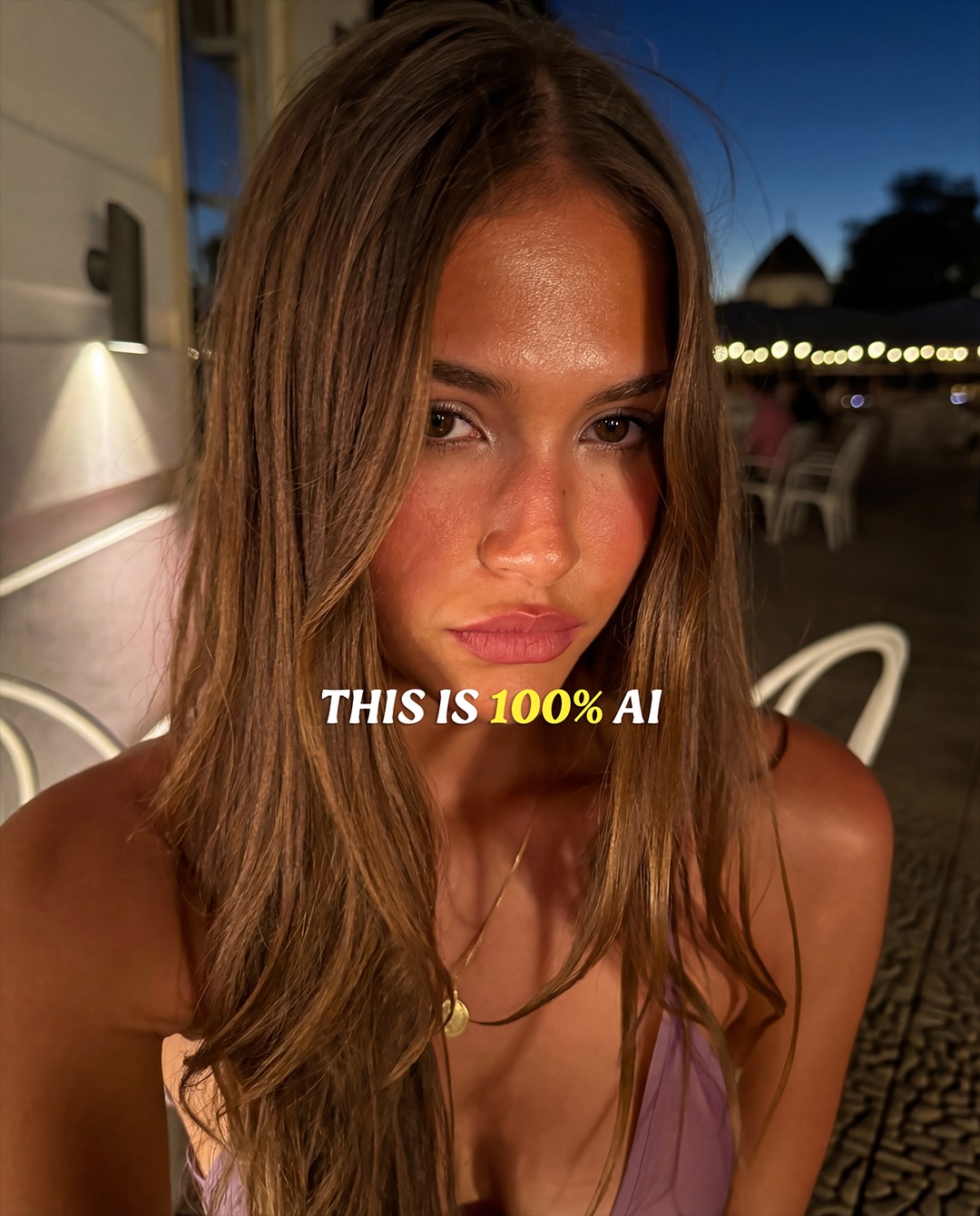
by.shlabu: Nighttime Outdoor Portrait AI Art
51 posts
[Subject]
A close-up portrait of a young woman with long loose brown hair, warm bronzed skin, softly defined lips, direct gaze, and a calm slightly intense expression, wearing a delicate lilac spaghetti-strap top and a small gold necklace.

[Environment]
The portrait is captured outdoors at dusk or early night in a restaurant or terrace setting, with white chairs, a softly lit wall sconce, cobblestone ground, and a row of warm string lights fading into the background under a deep blue evening sky.

[Composition/Camera]
Tight chest-up portrait, subject centered and leaning slightly forward toward the camera, vertical social-media framing, shallow depth of field, background softly blurred, direct eye contact emphasized, intimate front-camera or handheld portrait distance.

[Lighting]
Warm direct flash or strong frontal fill illuminates the face and shoulders, creating glossy highlights on the forehead, cheeks, and nose, while the background remains dim with warm practical lights and cool twilight ambient contrast.

[Style/Rendering]
Photorealistic nightlife lifestyle portrait, polished social-media beauty image, realistic skin texture with subtle sheen, casual luxury vacation mood, crisp smartphone-like sharpness, cinematic warm-versus-cool color separation.

[Detail constraints]
Keep the expression composed rather than smiling, preserve the natural hair strands framing the face, retain the warm skin glow, keep the necklace small and understated, maintain the terrace context with lights and chairs softly blurred, avoid studio polish, avoid excessive retouching, avoid editorial costume styling.

Negative prompt
studio backdrop, heavy beauty smoothing, plastic skin, exaggerated makeup, harsh contouring, extra jewelry, sunglasses, multiple people in focus, daytime sky, cluttered background, cartoon rendering, distorted facial proportions, watermark, text overlay, fashion runway styling

Suggested parameters
- Model: photoreal portrait / nightlife lifestyle capable model
- Aspect ratio: 4:5 or 3:4
- Stylization: low
- Guidance: 6.5-8
- Lighting priority: direct warm flash with dim ambient background
- Color contrast: warm skin tones against cool evening sky

Delta prompt strategy
1. If the face looks over-retouched, add: “preserve realistic skin texture, pores, and natural shine from direct flash.”
2. If the background becomes too sharp, add: “push the terrace lights and chairs into soft evening bokeh.”
3. If the lighting loses mood, add: “keep warm frontal flash on the subject against a cool dusk-blue background.”
4. If the pose feels stiff, add: “use a slight forward lean and relaxed shoulder angle for intimate camera presence.”
5. If the expression becomes too cheerful, add: “keep the mouth neutral and the gaze calm, direct, and self-possessed.”
6. If the hair feels too perfect, add: “allow loose natural strands to fall around the face and shoulders.”
7. If the setting reads as studio, add: “retain visible outdoor terrace cues such as wall light, string lights, and patio seating.”
8. If the skin tone looks flat, add: “restore warm bronzed highlights on cheeks, forehead, and collarbone.”
9. If the wardrobe takes over, add: “keep clothing minimal and secondary to the face.”
10. If the image lacks social-media realism, add: “preserve handheld portrait spontaneity with believable flash-lit nightlife atmosphere.”
Video
A vertical creator tutorial video about achieving AI character consistency across generations and workflows. A female presenter speaks directly to the camera against a clean lavender-purple background while holding a handheld microphone and explaining a multi-step process labeled with numbered sections like #1, #2, #3, and #4. As she talks, large overlays appear showing reference portraits, facial expressions, hat variations, prompt text, interface screenshots, parameter panels, model settings, and examples from different AI tools. The video walks through how to build a consistent character, refine realism, preserve facial identity, manage textures, and combine different generation tools into one repeatable system. The mood is educational, structured, creator-friendly, and optimized for short-form AI workflow teaching.
Video
GLOBAL LOCK: A vertical 9:16 creator-marketing Reel, approximately 33 seconds, built around one recurring host and a dark-mode AI character-generation interface. Keep three visual layers consistent across the whole video: (1) the host, a white male in his late 20s to early 30s with side-parted brown hair, slim build, expressive face, clean-shaven, wearing a fitted off-white knit sweater and speaking into a matte-black desktop microphone, lit by a warm amber key and soft vignetted studio background; (2) stylized portrait outputs of the same handsome male AI character, usually white, early 20s to early 30s, chiseled jaw, thick dark hair, slim-athletic build, shown in different fashion/editorial presets such as city streetwear, convenience-store candid, studio portrait, tank-top fashion, foggy road noir, cowboy desert, and black-and-white urban scenes; (3) Higgsfield.ai interface captures in dark mode featuring the Character section, Higgsfield Soul 2.0 highlighted in the left model list, a grid of example source faces, preset tiles labeled Editorials, Fashion, Street Photography, Double exposure, a bright lime-green Generate button with a coin cost indicator, and an Animate button on selected outputs. The pacing must stay aggressive and social-native with a new visual beat every one to two seconds, strong contrast between warm host footage and colder generated sample cards, crisp UI sharpness, black/charcoal backgrounds, neon-lime accent labels, and one energetic male speaker throughout with close-mic, dry, high-intelligibility audio. Lips are visible during all host sections and sync must feel tight.

[00:00-00:03] Start on a dark background with bold white uppercase text reading STOP DOING THIS, flanked by red X marks. Under the headline, show generic AI male portrait samples: first a black-coat city street shot, then a casual black sweater portrait, then another generic urban fashion image. The host appears in a rounded rectangle at the bottom, urgently raising one hand toward camera as if interrupting the viewer. Audio: same male host delivers a sharp pattern-break hook telling viewers to stop making the same boring AI character photos.

[00:03-00:07] Cut between the host in warm studio close-up and more bland sample outputs: a crouched white-sweater studio pose, a convenience-store fashion portrait with bomber jacket and bow tie, another convenience-store variation. The host points upward with both index fingers while speaking quickly. Camera on the host remains static medium close-up with 35mm to 50mm lens feel, shallow depth, warm amber falloff. Audio: one speaker, emphatic, corrective tone, lips fully visible.

[00:07-00:11] Introduce stronger preset-driven examples. Show a clean editorial portrait card labeled Editorials, then a Fashion preset with a white ribbed tank top, then Street Photography over a bright outdoor male portrait, then Double exposure with a grayscale silhouette overlay. Each sample occupies the upper two-thirds while the host continues in the lower panel. The transition rhythm should feel like flipping through creative options rather than a tutorial menu. Audio: host pivots from criticism to the better alternative.

[00:11-00:14] Briefly isolate the Higgsfield.ai logo on a dark bar, then cut to the platform interface. Show the Character tab area with Soul 2.0 in the model list highlighted and the host below continuing to explain. Use dark graphite UI, lime-green badges, and readable white text. Audio: same speaker names the tool and frames it as an easier route to ultra-realistic character creation.

[00:14-00:18] Show a grid of source reference portraits inside the character workflow: multiple male selfies and studio shots, the cursor hovering over them as if choosing a base identity. Host remains bottom-center, speaking calmly but with momentum. Emphasize that one character identity can be turned into many outputs. Audio: host explains consistency and customization, crisp consonants, no background reverb.

[00:18-00:21] Cut to a full-height preset card of a standing male figure against a white seamless with a lime Presets label, then to the generation composer showing a dark prompt box, a character token or preset mention, and a lime Generate button with a coin cost. Cursor movement should imply that generation is about to happen. Audio: host explains that the system can create polished images in a couple of clicks.

[00:21-00:24] Reveal generated outputs in different environments: a dark cinematic portrait of a bespectacled man, a convenience-store streetwear shot with Presets badge, and an outdoor coastal portrait with Animate highlighted in lime. The host gestures with one hand as if listing options. Color shifts between cool storefront daylight, neutral portrait lighting, and warm natural outdoor scenes while the UI frame stays dark.

[00:24-00:28] Expand the sample range further with a foggy road full-body shot in a long black coat, a desert cowboy standing in front of a stepped stone structure, and a top-down tank-top fashion portrait. These three outputs should feel dramatically different in location and styling while keeping premium realism and the same polished character aesthetic. Audio: same male narrator sells variety, speed, and realism for creators.

[00:28-00:31] Tighten into darker cinematic portraits: a serious close-up male face against a charcoal backdrop, then a black-and-white street portrait with overlaid CTA text Comment "AI", then a fashion portrait with the same CTA treatment. Keep typography large, bold, white, and lime-yellow, centered over the images. The host points upward from the bottom frame to reinforce the CTA timing.

[00:31-00:33] End on another fast CTA repetition using the strongest portrait samples while the host lands the final line. Maintain the warm studio box below, sharp microphone silhouette, and dark premium brand palette. Audio: one male speaker, punchy final comment-gate instruction, no fade, no music swell overpowering the words.

NEGATIVE PROMPT: avoid identity drift between generated male portraits, avoid uncanny skin texture, avoid distorted eyes or asymmetrical jawlines, avoid over-smoothed plastic faces, avoid broken hands in host gestures, avoid unreadable UI labels, avoid cluttered text overlays beyond STOP DOING THIS and Comment "AI", avoid fake logos, avoid low-resolution preset cards, avoid inconsistent sweater color on the host, avoid muddy shadows on the warm studio shot, avoid robotic speech, lip-sync mismatch, clipped peaks, harsh sibilance, or over-compressed voice.
Video
GLOBAL LOCK: 
Subject identity must transition from high-profile celebrities to a consistent female creator. 
Celebrity segment: Chris Hemsworth (Caucasian male, short blonde hair, beard, black suit), Sydney Sweeney (Caucasian female, blonde hair, red lipstick, black dress), Timothée Chalamet (Caucasian male, curly brown hair, black blazer), Zendaya (African-American/Caucasian female, slicked back hair, silver choker). 
Creator segment: Caucasian female, mid-20s, wavy light brown hair, wearing a beige/cream blazer over a ribbed tan top. 
Environment: High-end studio backgrounds (dark green, white, grey) for celebrities; modern, bright office/indoor setting for creator. 
Lighting: Professional studio lighting with soft key and rim lights. 
Color Grade: High saturation and contrast for hooks; neutral, warm tones for tutorial. 
Speech: Energetic, clear female voiceover, direct-to-camera delivery.

[00:00–00:02]
Extreme close-up of Chris Hemsworth, sharp focus on eyes, studio lighting against a dark green textured background. Rapid cut to Sydney Sweeney, front-facing, bright red lipstick, white background. Camera is static. High-contrast color grading.

[00:02–00:04]
Extreme close-up of Timothée Chalamet, neutral expression, curly hair detail visible. Rapid cut to Zendaya, split-screen effect showing a "before and after" lighting change on her face. Text overlay "Photographers are officially cooked" in yellow and white.

[00:04–00:07]
A 4-way grid appears featuring the previous four celebrity portraits. The grid is static, then zooms in slightly. The text overlay remains at the bottom.

[00:07–00:10]
Screen recording of the Google Gemini mobile interface. A thumb taps the "+" icon, selects a selfie of a woman in a beige blazer, and types the text "selfie of yourself". The UI is in dark mode. The movement is smooth and functional.

[00:10–00:12]
The screen recording shows the AI processing and then reveals a stunning, professional headshot of the woman. The woman has wavy brown hair and is wearing a professional beige suit in a blurred modern office background.

[00:12–00:14]
Cut to the real-life creator (matching the AI headshot's identity). She is in a medium close-up, gesturing with her hands, speaking directly to the camera. Her expression is enthusiastic. Background is a bright, out-of-focus indoor space.

[00:14–00:16]
The creator continues speaking. A large text overlay appears: Comment "Photo". She points towards the camera/text. The cut is clean. The audio is crisp with a slight room resonance.

NEGATIVE PROMPT: 
Blurry faces, distorted eyes, inconsistent hair textures between cuts, robotic voice, laggy screen recording, messy background, low lighting, oversaturated skin tones, visible AI artifacts on hands or clothing, text flickering.

SPEECH PACK:
[00:05–00:16]
"Photographers are officially cooked, because you can go to Google's Gemini, upload any basic selfie of yourself and get this stunning professional headshot. It's that simple. If you want to try this, comment 'Photo' and I'll send you the prompt."

TAKE_A (Energetic/Fast): "Photographers are officially COOKED! Go to Google Gemini, upload a selfie, and boom—professional headshot. Simple. Comment 'Photo' for the prompt!"
TAKE_B (Informative/Steady): "Photographers are officially cooked. You can now use Google Gemini to turn any basic selfie into a stunning professional headshot. If you want to try it, just comment 'Photo' and I'll send the prompt."
TAKE_C (Casual/Friendly): "So, photographers are officially cooked. Just go to Gemini, upload your selfie, and get a pro headshot instantly. Want the prompt? Comment 'Photo' below!"

Prosody: Emphasis on "COOKED", "Gemini", and "PHOTO". Short pause after "headshot".
Sync: High lip-sync strictness for the final 4 seconds. Phrase boundaries aligned to cuts at 00:12.
by-shlabu: 100 Percent AI Selfie AI Portrait
51 posts
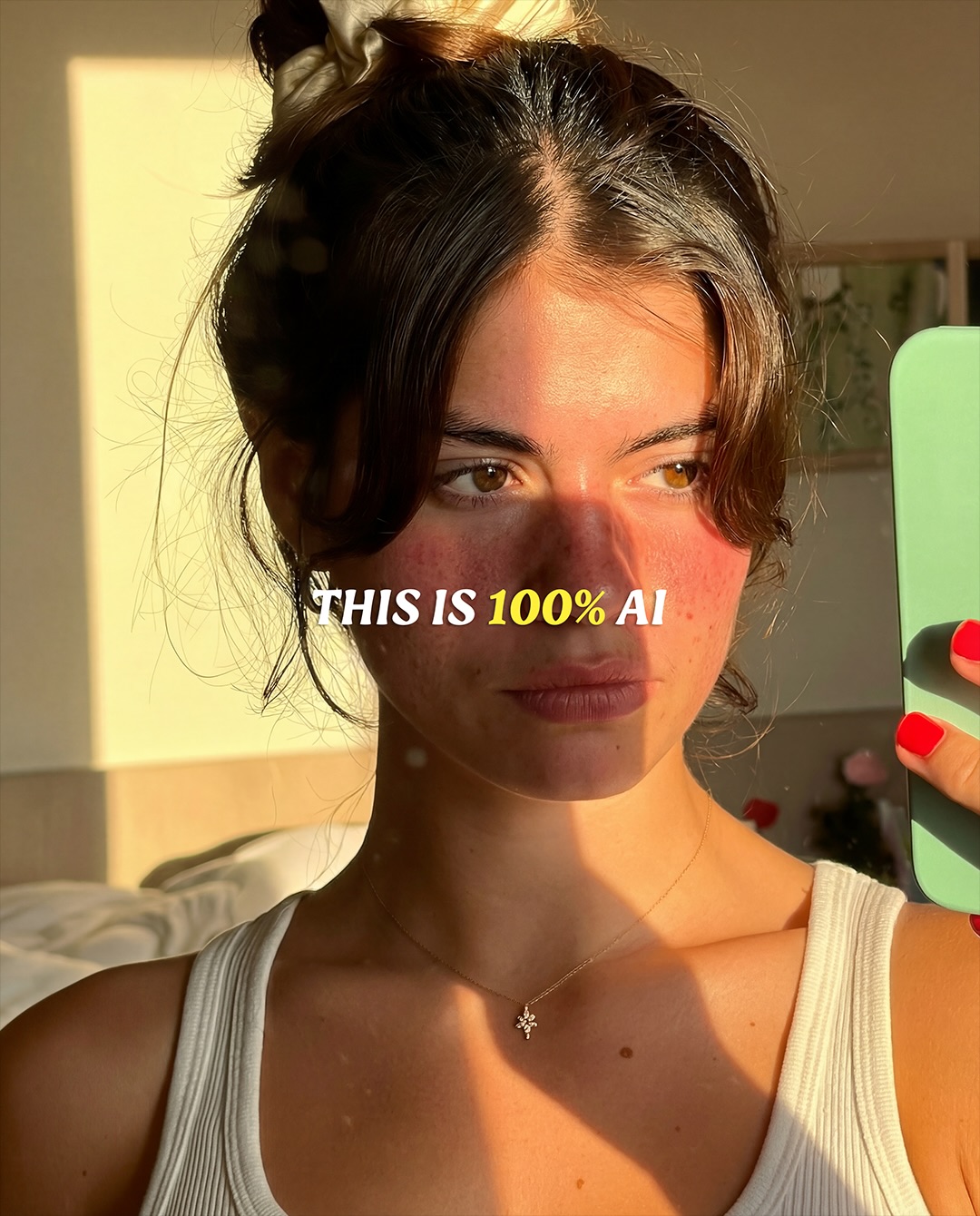
A vertical golden-hour selfie portrait featuring a woman indoors taking a mirror-style photo with a mint-green smartphone, wearing a white tank top and small delicate necklace. Warm low sunlight should cut across her face and upper body, creating strong natural shadow bands and a believable late-afternoon glow. The image should feel casual, intimate, and highly realistic, like a personal lifestyle selfie taken during perfect evening light. Small styling details such as red nails, loose face-framing hair, and soft background clutter should remain visible to increase authenticity. Overlay text should read “THIS IS 100% AI,” making the image function as a direct proof-of-realism statement for AI-generated photography. The final result should blend sunlight portrait beauty, natural smartphone selfie aesthetics, and creator-led AI demonstration content.
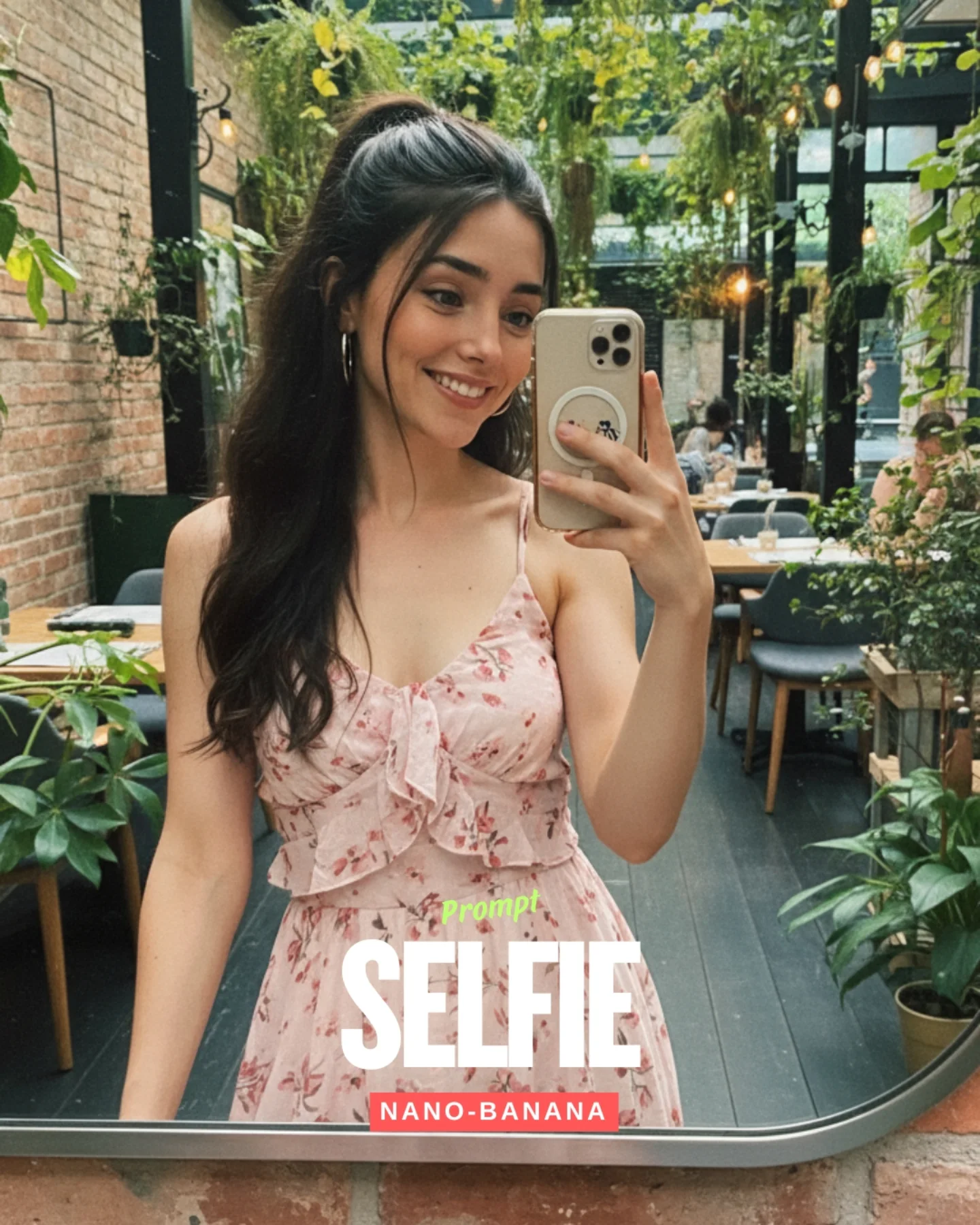
soy_aria_cruz: Floral Dress Garden Cafe Selfie
[Subject] One young woman in her early 20s taking a mirror selfie, feminine presentation, slim build, light-medium skin tone, smiling softly while looking at her phone screen. She has long dark hair styled half-up in a high ponytail with loose face-framing strands, defined brows, winged eyeliner, natural rosy makeup, and medium silver hoop earrings. She holds a light beige smartphone with a round grip accessory on the case. She is wearing a light pink sleeveless floral sundress with thin straps, a fitted bodice, small pink rose print, and a ruffled bow-like detail at the center chest. [Environment] Bright indoor garden cafe or greenhouse-style restaurant with abundant green hanging plants, potted plants, brick wall on the left, black metal beams and glass roof overhead, warm hanging bulbs, wooden tables, gray chairs, and a casual dining setting in the background. The image is seen through a large mirror with a slightly rounded frame edge visible at the bottom. [Composition/Camera] Vertical mirror selfie, medium crop from mid-thigh or waist area upward, subject centered slightly left, phone held up near face, full upper body and dress bodice visible, background deep enough to show cafe seating and plant-filled interior. [Lighting] Soft natural daylight mixed with warm ambient cafe bulbs, gentle flattering light across the face, fresh green reflections from the plants, moderate contrast, clean skin exposure, airy daytime atmosphere. [Style/Rendering] Realistic lifestyle social-media selfie, bright natural cafe aesthetic, crisp facial detail, light smartphone-camera look, soft background depth but readable environment, fresh feminine influencer styling. [Detail constraints] Keep exactly one woman, preserve the pink floral sundress, beige phone, greenhouse cafe background with many plants, mirror-selfie framing, and cheerful natural expression; do not add extra props, sunglasses, food in hand, multiple people in foreground, or different wardrobe colors. Negative prompt: extra people dominating frame, dark nightclub lighting, plain room, missing phone, different dress color, no floral print, heavy blur, overprocessed skin, glasses, necklace, handbag, text-only poster background, distorted fingers, missing plants, outdoor garden instead of indoor cafe. Suggested parameters: aspect ratio 4:5, smartphone lens 26mm equivalent, moderate depth of field, 28-36 steps, CFG 6-7, sampler DPM++ 2M Karras, seed 593104. Delta prompt strategy: 1) If the dress loses pattern, append 'light pink sundress with small floral print'. 2) If the cafe becomes generic, append 'greenhouse-style cafe interior with hanging plants and tables'. 3) If lighting gets too dark, append 'bright natural daylight mixed with warm cafe bulbs'. 4) If the phone changes, append 'light beige smartphone with round grip accessory'. 5) If the smile disappears, append 'soft cheerful mirror-selfie smile'. 6) If the crop widens too far, append 'vertical medium mirror selfie showing upper body and bodice'. 7) If the brick wall vanishes, append 'brick wall visible along the left side'. 8) If extra people crowd the scene, append 'background diners minimal and out of focus, only one main subject'. 9) If hair changes, append 'long dark half-up ponytail with loose face-framing strands'. 10) If the image loses mirror realism, append 'visible mirror edge at the bottom with natural reflection look'.
by-shlabu: 100 Percent AI Male Selfie AI Portrait
51 posts
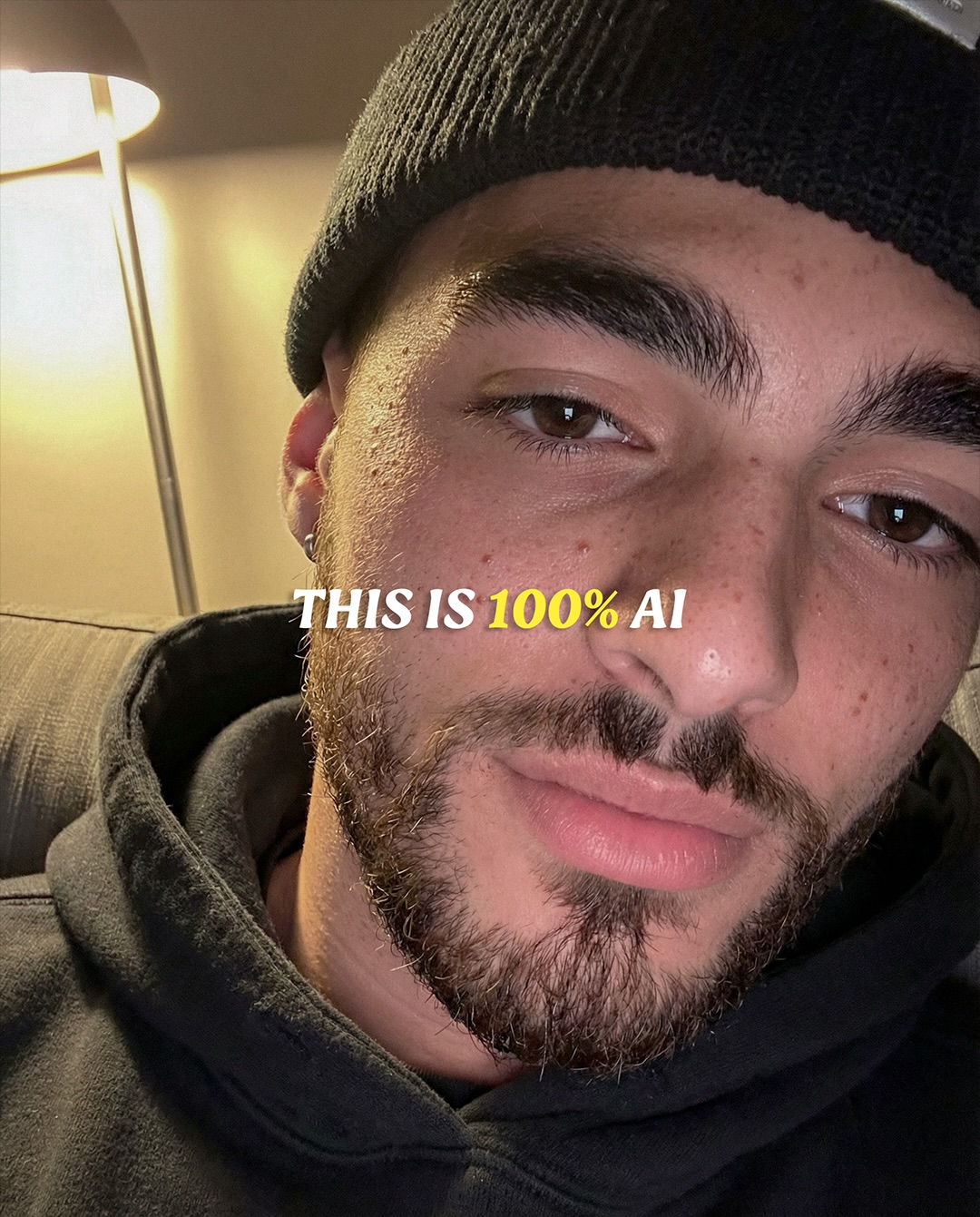
A vertical casual close-up selfie portrait featuring a man reclining indoors on a couch, wearing a black knit beanie and dark hoodie under warm lamp light. The image should feel intimate, everyday, and highly believable, with realistic beard texture, natural skin pores, subtle facial asymmetry, and soft ambient household lighting. The framing should resemble a spontaneous phone selfie rather than a polished campaign photo, with the face filling most of the image and the background staying minimal. Overlay text should read “THIS IS 100% AI,” with the percentage emphasized, so the image functions as a direct realism proof statement for AI-generated portraits. The final aesthetic should blend cozy home lighting, natural masculine portrait detail, and social-native authenticity.
Video
51 posts
GLOBAL LOCK: A vertical 9:16 intimate selfie-style bedroom video, approximately 13 seconds, designed to look uncannily real and emotionally raw. Keep the subject consistent: a young white woman in her early 20s, soft green-hazel eyes, dark brown slightly messy hair, natural brows, visible skin texture and minor blemishes, wearing a white sleeveless ribbed tank top, lying on her side in bed with her head sunk into a gray pillow. The environment must remain simple and believable: beige or off-white bedding, neutral bedroom wall, bedside lamp in the background, soft warm indoor night lighting, handheld phone perspective close to the face. The emotional core is micro-expression realism: tired eyes, slight lip tremble, breath pauses, uncertain glances off-camera, watery eyes, forehead creasing, subtle shifts between speaking and holding back emotion. Motion should be minimal and organic, with tiny handheld drift and body settling into the pillow. White text overlays land briefly across the center with phrases like KLING 3.0 and generations, and later there are dark workflow screenshots showing a reference image, prompt text, and notes that the sequence was generated using Nano Banana Pro for the opening frame and animated via Kling 3.0. The main goal is to maximize facial realism, emotional ambiguity, and the feeling that viewers are watching a real late-night phone confession.

[00:00-00:03] Open on the woman very close to camera, lying sideways against a gray pillow, mouth slightly open as if beginning to speak or catching breath. The shot feels like a front-facing phone camera at night. Soft warm bedroom lighting reveals natural skin texture, light under-eye shadows, and a relaxed but emotionally charged expression.

[00:03-00:06] She glances away to the side, then back toward camera, eyes glistening slightly. Her lips part and close as if choosing words carefully. Keep the camera close and imperfect, with micro handheld drift and bedding visible at the frame edge. This is where the realism comes from: not dramatic acting, but quiet uncertainty.

[00:06-00:09] Text overlays such as KLING 3.0 and generations appear while the woman’s expression shifts from tired openness to a more suspended, pained stillness. Her brows lift slightly, forehead lines appear, and the pillow compresses under her cheek. Maintain the feeling of a candid late-night clip rather than a polished performance.

[00:09-00:11] Transition briefly into dark workflow screenshots showing the same woman’s reference frame, a prompt describing the intimate bedside UGC-style video, and notes about the image being created with Nano Banana Pro and animated via Kling 3.0. The interface should feel like proof, not the main attraction.

[00:11-00:13] Return mentally to the emotional claim: Kling 3.0 captures expressions and feelings so well that the result crosses from “looks real” to “is it real?” The final impression should be the woman still lying against the pillow, caught in an unresolved, intimate emotional beat that feels almost too human for AI.

NEGATIVE PROMPT: avoid beauty-filter skin, avoid plastic smoothing, avoid perfect influencer makeup, avoid overlit bedroom lighting, avoid exaggerated crying faces, avoid dramatic lip-sync mismatch, avoid stiff neck motion, avoid dead eyes, avoid overly cinematic camera moves, avoid artificial sharpening, avoid text clutter beyond the brief white overlays, and avoid making the workflow screenshots more visually dominant than the emotional face performance.
Video
GLOBAL LOCK: beauty-tech vertical explainer reel, photoreal close-up of a young woman with clear skin, dark center-parted hair, neutral makeup, warm indoor room lighting, framed in selfie-style portrait shots inside a softly lit home interior with lamp and shelves in the background, strong on-screen headline text about "Nano Banana Pro" and "the secret to perfect realism with AI", model points to her under-eye area, cheeks, lips, and overall face to demonstrate skin detail and realism, the edit alternates between close beauty crop and medium portrait framing, polished social-media ad aesthetic, no extra people.

00:00-00:02
Open on an extreme close-up of one eye and cheek while the model points directly under the eye to highlight skin realism and detail. Large bold text overlay fills the lower half of the frame, emphasizing Nano Banana Pro and the promise of perfect realism with AI. The shot must feel like an attention-grabbing hook for a beauty-tech reel.

00:02-00:04
Shift to another close crop of the same face from a slightly different angle, maintaining soft warm room light and ultra-clean skin texture. The model keeps one finger near the eye area so the viewer knows exactly what detail is being demonstrated.

00:04-00:06
Move to a centered face shot with both eyes and upper face visible. The model gestures to the cheek area and holds a composed, neutral expression while the text overlay remains prominent. The room background should stay softly blurred and domestic, not studio-commercial.

00:06-00:08
Cut to close beauty framing on lips and lower face, then back to a full frontal face shot. The edit should emphasize smooth transitions between macro skin-detail zones and overall portrait realism. Keep the model calm, confident, and slightly posed like an ad demonstration.

00:08-00:10
Reveal a wider portrait view where the woman touches or frames her face with one hand, then another variation with both hands near the cheeks. The text still anchors the message that the tool is about realism, while the camera proves it with consistent skin texture and facial symmetry.

00:10-00:10.63
Finish on a softer medium portrait with the model slightly angled and looking camera-right, still in the same warm room setting. End with the beauty result rather than adding more feature clutter.

CAMERA: vertical beauty-ad framing, alternating macro facial close-ups and medium portrait shots, shallow depth of field, clean static compositions, no shaky handheld motion.

LIGHTING: warm indoor practical light, soft frontal fill on the face, gentle lamp glow in the background, smooth skin highlights without harsh contrast.

GRADE: polished neutral-beauty palette, healthy skin tones, controlled warmth, crisp but flattering facial detail, creator-reel social media finish.

MOTION: subtle hand gestures pointing to under-eye, cheek, lips, and overall face, small head turns, steady eye contact, minimal camera movement so the realism demo remains readable.

SPEECH PACK:
- No spoken audio required; this reel functions as silent text-led visual proof.
- If sound is added in recreation, use light trendy social media background music with no voice-over.
- Prioritize the visual headline and facial detail over any audio storytelling.

NEGATIVE PROMPT: harsh studio flash, beauty filter blur, heavy glam makeup, extra people, outdoor scene, dramatic fashion editorial lighting, cartoon skin, waxy face texture, over-smoothed pores, noisy room background, text-free edit, watermark, logo clutter beyond a small brand mark, distorted facial symmetry.
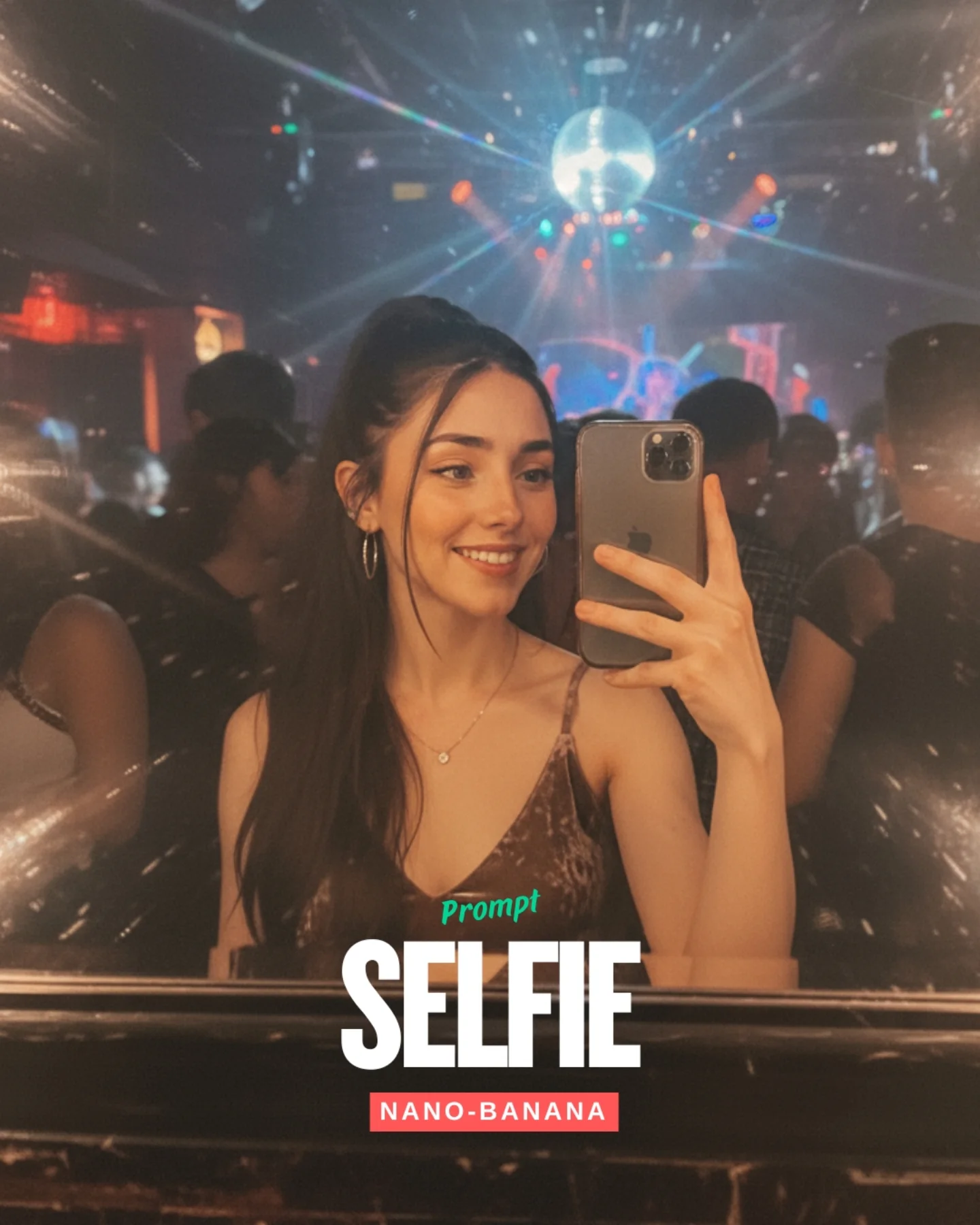
soy_aria_cruz: Nightclub Mirror Selfie AI
[Subject] One young woman in her 20s with fair-light skin, long black hair in a high ponytail, soft face-framing strands, natural glam makeup, and a warm candid smile. She wears medium hoop earrings, a delicate small pendant necklace, and a dark silky or satin spaghetti-strap camisole with a subtle sheen. She is taking a mirror selfie with a modern dark smartphone held in one hand, partially covering part of her face and upper chest. Her pose is relaxed and natural, angled slightly toward the mirror with shoulders turned and gaze directed toward the phone screen rather than straight into the lens. Expression should feel happy, casual, and nightlife-social rather than posed like a studio portrait.

[Environment] Dim nightclub or late-night bar interior seen through a slightly dirty or flare-prone mirror. Behind the subject is a crowded dance-floor environment with several blurred people, colorful small club lights, and a disco ball hanging near the upper center. The mirror and lens produce starburst flare streaks radiating outward from bright points, especially near the disco ball and along the edges. The lower edge of the frame includes a dark glossy bar or mirror ledge. Background should remain soft and atmospheric, with warm amber and cool blue-magenta club tones mixed together. No text overlay should appear in the recreated image.

[Composition/Camera] Vertical mirror-selfie framing, medium close-up from mid-torso to above the head. Subject centered slightly left-of-middle, smartphone visible in the right hand near the center-right of the image. Camera perspective is the phone reflected in the mirror, not a third-person camera. Keep enough background visible to show nightclub crowd silhouettes and the disco ball. The image should feel like an authentic social-media selfie captured in low light, with the subject in focus and the club behind softly blurred.

[Lighting] Low-light nightclub illumination with mixed warm and cool practical lights. Face is softly lit by a combination of phone-screen glow, ambient club lights, and reflected light from the mirror. Bright pinpoint highlights from the disco ball and venue fixtures create lens starbursts and haze. Keep skin natural and readable while preserving the low-light mood. Slight soft haze and bloom are acceptable to convey nightlife atmosphere.

[Style/Rendering] Photorealistic smartphone mirror selfie with a believable nightlife snapshot aesthetic. Realistic handheld framing, subtle low-light grain, natural skin detail, reflective satin top texture, and authentic club ambience. The style should feel candid and intimate, like a real weekend selfie, not an overproduced editorial or fantasy scene.

[Detail constraints] Keep exactly one female subject in a nightclub mirror selfie. Preserve the high ponytail, hoop earrings, delicate necklace, shiny dark camisole, smartphone in hand, disco ball overhead, blurred club crowd, and mirror-flare starburst effect. Maintain the dark glossy ledge at the bottom. Exclude all source-image text overlays such as "Prompt", "SELFIE", and "NANO-BANANA". Do not add extra props like drinks, flash-on-camera glare, or other phones.

Negative prompt: text overlay, "SELFIE", "NANO-BANANA", watermark, logo, app UI, extra phone, drinks in hand, empty nightclub, brightly lit studio, daylight, overly sharp background crowd, cartoon style, anime rendering, missing disco ball, missing phone, missing necklace, harsh direct flash, no mirror effect, no flare, deformed fingers, duplicated people in foreground, pristine mirror with no atmosphere.

Suggested parameters for reproducibility: aspect ratio 4:5; smartphone selfie perspective; focal length feel 26mm to 28mm equivalent; 28-36 steps; CFG/style strength 5.5-7.5; sampler DPM++ 2M Karras or equivalent; seed suggestion 718452904.

Delta prompt strategy:
1. If the selfie framing is lost: append "authentic mirror selfie composition with the smartphone visible in her hand and gaze directed at the phone screen".
2. If the nightclub mood weakens: append "dim crowded nightclub with blurred partygoers, colored lights, and a disco ball overhead".
3. If the starburst flares disappear: append "bright points of light producing mirror-lens starburst streaks and soft haze around the frame edges".
4. If the outfit changes: append "dark satin spaghetti-strap camisole with a subtle sheen and thin straps".
5. If the jewelry disappears: append "medium hoop earrings and a tiny pendant necklace catching faint club light".
6. If the subject becomes too posed: append "casual candid smile, spontaneous social-night selfie energy, relaxed shoulders".
7. If the background gets too crisp: append "soft blurred club crowd and softened stage lights behind the subject".
8. If text reappears: append "image only, no words, no labels, no promotional overlays".
9. If the lighting becomes too clean or bright: append "low-light smartphone realism with ambient club glow and slight grain".
10. If the mirror ledge vanishes: append "dark glossy lower mirror edge or bar ledge visible at the bottom of frame".
Video
51 posts
GLOBAL LOCK: vertical 9:16 social-growth tutorial reel, fast-cut creator-explainer style with large keyword subtitles, repeated examples of viral AI influencer clips, warm indoor talking-head footage, mirror selfies, motion-control app screens, avatar customization panels, face and outfit variation grids, and bright pastel intertitle cards. The overall tone is practical and slightly salesy, optimized for short-form virality and CTA conversion rather than cinematic polish. Multiple example influencers appear, but the reel’s structure stays consistent: hook, proof, secret, app demo, output, offer, comment CTA.

[00:00-00:05] Open with a rapid hook showing viral AI-influencer examples: stylish women dancing or posing, a visible high-view-count indicator, and subtitle text stating that these AI creators are getting huge views while most people still do not know how to make them. The first seconds should feel urgent, proof-driven, and native to Instagram or TikTok tutorial culture.

[00:05-00:10] Cut to a woman speaking directly to camera in a casual indoor setup, then to a male mirror-selfie example in a hallway. Subtitle-led narration reveals that the workflow can be built from a prompt and motion control rather than by manually creating each clip from scratch. The pacing remains quick and hook-oriented.

[00:10-00:15] Show more creator example footage and screen recordings of a mobile or web app interface where a user can build AI influencer videos. Highlight that one template or one prompt can produce many clips per day. Transition into green and pale intertitle cards emphasizing volume and repeatability.

[00:15-00:21] Move fully into the app demo: show a selfie being uploaded, an “AI influencer” mode or label highlighted, and a dashboard with pose, look, or motion settings. The UI should clearly suggest that the user can customize identity, style, and animation behavior from one source image.

[00:21-00:27] Continue with panels showing face variations, eye or feature options, body or outfit grids, and multiple generated look presets. The narration implies that the app can handle many outputs quickly and even includes features like lip-sync or talking-head generation. The reel should feel like a product tutorial crossed with a content-farm system reveal.

[00:27-00:31] Show a stylized output example, including a transformed creature-like or stylized female avatar result to prove the system can generate broad visual variation. Follow with a polished influencer talking-head output and a pricing or discount screen, framing the tool as immediately usable for creators.

[00:31-00:34] End on pale green CTA cards telling viewers to comment “AI” and the creator will send the resource. The last beat should clearly function as lead capture attached to a growth-hack tutorial.

NEGATIVE PROMPT: unreadable UI, broken faces, deformed influencer bodies, distorted hands, duplicated avatars, inconsistent lighting between example clips, low-detail app screens, cluttered subtitles, robotic motion, watermark, flicker, temporal jitter, accidental nudity, broken mirror reflections, malformed eyes.

SPEECH PACK:
- Hook: These AI influencers are getting massive views, but almost nobody is showing you how to make them.
- Beat 1: You only need one prompt and a motion-control workflow to start generating them.
- Beat 2: This app lets you upload a face, customize the look, and create many videos fast.
- Beat 3: You can batch styles, swap features, and keep producing content every day.
- CTA: Comment AI and I’ll send it.
Video
GLOBAL LOCK:
The video features a white male creator in his mid-30s with medium-length, wavy brown hair and a groomed beard, wearing a clean white t-shirt. He is positioned in a bright home office with a professional black condenser microphone on a boom arm in the foreground. The video uses a split-screen or multi-panel layout to compare "Source Video" (the creator) with "AI Generated Results" (various celebrities and characters). The AI characters must perfectly mirror the creator's head tilt, facial expressions, lip-sync, and hand gestures. The lighting is soft, natural window light from the side. The color grade is clean and realistic.

[00:00–00:03]
The screen is split into three vertical panels. Top panel: The creator waves both hands excitedly and points to his right. Middle panel: Sabrina Carpenter in a pink feathered dress mimics the exact hand wave and pointing. Bottom panel: Billie Eilish in a black outfit and sunglasses mimics the same gestures. High-fidelity lip-sync as they all say "Hear me out."

[00:03–00:07]
The layout shifts. Top panel: Creator continues talking with expansive hand gestures. Middle panel: Taylor Swift in a red dress mimics the gestures. Bottom panel: Kim Kardashian in a black tank top mimics the gestures. The transitions between characters are sharp cuts.

[00:07–00:10]
Split screen: Creator (top) vs. Queen Elizabeth II (bottom). The creator looks to his left and then back to the camera with a skeptical expression. The Queen, wearing a crown and sash, mirrors the look perfectly.

[00:10–00:13]
Split screen: Creator (top) vs. Edna Mode from The Incredibles (bottom). The creator scratches the top of his head with his right hand. Edna Mode, with her signature bob and glasses, scratches her head in perfect sync.

[00:13–00:20]
A screen recording of a software interface (Enhancor). A cursor selects the "Wan2.2" model from a dropdown menu. The UI shows a "Source Video" of the creator and a "Character Image" of a woman. The cursor toggles "Pro Mode" on and adjusts resolution to 720p.

[00:20–00:23]
Split screen: Creator (top) vs. a woman with long brown hair in a floral dress (bottom). They are both in the same room. The creator raises his hands in a "stop" gesture; the woman mirrors him perfectly.

[00:23–00:27]
The UI returns, showing the "Photo Animate" tab being selected. A different reference photo of the same woman is used. The cursor clicks "Generate Video."

[00:27–00:35]
Final comparison. Split screen: Creator (top) vs. the woman (bottom). The creator looks around the room and then smiles at the camera while touching his hair. The woman mirrors the hair-touching and the smile, but her background is now a different indoor setting matching her reference photo. The text "AI" appears centered on the screen.

NEGATIVE PROMPT:
Visual: flickering faces, distorted limbs, extra fingers, blurry textures, face-swapping artifacts, unnatural skin smoothing, background warping, robotic movements, low resolution, watermarks.
Speech: robotic voice, mismatched lip-sync, muffled audio, background noise, unnatural pauses, clipping audio.

SPEECH PACK:
[00:00–00:07]
Transcript: "Hear me out, all of your favorite movies and animations are going to be completely acted out by someone else in the next two years."
TAKE_A: Energetic, fast-paced, direct-to-camera.
TAKE_B: Mysterious, slightly slower, emphasizing "completely."
TAKE_C: Casual, conversational, like a friend sharing a secret.

[00:07–00:13]
Transcript: "So I'm going to teach you everything you need to know about this in the next 20 seconds so that you can do this for yourself and stay ahead of the curve."
TAKE_A: Authoritative, instructional, rhythmic.
TAKE_B: Helpful, warm, encouraging.
TAKE_C: Urgent, fast-talking to fit the "20 seconds" claim.

[00:13–00:35]
Transcript: "So right now you have two options with this new AI video model called Wan 2.2. The first option is Character Swap... The second option is Photo Animate... This is absolutely mind-blowing. Comment AI for the link."
TAKE_A: Professional narrator style, clear enunciation.
TAKE_B: Enthusiastic, high energy on "mind-blowing."
TAKE_C: Calm, tech-reviewer tone, clear CTA at the end.

AI Selfie Generator

AI selfie generator content is most useful when it captures the informal feel of a real selfie. People searching this topic usually want an image that reads as personal and immediate, like something shot on a phone rather than posed in a studio. That can make it useful for creative experiments, profile imagery, or stylized self-portraits that still feel casual and familiar.

The strongest examples here should preserve the visual cues that make a selfie feel like a selfie. Close framing, a first-person perspective, and a background that feels natural or everyday all matter. When you compare ideas on this page, focus on whether the result feels spontaneous, whether it still resembles a real self-taken photo, and whether the final image could work as a personal post or avatar without losing that selfie identity.

FAQ

What is an AI selfie generator best for?

It is best for creating casual self-taken photo styles, stylized self-portraits, and profile-ready images with a selfie feel.

How is this different from a portrait generator?

A selfie generator should feel more informal and phone-captured, while a portrait generator usually leans toward composed or artistic framing.

Who usually uses this kind of page?

Social creators, profile users, and people experimenting with personal image styles often use it for casual, shareable visuals.

What should I compare on this page?

Compare framing, background realism, and whether the image still feels like a believable self-taken photo.

AI Selfie Generator: Casual Selfie-Style Image Ideas | Alici.AI