How to Create a Kiki Inspired Flying Selfie AI Image
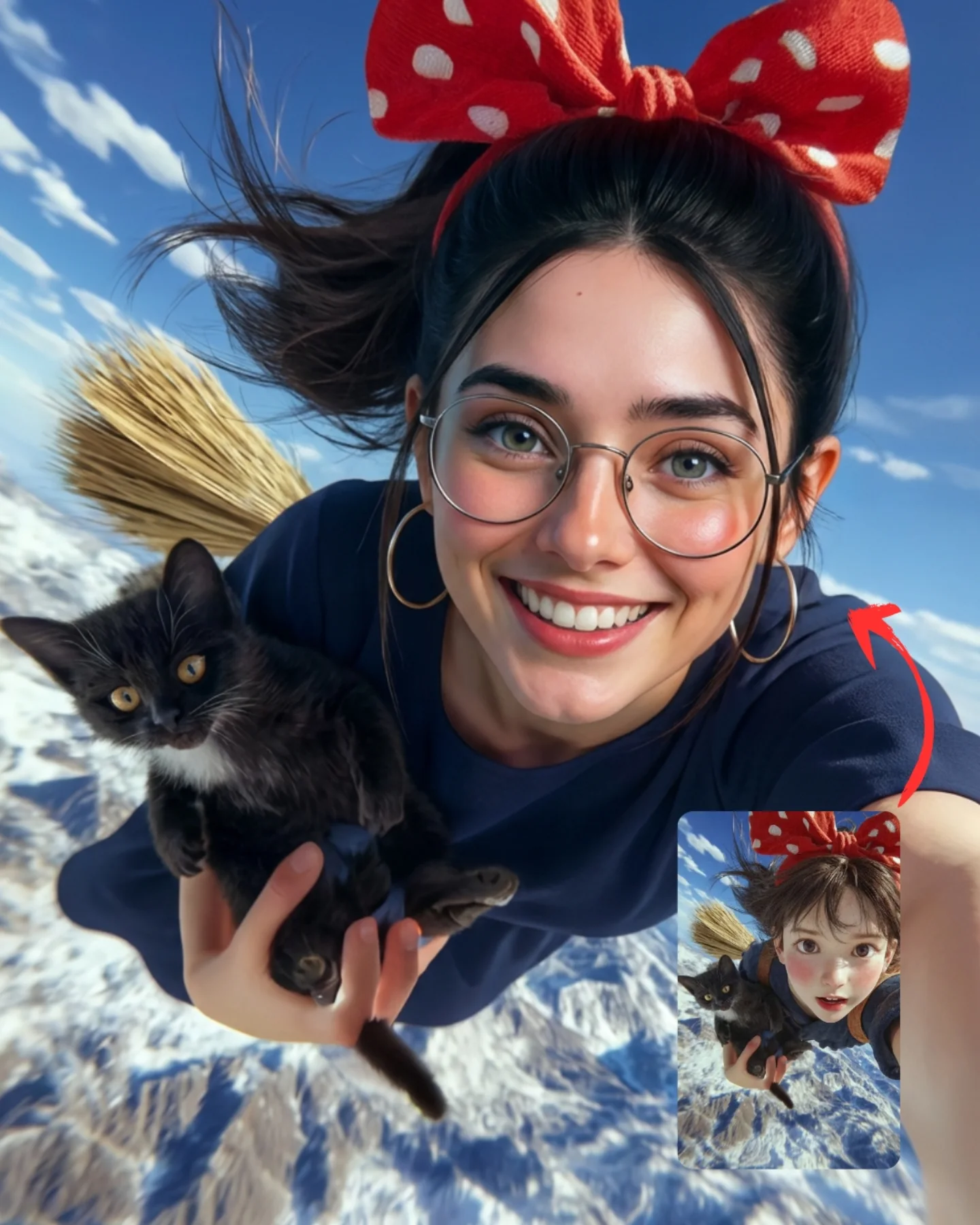
This image is effective because it does two jobs at once. It gives the audience a charming fantasy scene they already understand at a glance, and it also demonstrates a tool capability in a very visual way. The tiny reference image in the corner matters a lot. Without it, the post would just be a cute whimsical portrait. With it, the image becomes proof of transformation, and proof-based content almost always travels better than beauty alone.
For creators, this is a useful lesson in AI comparison design. If you want people to believe that a model can translate style, do not explain it only in the caption. Build the argument directly into the image. Here, the reference inset and red arrow immediately tell the viewer what they are supposed to notice: this is not only a fantasy render, it is a successful conversion from illustration language into hyperreal output.
Why the image pulls people in so fast
The first hook is recognizability. Even without naming a franchise, the red bow, the broom, the black kitten, and the airborne perspective instantly evoke a beloved witch-anime mood. That lowers friction. The viewer knows what emotional category the image belongs to almost immediately.
The second hook is motion. The wide selfie angle, flying hair, and mountain drop below create a sense of velocity without making the frame chaotic. Then the third hook arrives: the inset reference. That small corner device turns the post into a mini before-and-after story. It gives the audience a reason to inspect the details instead of scrolling past after one second.
| Signal | Evidence (from this image) | Mechanism | Replication Action |
|---|
| Instant transformation proof | Reference inset and red arrow visibly compare cartoon source to realistic result | Viewers understand the claim without reading the caption | Add a small source-style inset when showcasing style-transfer or replication capability |
| High-recognition fantasy coding | Red polka-dot bow, broom, black kitten, airborne pose | Familiar visual signals speed up engagement and emotional connection | Lock the most iconic 3-4 markers before refining realism |
| Playful motion clarity | Hair streams backward while the face remains close, bright, and readable | The image feels energetic but still feed-friendly at thumbnail size | Use dynamic camera angle plus one stable smiling face for high-motion prompts |
Where this format fits best
This structure is ideal for AI tool comparison posts, prompt educators teaching style transfer, fantasy remix pages, and creators who want to prove that a model can reinterpret illustration references into believable photographic images. It is especially useful when the audience needs visual evidence more than technical explanation.
It is less effective for luxury or minimal aesthetic pages, because the inset reference and bright whimsical props intentionally make the composition more instructional and playful. That is not a weakness here. It is the point. But it means the format is strongest when the goal is demonstration plus delight.
- Best fit: AI comparison creators. Why fit: the inset makes the performance claim immediately visible. What to change: vary the source style and target realism level.
- Best fit: prompt tutorial accounts. Why fit: the image teaches reference translation, motion, and prop preservation in one frame. What to change: annotate which details must stay constant between source and result.
- Best fit: whimsical fantasy pages. Why fit: the core scene is charming even before the technical layer is understood. What to change: swap franchise-coded props while preserving the same transformation structure.
- Not ideal: minimalist fashion pages. Reason: the image is intentionally playful and comparison-driven.
- Not ideal: strict realism accounts. Reason: the core concept still depends on fantastical flying imagery.
Transfer recipes
- Keep: reference inset, red arrow, one iconic character setup, and photoreal target. Change: witch-flying scene to mermaid, fairy, or sci-fi pilot translation. Slot template: "{cartoon source inset} transformed into {photoreal scene} with {signature props}"
- Keep: wide selfie energy and one companion animal or object. Change: bow, outfit, and environment while preserving the transformation cue. Slot template: "{subject archetype} in a dynamic selfie above {environment} holding {companion detail}"
- Keep: cheerful face plus high-recognition prop bundle. Change: the source art style and realism intensity only. Slot template: "{illustrated reference} converted into {realistic output} with {locked iconic markers}"
What makes the image aesthetically persuasive
The image succeeds because it keeps whimsy readable. The bow is oversized, the cat is dark and distinct, and the broom remains visible as a shape rather than a vague accessory. Those are strong silhouette decisions. In fantasy-style AI work, silhouette is often more important than microscopic detail because it is what preserves recognizability at feed speed.
The bright daylight also helps. It stops the scene from becoming muddy or overdramatic. The snowy mountains below provide scale, but the face stays dominant and friendly. This balance matters for social performance. If the environment were too epic, the image would risk becoming a landscape. If the face were too large, the fantasy would disappear. Here, the ratio is handled well.
| Observed | Why it matters for recreation |
|---|
| Oversized red polka-dot bow | Acts as the fastest recognition cue in the entire frame |
| Black kitten held close to camera | Adds charm, contrast, and a second memorable subject |
| Wide flying selfie angle | Makes the transformation result feel energetic and modern |
| Small source-reference inset with arrow | Turns the image into proof of capability rather than simple fantasy art |
| Snowy mountains under bright blue sky | Provide scale and adventure without darkening the mood |
Prompt chunks worth locking first
If you want this kind of result, do not begin with “cute witch flying in sky.” That is too generic. Start with the transformation mechanic, then lock the iconic props, then define the camera behavior. That order protects both the concept and the proof angle.
| Prompt chunk | What it controls | Swap ideas (EN, 2–3 options) |
|---|
| photoreal flying selfie with anime-style reference inset | Comparison logic and post structure | before-after inset, source-preview corner card, reference-to-result composition |
| oversized red polka-dot bow and round glasses | Character recognition and face styling | yellow scarf and hat, ribbon headband, iconic hair clip set |
| black kitten held in one arm | Companion charm and visual contrast | small dog, owl, plush familiar creature |
| straw broom trailing behind in flight | Motion storytelling and genre cue | hoverboard, magic umbrella, flying scooter |
| snowy mountain range far below | Adventure scale and clean background structure | cloud sea, coastal cliffs, autumn valley |
| bright cheerful daylight with wind-swept hair | Readable optimism and believable movement | sunrise flight, golden cloud light, crisp midday sky |
An iteration path that keeps the image clean
Lock these three things first: the comparison inset, the bow-kitten-broom prop set, and the dynamic selfie angle. Those are the non-negotiables. Then refine realism, fur texture, and mountain clarity one pass at a time.
- Run 1: stabilize the face, bow size, and inset-reference composition.
- Run 2: improve cat anatomy, broom visibility, and wind motion in the hair.
- Run 3: refine photoreal skin texture and the snowy mountain depth below.
- Run 4: remix the source franchise or character while preserving the same transformation structure.
If the output feels like generic fantasy art, add the reference inset. If it feels too technical and less charming, strengthen the subject smile and the companion-animal presence. The best version balances proof with delight.