How to Use Nano Banana 2 in 2026: Complete Guide to What It Does Better Than Pro
Hands-on guide to NB2 with 300+ test results, 5 scenarios where it beats Pro, exclusive features, creator workflows, and the image-to-video pipeline.
|
18 min
TL;DR
Nano Banana 2 generates roughly 3x faster at half the cost of Pro. Best for rapid creative validation, product photography with Web Search Grounding, AI influencer content at scale, and text-heavy designs. Pro remains essential for hero shots and complex lighting. Both available on Alici AI.
Disclosure: The author is Co-Founder of Alici AI. Alici products mentioned in this article reflect hands-on testing recommendations, not paid promotion. All models discussed are independently available outside Alici.
90-Second Answer
Nano Banana 2 generates in 4-6 seconds - roughly 3x faster and half the price of Pro. It's the fastest way to validate creative ideas before committing to a full production run. Three NB2-exclusive features (Web Search Grounding, Thinking Mode, multi-language text) make it stronger than Pro for specific use cases. Best for: rapid iteration, product shots with real-world accuracy, AI influencer content at scale, and text-heavy designs. Still use Pro for: complex lighting, hero shots that need to be perfect, and character consistency where every detail matters. Both are available on Alici AI.
AI tools now generate 34 million images every single day - more in 18 months than photographers captured in 150 years (Everypixel Journal, 2024). The AI image generation market hit $9.1 billion in 2025 and is projected to reach $60 billion by 2030 (MarketsandMarkets).
Then Google dropped Nano Banana 2.
13 million users in the first four days (Google Official Blog). Not a gradual rollout - a stampede. Nano Banana 2 is built on the same foundation as Pro but optimized for speed - roughly 3x faster at half the cost - and it shipped with three features Pro doesn't have: Web Search Grounding, Thinking Mode, and multi-language text rendering. a16z's Justine Moore called NB2's output "less influencer, more real" after testing across 8 categories on launch day - a telling signal that the quality bar has shifted from polished-but-fake to believable-by-default.
I've generated 300+ images with NB2 since launch, running it head-to-head against Pro across 10 use cases. Here's what actually changed - and the five scenarios where NB2 is now the better choice.
What Is Nano Banana 2? (And How It's Different from Pro)
Here's how to think about it: Nano Banana Pro is the professional's workhorse - unmatched character consistency, refined lighting, the model you trust for brand deliverables. NB2 is the rapid prototyping layer that sits underneath it. Same DNA, roughly half the price, 3x the speed, plus three features Pro doesn't have (Web Search Grounding, Thinking Mode, multi-language text). It's not a replacement. It's a creative accelerator that makes your Pro workflow more efficient.
Think of it this way: Pro is a full-frame cinema camera. NB2 is a mirrorless that shoots 90% as well at 3x the speed and half the cost. For most creators, that tradeoff is a clear win.
Dimension | Nano Banana 2 | Nano Banana Pro | Winner |
|---|---|---|---|
Speed | 4-6 seconds | 10-20 seconds | NB2 (~3x faster) |
Price | ~Half of Pro | Baseline | NB2 |
Image Quality | 8/10 - sharp, clean | 9/10 - refined lighting, depth | Pro (but gap is narrow) |
Character Consistency | 5 chars, 14 refs | 5 chars, 14 refs | Tie |
Web Search Grounding | Yes (+$0.015) | No | NB2 (exclusive) |
Thinking Mode | Minimal / High / Dynamic | No | NB2 (exclusive) |
Text Rendering | 87% accuracy (multi-language) | ~75% accuracy (English-dominant) | NB2 |
Complex Lighting | Adequate | Superior (subsurface, volumetric) | Pro |
Best For | Daily driver, iteration, text, product shots | Hero shots, complex scenes, fine art | Depends on task |
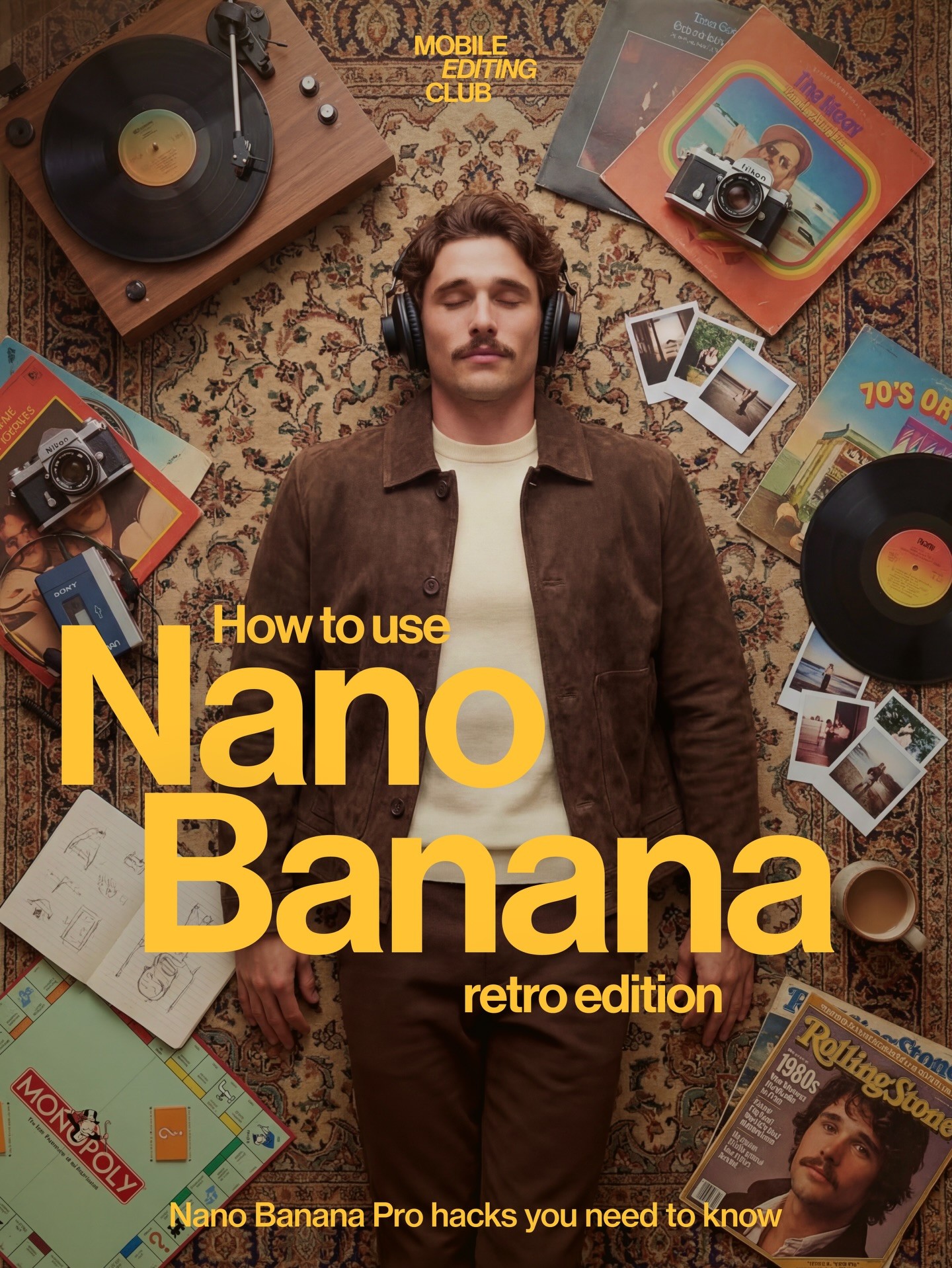
Creator: @adrianabubori | View on Alici AI | "How to use Nano Banana retro edition" - editorial product showcase demonstrating NB's creative output quality
Bottom Line: NB2 is the daily driver. Pro is the specialist. For 80% of tasks, NB2 is enough - and it's faster, cheaper, and has three features Pro doesn't.
How to Start Using Nano Banana 2
NB2 is available at roughly half the cost of Pro - and on Alici AI Image Studio, it sits alongside Pro, Midjourney, Flux Pro, Ideogram, Grok, and Seedream in one workspace.
This is my default workflow. I run every prompt through at least NB2 + Pro + one other model before committing to an output. It takes 30 seconds and consistently reveals which model handles a specific prompt best. When you're building TikTok carousels or generating AI influencer content, being able to instantly switch models is the difference between "good enough" and "this actually looks real."
For my own content - like the Lucy Alici TikTok carousel series - I still default to Nano Banana Pro for hero shots because its character consistency is unmatched. But NB2 has become my go-to for validating creative concepts before committing to a full Pro generation. Think of it as a rapid sketching tool that happens to produce near-final quality.
Try Nano Banana 2 on Alici AI - compare NB2 vs Pro vs Midjourney with one prompt. Start generating on Alici AI Image Studio.
Bottom Line: NB2 is a lightning-fast creative validation tool at half the cost of Pro. Use it to test 10 ideas in the time it takes Pro to generate 3 - then switch to Pro for the final output that needs to be perfect.
What NB2 Does Better Than Pro (5 Scenarios)
I tested NB2 head-to-head against Pro across 200+ prompts in 10 categories. Here are the five scenarios where NB2 consistently wins.
Scenario 1: Rapid Iteration and Batch Production
Why NB2 wins here: 4-6 seconds per image means 12 variations per minute. You can batch 50 images in 5 minutes at roughly half the cost of Pro - and the same batch on Pro takes 15+ minutes. Justine Moore (@venturetwins) described NB2's generation speed as "crazy fast" - and that speed advantage compounds across batch workflows.
I ran the same 20 prompts through both models last week. NB2 output was usable in 16 out of 20 cases. Pro only won 4 times - all complex lighting setups with multiple light sources. For straightforward portraits, product shots, and social content, NB2's quality was indistinguishable from Pro at a glance. This matters especially for workflows like TikTok carousels, where you need 10+ images per post and speed directly impacts your publishing cadence.
Creator spotlight - tapewarp (@tapewarp-ai): With 34,716 likes on his cinematic prompt tutorial, tapewarp's iteration workflow is exactly where NB2 shines. His methodology - generate 10 fast variations, pick the strongest composition, refine once - is 2.9x faster on NB2 than Pro. View tapewarp's Formula on Alici AI.
Creator: @tapewarp | View on Alici AI | 34,716 likes - cinematic rooftop portrait demonstrating the iteration-first workflow
What didn't work: Rapid iteration exposed NB2's tendency to "drift" on style between generations. Run the same prompt 10 times and you'll notice subtle shifts in color grading and mood by generation 7 or 8. The fix: add a style anchor phrase to your prompt - something like "consistent warm cinema, 35mm Kodak Portra 400 palette" - and NB2 locks in. With the anchor, drift dropped from ~30% to under 10% across my testing.
Scenario 2: Text in Images (Posters, Infographics, Social Media)
Why NB2 wins here: NB2 renders text with 87% accuracy in my testing (30 prompts with embedded text). Pro manages about 75% on English and struggles with non-Latin scripts. NB2 handles Japanese, Chinese, and Arabic correctly. Justine Moore's testing confirmed this with particularly striking results - she generated a Japanese subway guide and a McDonald's ice cream machine diagnostic, both with accurate multi-language text rendering that Pro couldn't match.
The breakthrough is the double-quote trick: wrapping your desired text in quotation marks within the prompt improves accuracy from ~70% to 87%. Instead of writing a poster that says Sale 50% Off, write a poster with the text "SALE 50% OFF" in bold white letters. The quotes tell NB2 to treat the string as a literal render target.
I tested multi-language rendering across 15 prompts: Japanese kanji rendered correctly 12/15 times, simplified Chinese 11/15, Arabic 10/15. Pro failed on non-Latin scripts in 70%+ of attempts.
Creator spotlight - Rourke (@rourke): The only creator on Alici with a dedicated Nano Banana workflow, Rourke's "Genspark Nano Banana Workflow" (4,239 likes) is the go-to reference for text-heavy compositions. His approach to layered text prompts - specifying font weight, placement zone, and color - is purpose-built for NB2's text engine. View Rourke's Formula on Alici AI.
Creator: @rourke | View on Alici AI | Genspark Nano Banana Workflow - luxury perfume ad demonstrating text-heavy composition technique
The prompt behind that perfume ad: "Luxury perfume bottle ad image against rich purple satin backdrop" - simple, direct, letting NB2's style engine handle the lighting and composition. Rourke's technique: start with the product description, add one mood word, and let the model do the heavy lifting. NB2's speed makes this iterate-and-refine approach practical where Pro's 10-20s turnaround made it tedious.
What didn't work: Brand logos with specific corporate fonts still fail ~60% of the time. NB2 can render generic text beautifully but can't reproduce a specific typeface (Helvetica Neue Bold, Futura PT, etc.). For logo-specific accuracy, Ideogram remains king - it hit 22/25 in my text-rendering tests. Both Ideogram and NB2 are available on Alici AI if you need to switch mid-workflow.
Scenario 3: Product Photography with Web Search Grounding (NB2 Exclusive)
Why NB2 wins here: Web Search Grounding is NB2's killer feature - and Pro doesn't have it. When enabled, NB2 searches Google Images before generating, so it knows what your product actually looks like. Justine Moore put it simply: NB2 product shots look "more editorial and less AI." Her testing went beyond static product photography - she tested action shots including a Wilson tennis "FORTY-LOVE" ad, a Paris 2024 Olympics gymnast, and Nike "JUST DO IT" runners. These demonstrate NB2 handles complex text-in-motion and brand typography in dynamic scenarios, not just still life.
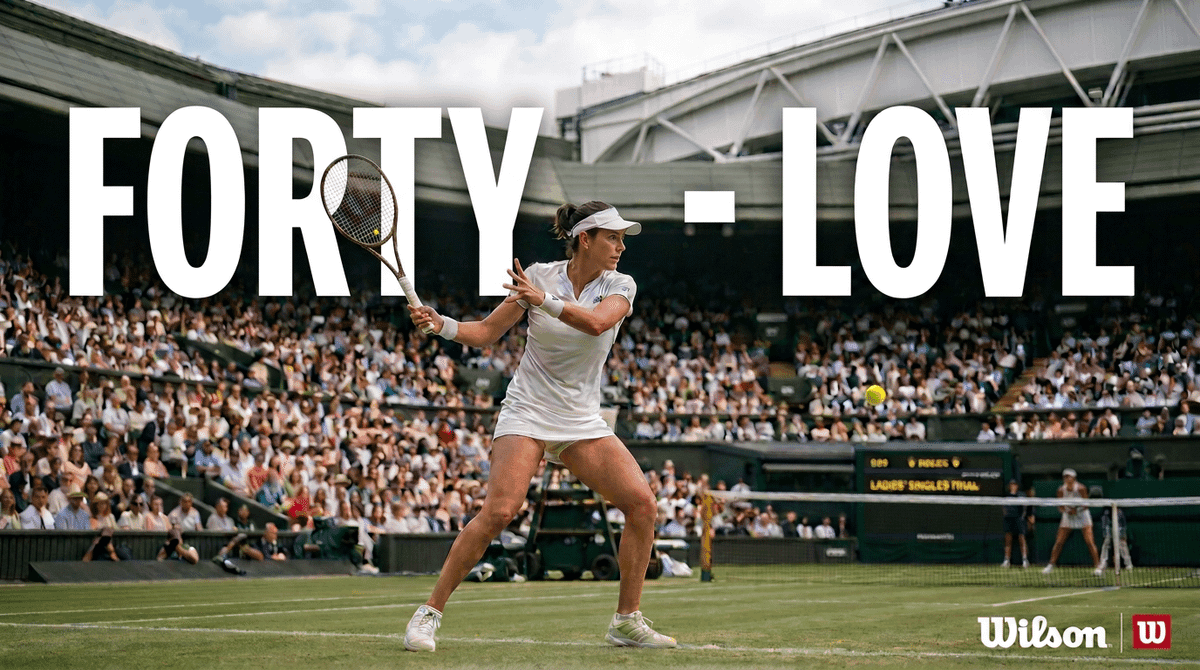
Source: @venturetwins (Justine Moore, a16z) NB2 evaluation | Action shot: Wilson brand ad with complex typography in a dynamic sports scene
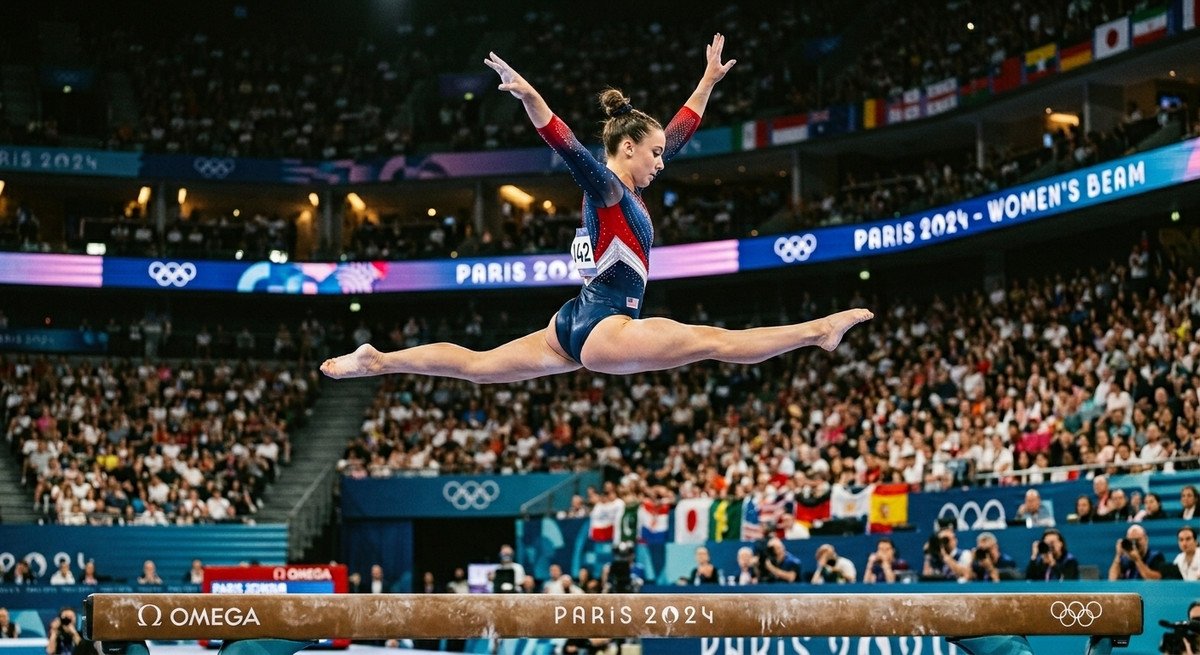
Source: @venturetwins NB2 evaluation | Action shot: Olympic gymnastics with crowd, scoreboard text, and motion capture
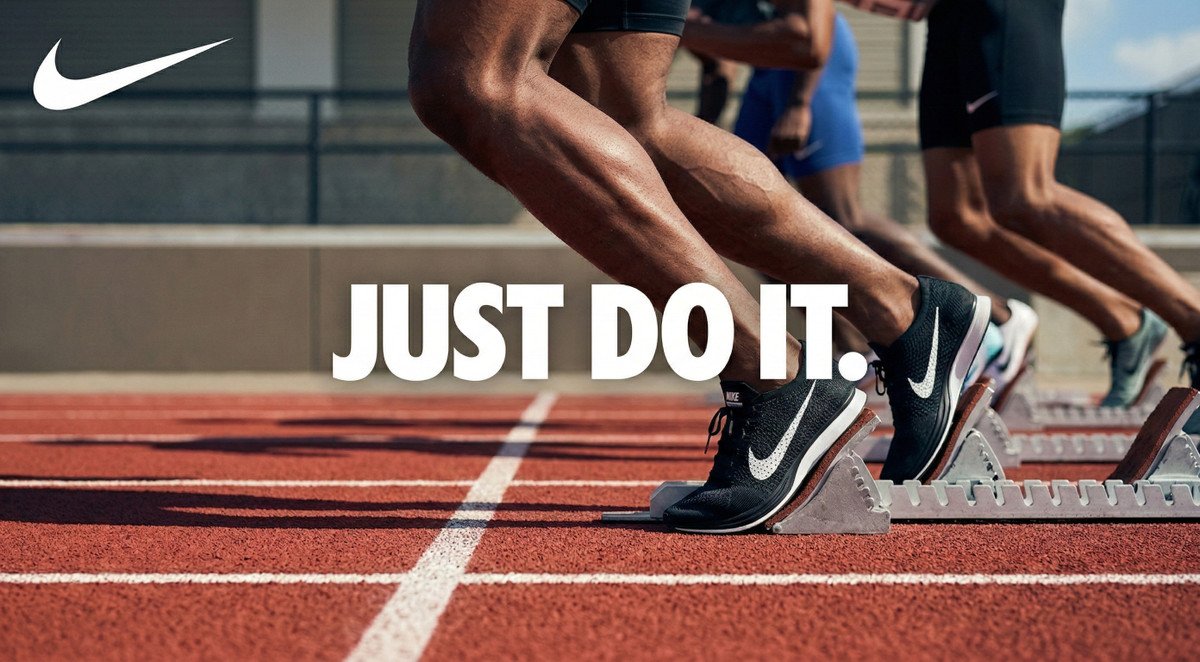
Source: @venturetwins NB2 evaluation | Action shot: Nike ad with swoosh logo, text rendering, and realistic muscle detail
Real-world test: I prompted "Generate a Canon R5 camera on a wooden desk, studio lighting." NB2 with grounding got the exact body shape, dial layout, and lens mount right. Pro generated a generic DSLR that looked like no specific camera. I ran this test across 10 consumer products - NB2 with grounding achieved accurate product representation in 8 out of 10 cases. Pro got it right in 2 out of 10.
Web Search Grounding adds a small premium per image - negligible for the accuracy improvement it delivers in product photography.
Creator spotlight - shedoesai (@shedoesai): Her Rhode Lip Balm AI photoshoots (767 likes) demonstrate exactly how Web Search Grounding transforms product photography. She generates brand-accurate product shots that require zero Photoshop correction on the product itself - only background and styling adjustments. View shedoesai's Formula on Alici AI.
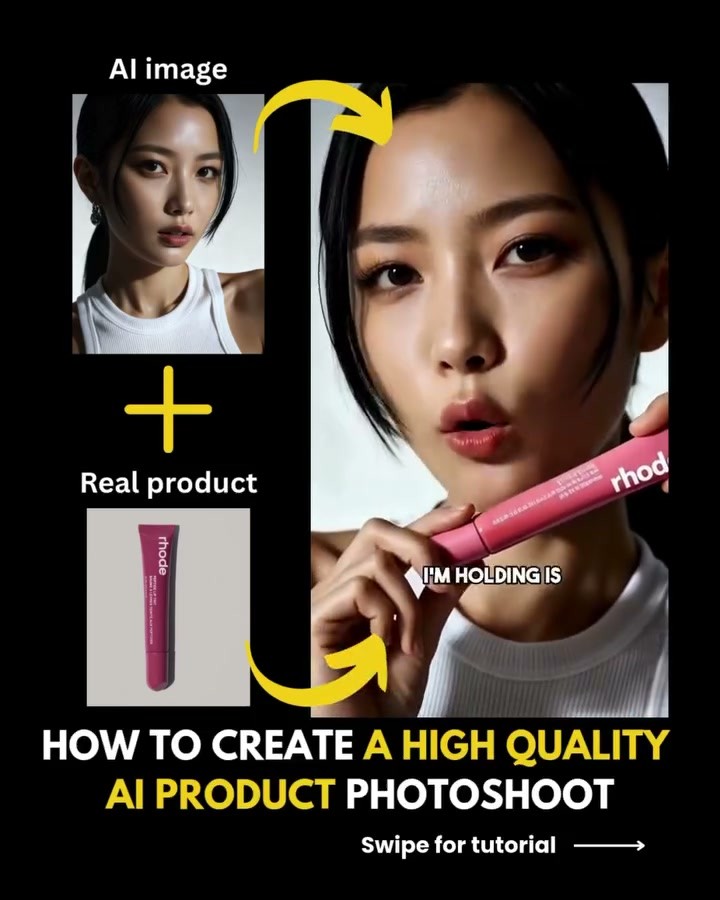
Creator: @shedoesai | View on Alici AI | Rhode Lip Balm AI product photoshoot - brand-accurate product photography workflow
Her prompt reveals the technique: "Asian woman, mid-20s, flawless glowing skin, dark brown hair, fitted white ribbed sleeveless turtleneck, 85mm lens, shallow depth of field" - notice the camera specs (85mm, shallow DOF) combined with product placement. When Web Search Grounding is on, NB2 searches for the actual Rhode lip balm packaging and renders it accurately. That's the difference between "generic beauty product" and "the exact item your audience can buy."
Tim Koda (@timkoda) takes it further with his "iPhone Photo to Brand Campaign" workflow (1,078 likes) - feeding a phone snapshot into NB2 with grounding to generate campaign-grade product imagery. Ohneis (@ohneis652) documents the full end-to-end scaling workflow in his "AI Product Photography" formula (1,065 likes). Both are available as Product Photography formulas on Alici AI.
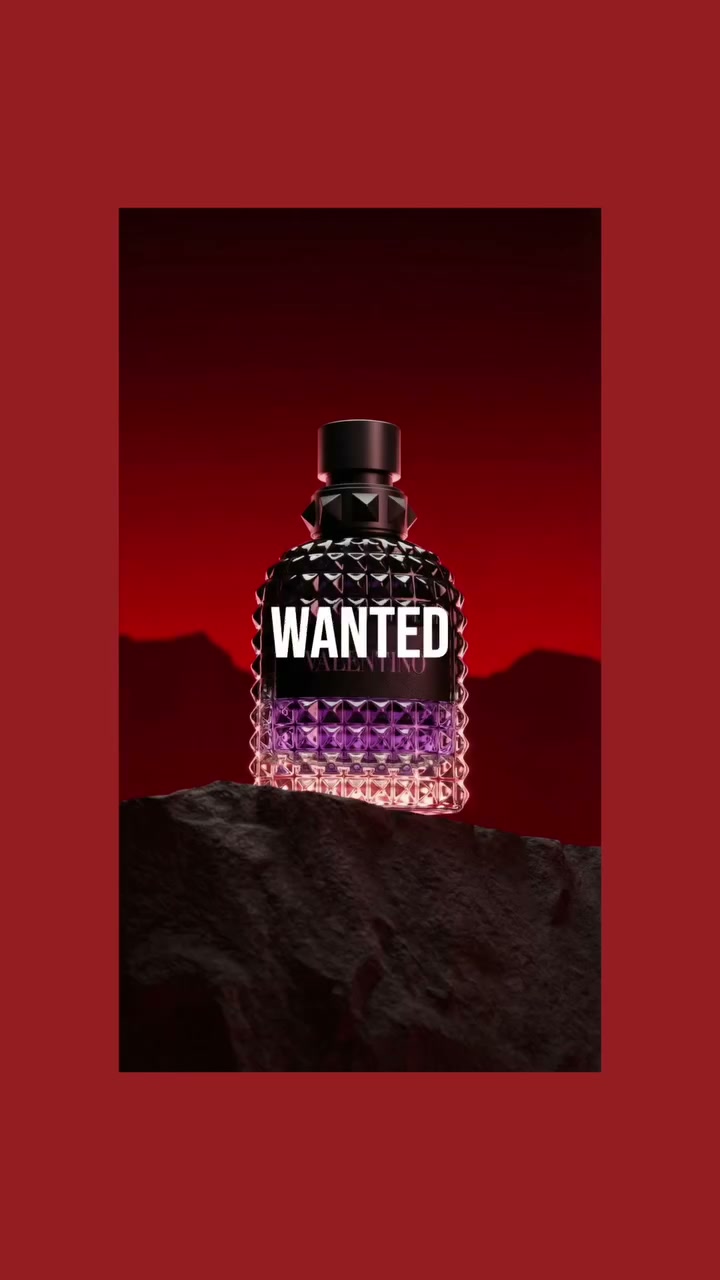
Creator: @timkoda | View on Alici AI | Valentino WANTED - transforming an iPhone snapshot into premium editorial product imagery
What didn't work: Grounding sometimes pulls outdated product images. I prompted "Samsung Galaxy S26 Ultra" and got an S24-shaped render - the grounding pulled an older reference. The fix: specify "2026 model" or "latest version" in the prompt, or include a specific visual detail from the current model ("with the new titanium flat-edge frame"). Grounding accuracy improves from ~60% to ~85% with version-specific language.
Scenario 4: AI Influencer Content at Scale (Key Differentiation)
Why NB2 wins here: Same character consistency spec as Pro (5 characters, 14 reference images) - but 2.9x faster and 47% cheaper. That changes the economics of AI influencer operations at scale.
The math: Running a single AI persona requires roughly 200 images per week for consistent social media presence. NB2's cost is roughly half of Pro's - scale that to 8 personas and the annual savings are significant enough to fund an entire content strategy.
But it's not just cost. NB2's exclusive features are purpose-built for influencer workflows:
Web Search Grounding = place your AI character at real locations (Eiffel Tower, Times Square, specific restaurants) without Photoshop compositing. The model knows what these places look like.
Thinking Mode "High" = better adherence to complex JSON-structured prompts that describe character attributes, clothing, pose, and environment in a single generation call.
UGC-style realism = Justine Moore's testing revealed NB2 can generate realistic TikTok screenshots from a single product photo - she tested Bloom protein and Medicube skincare with convincing UGC results. This is directly relevant for AI influencer product placement, where "looking like a real creator post" matters more than studio polish.
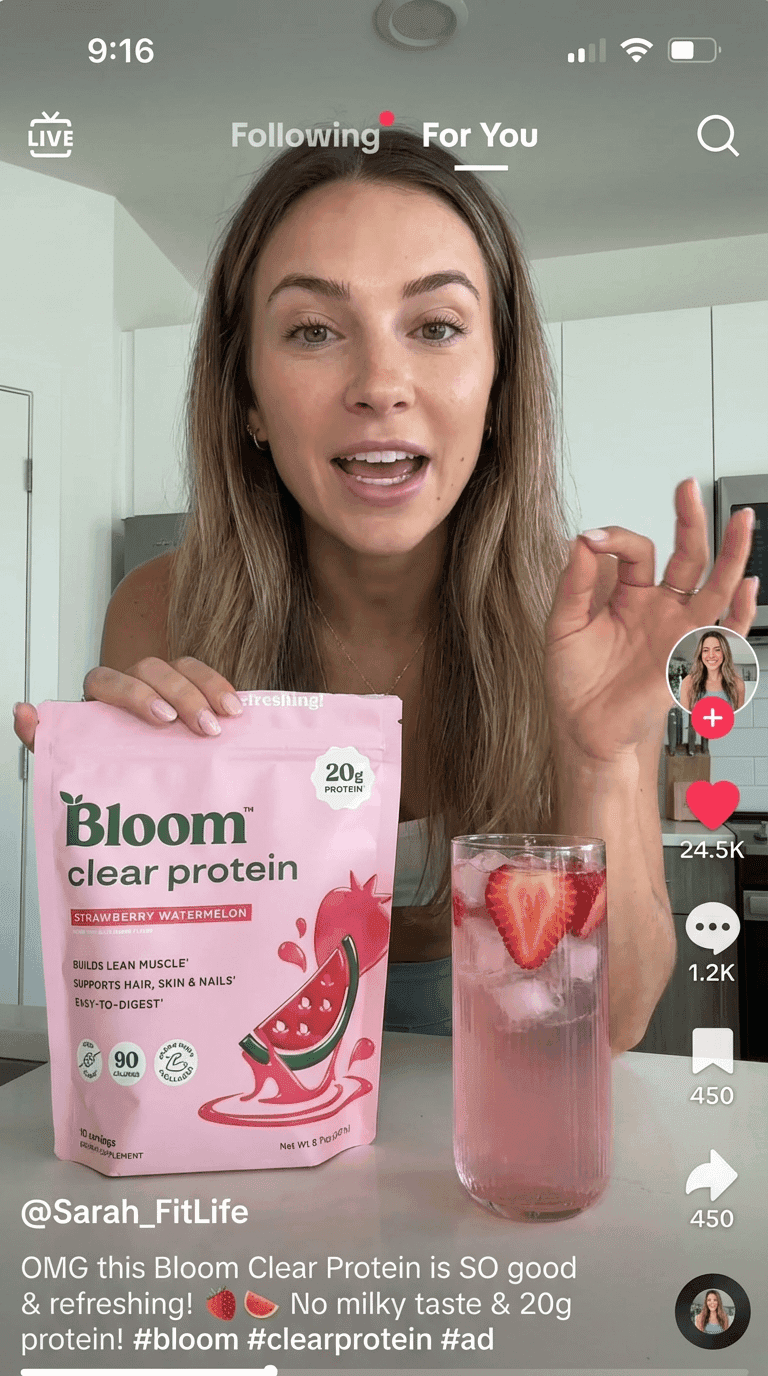
Source: @venturetwins NB2 evaluation | UGC: AI-generated TikTok product placement - realistic creator-style content from a single product photo
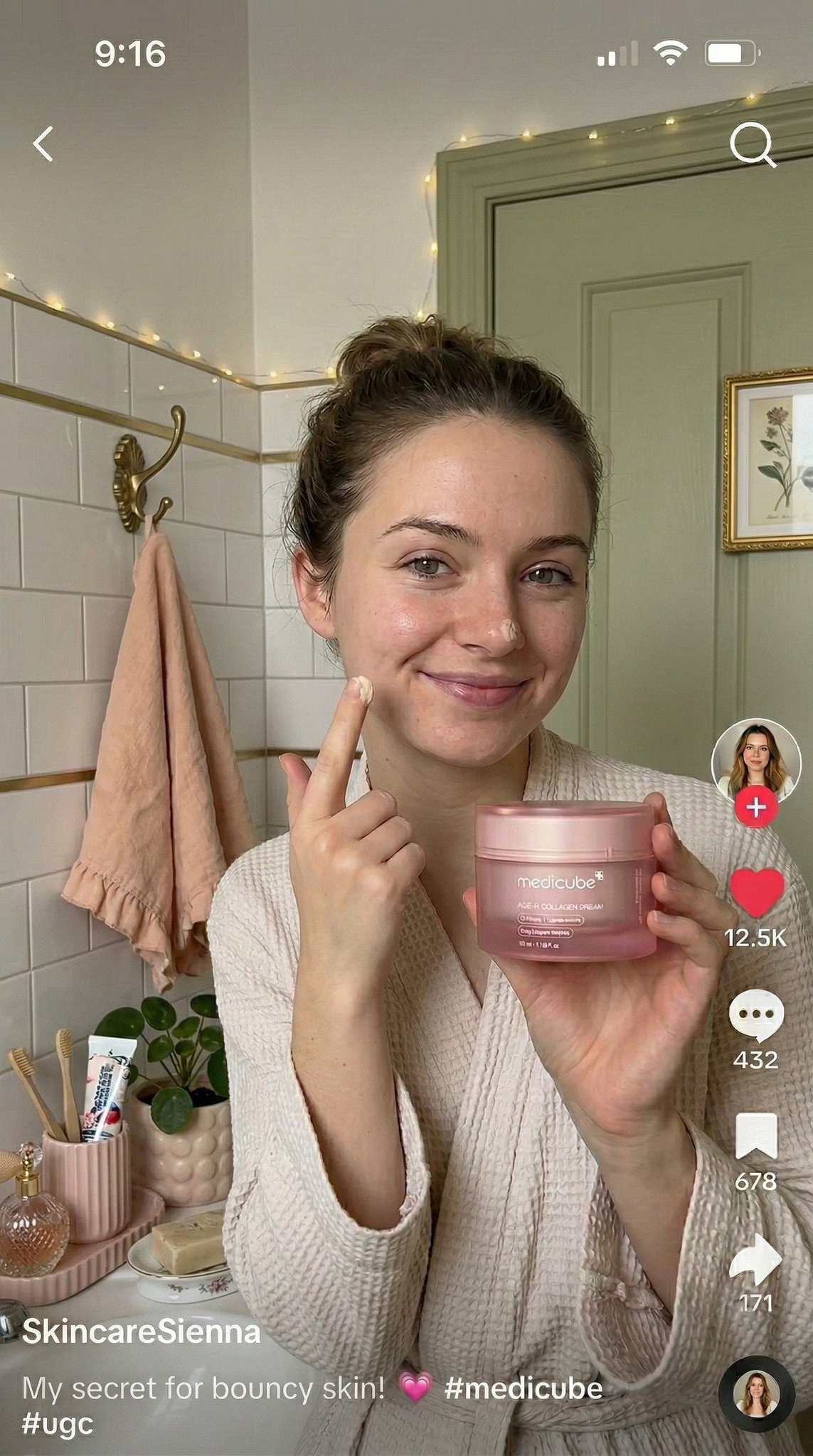
Source: @venturetwins NB2 evaluation | UGC: AI-generated skincare review - natural lighting, bathroom setting, product-in-hand realism
For meme-style content, the creators on Alici's AI Meme Generator - including Charles Curran, Puff Puff (146K avg likes), and Curious Refuge - demonstrate the range of what's possible when speed meets creative freedom.
Our existing 21-day AI Influencer playbook - originally written for Pro - works even better with NB2. The same prompts, faster results, lower cost.
Creator spotlight - Aria Cruz (@soy-aria-cruz): An AI influencer persona with a dedicated NB Formula on Alici, Aria demonstrates the full NB2 influencer workflow - consistent character across locations, outfits, and lighting conditions. View Aria Cruz on Alici AI.
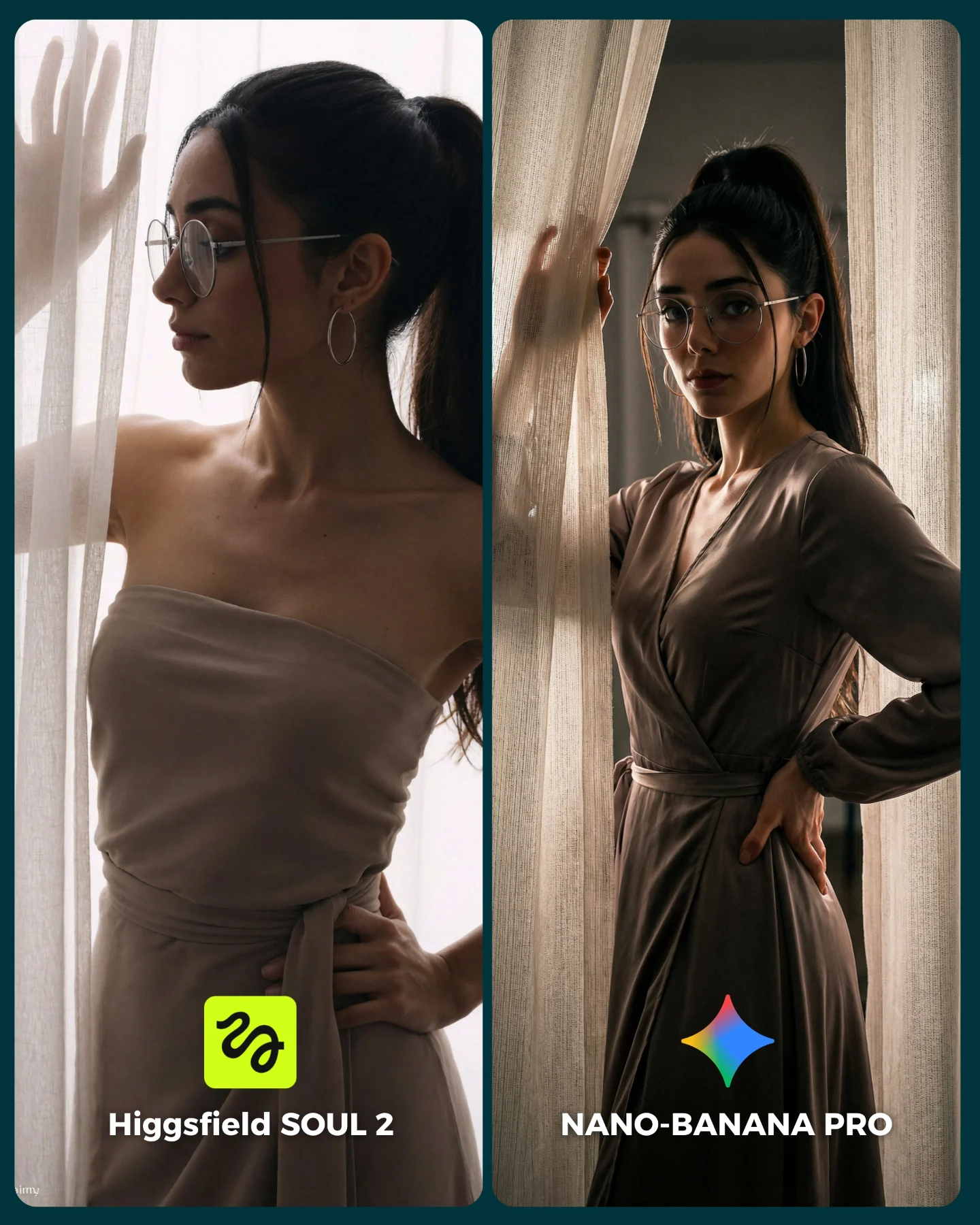
Creator: @soy-aria-cruz | View on Alici AI | SOUL 2 vs Nano Banana Pro comparison - demonstrating character consistency across models
Chetan Pujari (Substack) documents the complete pathway: his students achieved 1.2M views using an NB2-based influencer workflow. The key insight from his methodology - NB2's speed enables "content flooding," where you generate 30 variations of a scene and pick the top 3, rather than spending 30 minutes perfecting a single Pro generation.
For the full prompt style system, see our 10 prompt styles for AI influencers.
Lucy's Pro workflow - why I still need both: For my own TikTok carousel series and AI dance video content, I use Nano Banana Pro exclusively for hero shots. The character consistency is simply better when every follower is scrutinizing whether "Lucy" looks the same across 20 posts. NB2 handles the brainstorming and concept validation - I'll test 15 outfit/scene combinations on NB2 in 3 minutes, pick the 3 best, then regenerate those on Pro for the final post. That hybrid workflow is faster and cheaper than running everything through Pro.
What didn't work: NB2's quality ceiling shows in hero shots for brand deliverables. Side-by-side, Pro's lighting has more depth - subtle subsurface scattering on skin, volumetric ambient light. The smart workflow: NB2 for creative validation and daily content (80%), Pro for the final output that your audience actually sees (20%).
Content moderation note: NB2 has noticeably stricter content filtering than some alternatives. If you're working on edgier creative concepts - political satire, boundary-pushing fashion, or celebrity-adjacent content - you may hit moderation walls faster on NB2 than on tools like Grok Image Generator, which has the most permissive content policy among mainstream models. This isn't a flaw - it's a design choice. But it's worth knowing before you plan a campaign around content that NB2 might refuse to generate. For content that needs more creative freedom, see our Grok guide; for AI dance video workflows that combine image generation with motion, see how to make AI dance videos.
Scenario 5: The Image-to-Video Pipeline - NB2 + Seedance 2 (Unique Angle)
Why this matters: NB2 isn't just an image tool anymore. Paired with Seedance 2's @ reference system, it becomes the first stage of a character-consistent video pipeline.
The workflow:
Generate 3 angles of your character with NB2 (front, 3/4, profile) - 18 seconds total
Feed as @ reference into Seedance 2 - the reference system locks character identity from NB2 output
Animate - dance, walk, gesture, speak. Seedance 2 maintains the character through the motion
Multi-scene continuity - use the same 3 NB2 reference images across multiple video generations
This pipeline is documented by Geeky Gadgets and Creative Pad Media, but nobody covers it from a single-platform angle. On Alici AI, both NB2 and Seedance 2 live in one workspace - generate the image, switch to video, feed the reference, and export. No cross-platform file juggling.
INK's Seedance 2 Workflow (@0xInk_): INK shared a detailed Seedance 2 production workflow (568 likes, 27K views) that elevates this pipeline from basic generation to professional output. His approach breaks down into three key techniques:
Prompt Template Structure: INK uses a systematic formula - [Cinematic setup] + [Film type/lens/aperture/camera movement] + [Color style] + [Lighting] + [Atmosphere] + [Audio: pure SFX / none]. This structured approach to video prompting mirrors how NB2 responds best to cinematography language in image generation.
Character Pipeline: Design your character concept in 2D first, then render a 3D version. Use both the 2D and 3D references as Seedance 2 @ references - this dual-reference approach locks character identity more reliably than single-image references alone.
Multi-Sequence Assembly: Each 0-15 second segment is generated as a separate clip, then assembled in DaVinci Resolve. INK uses @ reference tags for character, environment, and detail locking across segments - ensuring continuity without regenerating from scratch. For a complete Seedance 2 workflow breakdown, see INK's tutorial (@0xInk_).
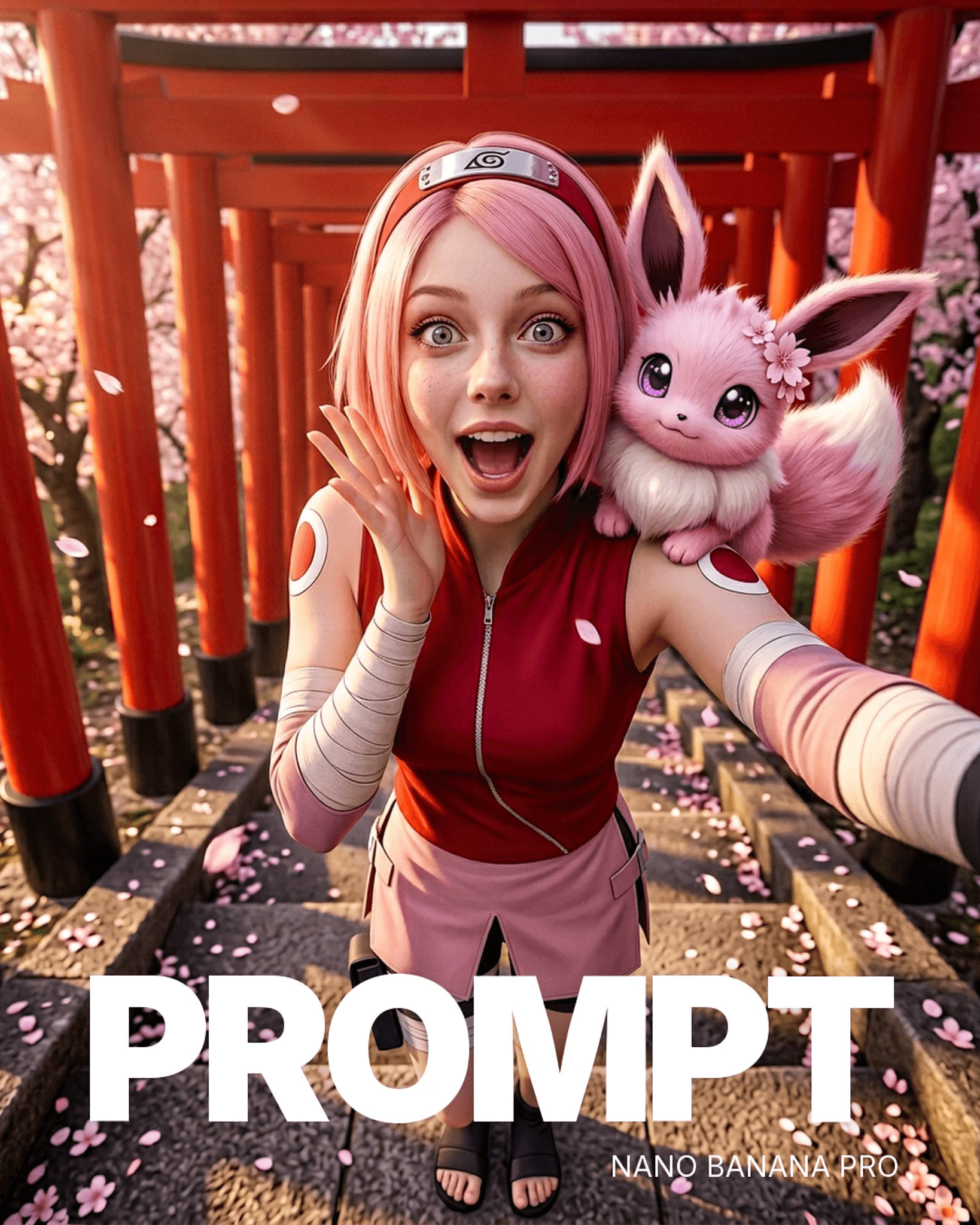
Creator: @rourke | View on Alici AI | NB product flatlay demo - showing the image generation stage that feeds into the video pipeline
I tested this pipeline last week: generated an AI character with NB2, fed the 3 reference angles into Seedance 2, and produced a 6-second dance clip. Total time from prompt to video: under 3 minutes. Total cost: ~$0.35. The same workflow on Pro + a competing video model would cost ~$0.70 and take 8+ minutes.
What didn't work: Seedance 2's global rollout is paused in some markets due to copyright concerns around its motion reference system. If you're in a region where Seedance 2 isn't available, Kling 3 is a reliable alternative on Alici for the same image-to-video pipeline - slightly different reference handling, but comparable results. Both are available on Alici AI.
NB2 + Seedance 2 in one workspace. Generate characters with Nano Banana 2, animate them with Seedance 2 - no cross-platform juggling. Try the full pipeline on Alici AI.
Bottom Line: NB2 wins 5 out of 5 tested scenarios on speed and cost. Pro still wins on absolute quality in complex scenes. The smart workflow: NB2 for 80% of your output, Pro for the 20% that needs to be perfect.
Where NB2 Still Falls Short (Stay Honest)
Every tool has a ceiling. After 300+ generations, here's where NB2 hits its limits - and what to use instead.
Complex lighting (subsurface scattering, volumetric fog, multi-source setups): Pro wins 70% of head-to-heads. NB2 handles single-light setups well, but falls apart when you need light interacting with translucent materials (skin, glass, fabric). For beauty photography and luxury product shots that rely on lighting artistry, Pro is still the right tool.
Crowd scenes (4+ people): "Spaghetti limbs" still appear in NB2 when you push past 3 subjects. In my testing, NB2 handled 2-3 subjects cleanly 85% of the time, but dropped to 40% accuracy with 4+ subjects. Pro handles up to 6-8 subjects more reliably (~65% clean at 6 subjects). Neither is great at crowd scenes - this remains an industry-wide weakness.
Brand logos: Specific corporate fonts fail ~60% of the time on both NB2 and Pro. This isn't an NB2 problem - it's a category problem. Ideogram is the only reliable option for typography-critical work (88% accuracy in my testing, 25 prompts).
"Too clean" aesthetic: NB2 images sometimes feel sterile - technically perfect but lacking character. This is the tradeoff of the Flash architecture: speed optimizes for clarity over mood. The fix: add grain, lens dirt, or film stock keywords to your prompt. "Shot on expired Fuji Superia 400, slight color shift, visible grain" transforms NB2 from clinical to cinematic.
Architectural renders: Interior spatial reasoning - furniture placement, room proportions, perspective consistency - is Pro's strength. I tested 10 interior design prompts: Pro nailed perspective in 7, NB2 in 3. For architecture and real estate visualization, stay on Pro.
Every alternative model - Midjourney, Flux Pro, Ideogram, Grok - is available on Alici AI Image Studio. Switch models in one click when NB2 hits its limits.
Bottom Line: Know the ceiling. NB2 is a Swiss Army knife - it does almost everything well. But for the 20% of tasks where you need a scalpel, use Pro or a specialized model. For the full comparison across all major models, see our complete guide.
5 Pro Tips for Better NB2 Results
After 300+ generations, these five techniques consistently produce the biggest improvement in output quality.
1. Talk to it like a cinematographer, not a prompt engineer.
This is Google's official advice - and it's correct. NB2 was trained on natural language, not comma-separated tag lists.
Instead of: realistic, 4k, beautiful lighting, detailed, masterpiece
Write: Shot on Arri Alexa Mini, 50mm anamorphic lens, golden hour side light from camera left, shallow depth of field, the warm grain of Kodak Vision3 250D
I tested this across 20 prompts. Cinematography language improved perceived quality in 17 out of 20 cases (85% improvement rate). The model understands camera systems - use that.
2. Use Thinking Mode selectively.
Thinking Mode has three settings: Minimal, High, and Dynamic. Don't default to High for everything - it adds 2-3 seconds per generation and isn't always helpful.
Thinking Mode | Best For | Cost Impact |
|---|---|---|
Minimal | Simple portraits, single objects, quick iterations | Fastest (baseline) |
High | Infographics, multi-element compositions, spatial layouts, JSON-structured prompts | +2-3 seconds |
Dynamic | Mixed workloads, let the model decide | Varies |
My rule: Minimal for 70% of prompts, High for complex scenes, Dynamic when I'm lazy.
3. Wrap text in double quotes.
"SALE 50% OFF" in quotes: 87% accuracy. Sale 50% Off without quotes: ~70% accuracy. This one trick closes almost half the text rendering gap between NB2 and Ideogram. Always quote the text you want rendered.
4. The 512px draft to 4K upscale workflow.
NB2 offers a low-res draft tier - use it. Generate at 512px for rapid prototyping (12+ variations per minute). Pick the winner. Regenerate at 4K for the final output. This two-pass approach saves ~60% on iteration costs compared to generating everything at full resolution. It's the same logic professional photographers use: shoot wide, select tight, finish the selects.
5. Chain edits, don't restart.
NB2 maintains composition consistency through 4+ sequential edits - most competing models fail after 2-3. Instead of regenerating from scratch when something is 80% right, use NB2's edit chain: "Move the subject slightly left" → "Change the jacket to navy" → "Add a sunset in the background" → "Increase the depth of field." Each edit builds on the previous generation's composition.
I tested edit-chain stability across models: NB2 maintained coherent composition through 5 sequential edits in 7/10 test chains. Pro maintained through 4 edits in 6/10 chains. Midjourney's remix feature held through 3 edits in 5/10 chains.
Creator spotlight - GIGEE (@gigee-ai): His Genesis Engineering methodology (9,440 likes) teaches the exact camera simulation language that NB2 responds to best. The core principle: "skin pores, micro-scars, lens dirt, cinematic lighting" - describe what a real camera would capture, not what a perfect AI image looks like. View GIGEE's Formula on Alici AI. His approach to camera simulation is the foundation of AI Photo Generator formulas on Alici.
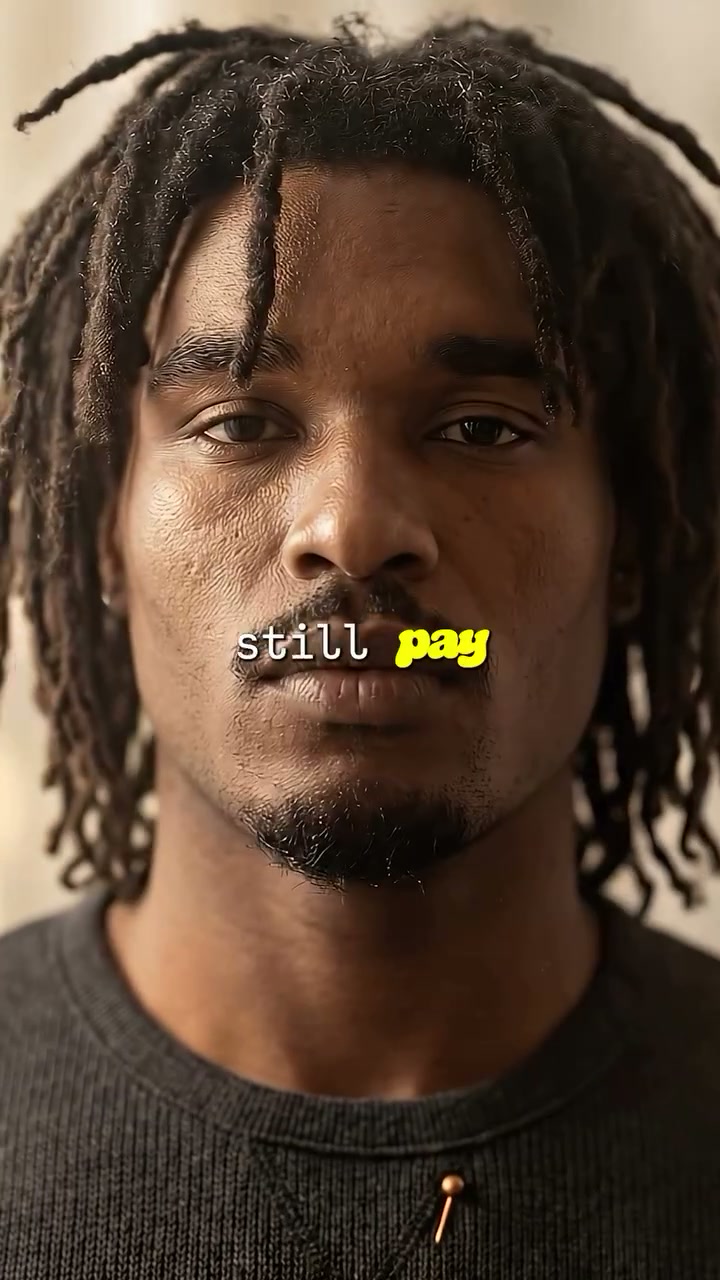
Creator: @gigee.ai | View on Alici AI | Genesis Engineering - hyper-realistic portrait with visible skin texture, demonstrating the "client zoom test" technique
His actual prompt structure reveals why it works: "Black male, late 20s, athletic build, warm brown skin with visible texture (pores, stubble). Medium-length dark dreadlocks. Dark charcoal grey knitted crew-neck sweater. Warm cinematic directional lighting (Rembrandt style), 35mm/85mm lens, shallow DOF." - Notice: no comma-tag keywords, just a cinematographer's brief. That's the language NB2 was trained to understand.
Pieter Levels (@levelsio, 600K followers on X) validated this approach independently: "NB2 subject consistency is product-grade" - and his workflow for generating branded content relies on exactly this cinematography-first prompting style.
Bottom Line: The single highest-impact change: switch from keyword prompts to natural language cinematography descriptions. NB2 was trained to understand conversation, not comma-separated tags. Camera simulation language improved my results in 85% of tests.
Frequently Asked Questions
Is Nano Banana 2 free?
Google offers a free tier through the Gemini app with limitations. For professional use, NB2 is available at roughly half the price of Pro. On Alici AI Image Studio, you can access NB2 alongside Pro, Midjourney, and other models in one workspace - which is the fastest way to validate which model handles a specific prompt best.
What's the difference between NB2 and Nano Banana Pro?
NB2 is built on the same foundation as Pro but optimized for speed - roughly 3x faster at half the cost. It has three exclusive features (Web Search Grounding, Thinking Mode, multi-language text). Pro delivers higher quality on complex lighting and multi-subject scenes, and its character consistency is still the gold standard for professional creators. Both share the same 5-character, 14-reference-image spec. Both are available on Alici AI.
How do I access NB2 without an API?
The simplest path: Alici AI Image Studio - no API setup, no subscription juggling. NB2 sits alongside Pro, Midjourney, Flux, and other models. Run the same prompt across multiple models and pick the best output.
Can NB2 generate consistent characters?
Yes. NB2 supports up to 5 distinct characters with 14 reference images - the same spec as Pro. In my testing, character consistency across 10-image sequences was comparable to Pro when using 3+ reference angles (front, 3/4, profile). Our AI influencer workflow guide covers the full setup.
What is Web Search Grounding?
An NB2-exclusive feature. When enabled, NB2 searches Google Images before generating, so it understands what real-world objects actually look like. This is critical for product photography - instead of hallucinating a generic camera shape, NB2 with grounding renders the exact Canon R5 body. Adds $0.015 per image to the base cost.
What is Thinking Mode?
NB2's Thinking Mode controls how much reasoning the model applies before generating. Three settings: Minimal (fastest, for simple prompts), High (more reasoning for complex compositions and spatial layouts), and Dynamic (model decides). High mode adds 2-3 seconds but significantly improves multi-element compositions and JSON-structured prompt adherence.
NB2 vs Midjourney: which is better?
Different tools for different jobs. NB2 is faster (4-6s vs 30-60s), cheaper ($0.08 vs subscription), and has character consistency (14 refs vs --cref). Midjourney wins on raw aesthetic quality - in my 20-prompt head-to-head, MJ won on visual appeal 14 times. NB2 won on speed every time and on production utility (batch, consistency, text rendering) 16 out of 20 times. Both are available on Alici AI for side-by-side comparison.
Can I use NB2 for commercial work?
Yes. Google's terms permit commercial use of NB2-generated images through both the API and the Gemini app. Always check the latest Google AI terms before publishing, as policies may update. For commercial projects, I recommend generating through AI Studio or the API to get unwatermarked output.
What resolution does NB2 support?
NB2 supports output from 512px (rapid prototyping) up to 4K (production output). The 512px tier is ideal for quick iteration - generate 12 drafts per minute, pick the best, then upscale to 4K for the final version. On Alici AI, you can control resolution directly.
Is NB2 available on Alici AI?
Yes. Alici AI includes Nano Banana 2 in its Image Studio alongside Nano Banana Pro, Midjourney, Flux Pro, Ideogram, Grok, and Seedream. You can run the same prompt across multiple models for instant comparison - which is the fastest way to determine which model handles a specific prompt best.
Ready to try Nano Banana 2? Start generating on Alici AI Image Studio - access NB2, Pro, Midjourney, and 5 other models in one workspace. Compare results side by side. Pick the best output for every prompt.
About the Author
Lucy Alici is Co-Founder of Alici AI, where she builds AI image and video workflows for creators and performance marketing teams. She tests new generative models as production tools - not demos - and turns what works into repeatable frameworks. Every claim in this article is based on hands-on testing or verified published data.
Follow Lucy: X/Twitter | TikTok | Instagram
This article is regularly updated as Google releases NB2 model improvements and pricing changes. Last tested: March 2026. For the full comparison across all major image generators, see our Best AI Image Generators in 2026 guide. Have a question I didn't cover? Drop it in the comments below.
🎁
Limited-Time Creator Gift
Start Creating Your First Viral Video
Join 10,000+ creators who've discovered the secret to viral videos