How to Make AI Dance Videos in 2026: Complete Guide (4 Methods Compared)
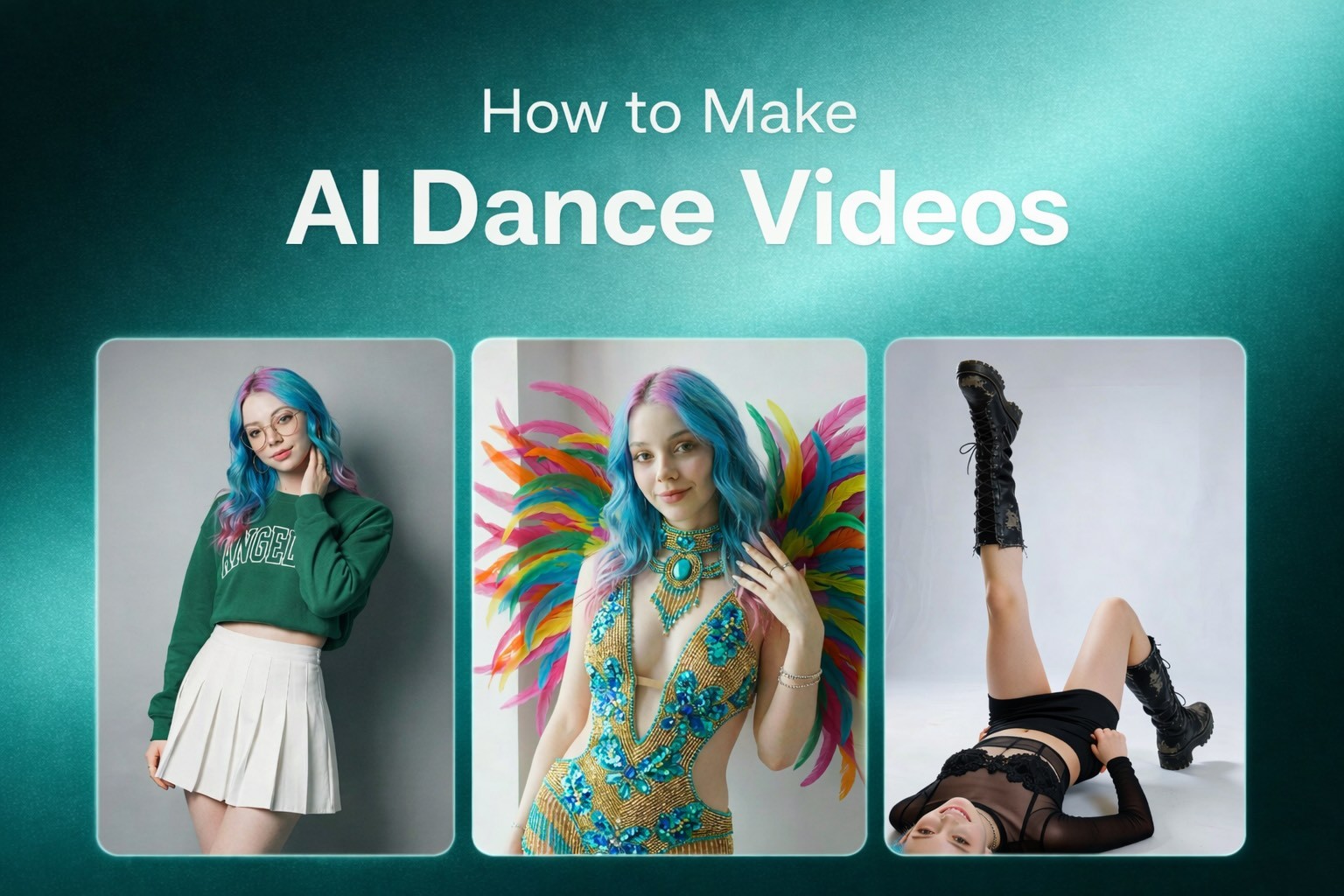
Step-by-step tutorial covering motion control, photo-to-dance, beat-synced, and style-preset methods. Includes copy-paste prompts, creator formulas, and platform optimization.
|
17 min
TL;DR
There are 4 ways to make AI dance videos: Motion Control (highest quality, Kling 3 via Alici AI), Photo-to-Dance (fastest, Viggle AI), Music-Driven (Seedance 2 via Alici AI), and Style Presets (Hailuo AI). Motion control with a reference video beats text prompting every time.
Dance content pulls 3 million+ median views on TikTok - roughly 25% higher engagement than any other content category. And AI tools have made it possible for anyone to create dance videos without filming a single second of footage. I've been producing AI dance content for months, studying 30+ top creators on Alici Formulas, and testing every major tool on the market. This guide is everything I've learned.
Quick Answer: There are 4 ways to make AI dance videos in 2026: (1) Motion Control (upload a reference dance + character photo - highest quality, use Kling 3 via Alici AI), (2) Photo-to-Dance (upload photo, pick a preset dance - fastest, use Viggle AI or Alici AI templates), (3) Music-Driven (upload a song, AI generates matching dance - use Seedance 2 via Alici AI), (4) Text-to-Dance (describe the dance in words - use Hailuo AI via Alici AI). Method 1 produces the best results. Method 2 is the fastest. I recommend starting with Alici AI's Dance Generator because it gives you access to all four methods from one dashboard.
Key Takeaways:
Motion control with a reference video beats text prompting every time. Kapwing tested 8 AI models and found that text-only prompts failed to reproduce specific choreography. If you want your AI dancer to do a specific move, show it - don't describe it.
Your character choice determines your ceiling. From studying Alici Formulas creators, I found that animal characters outperform human characters by a wide margin - Hugh's dancing raccoon hit 140,700 likes, while human characters from the same period averaged under 10K.
Simple choreography goes more viral than complex routines. The AI clips that perform best are ones viewers can "read" in a single watch. Arm pops, shoulder bounces, and step-touches beat backflips every time.
The first 3 seconds decide everything. A weak opening kills retention - if the first two seconds don't grab attention, people are already gone.
You can do all of this for free. Alici AI offers starter credits across all models.
[VIDEO: Hugh's Chicken Banana Raccoon - 80,853 likes - instant "here's what's possible"]
What You Need Before You Start
You don't need a studio, a camera, or any dance skills. Here's what you actually need:
Essential:
A clear, full-body photo of your "dancer" (person, pet, character, painting - anything)
An Alici AI account (free) - gives you access to Kling 3, Seedance 2, Hailuo, and more
A reference dance video (3-10 seconds) - OR use a preset template
For best results:
Photo with good lighting, no cropping at limbs, neutral starting pose
Leave "breathing room" around your subject - hidden limbs force the AI to hallucinate, causing finger artifacts and distortion
A vertical reference video (9:16) if targeting TikTok/Instagram/YouTube Shorts
The "Breathing Room" Rule (from Higgsfield's research): Leave space around your subject for arm movements. If hands are hidden behind the body or cropped out of frame, the AI has to guess where they are - and it guesses wrong almost every time. From my testing, this single tip improved my usable output rate from ~60% to 90%+.
Input Quality | Result |
|---|---|
Full body, clear lighting, neutral pose | 90%+ usable output |
Cropped limbs or hidden hands | 40-60% usable (finger artifacts) |
Low light or blurry | Below 40% (identity drift) |
Choose Your Character Type (This Matters More Than You Think)
Before you pick a tool or a dance style, decide what's dancing. From analyzing the Alici Formulas creator library, I found a clear engagement hierarchy:
Character Type | Avg. Engagement | Example | Why It Works |
|---|---|---|---|
Animals (dressed up) | Highest | Hugh's raccoon (140,700 likes), Meow Dance cats (16,732 likes) | Cuteness + surprise + shareability |
Paintings/Art | Very High | Mona Lisa Christmas Dance (38,619 likes) | Cultural recognition + incongruity |
Celebrity-coded characters | High | Dreamweaver's Dirty Dancing series (44,500 avg) | Recognition + "who do you see?" engagement |
Original AI characters | Medium | Streetwear characters, anime | Style appeal but less recognition |
Real human photos | Lower | Face swap tests (~1,800 avg) | Privacy concerns, less shareable |
Bottom Line: If you want maximum reach, make an animal or painting dance. If you want to build a personal brand, use a consistent AI character. Celebrity-coded content gets 7x more engagement but carries more content moderation risk.
[VIDEO: Meow Dance cat crew - 14,980 likes - shows animal character approach]
Method 1: Motion Control Dance Transfer (Highest Quality)
Best for: Professional-quality dance videos where you control exactly what movements happen.
Tools: Kling 3 Motion Control via Alici AI | Time: 2-5 minutes | Cost: Free (66 daily credits) to $10+/mo
Template: Kling Motion Control Dance
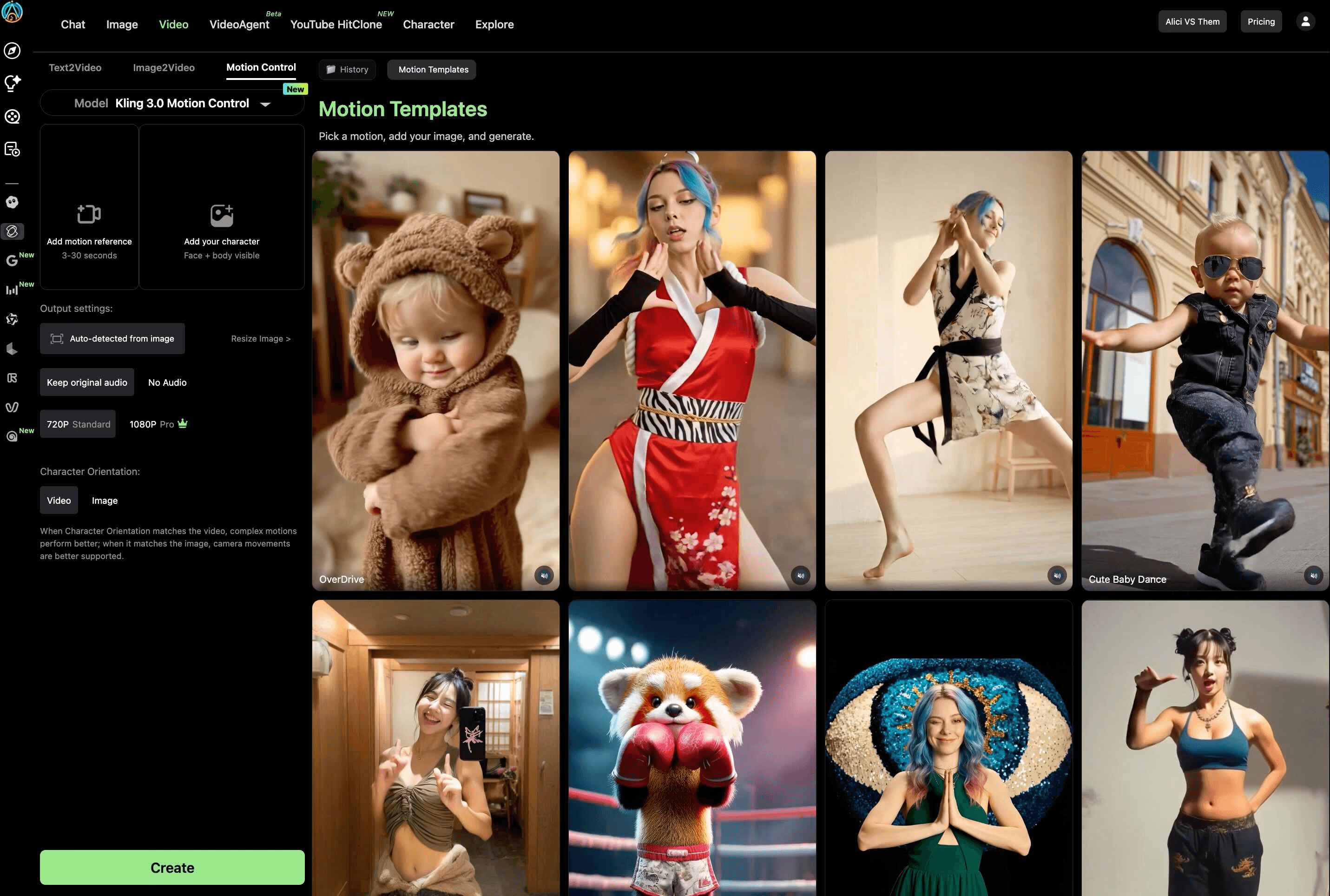
This is the method I use for all my serious dance content. You give the AI two things: a "performance recording" (reference dance video) and an "actor headshot" (character photo). The AI transfers the dance onto your character with realistic physics. I wrote a complete guide to Kling 3 Motion Control where I tested it with finger dances and four streetstyle outfits - the weight transfer and identity preservation are unmatched.
Step 1: Prepare Your Reference Dance Video
What Works | What Fails |
|---|---|
3-10 seconds long | Multiple people (AI can't decide who to track) |
Single person, clearly visible | Heavy occlusion (hands covering face) |
Stable camera (tripod) | Extremely fast movements (especially fingers) |
Good lighting, no extreme shadows | Shaky handheld footage |
Frame 1: neutral pose with clear face |
Choreography Risk Ladder (from Alici Formulas research):
Risk Level | Movements | Recommendation |
|---|---|---|
Low (start here) | Arm pops, shoulder bounces, step-touches, swaying | Beginners - highest success rate |
Medium | Walking, running, social dances, simple hip-hop | Good with a clean reference video |
High (advanced) | Rapid footwork, acrobatics, multi-person contact | Expect multiple retries |
Step 2: Upload to Alici AI
Go to Alici AI's Dance Generator or Video Studio
Select Kling 3 as your model
Upload your character photo (full body, clear face, breathing room)
Upload your reference dance video
Enable Element Binding - upload 2-3 additional face angles of your character for identity consistency during fast movement. This is Kling 3's exclusive feature, and I haven't found a single competitor tutorial that teaches it properly. See my detailed Element Binding guide.
Step 3: Configure and Generate
Scene Source: "Reference video" for dance content (background matches the motion video)
Orientation: "Video orientation" for complex dances (supports up to 30-second clips)
keepOriginalSound: ON for dance content (preserves audio from your reference)Prompt: Do NOT describe the dance - the reference video handles movement. Your prompt describes scene and style only.
Prompt template for motion control:
Step 4: Review and Iterate
From my testing: first-generation success rate is about 70% with good inputs. If the output has issues:
Finger artifacts: Reduce choreography complexity or add more Element Binding references
Identity drift: Ensure frame 1 of your reference has a clear, well-lit face
"Ice skating" feet: This was a Kling 2.6 problem - Kling 3 has mostly solved it with physics-based weight transfer
[VIDEO: Dreamweaver Runway Dance - 138,600 likes - shows celebrity-adjacent motion control technique]
Bottom Line: Motion control is the gold standard. It takes 15 minutes to learn Element Binding, but after that, every generation is predictable. This is how the AI Baby Dance trend generated 500M+ views on TikTok.
Method 2: Photo-to-Dance (Fastest - Under 1 Minute)
Best for: Quick social media content when you want speed over precision.
Tools: Viggle AI or Alici AI templates | Time: Under 60 seconds | Cost: Free
Template: Make Photo Dance AI
This is the easiest method: upload a photo, pick a dance from a library, and the AI animates it. No reference video needed.
With Viggle AI:
Upload your character photo
Choose Mix mode (blend photo into dance) or Move mode (keep original background)
Select a dance from Viggle's library - or upload your own reference
Generate - usually under 30 seconds
With Alici AI (Recommended):
Go to the AI Dance Generator and browse 60+ dance templates
Pick a template matching your style - cat dance, hip-hop, K-pop, dirty dancing, sway filter, or any of the trending dance effects
Follow the template's prompt structure - each includes an AI-identified prompt from real viral videos
Choose your model: Kling 3 for quality, Seedance 2 for beat-sync, Hailuo for style presets
Generate - the multi-model access lets you A/B test the same photo across models and keep the best result
Bottom Line: Photo-to-dance is 90% about speed, 40% about quality. For TikTok memes and quick social content, it's perfect. For anything professional, use Method 1.
Method 3: Music-Driven Dance (Beat-Synced)
Best for: Music videos, dance challenges, any content where the dance must match the beat.
Tools: Seedance 2.0 via Alici AI, FreeBeat AI | Time: 5-12 seconds generation | Cost: Free (120 daily Seedance points)
Template: AI Dance Generator From Music
Seedance 2.0 (by ByteDance) is the only major model with quad-modal input - images + videos + audio + text in one generation. You can access it through the dedicated Seedance 2 page on Alici AI or via Video Studio. I compared it with Kling 3 in our Kling 3 vs Seedance 2 comparison: Seedance wins on audio-sync, Kling wins on motion precision.
Steps:
Go to Alici AI's Seedance 2 page or open Video Studio and select Seedance 2
Upload your character photo
Upload your music track (MP3, or paste a link from YouTube/SoundCloud/Suno/Udio)
Optionally add a reference dance video for movement guidance
Write a brief style prompt (Seedance handles the choreography from the audio)
Generate - typically 5-12 seconds processing
Audio-Style Prompt Guide (from Alici Formulas):
Dance Style | BPM | Instruments | Tone |
|---|---|---|---|
Waltz | 110-120 | Soft strings, light percussion | Romantic, whimsical |
Hip-hop | 90-110 | Drums, bass, synths | Confident, swagger |
K-pop | 95-120 | Bright synths, drums | Playful, energetic |
Bottom Line: If your starting point is a song, Seedance 2 is the best choice - the beat-matching is genuine, not just random movement with music layered on.
Method 4: Image-to-Dance with Style Presets (No Reference Video Needed)
Best for: When you have a character photo but no reference dance video, and want the AI to choreograph for you.
Tools: Hailuo AI via Alici AI | Time: 3-5 minutes | Cost: Free tier available
Template: AI Choreography Generator
Hailuo AI's 2.3 model has a dedicated AI Dance Generator with style presets. Unlike Method 1 (which needs a reference dance video), Hailuo lets you upload a photo and choose a dance style - the AI choreographs the movement based on the style selection.
How it works:
Upload a clear photo of your character (full body, good lighting)
Choose a dance style: K-pop, hip-hop, ballet, contemporary, or one of 10 built-in choreography presets (Party Bounce, The Wave, Robot Pop, Shimmy Shake, Classic Twist, Freeze Frame Dance, Step-Touch Groove, Sway & Snap, Celebration Jump, Smooth Slide)
Add an optional text prompt describing the scene, lighting, and mood (the dance movement comes from the style preset, not the text)
Generate - typically 3-5 minutes
Important clarification: Hailuo also supports pure text-to-video (T2V) where you can describe a dance scene without uploading any image. However, the dedicated dance presets work through the image-based workflow and give you more control. For custom characters, you'll want to upload a photo.
General text prompt example (T2V, no image):
When to use this vs. motion control:
You have a photo but no reference video → Method 4 (style presets)
You want a specific dance move replicated exactly → Method 1 (motion control)
You want creative surprise with no inputs at all → Method 4 T2V mode
You need consistency across multiple videos → Method 1 (Element Binding)
Bottom Line: Method 4 fills the gap when you don't have a reference dance. The style presets give you reasonable control, and the T2V mode works for creative exploration. But for anything requiring precise choreography, motion control (Method 1) is still the gold standard.
5 Dance Prompts You Can Copy Right Now
These are adapted from the Alici Formulas template library - each has been validated by creators with 5K-140K likes:
Prompt 1: Cute Animal Hip-Hop (from @meowdance.ai)
Prompt 2: Celebrity-Adjacent Cinematic (from @dreamweaver_ai_pl)
Prompt 3: Cultural IP Collision (from @monalisa_and_friends)
Prompt 4: Meme Dance Character (from @hugh.yellownine)
Prompt 5: Quick Social Sway (for beginners)
[VIDEO: Paper Origami Dance by gerdegotit - 5,596 likes - shows unique aesthetic possible with good prompts]
Common Mistakes and How to Fix Them
From my testing + competitor research + Alici Formulas community data:
Mistake | Why It Happens | Fix |
|---|---|---|
Finger artifacts | Hidden hands in character photo | Ensure all limbs visible + "breathing room" |
Identity drift | Poor face angle in reference | Add 2-3 Element Binding images (Method 1) |
"Ice skating" feet | Older models (Kling 2.6) | Use Kling 3.0 - physics engine solved this |
Overcomplicated prompt | Too many instructions confuse the model | Keep prompts structured + use negative prompts |
Wrong choreography | Text prompts can't specify precise moves | Use reference video (Method 1), not text |
Outfit flicker | Complex patterns (plaid, stripes) | Simplify one variable - solid colors work best |
Weak opening | No hook in first 2 seconds | Edit the strongest moment to the front |
Wrong aspect ratio | Landscape video for TikTok | Always export 9:16 vertical for social platforms |
The Negative Prompt Master List (from Alici Formulas):
Copy this into every generation to significantly reduce artifacts.
How to Optimize for TikTok, Instagram Reels, and YouTube Shorts
Once your dance video is generated, optimizing it for each platform makes the difference between 1,000 views and 1,000,000.
Factor | TikTok | Instagram Reels | YouTube Shorts |
|---|---|---|---|
#1 algorithm signal | |||
Optimal dance length | 60-120s (or <15s loops) | 7-30s | 13s or 60s |
Audio strategy | Original audio preferred | Trending audio (early, not peak) | Trending audio/effects |
Best posting time | Evenings 6-11 PM, weekends | Evenings, Wed/Thu | No dance-specific data |
Posting frequency | 3-5x/week | 3-5x/week | Weekly minimum |
2026 change | Qualified views >5s, SEO-ification | User-controlled algorithm | 200B daily views, cross-platform sharing rewarded |
3 Platform-Specific Tips:
TikTok: Keep choreography simple enough for viewers to imagine copying. Rewatches count 5x more than likes. Loopable dances (<15s) get the highest rewatch rates.
Instagram Reels: Use trending audio while it's still rising, not after it peaks. The algorithm favors early adopters. Dance + outfit transitions (glow-ups) are a proven combo.
YouTube Shorts: Cross-platform sharing is actively rewarded - if your Shorts gets shared to TikTok/IG, YouTube's algorithm gives it a boost. Post your dance on all three platforms.
Hashtag strategy: #AIDance #AIDanceVideo #ViralDance #AIArt #DanceTrend + niche tags (#AICatDance, #BabyDance, etc.)
Use Cases: What to Make
Use Case | Best Method | Template Link | Related Guide |
|---|---|---|---|
TikTok viral dance | Method 2 (fastest) | AI Sway Dance Filter guide | |
AI baby dance | Method 1 (Kling MC) | ||
Pet dance (cat/dog) | Method 1 or 2 | AI Cat Dancing guide | |
Music video | Method 3 (beat-synced) | ||
Dance meme | Method 2 | AI Dance Meme guide | |
Professional/branded | Method 1 | ||
Celebrity-style | Method 1 + formula | ||
Go viral on TikTok/IG/Shorts | Method 1 + formula | How to Go Viral with AI Dance | |
Compare tools | All methods |
[VIDEO: Mona Lisa Christmas Paintings Dance - 38,619 likes - Cultural IP Collision strategy]
Pro Tips from Studying 30+ AI Dance Creators
These insights come from months of analyzing top performers on Alici Formulas:
The Two Viral Paths
Path 1: Accumulated Character IP - Build one recurring character across dozens of videos. Hugh's raccoon appeared in 100+ videos before hitting 140,700 likes. The audience builds recognition and anticipation. Each new video compounds on the last.
Path 2: Cultural IP Collision - Take a scene audiences have strong feelings about (Mona Lisa, Dirty Dancing, Squid Game) and add tonally mismatched dance. The Contradiction Rule: "The environment signals high stakes while the dance signals carefree fun. The contradiction is visible in one frame."
Celebrity Casting = 7x Engagement
From Dreamweaver's data: celebrity-coded videos averaged 44,500 likes versus 6,100 for non-celebrity - a 7x gap. Use "a person resembling [Celebrity]" framing + "Who do you see?" captions to drive engagement without violating platform rules.
Stillness Protects Quality
Counterintuitive finding: minimal background motion protects facial detail. The top creators keep backgrounds static while concentrating all movement on the primary subject. This is why Dreamweaver's restrained motion approach outperforms chaotic full-scene animations.
[VIDEO: Hugh's Taylor Swift Raccoon - 140,700 likes - highest single engagement piece from Alici Formulas]
FAQ
How long does it take to generate an AI dance video?
It depends on the method. Photo-to-dance (Viggle AI): under 30 seconds. Motion Control (Kling 3): 2-5 minutes per clip. Beat-synced (Seedance 2): 5-12 seconds. Text-to-dance (Hailuo): 3-5 minutes. The quality-speed tradeoff is consistent - faster tools produce simpler animation.
What types of photos work best for AI dance generation?
Clear, well-lit, full-body photos with a neutral starting pose. All limbs visible, face clearly shown, minimal occlusion. Leave "breathing room" around the subject for arm movement. From my testing: these conditions produce 90%+ usable output rate. Dark, blurry, or cropped photos drop success to below 40%.
Can I make AI dance videos for free?
Yes - five tools have free tiers. Viggle AI (5 videos/day), Seedance 2 (120 daily points), Kling AI (66 daily credits), Hailuo AI (daily limit), Alici AI (starter credits). For a full tool comparison, see our Best AI Dance Video Generators 2026.
Can I use AI dance videos commercially?
Most tools allow commercial use on paid plans. Always check the specific tool's terms of service - especially for content featuring recognizable faces or copyrighted music. The safest approach: use AI-generated characters and royalty-free music. All paid Alici AI plans include commercial usage rights for generated content.
How do I make my cat or dog dance with AI?
Upload a clear photo of your pet (full body, good lighting) and use Method 1 (Kling 3 Motion Control via Alici AI) with a simple dance reference video. Animal characters are actually the highest-performing content type - "ai cat dancing" gets 1,600+ monthly searches with near-zero competition. See our AI Cat Dancing guide for a detailed tutorial, and browse 9 cat dance templates on Alici AI.
Is the AI dance filter on TikTok free?
The viral AI dance filters (sway dance, baby dance) are typically created using external tools and then posted to TikTok - they're not native TikTok filters. Viggle AI has a free tier for character animation. Alici AI's Dance Generator has 60+ templates including trending dance effects like sway, baby dance, and Tyla dance. See our AI Sway Dance Filter guide for how to recreate the viral effect.
How do I go viral with AI dance videos?
Three proven strategies from Alici Formulas research: (1) Use animal or cultural characters instead of humans - they get significantly more engagement, (2) Keep choreography simple and loopable - viewers who rewatch boost you in the algorithm, (3) Hook in the first 2 seconds - put the most surprising moment first. TikTok's algorithm now requires 70% completion rate for distribution, so shorter + simpler beats longer + complex.
What's Next
You've now got four methods, five copyable prompts, and a viral strategy framework. Here's my recommended learning path:
Start with Method 2 (Photo-to-Dance) - get your first AI dance video in 60 seconds via Alici AI's Dance Generator
Graduate to Method 1 (Motion Control) - learn Element Binding from my Kling MC guide
Go viral - read our How to Go Viral with AI Dance Videos for the 5 proven formulas and platform playbooks
Study the creators - browse Alici Formulas to see what the top AI dance creators do differently
Try beat-synced dance - explore Seedance 2 on Alici AI for music-driven choreography
Compare tools - see our Best AI Dance Video Generators 2026 for the full breakdown
The AI dance space is where AI image generation was in 2024: tools improve monthly, new models keep launching, and the quality floor keeps rising. The creators who start building their dance content library now will have the biggest head start when these tools mature.
Ready to make your first AI dance video? Try Alici AI's Dance Generator - access Kling 3, Seedance 2, Hailuo, 60+ dance templates, and creator formulas in one platform. Start for free.
🎁
Limited-Time Creator Gift
Start Creating Your First Viral Video
Join 10,000+ creators who've discovered the secret to viral videos