AI Cartoon Generator From Text Free

AI cartoon generator from text free is a transactional page for users who want a genuinely free way to create cartoon or anime images from prompts. It ranks free tools by output quality and explains the limits that matter, including daily caps, queue time, resolution caps, web access, and mobile apps.

Video
GLOBAL LOCK: a soft 2D hand-drawn cartoon animation with clean outlines, pastel suburban color palette, gentle Studio Ghibli-inspired slice-of-life mood, an elderly man with gray-blue hair and a full beard, casual vest and shirt, a small vintage blue compact car, quiet suburban streets, dashboard flower ornament, police station / driver's license renewal office setting, smooth simple character motion, daytime lighting, no photorealism, no 3D look.

[00:00-00:05] Start outside a modest suburban house where the elderly man steps out from the porch and heads toward his small blue vintage car, calm neighborhood in the background, warm everyday cartoon atmosphere.

[00:05-00:10] Cut inside and around the car as he drives through the neighborhood, hands on the wheel, the dashboard visible with a small pink flower ornament, soft windshield reflections and passing houses establishing a slow everyday commute.

[00:10-00:16] Show exterior driving angles of the blue car moving down a quiet residential street, then approaching a police or civic-services building, keeping the animation style simple, gentle, and readable.

[00:16-00:22] Move closer to the front of the car and dashboard as he parks and reaches forward, then transition to the building entrance where he walks toward a public service counter, preserving the same cozy cartoon look.

[00:22-00:30] End in a driver's license renewal office where the elderly man speaks face-to-face with a clerk across the counter under a sign reading driver's license renewal, holding on a calm conversational exchange and mild facial reactions in a clean storybook-style cartoon frame.

NEGATIVE PROMPT: photorealism, 3D CGI, anime action style, dark noir lighting, futuristic city, luxury sports car, young protagonist, messy sketch lines, heavy shadows, horror, text-heavy graphic design, warped anatomy, crowded background, high-speed chase, dramatic explosions.
Video
GLOBAL LOCK:
The subject is a female presenter, Caucasian appearance, mid-20s, with long straight brown hair parted in the middle. She wears a long-sleeved top with a blue-to-grey vertical gradient texture. The background is a clean, futuristic studio with soft, diffused lighting and blurred digital displays. The animation style for the cartoon segments is high-quality 3D stylized (Pixar-esque), featuring an old man with a large nose, white hair, and a blue beard, wearing a grey vest over a white shirt. The environment is a sunny suburban neighborhood with a red vintage-style car. Speech is clear, professional, and instructional.

[00:00–00:05]
Visual: Split screen. Top half shows the old man walking out of a wooden house onto a porch. Bottom half shows a police station exterior with a red car parked in front. Large yellow and white text overlay: "Biggest Hack to make AI cartoons in 2026 (using ONE prompt)".
Action: The old man walks toward the camera.
Speech: "I think I just found the biggest cheat code to make AI cartoons in 2026 with just one prompt."

[00:05–00:10]
Visual: MCU of the female presenter speaking. Rapid montage overlays: a Ghibli-style house, a boy running with a goose, a Ghibli train scene, and a Japanese Ukiyo-e style illustration.
Action: Presenter gestures with hands.
Speech: "Step one: Start with your source image. You can take any style of animation, like Ghibli, Pixar, or Ukiyo."

[00:10–00:15]
Visual: Screen recording of the Seedance 2.0 website showing a basketball player, then a black screen with yellow/white text showing the prompt: "'A man walks out of his house toward the parked car. [cut] The man gets into the car. [cut] Man turns on the engine...'"
Speech: "Then head to Seedance 2.0 and use the following prompt."

[00:15–00:22]
Visual: MCU of the presenter. Inset videos show the old man walking down stairs, then a close-up of him driving the red car, then a close-up of a yellow flower in a vase on the dashboard.
Action: Presenter explains the syntax.
Speech: "The word 'cut' here is used to jump from one scene to another within the same prompt. This way, you don't have to use multiple prompts for multiple scenes."

[00:22–00:30]
Visual: MCU of the presenter. A grid of four screenshots appears: the house, the man driving, the flower, and the car driving away.
Action: Presenter points to the screenshots.
Speech: "After that, take a few screenshots of the character and key details like the flower from the generated video. This is how we maintain character and shot consistency."

[00:30–00:35]
Visual: Black screen with the second "Master Prompt" text. Then, a sequence of the red car arriving at the police station, the man getting out with the flower, and a close-up of the old man's face looking hopeful.
Speech: "Upload them in Seedance and use this prompt to create the following shots of your cartoon."

[00:35–00:42]
Visual: A brief shot of a video editing timeline (CapCut). Then back to the MCU of the presenter. Text overlay: "Comment 'AI'".
Action: Presenter smiles and gestures toward the text.
Speech: "Then combine your clips and choose a background music that fits the story. If you want the full tutorial, comment 'AI' and I'll send it to you."

NEGATIVE PROMPT:
Visual: Low resolution, blurry textures, inconsistent character features (beard color changing), flickering lighting, distorted hands or faces in animation, watermark, messy UI, robotic presenter movements.
Speech: Monotone voice, robotic cadence, background noise, poor lip-sync, unnatural pauses, muffled audio.

SPEECH PACK:
[00:00–00:05]
Transcript: "I think I just found the biggest cheat code to make AI cartoons in 2026 with just one prompt."
TAKE_A: (Excited, high energy) "I think I just found the BIGGEST cheat code... to make AI cartoons in 2026... with just ONE prompt!"
TAKE_B: (Informative, steady) "I think I just found the biggest cheat code to make AI cartoons in 2026 with just one prompt."

[00:05–00:15]
Transcript: "Step one: Start with your source image. You can take any style of animation, like Ghibli, Pixar, or Ukiyo. Then head to Seedance 2.0 and use the following prompt."
TAKE_A: "Step one: Start with your source image. You can take ANY style... Ghibli, Pixar, or Ukiyo. Then head to Seedance 2.0..."

[00:15–00:30]
Transcript: "The word 'cut' here is used to jump from one scene to another within the same prompt. This way, you don't have to use multiple prompts for multiple scenes. After that, take a few screenshots of the character and key details like the flower from the generated video. This is how we maintain character and shot consistency."
TAKE_A: "The word 'CUT' here... is used to jump from one scene to another. This way, you don't need multiple prompts. After that? Take screenshots... that's how we keep consistency."

[00:30–00:42]
Transcript: "Upload them in Seedance and use this prompt to create the following shots of your cartoon. Then combine your clips and choose a background music that fits the story. If you want the full tutorial, comment 'AI' and I'll send it to you."
TAKE_A: "Upload them... use this prompt. Then combine your clips. Want the full tutorial? Comment 'AI'!"
Video
GLOBAL LOCK: A vertical promotional AI video tile designed like a social-media prompt pack cover. Keep the composition consistent: a black decorative border with tiny star sparkles, large handwritten-style text at the bottom reading “+100 Prompts”, and a central portrait area showing a blonde young woman whose look shifts between stylized cartoon beauty and photoreal beauty. Keep the subject identity consistent across all frames: fair-skinned young woman, short blonde bob haircut, soft green or hazel eyes, black off-shoulder top with thin straps, black choker, delicate pretty expression. The visual concept is a smooth transformation or comparison between two aesthetics: a doll-like illustrated version and a realistic camera-ready portrait version. Background stays minimal and soft. Motion is subtle, focused on transition and light pose variation rather than action. No dialogue, no extra subtitles, no logos beyond the baked-in “+100 Prompts” design.

[00:00-00:01] Open on the stylized version of the blonde woman inside the black framed promo card. The face is slightly doll-like, with softened illustrated features, while the “+100 Prompts” text and sparkly border are already visible.

[00:01-00:02] The central portrait begins shifting into a more photoreal interpretation. Keep the bob haircut, choker, and off-shoulder black top fixed so the viewer reads this as a style transformation, not a different person.

[00:02-00:03] The realistic version becomes dominant: cleaner skin detail, natural lighting, and a more photographic face. The border, stars, and handwritten title remain static and legible.

[00:03-00:04] The portrait subtly drifts back toward the softer stylized look, as if comparing two prompt outcomes within the same branded card layout. Preserve the same gentle head angle and calm expression.

[00:04-00:05] End with the stylized portrait or a halfway blend that still clearly communicates the before-and-after concept. The final frame should feel like a course promo visual for a large prompt pack focused on portrait styles.

NEGATIVE PROMPT: missing border, missing stars, missing “+100 Prompts” text, unrelated background, hair color drift, changing clothing, extra accessories, warped bob haircut, asymmetrical face, heavy camera movement, subtitles, logos, watermark clutter, broken style transition, distorted eyes, unstable choker, aggressive morphing, uncanny blend artifacts.

SHOT PROMPTS:
SHOT 1 DELTA: establish stylized blonde portrait inside sparkly black promo frame.
SHOT 2 DELTA: begin transition toward realistic portrait while identity stays locked.
SHOT 3 DELTA: realistic beauty version fully readable, promo layout unchanged.
SHOT 4 DELTA: soften back toward stylized look for direct prompt-comparison feel.
SHOT 5 DELTA: finish on a clear branded style-comparison hero frame with “+100 Prompts”.

SPEECH PACK:
Timecoded transcript: no dialogue is present in the reference clip.
TAKE_A [00:00-00:05]: silent promo-card transformation, no speech.
TAKE_B [00:00-00:05]: no spoken words, portrait-style comparison only.
TAKE_C [00:00-00:05]: quiet prompt-pack cover animation showing stylized versus realistic portrait output.
Closest audible version: no intelligible spoken content detected.
Safe paraphrase version: a blonde portrait shifts between cartoon-like and realistic styles inside a branded “+100 Prompts” card.
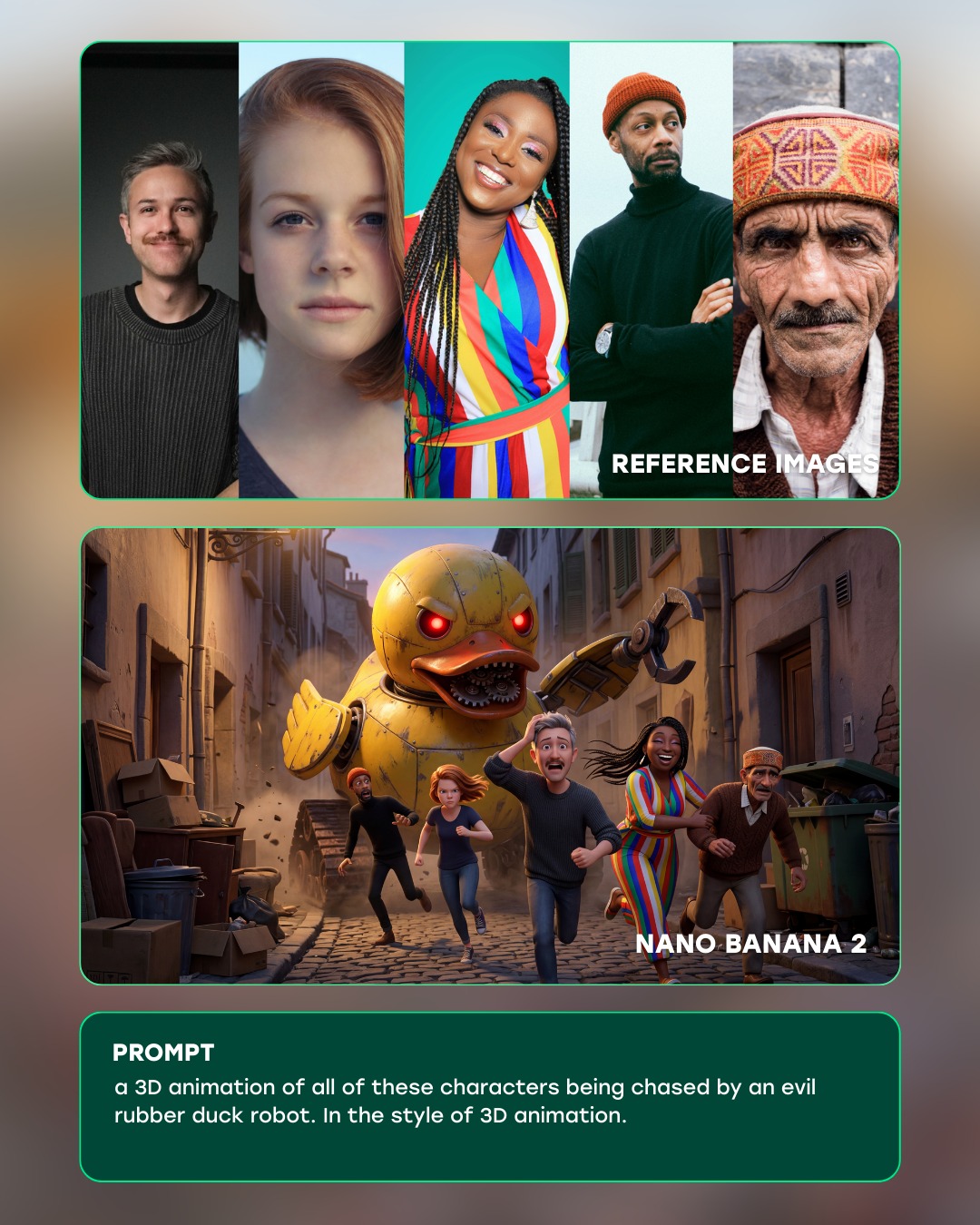
Curious Refuge: Evil Rubber Duck Chase AI Art
A group of characters sprint through a narrow alley while an evil giant rubber duck robot chases them, rendered as a playful 3D animation scene.
Video
GLOBAL LOCK: A vertical AI-tool marketing tutorial / ad featuring the same young woman presenter with long brown wavy hair, fair skin, and a fitted white long-sleeve top, seated against a soft mauve-gray studio backdrop. The video alternates between direct-to-camera talking-head delivery and app/UI screenshots promoting DeepAI as an alternative to multiple paid AI subscriptions. Keep the presenter’s identity, minimal studio setup, calm persuasive speaking style, bold on-screen caption rhythm, and purple-black DeepAI brand interface consistent throughout. The tone is practical, promotional, and creator-focused, with clean close-mic audio and confident social-ad pacing.

[00:00–00:04] Open with UI screenshots showing subscription dashboards, app interfaces, and a red X over the Discord-style premium subscription idea. The presenter appears below or between interface panels and begins with a hook about replacing “all your subscriptions.” The editing is fast, direct, and clearly framed as a cost-saving creator tip.

[00:00–00:04] Speech should be concise and persuasive, with emphasis on the pain point of paying for too many AI tools. If lips are visible, sync should land on captioned words like “all your” and “subscriptions.”

[00:04–00:08] Show the DeepAI website or app interface with a dark purple design and a grid of AI generators. The presenter explains that instead of juggling separate tools, viewers can use one place for image generation and related AI workflows. The screen inserts should be legible and product-centered, with feature icons clearly visible.

[00:08–00:13] Cut between the presenter in her seated studio setup and sample outputs: a realistic woman outdoors in golden-hour light, a stylized dark-haired portrait with dramatic composition, and other generated examples. She explains where everything can be generated and suggests that video, image, and other creative outputs are available in one ecosystem. Keep the presenter centered in medium shot, hands gesturing naturally near her lap.

[00:13–00:17] Insert more DeepAI branding screens and example generations, including fantasy-style red-dress artwork with floating red petals or fish-like shapes. The presenter’s voice continues over these inserts, reinforcing that the platform can handle prompt-based generation without multiple separate tools.

[00:17–00:20] Show a logo comparison screen featuring several competing AI tools, then return to DeepAI’s interface. The presenter explains that a range of generators and creative tools are available in one place. The motion is simple slide or cut transitions, optimized for short-form ad clarity.

[00:20–00:23] End with the presenter back in the studio giving a direct call to action. She tells viewers to comment “AI” and she will send the website. The final captions should emphasize “comment AI” and “send you,” with a friendly but sales-oriented expression and clean centered framing.
soy_aria_cruz: Emociones CTA Portrait AI
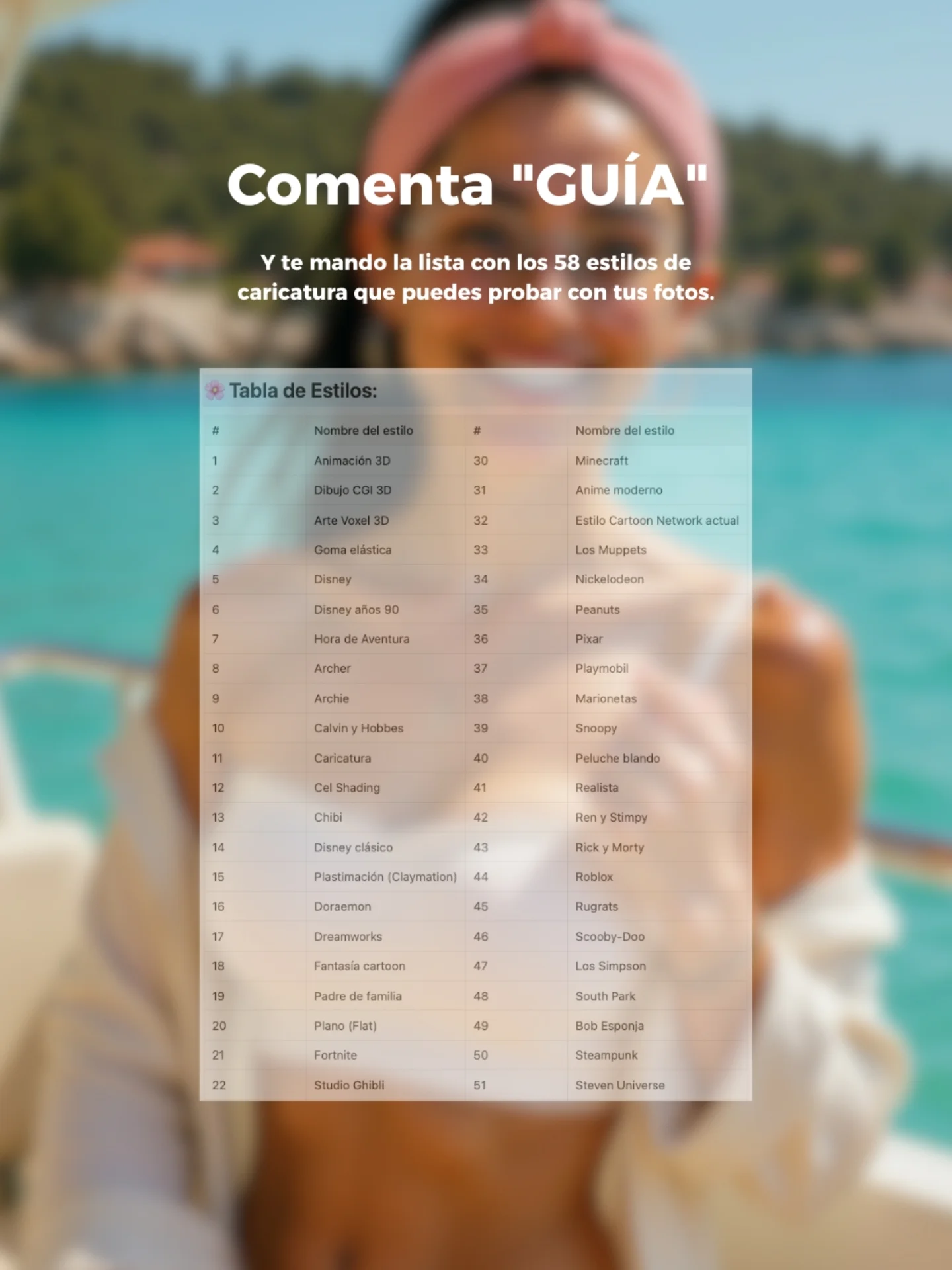
[Subject] A vertical social-media CTA poster built over a heavily blurred summer portrait background. In the blurred background, one young woman stands on a boat in front of turquoise water and distant green shoreline, wearing a pink headscarf and light cream summer clothing. Her figure is centered and recognizable only as a soft vacation silhouette because the foreground information layers are meant to dominate. [Environment] Bright sunny seaside setting with vivid aqua water, green coastal hillside, Mediterranean summer mood, boat deck edges faintly visible. The environment stays intentionally out of focus as a warm aspirational backdrop. [Composition/Camera] Vertical Instagram-style lead magnet graphic. At the top center, large bold white Spanish headline text reads: "Comenta \"GUÍA\"". Below it, smaller white subheadline text reads: "Y te mando la lista con los 58 estilos de caricatura que puedes probar con tus fotos." In the center, place a semi-transparent or lightly opaque rectangular screenshot overlay of a style guide table titled "Tabla de Estilos:" showing a long numbered list of cartoon or illustration styles in two columns. The overlay should feel like a real document screenshot placed over the blurred background. [Lighting] Bright daytime outdoor lighting in the background, with crisp readable white text and a pale document card overlay in the foreground. High readability is more important than realistic foreground shadows. [Style/Rendering] Social-media giveaway poster, creator lead magnet graphic, blurred travel portrait plus educational resource overlay, clean mobile-readable design, polished but simple Instagram CTA aesthetic. [Detail constraints] Keep the boat-and-sea portrait blurred, keep the top white CTA text, keep the center style-list screenshot card, and preserve the summer vacation color palette behind it. Do not turn this into a plain portrait or remove the instructional overlay. Negative prompt: sharp background portrait, missing headline, no table overlay, unreadable Spanish text, cluttered stickers, extra people, different background setting, dark palette, missing sea, no headscarf silhouette, decorative clutter, low-contrast text, distorted document layout. Suggested parameters: aspect ratio 4:5, lens 50mm equivalent for background source image, shallow depth of field, steps 26-36, CFG 6.5-8, sampler DPM++ 2M Karras, seed 891240533. Delta prompt strategy: 1) If the background is too sharp: "blurred summer boat portrait with turquoise sea and green shore"; 2) If headline changes: "large white text Comenta 'GUÍA' at top center"; 3) If the subheadline is missing: "smaller Spanish line promising the list of 58 caricature styles"; 4) If the overlay disappears: "centered screenshot of a style table titled Tabla de Estilos"; 5) If the scene changes: "Mediterranean boat setting with bright aqua water"; 6) If the figure loses identity cues: "blurred woman silhouette with pink headscarf and cream summer outfit"; 7) If design gets cluttered: "clean giveaway poster layout with one centered document card"; 8) If text becomes unreadable: "high-contrast bold white mobile-friendly typography"; 9) If palette dulls: "bright summer turquoise and cream tones"; 10) If style turns into a plain flyer: "Instagram lead magnet CTA graphic layered over a blurred travel portrait".
Video
GLOBAL LOCK: vertical 9:16 AI creator tutorial reel, one consistent young adult male host with light skin, slim build, black backwards baseball cap, black hoodie, seated at a desk with a black microphone and red accent light, dark studio background with magenta-blue edge lighting, intercut with viral cartoon-short examples, Instagram proof screens, GPT directories, prompt text blocks, and dark AI image/video creation interfaces. The showcase content features nostalgic cartoonized characters rendered like soft toy figurines or stylized animated dolls in warm cozy interiors, with cinematic warm light, childlike proportions, and storybook emotion. Same male speaker throughout, dry close-mic narration, clear subtitle words, brisk step-by-step educational pacing.

[00:00-00:05] Open with a fast collage of viral cartoon-short examples and bold poster text promising viewers they can create cartoon shorts with AI. Show multiple nostalgic character variants in cozy rooms, including plush-like toy characters and recognizable archetypes reimagined as warm cinematic cartoon figures. Intercut the host talking directly to camera to establish the tutorial structure.

[00:05-00:10] Continue with example panels and proof-of-performance imagery, including Instagram account screens and posts with strong view counts. The host explains that nostalgic cartoon-style shorts can attract millions of views because they combine familiar characters with emotionally soft, cinematic rendering. Subtitle words highlight viral, nostalgic, millions, and views.

[00:10-00:16] Shift into the planning stage. Show logos and GPT search interfaces while the host explains that the first step is to use ChatGPT and specialized GPTs to generate the exact prompts for the cartoon style. The workflow emphasizes browsing GPTs rather than freehand guessing, keeping the method systematic and repeatable.

[00:16-00:24] Demonstrate a structured prompt-building phase. White screens show GPTs being explored and selected, then detailed prompt text appears, including “locked prompt” style blocks for cartoon nostalgia, environment, and subject direction. The host explains that the prompt needs to lock the style, room, and emotional tone before generating images.

[00:24-00:32] Move into the image-generation tools. Show a dark all-in-one creation interface and brand or model selections such as OpenArt, NanoBanana, or Flux-type image models. The host explains that you should first create still images in a clean stylized aesthetic before attempting motion.

[00:32-00:40] Demonstrate configuration choices like 9:16 framing, 2K output, and image guidance or generation settings. Show the first generated cartoon images: toy-like or puppet-like characters in cozy warm-lit interiors. The host explains that these stills become the visual basis for the final short-form animation.

[00:40-00:48] Transition into the AI video stage with dark model panels and Kling AI visible. The host explains how to take the generated image, upload it into the video model, and preserve the character identity while adding subtle motion. The tutorial remains practical and interface-focused rather than abstract.

[00:48-00:56] End on the final cartoon outputs: a pair of cozy character figures together, then a seated single character, then a warm window-side close-up with soft cinematic light. Return to the host full-screen for a CTA encouraging viewers to follow or comment for the workflow, making the clip feel like a complete creator-growth tutorial.

NEGATIVE PROMPT: broken doll anatomy, uncanny facial distortion, unreadable prompt text, muddy lighting, low-resolution textures, duplicated host, inconsistent cartoon style, warped hands, unstable eye placement, flat plastic shading, robotic narration, clipping, harsh sibilance, watermark, jittery transitions, aspect-ratio drift.

SPEECH PACK:
- Hook: Here’s how to create viral cartoon shorts with AI.
- Beat 1: Start in ChatGPT and use GPTs to build exact locked prompts for the cartoon style you want.
- Beat 2: Generate the still images first, then set the format to 9:16 and keep the output clean and cinematic.
- Beat 3: Move those images into Kling or your video model to animate them without breaking the character style.
- CTA: Follow for more, or comment if you want the workflow.
Video
MASTER PROMPT

Famous cartoon creators portrait montage, vertical 9:16 nostalgia documentary-style social video, each segment shows two real-life creators seated or posed together inside a cozy studio or office filled with framed artwork, sketchbooks, and standees of the characters they created, warm indoor lighting, friendly candid expressions, creator-heritage mood.

GLOBAL LOCK: Keep the entire video in a polished creator-portrait format with medium full-body or seated medium-wide framing, indoor studio or office environments, walls covered in framed comic or animation art, sketchbooks and drawing materials visible in the foreground, and large recognizable character standees or illustrations behind the creators. Every beat should feel intimate, celebratory, and nostalgic, like a tribute to the people behind beloved cartoons. Preserve warm realistic skin tones, casual clothing, natural smiles, and documentary-style stillness with only subtle body motion.

[00:00-00:03]
Two middle-aged creators sit closely together in a comic-filled office, one bald with glasses and a sweater vest holding a pencil and sketchbook, the other with dark hair and black-rimmed glasses leaning in with a warm smile. Teenage Mutant Ninja Turtles art and character cutouts fill the background. Keep the framing friendly and slightly candid.

[00:03-00:06]
Cut to another creator duo in the same office-portrait style, seated side by side with colorful cartoon character standees behind them. One has short hair and glasses, the other is bald and smiling. The environment is packed with framed drawings, giving the scene a working-artist authenticity.

[00:06-00:09]
Another pair of creators sit in front of a table covered with sketches and notebooks. Behind them are cartoon-family style character cutouts and a wall grid of framed art. Keep the mood respectful, warm, and quietly celebratory, with minimal motion.

[00:09-00:12]
A younger creator sits alone or with a slight turn toward camera, holding a sketchbook page while animated family-character standees fill the office behind him. Preserve the creator-studio intimacy, visible line art, and soft indoor daylight.

[00:12-00:15]
Two men lean together in a cozy animation office in front of South Park-style cutout characters. One wraps an arm around the other in a relaxed friendly pose. The desk, sketchbook, and wall art remain visible, reinforcing the “creators behind famous cartoons” concept.

[00:15-00:18]
Final pair of creators smile and gesture toward camera inside a bright studio with stylized hero and fantasy character standees behind them. Keep the office setting full of framed sketches and the mood as a tribute to artistic legacy rather than a dramatic scene.

NEGATIVE PROMPT

empty office, corporate boardroom, modern tech startup look, bad anatomy, extra fingers, deformed face, broken glasses, blurry sketchbook, unreadable wall art, missing character standees, plastic skin, harsh flash lighting, unstable background, duplicate person, weird hands, distorted chair, low resolution, watermark, text corruption, logos
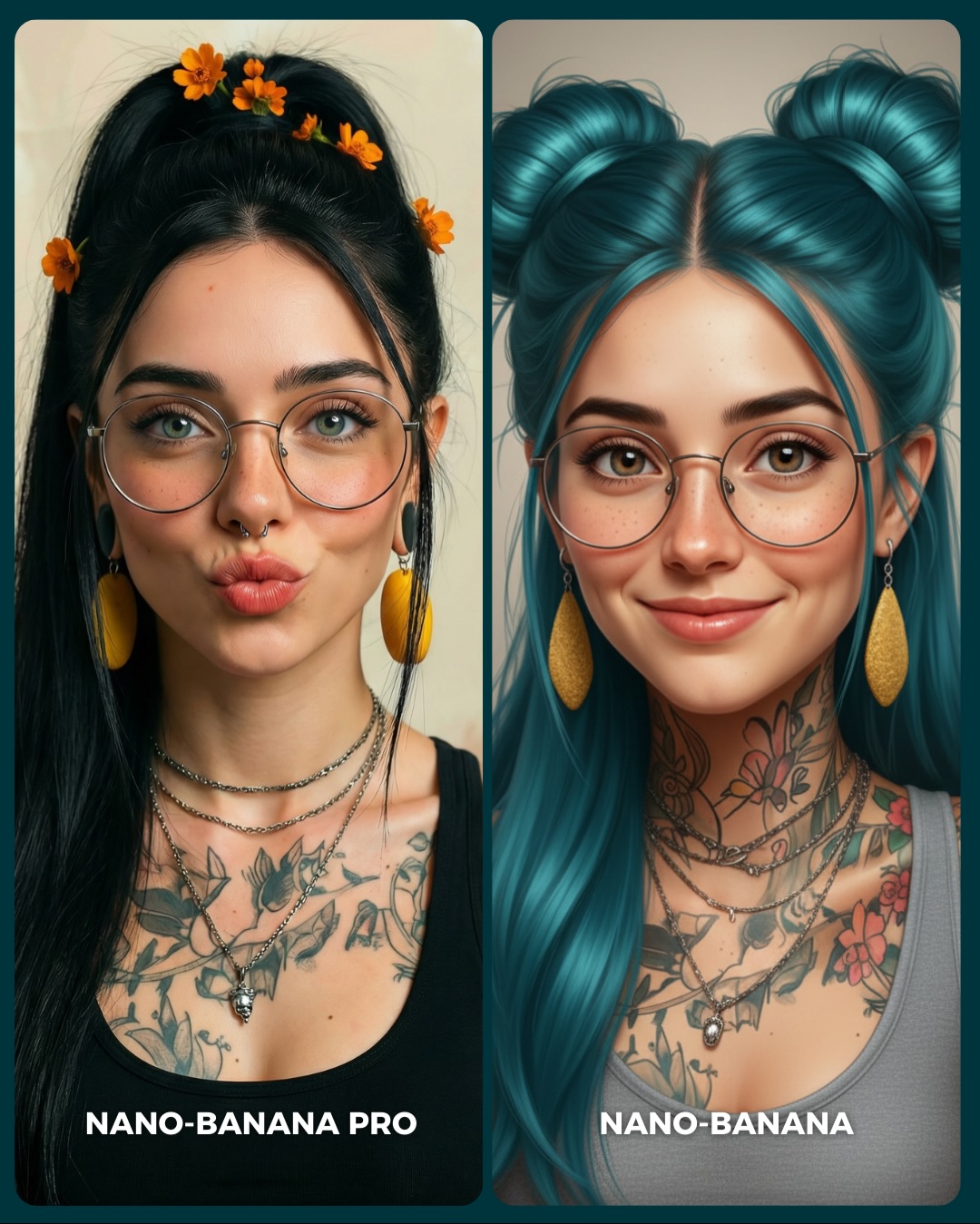
soy_aria_cruz: Nano-Banana Pro vs Nano-Banana Realism vs Stylized Comparison
[Subject] Side-by-side comparison image with two vertical portrait panels of the same tattooed young woman interpreted in two different model styles. Left panel: realistic version, early 20s, feminine presentation, light olive skin, long straight black hair in a high ponytail with small orange flowers placed through the hair, thin round metal glasses, small septum ring, large yellow drop earrings, layered silver necklaces, black tank top, floral chest and shoulder tattoos, and puckered kiss-face lips. Right panel: stylized or beautified version of the same woman, still wearing thin round glasses, yellow earrings, layered necklaces, and visible tattoos, but with turquoise-blue hair styled into two high buns with long front sections falling down. She has a softer smile, smoother face, slightly more illustrative or beautified finish, gray sleeveless top, and the same general identity translated into a more stylized rendering. Bottom labels identify the left as "NANO-BANANA PRO" and the right as "NANO-BANANA".
[Environment] Minimal studio-style portrait background with soft beige or warm neutral backdrop, no environmental props. This image is a direct comparison poster illustrating the difference between a more realistic output and a more stylized output while preserving the same character identity markers.
[Composition/Camera] Vertical 3:4 canvas divided into two equal rounded-corner columns with a narrow divider. Both portraits are chest-up, centered, front-facing, and tightly cropped. Subject fills most of each panel. The left panel emphasizes realism and sharper photographic fidelity. The right panel emphasizes a cleaner, more beautified, somewhat illustrative aesthetic. Composition must remain highly symmetrical and consistent so viewers can compare style drift, identity retention, and detail fidelity.
[Lighting] Soft frontal portrait lighting with balanced illumination on both faces, gentle catchlights in the eyes, subtle reflections on glasses, and minimal shadow. Light should be neutral and flattering, allowing differences in texture realism and rendering style to show naturally. Skin and tattoos must remain readable in both panels.
[Style/Rendering] Comparison poster for AI portrait generation quality. Left panel should feel photorealistic, detailed, and grounded. Right panel should feel smoother, more stylized, and slightly digital or illustrated while retaining realism-adjacent portrait structure. Both images should remain polished and attractive, but the contrast between realism and stylization should be obvious. No extra poster graphics beyond the bottom labels.
[Detail constraints] Keep exactly two portrait panels, preserve key identity markers across both sides: glasses, yellow earrings, layered necklaces, tattoos, youthful female face, and centered framing. Maintain bottom labels "NANO-BANANA PRO" on the left and "NANO-BANANA" on the right. Do not add side props, cluttered backgrounds, extra people, or text beyond the labels. The comparison is about fidelity versus stylization, not about different scenes.

Negative prompt: single panel only, missing tattoos, missing glasses, no yellow earrings, no labels, cluttered background, wildly different identities between panels, cartoon exaggeration, anime eyes, painterly texture, distorted face, low-detail jewelry, no septum ring, extra objects, watermark.

Suggested parameters: aspect ratio 3:4, 70-85mm portrait feel, shallow depth of field, 28-36 steps, CFG/style strength 6.5-8, sampler DPM++ 2M Karras or equivalent, seed around 465328.

Delta prompt strategy:
1. If the split-screen disappears: add "two equal vertical comparison panels with a narrow divider and matched crop".
2. If identity diverges too much: add "same woman, same facial structure, same jewelry, same tattoos across both panels".
3. If the left panel is not realistic enough: add "left panel photorealistic, crisp skin detail, natural hair texture, grounded realism".
4. If the right panel is not stylized enough: add "right panel smoother, more beautified, slightly illustrative finish with turquoise twin buns".
5. If the tattoos fade: add "clear floral tattoos across chest, neck, and shoulders visible in both panels".
6. If the earrings disappear: add "large yellow drop earrings clearly visible on both sides".
7. If the orange flowers on the left vanish: add "small orange flowers tucked into the black ponytail on the left panel".
8. If the labels disappear: add "bottom left label NANO-BANANA PRO and bottom right label NANO-BANANA in bold white text".
9. If the background gets busy: add "plain warm neutral portrait backdrop with no props or decor".
10. If the glasses distort: add "thin round metal eyeglasses with natural reflections and correct lens proportions".
Video
GLOBAL LOCK: A vertical creator-tech demo video, approximately 3 minutes 23 seconds, structured as a streamer-style talking-head introduction followed by a live avatar transformation demonstration. The opening section shows a male content creator seated at his desk in a bright bedroom-studio setup, speaking directly to camera with expressive hand gestures. He has light skin, ginger beard, glasses, over-ear headphones, and a bright yellow beanie featuring a cartoon patch. He wears a dark hoodie and sits in front of a colorful gaming-and-anime themed background with posters, figures, shelves, illuminated PC hardware, and decorative collectibles. The mood is casual, enthusiastic, and explanatory, like a YouTube or TikTok tech creator introducing a tool.

The second major section shifts into the actual feature demonstration: the creator appears inside a video-call style interface where his webcam feed is replaced by a stylized 3D cartoon avatar. The avatar is a youthful curly-haired redheaded boy with exaggerated large eyes, freckles, soft skin shading, and a gaming headset. The interface resembles a live call or streaming overlay, with a timer or “New Character” label in the corner, microphone and call icons at the bottom, and the creator’s real face visible in a smaller inset tile on the side. Across this segment, the avatar mirrors head tilts, blinking, subtle facial expressions, and mouth movements, implying real-time facial tracking or character streaming.

The overall piece should feel like a creator reviewing or showing off an AI/live-animation avatar tool. The value is in the before-and-after contrast between ordinary webcam presence and a polished animated persona that preserves personality cues. Visual priorities: cozy creator room with gaming decor, direct-to-camera explanation style, yellow beanie and glasses as memorable host identity, clear transition into 3D avatar call interface, exaggerated cartoon facial rig, headset and streamer setup continuity, and readable UI overlays suggesting real-time communication. Avoid turning it into a generic animation clip; the key concept is creator identity translated into a live cartoon character for online use.
Video
GLOBAL LOCK: 
Subject is a young woman with long, wavy dark brown hair, fair skin with warm undertones. She wears a white ribbed turtleneck sweater and a delicate gold necklace. The environment is a professional studio with a soft, out-of-focus purple and pink gradient background. Lighting is soft three-point studio lighting with a subtle purple rim light on the subject's hair. Camera is a high-quality 4k sensor, 35mm lens feel, shallow depth of field. Speech is direct-to-camera, energetic, clear, and authoritative.

[00:00–00:01]
Split screen composition. Top half: A glossy 3D app icon featuring a stylized white face with glowing neon visor and the text "UNCENSORED" in a red banner. Bottom half: The subject speaking directly to the camera, smiling slightly. Camera is static, MCU.
Speech: "If you go to this"

[00:01–00:03]
Full screen graphic overlay. A 2x3 grid of popular AI tool logos (Runway, Sora, Midjourney, etc.) on black rounded-square backgrounds. The logos appear with a slight pop-in animation.
Speech: "website you get unlimited video"

[00:03–00:04]
The grid of logos changes to a new set of icons including the OpenAI logo and others. Text overlay "generation," appears in yellow.
Speech: "and image generation,"

[00:04–00:07]
Screen recording of a mobile UI. A dark-themed list of AI models scrolls vertically. Models include "Gemini 3 Uncensored," "Model T 2.0 Extended," and "Claude Opus 4.6." Some are marked "CENSORED" in grey, others "UNCENSORED" in blue. Text overlay "AI tools Completely Free all in One place" appears in bold white and yellow.
Speech: "and you can use all premium AI tools completely free all in one place."

[00:08–00:09]
Close-up of the UI. A finger (or cursor) selects "Nano Banana Pro" from a dropdown menu. A text input box says "Describe the image you want to generate in detail."
Speech: "Simply choose your AI model, write"

[00:09–00:10]
The word "your" is typed into the prompt box.
Speech: "your prompt"

[00:10–00:11]
Cinematic AI-generated image: A close-up portrait of a beautiful woman with wind-swept brown hair, golden hour lighting, extremely detailed skin texture, and expressive green eyes.
Speech: "and within just one minute"

[00:11–00:12]
Cinematic AI-generated image: A woman in a yellow vintage outfit and hat, surrounded by yellow flowers, soft cinematic lighting, 35mm film aesthetic.
Speech: "it will create high"

[00:12–00:13]
Cinematic AI-generated video: A woman in a navy tracksuit running happily on a beach with a brown dog jumping beside her. Overcast sky, realistic waves, handheld camera movement.
Speech: "quality images and videos"

[00:14–00:15]
UI demonstration: A cursor clicks a green "Download" icon on a dark interface.
Speech: "that you can customize and download."

[00:16–00:18]
Return to the subject in the studio. MCU, static. She gestures with her hands while speaking. Text overlay "comment Tool" and "send it" appears.
Speech: "Want the link? Comment 'Tool' and I'll send it to you."

NEGATIVE PROMPT:
Visual: blurry face, distorted logos, low resolution, messy background, harsh shadows, unnatural skin texture, flickering overlays.
Speech: robotic voice, monotone delivery, background noise, muffled audio, lip-sync mismatch, stuttering, long silences.

SPEECH PACK:
[00:00-00:01] "If you go to this"
TAKE_A: (Rising intonation, high energy) "If you go to this..."
TAKE_B: (Direct, pointing gesture) "If you go to THIS..."
TAKE_C: (Whisper-like, secretive) "If you go to this..."

[00:01-00:07] "website you get unlimited video and image generation, and you can use all premium AI tools completely free all in one place."
TAKE_A: (Fast-paced, emphasizing "unlimited" and "free")
TAKE_B: (Rhythmic, pausing after "generation")
TAKE_C: (Excited, high pitch on "all in one place")

[00:08-00:15] "Simply choose your AI model, write your prompt and within just one minute it will create high quality images and videos that you can customize and download."
TAKE_A: (Instructional, calm but steady)
TAKE_B: (Fast, emphasizing "one minute")
TAKE_C: (Awe-struck tone during "high quality")

[00:16-00:18] "Want the link? Comment 'Tool' and I'll send it to you."
TAKE_A: (Friendly, inviting, direct eye contact)
TAKE_B: (Urgent, pointing at the camera)
TAKE_C: (Casual, smiling)
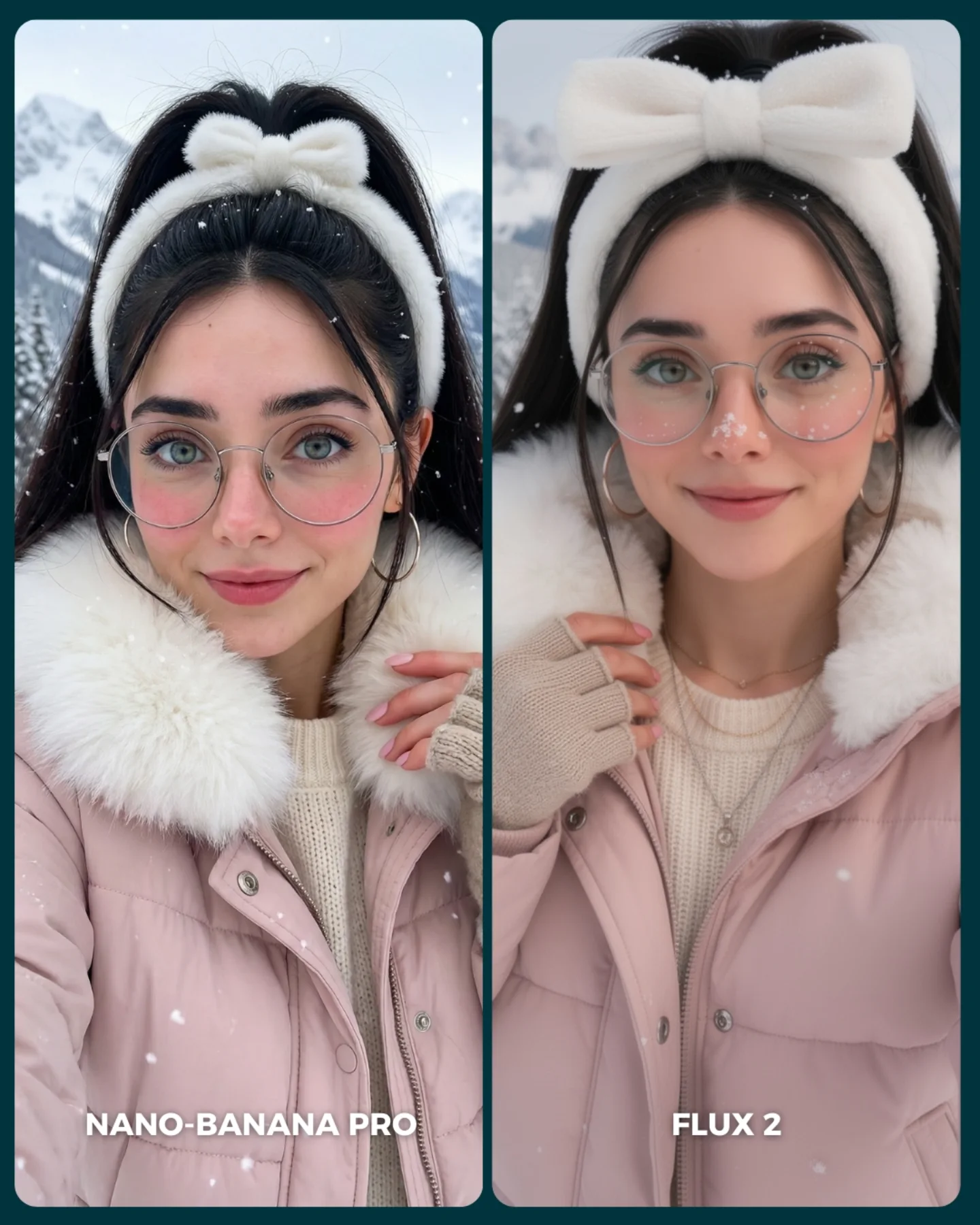
soy_aria_cruz: Winter Pink Puffer Comparison AI Image
[Subject] A side-by-side winter portrait comparison featuring the same young woman shown twice in nearly matching styling and framing. She has fair skin, large blue-green eyes, long black hair tied into a high ponytail, oversized round wire-frame glasses, silver hoop earrings, soft pink lips, and a gentle friendly expression. She wears a fluffy white plush headband with a large bow on top, a pale pink puffer jacket with oversized white faux-fur collar, and a cream knit sweater underneath. On the left panel, her expression is slightly more neutral and direct, with one hand touching the collar near the lower right. On the right panel, she has a softer smile and slightly different hand placement near the coat opening. Keep the woman’s styling nearly identical in both panels while allowing minor natural variation.

[Environment] Snowy outdoor mountain setting in winter, blurred and pale in the background. The backdrop should show soft white snow, faint gray-blue mountain shapes, and floating snowflakes. The environment is simple and cold, but the subject remains warmly styled. This is not a single natural photograph: it is a split-screen comparison cover with two portrait panels placed side by side on a dark teal background. Each panel is framed as a rounded-rectangle card. White text overlays appear at the bottom of each panel: “NANO-BANANA PRO” on the left and “FLUX 2” on the right. Keep the full comparison layout because it is visibly part of the provided image.

[Composition/Camera] Vertical social-media comparison design, overall frame near 4:5. Two portrait cards fill most of the canvas, separated by a slim dark teal divider. Both portraits are medium close-ups from upper chest to slightly above the headband bow, centered and symmetrical enough to invite direct visual comparison. The left image is slightly tighter and cooler in facial expression, while the right image is a touch softer and more polished. Both subjects look directly at the camera. Preserve the clean side-by-side benchmarking layout and the card-like framing with rounded corners.

[Lighting] Soft overcast winter daylight with even frontal illumination on both faces. No harsh shadows. The light should feel diffuse, flattering, and cold-weather appropriate, keeping skin clear and smooth while preserving realistic facial depth. Snowflakes and pale mountain background remain softly lit. Overall color temperature is cool-neutral, but the pink jacket and cream knit add warmth. Maintain consistent lighting across both panels for fair comparison.

[Style/Rendering] Hyper-real winter selfie portrait with a social-media comparison aesthetic. The main emphasis is realism in skin, glasses, knit texture, faux-fur softness, and puffer-jacket material. The left panel should feel slightly sharper and more photographic, while the right panel can feel a little softer or more beautified, but both must remain plausible and high quality. The overall composition should read as a generator-versus-generator cover image, not a random collage and not a fashion magazine spread.

[Detail constraints] Do not remove the split layout. Keep exactly two vertical portrait cards of the same styled woman, with dark teal borders/divider and the white labels “NANO-BANANA PRO” and “FLUX 2” at the bottom of each respective panel. Preserve the pink puffer jacket, fluffy white collar, white bow headband, glasses, hoop earrings, ponytail, cream sweater, snowflakes, and snowy mountain backdrop. Do not convert the image into one single portrait or change the winter styling.

Negative prompt: single image only, missing split-screen, different people in each panel, blonde hair, no glasses, no bow headband, indoor background, Christmas room, ski goggles, heavy makeup, harsh sunlight, dark dramatic shadows, extra text, warped eyes, asymmetrical glasses, melted fur, deformed hands, anime illustration, painterly style, watermark clutter.

Suggested parameters: aspect ratio 4:5 vertical overall; lens 50-70mm equivalent portrait feel; aperture look f/2.8 to f/4; steps 30-40; CFG/style guidance 6.5-8; sampler DPM++ 2M Karras or photoreal portrait sampler; seed suggestion 286411570.

Delta prompt strategy:
1. If the split-screen disappears: "two rounded-rectangle portrait panels side by side on a dark teal background with a slim divider"
2. If the styling changes between panels: "same young woman in both images with matching pink puffer jacket, white bow headband, glasses, and cream sweater"
3. If the winter mood weakens: "snowy mountain background with floating snowflakes and cool diffuse daylight"
4. If the bow headband is wrong: "large plush white bow headband centered over a high black ponytail"
5. If the fur collar loses softness: "oversized fluffy white faux-fur collar around the neck and shoulders"
6. If the panels look too identical and artificial: "same subject, similar styling, slight natural variation in expression and hand placement between panels"
7. If text labels disappear: "white lower text labels reading NANO-BANANA PRO on the left and FLUX 2 on the right"
8. If it becomes a fashion editorial instead of a comparison: "social-media generator comparison cover, clean benchmarking layout"
9. If skin becomes over-retouched: "realistic skin texture, subtle winter softness, no beauty-filter plastic skin"
10. If the background gets busy: "minimal pale snowy mountains softly blurred behind the subject"
Video
Claye Ai
GLOBAL LOCK: 
Subject: A young woman of South Asian descent, olive skin tone, long wavy dark brown hair with subtle highlights, expressive brown eyes, natural makeup. 
Wardrobe: Left side wears a white ribbed knit crewneck sweater; Right side wears a black ribbed knit crewneck sweater. 
Environment: A professional podcast studio setting. A polished dark wooden table in the foreground. A professional condenser microphone with a red shock mount is mounted on a small black tripod in the center. 
Lighting: Split-screen lighting logic. Left side has a deep purple and magenta ambient glow in the background. Right side has a deep blue and cyan ambient glow. Soft key lighting on the subject's face from the front. 
Camera: Static Medium Close-Up (MCU), eye-level angle, shallow depth of field with a blurred studio background. 
Speech Style: Professional, rhythmic, direct-to-camera delivery. Clear articulation with a warm, helpful tone.

[00:00–00:02]
Subject: The woman is centered in the split screen, looking directly at the camera with a friendly smile.
Action: She begins speaking the intro. Subtle head tilt.
Framing: MCU, split screen.
Text Overlay: "Free VS Paid ai tools" appears at the top center. "Paid" on the left, "Free" on the right.
Speech: "Free versus paid AI tools. Let's compare."
Lip-sync: High strictness.

[00:02–00:05]
Subject: Subject continues speaking, maintaining eye contact.
Action: Natural blinking and slight hand gestures near the microphone.
Environment: "image generation" text appears at the top.
Logos: Midjourney logo appears on the left ("Paid"), Google Gemini logo on the right ("Free").
Speech: "Midjourney, Google Gemini."
Lip-sync: High strictness.

[00:05–00:08]
Subject: Subject maintains the same pose.
Environment: "AI chat assistants" text appears.
Logos: ChatGPT logo on the left, DeepSeek logo on the right.
Speech: "ChatGPT, DeepSeek."
Lip-sync: High strictness.

[00:08–00:11]
Subject: Subject maintains the same pose.
Environment: "AI video editing" text appears.
Logos: Kling AI logo on the left, Artflow logo on the right.
Speech: "Kling 1.0, Artflow."
Lip-sync: High strictness.

[00:11–00:14]
Subject: Subject maintains the same pose.
Environment: "AI ads" text appears.
Logos: Canva logo on the left, Gemini Pomelli logo on the right.
Speech: "Canva, Gemini Pomelli."
Lip-sync: High strictness.

[00:14–00:17]
Subject: Subject maintains the same pose.
Environment: "AI video generation" text appears.
Logos: Google Veo 3.1 logo on the left, Meta AI logo on the right.
Speech: "Veo 3.1, Meta AI."
Lip-sync: High strictness.

[00:17–00:20]
Subject: Subject maintains the same pose.
Environment: "voice cloning" text appears.
Logos: ElevenLabs logo on the left, Fish Audio logo on the right.
Speech: "ElevenLabs, Fish Audio."
Lip-sync: High strictness.

[00:20–00:22]
Subject: Subject maintains the same pose.
Environment: "AI avatars" and "Lipsync videos" categories flash quickly.
Logos: HeyGen, Wondershare Virbo, Infinite Talk, and Wand 2.2 logos appear and swap.
Speech: "HeyGen, Wondershare Virbo, Infinite Talk, Wand 2.2."
Lip-sync: High strictness.

[00:22–00:25]
Subject: The background blurs further and darkens.
Action: The subject is still visible but the focus shifts to a central graphic.
Visual: A cluster of the previously mentioned AI logos floats around a central purple geometric icon.
Text Overlay: "comment AI" with a heart icon and a small profile picture of the creator.
Speech: "Want all these tools with links? Comment AI and I'll send the full list."
Lip-sync: High strictness.

NEGATIVE PROMPT: 
Visual: Unnatural facial warping, flickering background lights, inconsistent hair movement between cuts, extra fingers, distorted microphone shape, blurry logos, text spelling errors, low-resolution textures, robotic or stiff body movement.
Speech: Robotic monotone, misaligned lip-sync, background hiss, popping 'p' sounds, unnatural pauses mid-word, metallic voice artifacts, inconsistent volume levels.

SPEECH PACK:
[00:00-00:02] "Free versus paid AI tools. Let's compare."
TAKE_A: (Energetic) Free versus paid AI tools! Let's compare.
TAKE_B: (Professional) Free versus paid AI tools. Let's compare.
TAKE_C: (Casual) Free vs paid AI tools... let's compare.

[00:02-00:20] "Midjourney, Google Gemini. ChatGPT, DeepSeek. Kling 1.0, Artflow. Canva, Gemini Pomelli. Veo 3.1, Meta AI. ElevenLabs, Fish Audio. HeyGen, Wondershare Virbo, Infinite Talk, Wand 2.2."
TAKE_A: (Rapid fire, rhythmic) [Tool Name], [Tool Name]. (Pause) [Tool Name], [Tool Name].
TAKE_B: (Steady pace) [Tool Name] versus [Tool Name].

[00:20-00:25] "Want all these tools with links? Comment AI and I'll send the full list."
TAKE_A: (Direct) Want the full list? Comment AI and I'll send it over!
TAKE_B: (Helpful) Comment AI below and I'll send you all the links.
Video

GLOBAL LOCK: Split-screen vertical comparison video featuring the same male creator duplicated into two contrasting studio setups. He is a light-skinned man in his 20s or early 30s with blue eyes, side-parted brown hair, clean-shaven face, slim build, and direct-to-camera delivery. The left side represents PAID tools with warm orange lighting, dark background, black T-shirt, and black podcast microphone visible near the lower left. The right side represents FREE tools with cool blue lighting, dark textured background, blue denim jacket over a black shirt, and a matching microphone near the lower right. Both versions preserve the same identity, framing, and speaking rhythm while category labels and tool logos change above them. Style is crisp social-media explainer graphics, hard center split, bold neon text overlays, fast reel pacing, and single-speaker tutorial energy with close-mic, punchy, intelligible speech.

[00:00-00:03] Open on the split-screen presenter, left half cool blue with the word FREE in large yellow text, right half warm orange without the category title yet or transitioning into the main comparison look. The creator speaks directly to camera with a neutral-to-urgent expression, slight forward lean, and clear lip sync. The center split must stay perfectly vertical.

[00:03-00:06] Text changes to FREE vs PAID, clarifying the two-column comparison format. The creator continues talking in both halves, matching expression and timing but wearing different clothes and lighting setups on each side. Camera stays locked in medium close-up, no zoom, no handheld shake.

[00:06-00:09] Category header reads "Image generation" at the top. Beneath it, show Nano Banana Pro on the paid side and Google Flow on the free side, each with large PAID and FREE labels in bright green and yellow. The creator continues energetic explanation while the logos sit above his headshots.

[00:09-00:12] Cut to another comparison card for AI video editing. Show Kling AI on the paid side and a free alternative on the right, keeping the same split-screen layout, bold color coding, and symmetrical portrait framing. Speech remains fast, confident, and list-like, as if rapidly naming recommended tools.

[00:12-00:15] Category switches to voice cloning. ElevenLabs appears as the paid option on the left while the free option remains on the right. The creator smiles wider and opens his mouth more on emphasized words. Keep audio dry, close, and social-ready.

[00:15-00:19] Move into AI avatar comparison with platform logos placed above each half. The creator keeps looking into lens, shoulders squared, with minor head bobs and subtle hand gestures occasionally entering frame. Maintain the same hard split and contrasting warm-versus-cool grade.

[00:19-00:22] Final category becomes lip sync in video/images. InfiniteTalk appears on the paid side and Wan 2.2 on the free side. The delivery becomes more decisive, like a final recommendation roundup. Logos and labels are large, centered, and immediately readable on mobile.

[00:22-00:24] End card says Comment "AI" in bold yellow and white lettering above the split-screen presenter. He finishes the CTA with a persuasive creator-marketing cadence, maintaining perfect lip sync and the same two-tone studio contrast until the cut.
Video
Create a vertical 9:16 futuristic AI product-promo visual centered on a hyper-realistic fashion portrait of a young woman with slicked-back hair, pale skin, blue-grey eyes, and bold matte red lipstick, wearing a reflective chrome silver high-collar outfit in a bright metallic environment filled with iridescent foil-like textures. Behind her, large bold yellow text reads Meta AI, integrated like a clean social-ad headline. The image should feel like a premium generative-AI campaign frame promoting free image generation and AI lip sync tools, combining polished beauty-editorial realism with tech branding. Keep the composition crisp, symmetrical, high contrast, and optimized for short-form creator marketing. No extra clutter, no subtitles, no cartoon styling, no unrelated props.
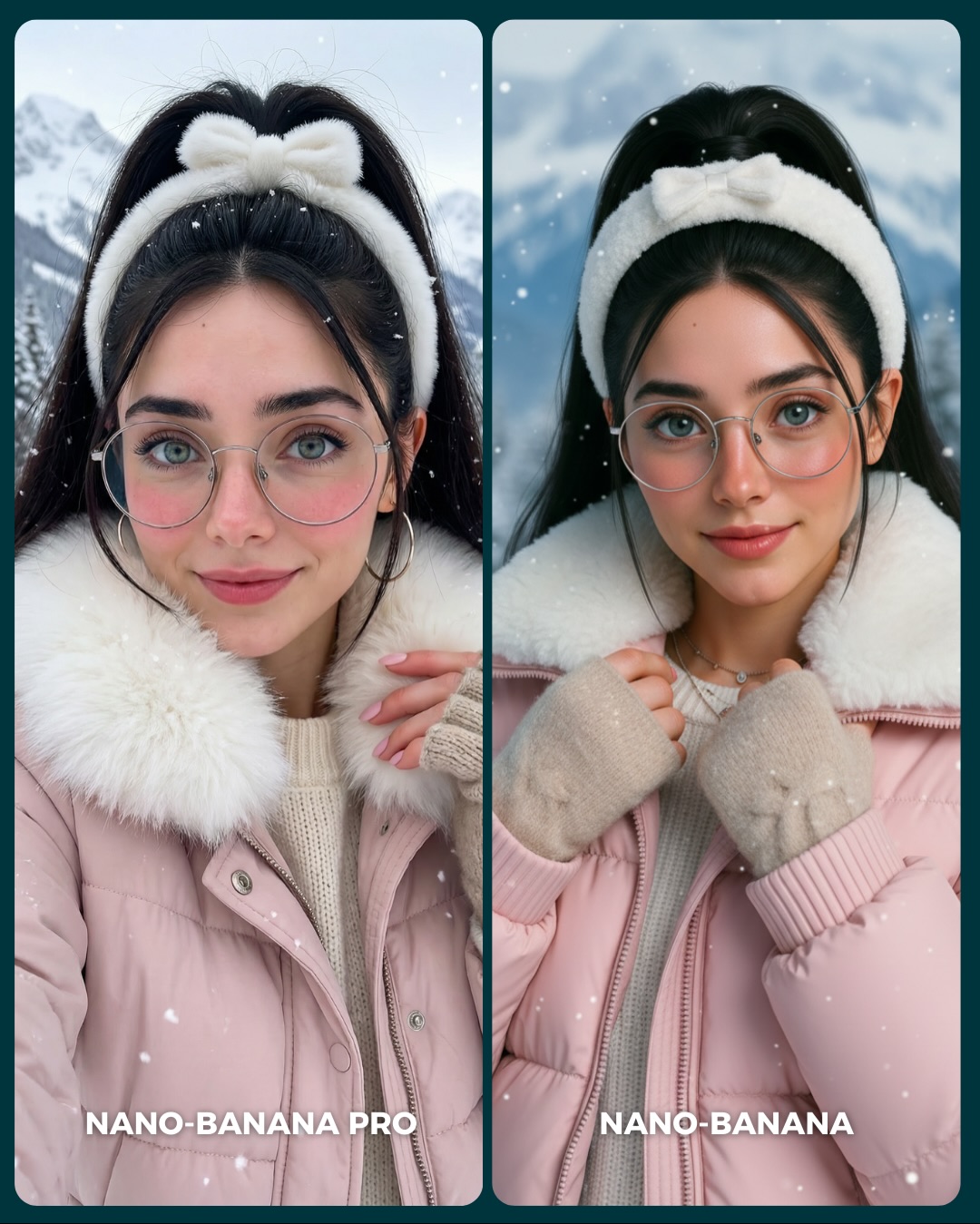
soy_aria_cruz: Winter Pink Puffer Comparison AI Image
[Subject] A side-by-side winter portrait comparison showing the same young woman in two closely matched variations. She appears in her 20s with fair skin, large blue-green eyes, soft pink cheeks, dark eyebrows, delicate facial features, and a calm friendly expression. She has long black hair gathered back with a fluffy white bow headband or plush winter hairband. She wears oversized round silver wire-frame glasses and medium hoop earrings. Her winter outfit consists of a light pink puffer jacket with a plush white faux-fur collar, a cream ribbed knit sweater, and beige knit fingerless gloves or mitten-style hand warmers. In the left panel, she faces the camera more directly with one hand lifted near the collar; in the right panel, she holds the jacket edges or collar with both hands and has a slightly more polished, symmetrical pose. Both panels should depict the same person and same cold-weather styling.

[Environment] Snowy outdoor mountain setting with softly blurred pale blue-white mountains and winter sky in the background. Light snowflakes drift across the frame. The composition is presented as a social-media comparison board: two tall rounded rectangular portrait panels side by side with a thin dark teal divider between them and a dark teal outer border or background. Keep the background clean, bright, and wintry, with no buildings or city elements. Do not include any bottom labels or text overlays.

[Composition/Camera] Vertical 4:5 diptych layout. Each panel is a tight medium portrait from chest level to above the head, centered on the subject. Eye-level camera, straightforward beauty composition, shallow depth of field, and balanced spacing around the headband. Subject fills most of each panel, with the fluffy white collar occupying the lower-middle area and the snowy mountains softly visible behind. The left panel feels slightly more candid and open; the right panel is more refined and centered. Maintain strong consistency so the image reads as a clear model comparison.

[Lighting] Soft overcast winter light with cool ambient brightness and very gentle contrast. Even illumination across the face, no harsh shadows, and subtle pink warmth in the skin from the cold environment. Snowy daylight creates clean catchlights in the eyes and slight shine on the glasses rims. Overall the light should feel bright, diffuse, and flattering, with a crisp cold-weather atmosphere but no blue cast so strong that skin looks lifeless.

[Style/Rendering] Photorealistic AI beauty portrait with cozy winter fashion styling. Clean skin rendering, fine knit and puffer textures, believable faux-fur softness, and lightly stylized social-media polish. The goal is a premium generator-comparison image that still feels warm and aspirational. Preserve natural facial identity across both panels and avoid cartoonish perfection. No text, no watermark, no logos.

[Detail constraints] Show exactly one matching woman in two side-by-side winter portrait variants. Keep the fluffy white bow headband, round glasses, pink puffer jacket, white faux-fur collar, cream sweater, and beige knit gloves consistent in both panels. Maintain snowy mountain background, falling snow, rounded panel corners, and the dark divider/background frame. Exclude the source image’s bottom model-name labels. Do not add scarves, hats, extra jewelry, or extra people. The subject must remain soft, approachable, and cold-weather polished.

Negative prompt: text overlay, "NANO-BANANA PRO", "NANO-BANANA", watermark, logo, app UI, extra people, city street, indoor background, no snow, harsh sun shadows, different hair color, no glasses, wrong jacket color, no fur collar, bulky scarf, ski goggles, heavy makeup, anime look, plastic skin, duplicate person inside one panel, distorted hands, asymmetrical eyes, cropped headband, overly blue skin tone.

Suggested parameters for reproducibility: aspect ratio 4:5; portrait lens feel 70mm; aperture f/2.8 look; 28-36 steps; CFG/style strength 5.5-7; sampler DPM++ 2M Karras or equivalent; seed suggestion 592714308.

Delta prompt strategy:
1. If the image stops reading as a comparison: append "two tall rounded portrait panels side by side showing the same woman in matching winter styling".
2. If the headband changes: append "fluffy white bow headband framing the top of the dark hair in both panels".
3. If the outfit drifts: append "light pink puffer jacket with a thick white faux-fur collar over a cream ribbed sweater".
4. If the gloves disappear: append "beige knit fingerless gloves or hand warmers visible near the collar and jacket opening".
5. If the glasses are lost: append "large round silver wire-frame eyeglasses with soft daylight reflections".
6. If the mountain setting becomes vague: append "snowy alpine mountain background, softly blurred, with light falling snow".
7. If bottom labels reappear: append "image-only comparison board, no words, no captions, no model names".
8. If the lighting becomes too dramatic: append "soft overcast winter daylight, even facial illumination, no harsh shadows".
9. If the skin becomes too cold or lifeless: append "natural rosy cheeks and soft warm skin tones despite the snowy environment".
10. If both panels become identical in pose: append "left panel slightly more candid with one hand near the collar, right panel more centered with both hands holding the jacket".

AI Cartoon Generator From Text Free

Why free text to cartoon is transactional

This query stacks three constraints at once: text input, cartoon or anime output, and free access. That makes the page highly transactional. Users want to know which tools are truly free, which ones only offer limited free tiers, and which ones give the best output before any payment is needed.

The page should lead with genuinely free tools and be explicit about what the free tier can and cannot do. That means clear ranking by output quality, honest notes about limits, and a simple path to a first result.

Key Insight: The best free page earns trust by being explicit about limits instead of hiding them behind a free label.

Takeaway: Rank tools by free quality first, then explain the restrictions that affect real use.

What to compare

Output quality: Start with the tools that produce the strongest cartoon or anime results from a text prompt.

Free tier limits: Look for daily generation caps, queue delays, and resolution limits.

Access type: Include both web based tools and mobile apps so users can choose their preferred workflow.

Prompt behavior: The best tools respond well to simple prompt formulas without requiring technical setup.

Prompt examples to test

Character prompt: cute anime girl, cherry blossoms, soft light, clean outline.

Comic prompt: cartoon fox hero, bold colors, simple shapes, expressive pose.

Scene prompt: anime street at sunset, warm color palette, detailed background.

Mascot prompt: playful brand mascot, cheerful expression, flat illustration style.

FAQ

What does genuinely free mean here?

It means you can make real outputs without being forced into a paid plan on the first try.

Should I trust every free label?

No. Check for queue time, watermarks, resolution caps, and hidden export restrictions.

Do I need technical setup?

No. This page should stay focused on casual user tools, not local installs.

What should I compare first?

Compare output quality first, then compare the free tier limits that affect how often you can use the tool.