An AI clothing swap page is useful because many users already know the exact action they want: replace the current clothes with different clothes and compare the result. They are not asking for broad styling theory. They want a straightforward wardrobe substitution. That is why this page matters: it focuses on direct clothing replacement and easy before-and-after comparison.\n\nThis page is organized around the swap situations people actually search for: casual-to-formal changes, outfit replacement, portrait restyling, product-image experiments, and quick wardrobe comparisons. Start with the original clothing and the target replacement first, then keep the swap clear so the result stays believable.

Video
GLOBAL LOCK:
Subject is a young East Asian female model, approximately 20-25 years old, with a slender build and neutral, professional editorial expression. She has dark hair tied back in a sleek bun. Her wardrobe consists of a white, green, and black Nike-style zip-up tracksuit jacket and light blue patterned trousers. The environment is a clean, minimalist photography studio with a neutral grey background and soft, high-key three-point lighting. The camera uses a 50mm or 85mm prime lens feel, creating a shallow depth of field with a clean, sharp focus on the subject. The color grade is bright, high-contrast, and editorial, resembling a high-end fashion lookbook.

[00:00–00:03]
The model is shown in three distinct states: first, sitting in a light blue hoodie; second, a reference image of a white/green tracksuit; third, the final merged result of the model wearing the tracksuit. The camera is a static medium shot. Lighting is soft and even.

[00:04–00:07]
A storyboard grid view showing 16 small frames. In each frame, the same model is in a different pose: standing, sitting, arms crossed, hands on hips. The character consistency is high; the tracksuit and facial features remain identical across all frames.

[00:08–00:15]
A screen recording of the LTX Studio interface. A cursor uploads a photo of a male model in a grey hoodie, then uploads a reference photo of the white/green Nike jacket. The UI is dark mode with blue highlights.

[00:16–00:20]
The cursor clicks into a text prompt box and types: "Replace the dark jumper with the white nike jacket." The AI processes, and the image of the male model updates to show him wearing the Nike jacket. The transition is a clean "pop" into the new clothing.

[00:21–00:25]
The screen switches to a browser window showing a ChatGPT chat. The text displays a list of "Flux Kontext Poses" including "Standing Poses," "Action/Dynamic Poses," and "Seated Poses" with detailed descriptive bullet points.

[00:26–00:31]
Back to the LTX Studio storyboard. The screen scrolls through dozens of variations of the Asian female model in the Nike tracksuit, showcasing a wide range of professional fashion poses. The motion is a smooth vertical scroll.

NEGATIVE PROMPT:
Visual artifacts, distorted logos, extra limbs, blurred facial features, inconsistent clothing patterns, robotic movement, flickering lighting, low resolution, grainy texture, unnatural skin tones, warped background, text/watermarks on the model's skin, mismatched shadows.

SPEECH PACK:
[00:00-00:07]
"Here's how to replace clothing on models using AI and then generate hundreds of different poses of them and then use camera presets to create motion."
TAKE_A: (Energetic, fast-paced, direct-to-camera)
TAKE_B: (Informative, steady cadence, emphasizing "hundreds of different poses")
TAKE_C: (Casual, conversational, slightly faster on the intro)

[00:08-00:15]
"This is LTX Studio. Start by uploading your photo to LTX Studio. Then you can upload a photo of the item of clothing."
TAKE_A: (Instructional, clear pauses between steps)
TAKE_B: (Warm, helpful tone, emphasizing the tool name "LTX Studio")
TAKE_C: (Quick, "pro-tip" style delivery)

[00:16-00:25]
"And you can write in a prompt asking it to switch them over. Then you've got your image which you can then bring back into Flux Kontext and now go to ChatGPT where you can take any of these prompts."
TAKE_A: (Explaining the workflow, emphasizing the "switch them over" moment)
TAKE_B: (Logical progression, clear articulation of "Flux Kontext")
TAKE_C: (Excited, showing the "magic" of the prompt)

[00:26-00:31]
"And if you type AI in the comments I'll send you all my prompts and then you get all of these different poses. If you want to try this out for yourself, type AI in the comments and I'll send you the link."
TAKE_A: (Strong Call to Action, emphasizing the word "AI")
TAKE_B: (Friendly, offering value, clear and punchy ending)
TAKE_C: (Fast, high-energy finish to drive engagement)
Video
51 posts
GLOBAL LOCK: vertical 9:16 creator-workflow reel about AI face swap and identity recasting, fast subtitle-led pace, selfie examples, side-by-side source-vs-swapped faces, dark tool UI screens, and cinematic dialogue-shot outputs featuring different actors in the same scene setup. The central promise is that a base clip plus a new face can create realistic recast content with audio, perspective, and motion preserved. Tone is practical, slightly provocative, and positioned around creative freedom without reshoots.

[00:00-00:05] Open on a bright selfie clip of a blonde woman, then quickly swap to a brunette version in the same framing and lighting. Large subtitle text says AI face swap has become so simple it almost feels unfair. The side-by-side or rapid alternation must make the identity replacement instantly obvious while preserving the same base scene.

[00:05-00:10] Continue with more side-by-side selfie comparisons and bold text cards naming a tool like WAN 2.2 Animate with audio. The reel should communicate that this is not just a static face edit, but a workflow that keeps motion and voice alignment intact. The energy is “drop it in and let it work.”

[00:10-00:16] Move into dark mobile-style UI screens where the user uploads a base clip and then a face image. Show buttons and panels suggesting automatic processing, then emphasize the word MAGIC or a similar claim that the system handles the swap internally. The UI should look accessible, like a plug-and-play creator tool.

[00:16-00:21] Transition to cinematic dialogue-scene examples featuring different men seated in the same warm-lit bar or restaurant setup. The point is that the perspective, acting, and shot grammar remain, while the identity changes. Subtitle text highlights that the perspective is still right even after the recast.

[00:21-00:26] Continue with a close-up man lying in bed at night, lit by phone glow, while the reel explains there are no reshoots and no budget stress, only more creative freedom. The same core message should be clear: once the base clip exists, the face swap unlocks many versions without rebuilding the scene.

[00:26-00:26] End on bold red CTA cards telling viewers to comment “SWAP” for a quick walkthrough. The final beat should feel like a direct lead magnet for a face-swap workflow, not a general AI rant.

NEGATIVE PROMPT: broken facial alignment, identity drift, uncanny eyes, warped mouth sync, mismatched skin tone, bad perspective after swap, flicker, low-detail UI, unreadable app screens, distorted hands, audio-lip mismatch, cheap deepfake artifacts, watermark, temporal jitter.

SPEECH PACK:
- Hook: AI face swap is so simple now it almost feels unfair.
- Beat 1: Drop in your base clip, add the face, and let the tool handle the rest.
- Beat 2: You keep the scene, the perspective, and the performance without needing reshoots.
- Beat 3: That means no budget stress, just more creative freedom.
- CTA: Comment SWAP and I’ll send you a quick walkthrough.
Video
GLOBAL LOCK:
The video features a white male creator in his mid-30s with medium-length, wavy brown hair and a groomed beard, wearing a clean white t-shirt. He is positioned in a bright home office with a professional black condenser microphone on a boom arm in the foreground. The video uses a split-screen or multi-panel layout to compare "Source Video" (the creator) with "AI Generated Results" (various celebrities and characters). The AI characters must perfectly mirror the creator's head tilt, facial expressions, lip-sync, and hand gestures. The lighting is soft, natural window light from the side. The color grade is clean and realistic.

[00:00–00:03]
The screen is split into three vertical panels. Top panel: The creator waves both hands excitedly and points to his right. Middle panel: Sabrina Carpenter in a pink feathered dress mimics the exact hand wave and pointing. Bottom panel: Billie Eilish in a black outfit and sunglasses mimics the same gestures. High-fidelity lip-sync as they all say "Hear me out."

[00:03–00:07]
The layout shifts. Top panel: Creator continues talking with expansive hand gestures. Middle panel: Taylor Swift in a red dress mimics the gestures. Bottom panel: Kim Kardashian in a black tank top mimics the gestures. The transitions between characters are sharp cuts.

[00:07–00:10]
Split screen: Creator (top) vs. Queen Elizabeth II (bottom). The creator looks to his left and then back to the camera with a skeptical expression. The Queen, wearing a crown and sash, mirrors the look perfectly.

[00:10–00:13]
Split screen: Creator (top) vs. Edna Mode from The Incredibles (bottom). The creator scratches the top of his head with his right hand. Edna Mode, with her signature bob and glasses, scratches her head in perfect sync.

[00:13–00:20]
A screen recording of a software interface (Enhancor). A cursor selects the "Wan2.2" model from a dropdown menu. The UI shows a "Source Video" of the creator and a "Character Image" of a woman. The cursor toggles "Pro Mode" on and adjusts resolution to 720p.

[00:20–00:23]
Split screen: Creator (top) vs. a woman with long brown hair in a floral dress (bottom). They are both in the same room. The creator raises his hands in a "stop" gesture; the woman mirrors him perfectly.

[00:23–00:27]
The UI returns, showing the "Photo Animate" tab being selected. A different reference photo of the same woman is used. The cursor clicks "Generate Video."

[00:27–00:35]
Final comparison. Split screen: Creator (top) vs. the woman (bottom). The creator looks around the room and then smiles at the camera while touching his hair. The woman mirrors the hair-touching and the smile, but her background is now a different indoor setting matching her reference photo. The text "AI" appears centered on the screen.

NEGATIVE PROMPT:
Visual: flickering faces, distorted limbs, extra fingers, blurry textures, face-swapping artifacts, unnatural skin smoothing, background warping, robotic movements, low resolution, watermarks.
Speech: robotic voice, mismatched lip-sync, muffled audio, background noise, unnatural pauses, clipping audio.

SPEECH PACK:
[00:00–00:07]
Transcript: "Hear me out, all of your favorite movies and animations are going to be completely acted out by someone else in the next two years."
TAKE_A: Energetic, fast-paced, direct-to-camera.
TAKE_B: Mysterious, slightly slower, emphasizing "completely."
TAKE_C: Casual, conversational, like a friend sharing a secret.

[00:07–00:13]
Transcript: "So I'm going to teach you everything you need to know about this in the next 20 seconds so that you can do this for yourself and stay ahead of the curve."
TAKE_A: Authoritative, instructional, rhythmic.
TAKE_B: Helpful, warm, encouraging.
TAKE_C: Urgent, fast-talking to fit the "20 seconds" claim.

[00:13–00:35]
Transcript: "So right now you have two options with this new AI video model called Wan 2.2. The first option is Character Swap... The second option is Photo Animate... This is absolutely mind-blowing. Comment AI for the link."
TAKE_A: Professional narrator style, clear enunciation.
TAKE_B: Enthusiastic, high energy on "mind-blowing."
TAKE_C: Calm, tech-reviewer tone, clear CTA at the end.
Video
GLOBAL LOCK: A vertical 4:5 AI dance-swap demo layout. Left side is a dark teal instructional sidebar showing two stacked reference images connected by a yellow curved arrow, with white/yellow text reading “WAN 2.2 swap.” Right/main side shows the generated output: a young woman AI influencer standing outdoors on a rocky riverbed/field edge with green grass and tall trees behind her. Keep the woman’s identity consistent: long black hair, glasses, hoop earrings, light skin, slim build, fitted sleeveless black romper, soft smile, and casual dance energy. The clip demonstrates motion transfer from a dance reference onto a static AI influencer image.

[00:00-00:02] Start with the woman standing front-facing in the outdoor location, body mostly still, arms relaxed near her sides. She looks into camera with a calm pleasant expression. The left tutorial sidebar remains visible with the two input images and the yellow curved arrow pointing down toward the “WAN 2.2 swap” label.

[00:02-00:04] The dance begins subtly. She lifts one arm outward and starts a small side-to-side upper-body sway. Her head tilts slightly, glasses remain aligned, and long hair stays smooth over the shoulders and back. The outdoor background stays bright and slightly soft, emphasizing the character rather than the scenery.

[00:04-00:06] The motion transfer becomes clearer: her shoulders and elbows move in a simple rhythmic dance, and one knee or hip angle shifts lightly as if following a reference choreography. The movement stays close to camera and mostly upper-body dominant, which helps preserve facial consistency. The expression brightens into a wider smile.

[00:06-00:08] Continue the playful dance with hand gestures closer to the torso and slight alternating arm positions. Her body remains mostly centered, with only small weight shifts. Keep the black romper fitted and stable, avoid fabric glitches, and preserve the clean face identity and glasses.

[00:08-00:11] End on the clearest dance-swap payoff: she smiles directly at camera while doing small finger-heart or pinched-finger style gestures with both hands near chest height, hips slightly angled. The result should feel charming and social-media friendly rather than technically perfect, with emphasis on identity preservation during simple choreography. The left-side instructional column and “WAN 2.2 swap” label remain on screen to underline the workflow.

NEGATIVE PROMPT: broken fingers, warped elbows, melted face, drifting glasses, identity swap, floating feet, broken knees, impossible hip twist, random camera zoom, missing sidebar, unreadable text, extra people, messy hair deformation, outfit flicker, body wobble, low-res landscape, overblown highlights, dance motion too large, face losing consistency.

SHOT PROMPT DELTA: tutorial demo layout, left reference sidebar, right generated influencer dancing outdoors, simple social dance, soft smile, black sleeveless romper, glasses and long hair stable, motion transfer test for WAN 2.2.
Video
Core format and topic lock: a vertical creator tutorial about replacing clothing in videos using AI, likely with Kling AI or a similar try-on workflow. The layout combines a main sample video or interface demo above with a talking-head presenter below. The featured subject is the creator himself in a plain indoor room, first wearing a simple light t-shirt and neutral pants, then providing front and back references, then using an interface with masking and region controls such as subject, face, costume, and manual adjustments, and finally showing a new outfit generated onto the same motion clip.

Shot-by-shot reconstruction

0.0s-12.0s
Open with the raw driving-input video of the creator standing in a room and reaching toward the camera. The presenter in the lower talking-head frame explains that this source clip will be used to replace the clothing while preserving the motion.

12.0s-24.0s
Show front and back stills or frames of the subject so the workflow can understand how the clothing wraps around the body from multiple angles. Keep the emphasis on gathering better reference coverage for more accurate outfit replacement.

24.0s-40.0s
Display the interface where the creator selects or confirms the relevant regions of the frame. Show mask and control options such as subject, face, costume, and manual refinement. This section should read as the setup stage for the virtual try-on transformation.

40.0s-53.3
Reveal the output clip in which the creator’s clothing has been changed while the same room, pose, and camera angle remain intact. End on the transformed outfit result and creator commentary encouraging viewers to comment for the workflow link.

Visual style
Vertical AI fashion-tech tutorial, clean screen-recorded UI, talking-head explainer overlay, indoor webcam-like source footage, practical virtual try-on workflow, no cinematic scene changes.

Motion notes
Motion comes from the source video demonstration, interface selection steps, and the presenter’s gestures. Preserve the same performer identity, room, and body movement between input and output so the value of the clothing replacement is obvious.

Negative prompt
messy interface, unrelated clothing examples, unreadable UI, extra presenters, watermark, subtitles unrelated to tutorial, broken body anatomy, changing room layout, random fashion runway shots, non-human subjects, unrelated software screens

Speech pack
English creator narration explaining how to capture a driving input, provide front and back references, mask the right regions, and generate a believable outfit replacement video.
Video
GLOBAL LOCK: A photoreal vertical dance-transfer demo video using a fixed left-side instructional strip labeled “WAN 2.2 Swap.” Keep the composition consistent across all frames: a narrow left panel showing two stacked reference images with a yellow arrow and the text “WAN 2.2 Swap,” plus the main dance area on the right taking most of the frame. Keep the dancer consistent: young East Asian woman, fair skin, slim fit build, long dark hair down, round glasses, calm playful expression, full black fitted unitard or tight black one-piece outfit, barefoot. Keep the environment locked: simple empty indoor room with beige walls, light floor, soft natural light, minimal clutter. Motion is a copied viral dance with side steps, cross-steps, arm flicks, small hip shifts, and playful bounce timing. The face should remain stable even during body movement. No dialogue, no extra subtitles beyond the built-in left-side demo strip.

[00:00-00:03] Open with the dancer already stepping lightly across the floor while the WAN 2.2 Swap reference strip is visible on the left. She performs a smooth cross-step and small hand flick, making it clear this is a dance-transfer proof clip, not a cinematic scene.

[00:03-00:06] The dance gains confidence with a relaxed smile and more readable footwork. She shifts weight from one leg to the other, bringing one arm up in a playful gesture. Keep the room empty and visually quiet so the motion stays easy to read.

[00:06-00:09] She rotates her torso slightly and steps wider, adding a soft bounce and shoulder rhythm. Hair should move naturally without breaking facial identity. The black one-piece outfit must remain clean and form-fitting.

[00:09-00:12] The choreography becomes a little more expressive, with arms lifting and a side sway. The clip should still feel like a casual dance test generated from a reference rather than a polished music video.

[00:12-00:15] Final beat settles into a forward-facing pose after a last cross-step. End with the dancer centered and readable, proving that the identity swap or motion-transfer held through the full dance phrase.

NEGATIVE PROMPT: missing left reference strip, unreadable WAN 2.2 Swap text, duplicated limbs, broken feet, mutated hands, face drift, outfit color change, shoes appearing, dramatic camera zooms, cluttered room, subtitles, logos, watermarks beyond the intended strip, low-detail hair, unnatural dance timing, robotic stiffness, background changes.

SHOT PROMPTS:
SHOT 1 DELTA: establish WAN 2.2 Swap demo layout with dancer entering a cross-step pattern.
SHOT 2 DELTA: playful hand flick and relaxed smile, barefoot dance readability emphasized.
SHOT 3 DELTA: torso turn and wider side-step, hair moves naturally while face stays stable.
SHOT 4 DELTA: more expressive arm lift and bounce rhythm in the empty room.
SHOT 5 DELTA: final forward-facing pose after last cross-step, clean motion-transfer payoff.

SPEECH PACK:
Timecoded transcript: no spoken dialogue is present in the reference clip.
TAKE_A [00:00-00:15]: silent dance-transfer demo, no speech.
TAKE_B [00:00-00:15]: no spoken words, motion-copy showcase only.
TAKE_C [00:00-00:15]: quiet WAN 2.2 Swap demonstration of a viral dance in a plain room.
Closest audible version: no intelligible dialogue detected.
Safe paraphrase version: a woman in a black fitted outfit performs a copied viral dance while a left-side WAN 2.2 Swap reference strip shows the source setup.
Video

INVARIANTS TO LOCK
- Vertical 9:16 split-comparison Reel.
- Same young adult white male creator in every shot: light skin, slim build, side-swept brown hair, clean-shaven, expressive face.
- Neutral studio setup with soft gray background, clean frontal lighting, medium framing from chest to head.
- Video alternates between “Original:” and “AI:” versions of the same gesture performance.
- The AI versions keep the exact body movement and timing, but swap wardrobe, accessories, and visual effects.
- Tone is demo-first, highly legible, fast, and social-native.

SHOTLIST
1. [00:00-00:02] AI label over a dark tactical outfit, then a red-and-blue spider-inspired superhero suit, then a brown aviator jacket with patches and sunglasses. Matching “Original:” frames underneath show the presenter in a plain black shirt doing the same finger snap gesture.
2. [00:02-00:05] The comparison continues with the aviator look in a warmer room setting with vertical blinds and a plant, still mirroring the original hand choreography.
3. [00:05-00:07] Fire effects appear behind and around the AI version while the original remains clean and unstyled below.
4. [00:07-00:09] Large subtitle CTA appears over the AI version: comment “AI” for guide. Final frames push the fiery transformation while the original keeps the same open-handed pose.

STYLE BIBLE
Visual style: creator demo of motion-consistent character transformation.
Camera signature: locked tripod, eye-level medium shot, no camera movement.
Lighting signature: soft even front light on the original clip; AI variants maintain similar face lighting while changing wardrobe and environment mood.
Grade signature: clean studio neutrals in the original; richer contrast and warmer highlights in the AI versions.
Speech style: brief solo creator commentary or silent caption-driven demo; if voice is present, it should sound casual, impressed, and direct.

MASTER PROMPT
GLOBAL LOCK: Create a vertical 9:16 Instagram Reel that compares an original studio performance against AI-transformed outputs. Use the same young adult white male creator with light skin, slim build, side-swept brown hair, and clean-shaven face throughout. Keep the original clip on a soft gray studio background with the creator in a plain fitted black shirt, medium framing, frontal lighting, and simple hand gestures. Every AI version must preserve identical timing, pose, eye line, and hand motion, while changing outfit, accessories, background mood, and effects. Use bold yellow labels “AI:” and “Original:” so the comparison is instantly readable.

[00:00-00:02] Show the creator snapping or flicking his fingers in sync across paired comparison frames. In the AI version, first dress him in a dark armored tactical costume, then switch to a red-and-blue spider-inspired superhero suit, then to a brown aviator jacket with sewn patches and black sunglasses. In the original version, keep the same gesture in a plain black shirt against a gray backdrop.

[00:02-00:05] Continue the gesture-matched comparison. The AI variant now settles into the aviator look in a warmer cinematic room with vertical blinds and a leafy plant, preserving exact mouth shape and hand timing from the original clip. The original remains unchanged below, emphasizing how the motion has been transferred rather than reanimated from scratch.

[00:05-00:07] Add stylized flames behind the AI character and subtle orange light wrapping around the jacket sleeves. Keep the original clip clean and neutral for contrast. Maintain sharp alignment between both performances so viewers can read the transformation as one-to-one motion mapping.

[00:07-00:09] End with the most dramatic fiery aviator transformation while overlaying a clear CTA: comment “AI” for guide. The original clip still mirrors the same open-handed pose. Finish on a high-energy, creator-demo beat.

NEGATIVE PROMPT
Do not drift the face identity, hairstyle, body proportions, or gesture timing between original and AI versions. Avoid extra fingers, broken sunglasses, distorted jacket patches, muddy flames, inconsistent eye direction, unreadable labels, flickering backgrounds, or cartoonish facial deformation. Do not let the AI transformation lose the exact one-to-one motion match with the original clip.

SPEECH PACK
[00:00-00:04] Speaker A, direct-to-camera, meaning: this is how the same motion can be restyled with AI. Delivery: short, confident, creator-demo cadence.
TAKE_A: “Same motion, completely different character styling.”
TAKE_B: “This is the exact same performance, just transformed with AI.”
TAKE_C: “Watch how the motion stays locked while the look changes.”

[00:04-00:09] Speaker A or on-screen text, meaning: these tools save creators time and a guide is available by comment. Delivery: casual CTA.
TAKE_A: “Comment AI if you want the full guide.”
TAKE_B: “If you want the workflow, comment AI below.”
TAKE_C: “Comment AI and I will send the guide.”
Video
Kallaway

Vertical creator explainer video about the future of marketing in the AI image era, focused on image models and controllable creative workflows. A male presenter wearing a black baseball cap and black shirt talks directly to camera in a dark indoor environment with soft warm lights blurred behind him. The video cuts between close talking-head shots with large kinetic word captions and app-style demo screens showing image generation, face swaps, style transfers, product mockups, ad creatives, and model comparisons. Tools and examples shown include Nano Banana, Google Veo3, Freepik, Higgsfield, and ChatGPT-related image workflows. Sample visuals include movie character edits, Billie Eilish-inspired clothing/object swaps, people holding drink cans, branded beverage product shots, floating bananas, tabletop ad scenes, portrait transformations, and side-by-side comparisons of image and video outputs. Social-media AI marketing tutorial format, creator economy tone, practical ad-generation workflow, polished software-demo pacing, educational direct-to-camera presentation.
Video

Vertical AI fashion-tech tutorial showing how to generate virtual try-on and outfit variations from a single street-style image. The video opens with a woman standing in a sunlit city street lined with yellow taxis and brick buildings, framed like a fashion campaign shot. Her original look is then transformed into multiple outfit variations, including a structured pale blue blazer dress, a dramatic deep-blue gown, a dark tailored look, and a short blue dress with bright shoes. The visual contrast between these versions immediately establishes the core promise: one subject, many AI-generated fashion outcomes.

The middle of the video moves into a software walkthrough. We see desktop interface screens with product selection, camera angle choices, photography style references, model or garment grids, and form fields for configuration. The creator clicks through options like selecting products, choosing visual style, adjusting photo settings, and generating new outfit versions. The tutorial keeps alternating between the interface and the finished fashion outputs, making it easy to connect each UI step to the visual change in the model image.

Later sections show the generated results in a side-by-side or sequential way, emphasizing how the same woman can be restyled into multiple commercial-ready looks. The workflow expands into broader catalog-style selection views and a final “Create Your Video” screen, suggesting this tool can turn fashion product choices into dynamic visual content. Overall, the clip should feel like a clean AI styling and virtual fashion try-on tutorial, blending product UI, model transformations, street-style fashion imagery, and creator-driven instructional pacing.
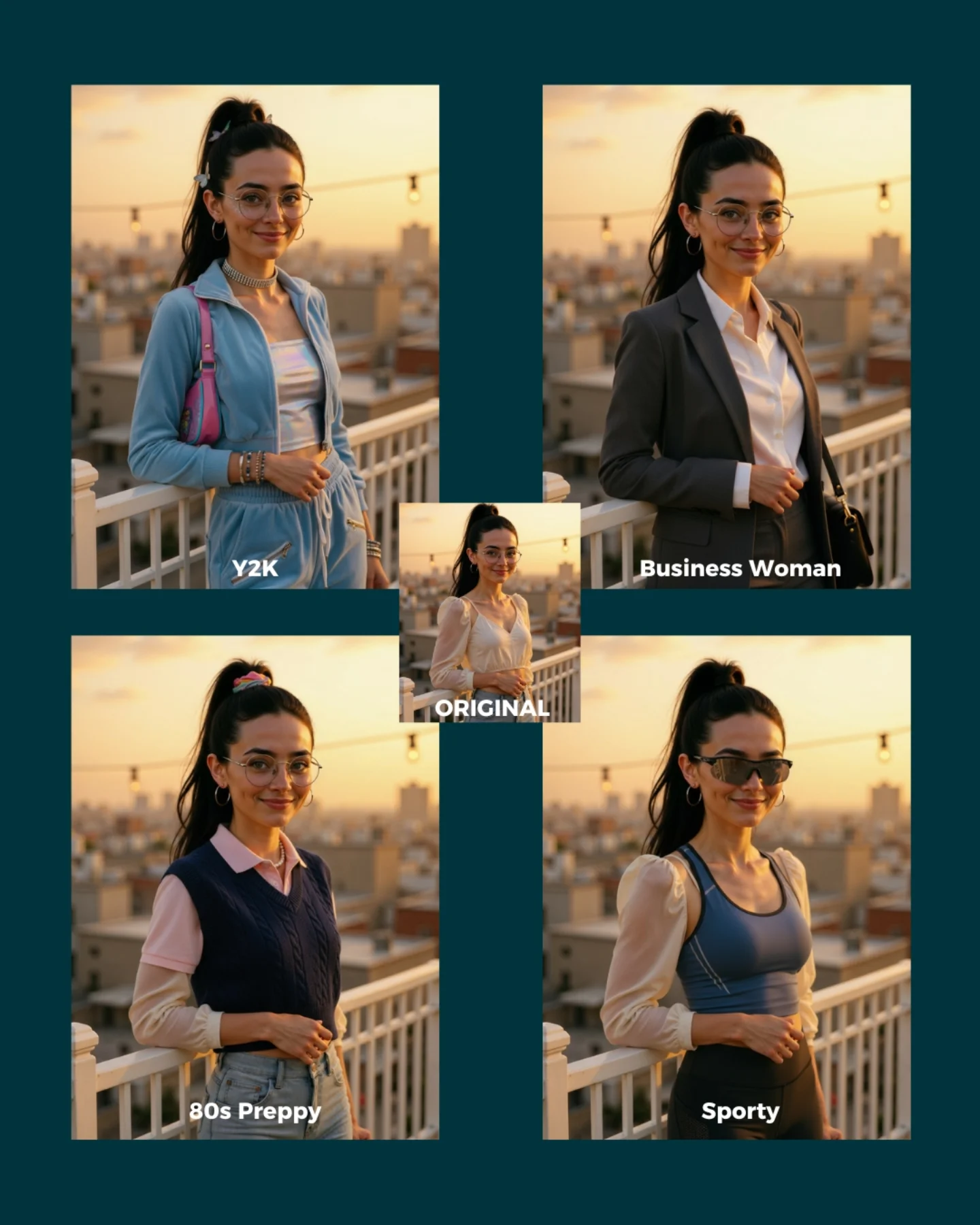
soy_aria_cruz: Nano Banana Style Remix AI
[Subject] A four-style fashion comparison cover built around the same young woman and the same rooftop pose. She appears early 20s, feminine presentation, slim build, light-medium skin tone, long dark hair in a high ponytail, round glasses, hoop earrings, and a gentle smile while standing beside a rooftop railing at golden hour. The center small panel shows the original look, while the four larger style variations reinterpret the same subject and pose. Top-left: Y2K styling with pastel blue zip jacket, white tube top, low-rise or relaxed bottoms, and a pink shoulder bag. Top-right: Business Woman styling with gray blazer, white button shirt, and structured officewear feel. Bottom-left: 80s Preppy styling with a navy sweater vest layered over a pale pink collared shirt. Bottom-right: Sporty styling with dark sunglasses, blue athletic tank, and activewear-inspired silhouette. [Environment] Rooftop terrace or balcony with white railing, blurred urban skyline in the distance, string lights overhead, warm sunset sky, shallow depth of field, all panels sharing the same location and lighting conditions. [Composition/Camera] Graphic comparison layout on a dark teal background: four larger rectangular images arranged in a grid, one smaller centered ORIGINAL image overlapping the middle, each panel labeled with its style name. Subject angle and framing remain mostly consistent across all variants for direct style comparison. [Lighting] Warm golden-hour sunset light with soft highlights on the face and clothing, gentle background glow, even flattering illumination consistent across all panels. [Style/Rendering] Realistic AI style-remix comparison cover, polished social-media educational graphic, consistent identity preservation across wardrobe changes, clean multi-panel layout, editorial makeover-thumbnail aesthetic. [Detail constraints] Keep the same woman, same rooftop pose, same sunset environment, and same face identity across every panel; only the wardrobe/accessory styling should change between Y2K, Business Woman, 80s Preppy, and Sporty. Do not add extra people, different locations, or dramatic lighting shifts between panels. Negative prompt: different identities across panels, changing pose too much, indoor scene, crowd, night lighting, text missing, messy collage, extra props unrelated to fashion, inconsistent skyline, distorted hands, duplicate people, random outfits outside the four named styles. Suggested parameters: aspect ratio 4:5 overall cover, lens 70-85mm equivalent portrait feel, shallow depth of field, 30-40 steps, CFG 6.5-7.5, sampler DPM++ 2M Karras, seed 521744. Delta prompt strategy: 1) If identity drifts, append 'same woman, same face, same hair, same glasses in every panel'. 2) If the rooftop changes, append 'same rooftop railing and sunset skyline across all variants'. 3) If the styles blur together, append 'clear wardrobe separation between Y2K, Business Woman, 80s Preppy, and Sporty'. 4) If the layout changes, append 'four-panel style comparison with a small centered ORIGINAL image'. 5) If sunset light disappears, append 'warm golden-hour rooftop lighting consistent in every panel'. 6) If labels vanish, append 'each panel labeled with its style name'. 7) If the sporty panel loses sunglasses, append 'sporty version includes dark sunglasses and activewear tank'. 8) If the business panel loses tailoring, append 'business version uses blazer and white shirt'. 9) If the Y2K panel loses the bag, append 'Y2K version includes a pink shoulder bag'. 10) If the preppy panel loses layering, append '80s Preppy version uses sweater vest over a collared shirt'.
Video
A polished futuristic fashion-showroom video set inside a sleek elevated boutique space with panoramic night-city lights outside and curated garments displayed all around the walls. At the center of the room, a glamorous brunette model stands on a circular rotating pedestal like a luxury retail hologram or high-end fashion installation. She begins in an elegant soft champagne-toned lounge look with a silky long robe or draped overlay and matching wide-leg trousers over a refined lingerie base, then transitions into a pale lace lingerie set with delicate structure, sheer details, and coordinated heels. Around her are suspended bras, slips, bodysuits, and dresses arranged like a premium showroom collection. The atmosphere should feel like a luxury fashion-tech presentation: clean, aspirational, sensual but polished, with soft studio lighting, metallic pedestal glow, and a sophisticated editorial rhythm. Use full-body pedestal shots, graceful turns, side-profile poses, and a final back-facing look that highlights silhouette and garment fit without losing elegance. No subtitles, no text, no watermark.
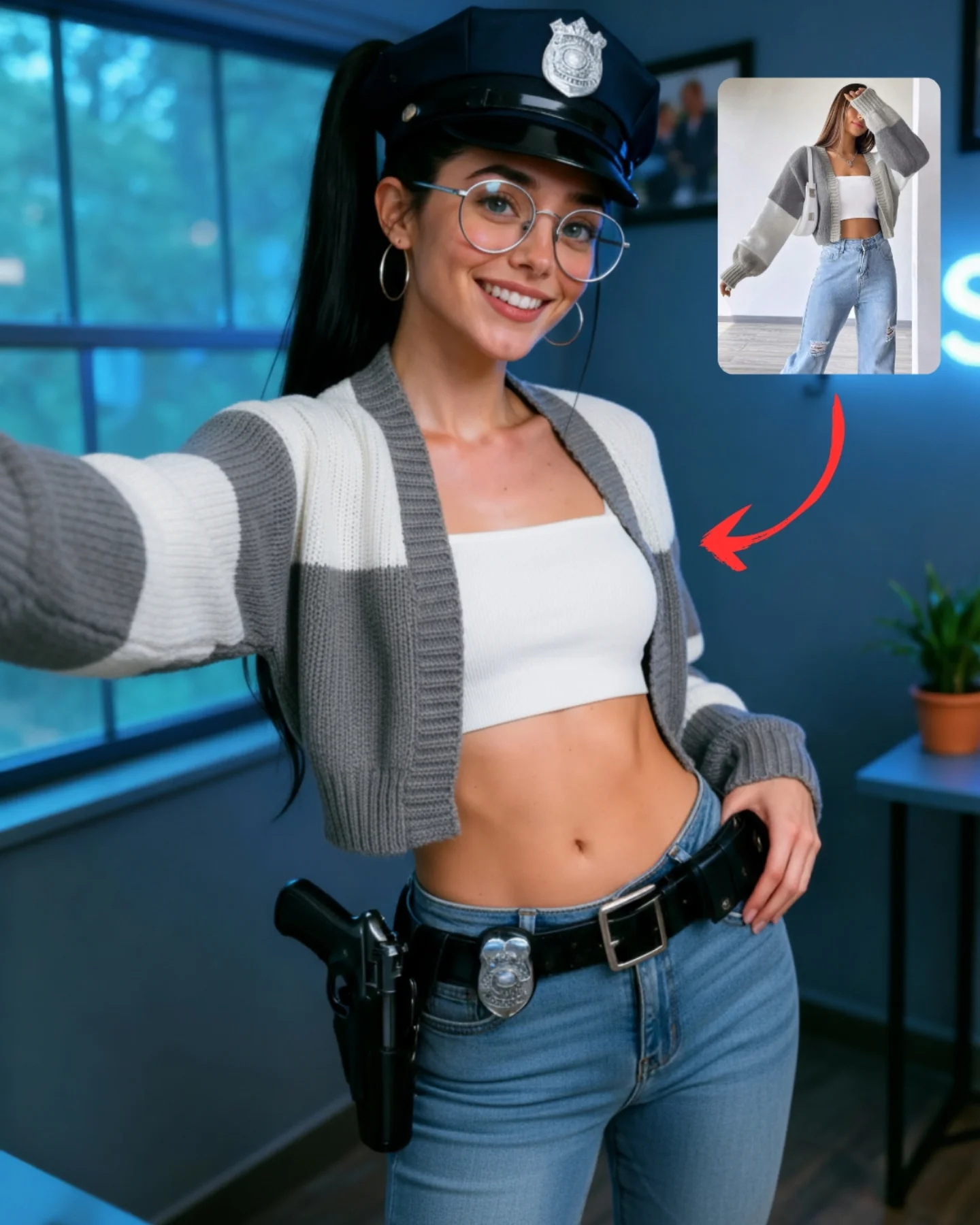
soy_aria_cruz: Police Hat Cardigan Jeans Style Transfer
Create a hyper-realistic vertical tutorial-style image showing an AI influencer style-transfer result. The main subject is a young woman taking a selfie in a modern room with cool blue ambient light. She has long dark hair in a high ponytail, large round silver eyeglasses, medium silver hoop earrings, and a playful confident smile. One arm is extended out of frame as if holding the phone for a selfie.

The key concept is that her identity and some accessories are preserved, while the clothing style has been transferred from a reference image. She wears a dark police-style cap with a silver badge and a black utility belt with metallic badge detail and a holster at the hip, but the rest of the outfit is casual and fashion-forward: a cropped gray-and-white striped cardigan, a fitted white bandeau or tube top, and light blue high-waisted jeans. The styling should look intentionally mixed, combining costume accessories with a copied casual outfit in a believable, polished way.

In the upper-right area, include a small rounded-rectangle inset reference image showing a fashion model in a white bandeau top, cropped cardigan, and light blue jeans. Add a bold curved red arrow pointing from the inset toward the main subject’s torso and outfit, making it clear that the clothing or styling has been transferred into the final image. The inset should feel like a creator tutorial overlay, not a random collage.

The room background should remain consistent with a creator-style interior: a large window with cool outdoor light, a faint neon sign glow, and a small table with a potted plant. Keep the background slightly soft but readable. Lighting should be crisp and flattering, preserving realistic detail in the glasses, cardigan knit texture, denim, belt hardware, holster, and skin.

The final result should feel like a polished social media tutorial cover about transferring clothing or fashion style onto an AI influencer while preserving identity. Prioritize realism, outfit clarity, overlay readability, creator-content aesthetics, and natural selfie energy.
Video
GLOBAL LOCK: A vertical social-media AI tutorial video that alternates between a realistic selfie-style female UGC sample and a Black male presenter in a neon-lit studio explaining the workflow. The female sample subject is a young white woman with blonde hair in a messy bun or loose ponytail, light skin, minimal casual makeup, and simple tank-top / homewear styling, filmed in a natural bedroom or bathroom-like domestic space with handheld phone framing. The presenter is a Black man with long locs, dark sunglasses, a black hoodie, and a red-and-black cap, seated against a purple-magenta studio background with soft key lighting. Keep the bold caption style, tutorial pacing, UI overlays, and practical AI workflow tone consistent across the full video. Speech should be direct, confident, concise, and educational, with a close dry mic sound and punchy emphasis on tool names and workflow steps.

[00:00–00:06] Open with the realistic UGC sample: a blonde young woman in a dim home interior records herself casually with a phone while turning her head and adjusting posture. Large on-screen text reads “Ai is getting too realistic.” The framing feels like authentic selfie content rather than polished cinema. Use handheld phone movement, warm domestic lighting, slight front-camera distortion, and natural facial motion.

[00:00–00:06] The opening line should feel like a scroll-stopping hook rather than a full explanation, either spoken or text-led. Timing should match the appearance of the headline text.

[00:06–00:12] Cut to the presenter in the neon-lit studio. He looks straight into camera and begins explaining why this kind of realism is now possible. Medium close-up, centered framing, 35mm lens feel, purple-pink ambient lights behind him. He speaks with measured confidence, using finger-point gestures and slight head movement to underline his point.

[00:12–00:18] Return briefly to the female sample and phone interface visuals. Show a phone screen or app workflow where the realistic selfie clip appears as source material. Then cut back to the presenter. He explains that the process starts with the right prompt and avatar setup. Use clean UI insert shots with clear text boxes and small thumbnail previews.

[00:18–00:24] Show workflow diagrams and interface graphics featuring tools like Higgsfield Soul and a prompt-to-avatar flow. Arrows connect a prompt box to an AI avatar output, suggesting a pipeline for generating believable human UGC footage. The presenter narrates over these inserts, explaining the first generation step and how to make the output more realistic.

[00:24–00:31] Back in the studio, the presenter explains how to improve realism using newer models and more detailed instructions. He references versions such as VEO 3.1 and KLING 2.1 while interface screens display prompt blocks, output thumbnails, and node-style arrows. Keep the tutorial rhythm quick but readable, alternating between face-to-camera explanation and screen graphics.

[00:31–00:37] The presenter breaks down a more specific method: use two images or a first-frame / last-frame setup that showcases the action, then feed that into the generation model. UI inserts should show image panels labeled like first frame and last frame, plus a prompt box and output node. His delivery becomes more step-by-step and procedural here, emphasizing repeatable workflow rather than hype.

[00:37–00:42] Continue with the presenter in the neon setup explaining that the motion prompt must be detailed and that the process should be repeated or refined until the result feels convincing. More diagram overlays and prompt windows appear behind or between his talking-head shots. Keep direct eye contact, precise hand gestures, and a strong creator-teacher vibe.

[00:42–00:45] End with a final realistic UGC-style female clip under bright pink club-like light, smiling into the camera in a handheld selfie shot. The presenter or on-screen text gives a call to action such as “comment UGC.” The ending functions as proof of output quality while also inviting engagement.
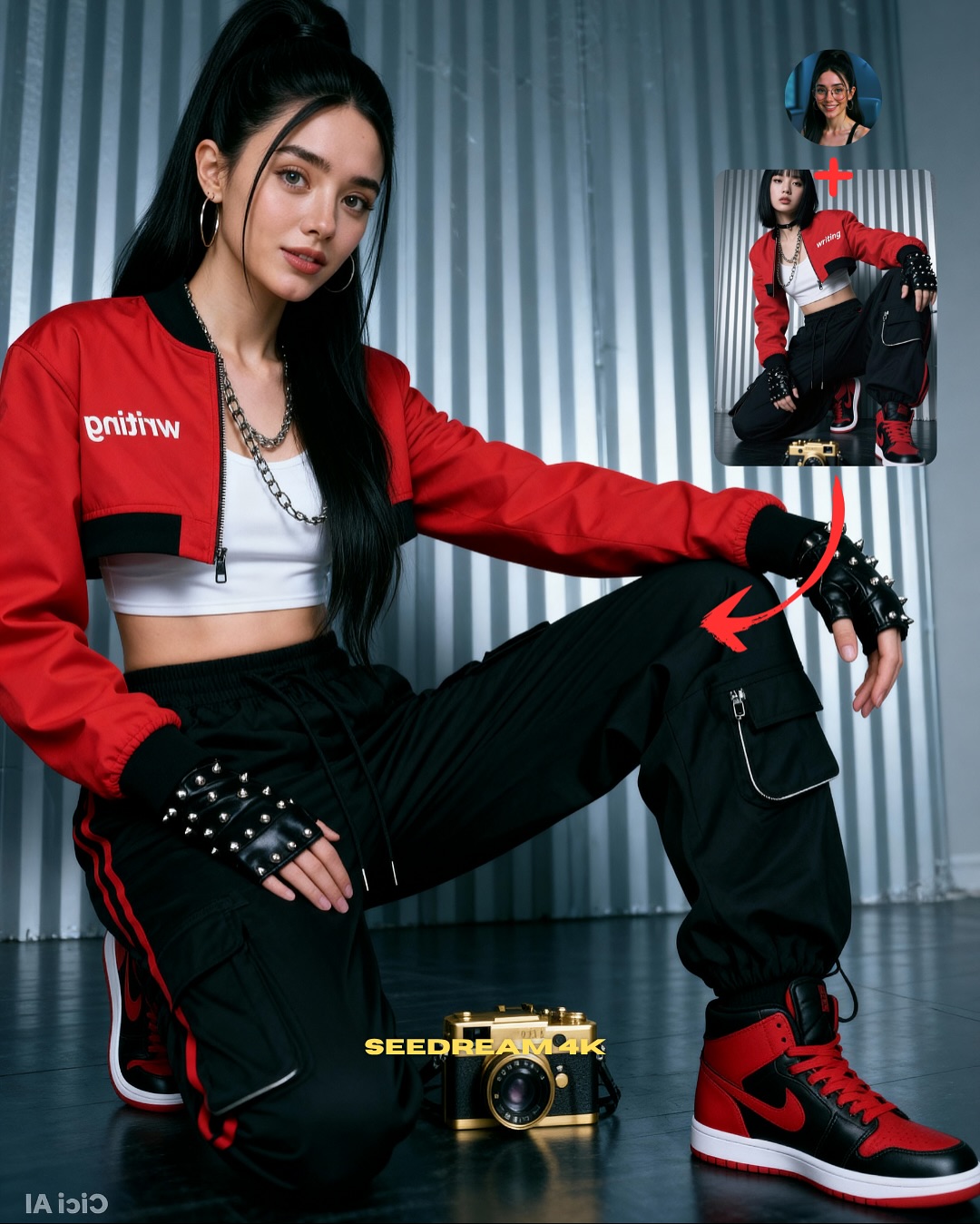
soy_aria_cruz: Streetwear Kneeling Pose Transfer AI
[Subject] A tutorial-style composite image showing pose transfer for an AI influencer. Main image: a single young woman with fair skin, long straight black hair in a high ponytail, large silver hoop earrings, soft glam makeup, and a calm direct expression. She is posed in a kneeling streetwear stance with one knee up and one knee down, one arm draped across the raised leg, hand relaxed downward. She wears a cropped red bomber jacket with black trim and white text on the chest, a white crop top, layered chain necklace, black cargo pants with zipper pockets and red side stripes, black fingerless studded gloves, and red-and-black high-top sneakers. [Props/objects] A gold-and-black retro-styled camera sits on the floor near the center bottom foreground. In the upper right are two inset reference images: a small circular face reference of the same woman, and a taller rectangular pose reference of another woman in a similar kneeling outfit pose. Red curved arrows connect the inset pose to the main subject to indicate pose transfer. Bottom-center text reads “SEEDREAM4K”. [Environment] Indoor studio-like space with a corrugated metallic silver wall background and dark floor, minimal set styling, no extra furniture. [Composition/Camera] Vertical 4:5 tutorial cover layout, main subject dominates most of the frame, eye-level to slightly low camera angle, full-body to three-quarter-body portrait, educational social-graphic composition with top-right inset references and bold red arrows. [Lighting] Clean soft studio lighting with even illumination, mild contrast, crisp clothing detail, subtle highlights on hair and jacket, no harsh shadows. [Style/Rendering] Photorealistic AI fashion tutorial cover, polished social-media educational graphic, streetwear aesthetic, clear image hierarchy, realistic fabric folds, clean skin, sharp product-like detail. [Detail constraints] Keep exactly one main subject plus the two inset references; preserve the red jacket, black cargo pants, studded gloves, red-black sneakers, gold camera, red arrows, and “SEEDREAM4K” text; no extra people in the main frame, no additional props, no environment changes.
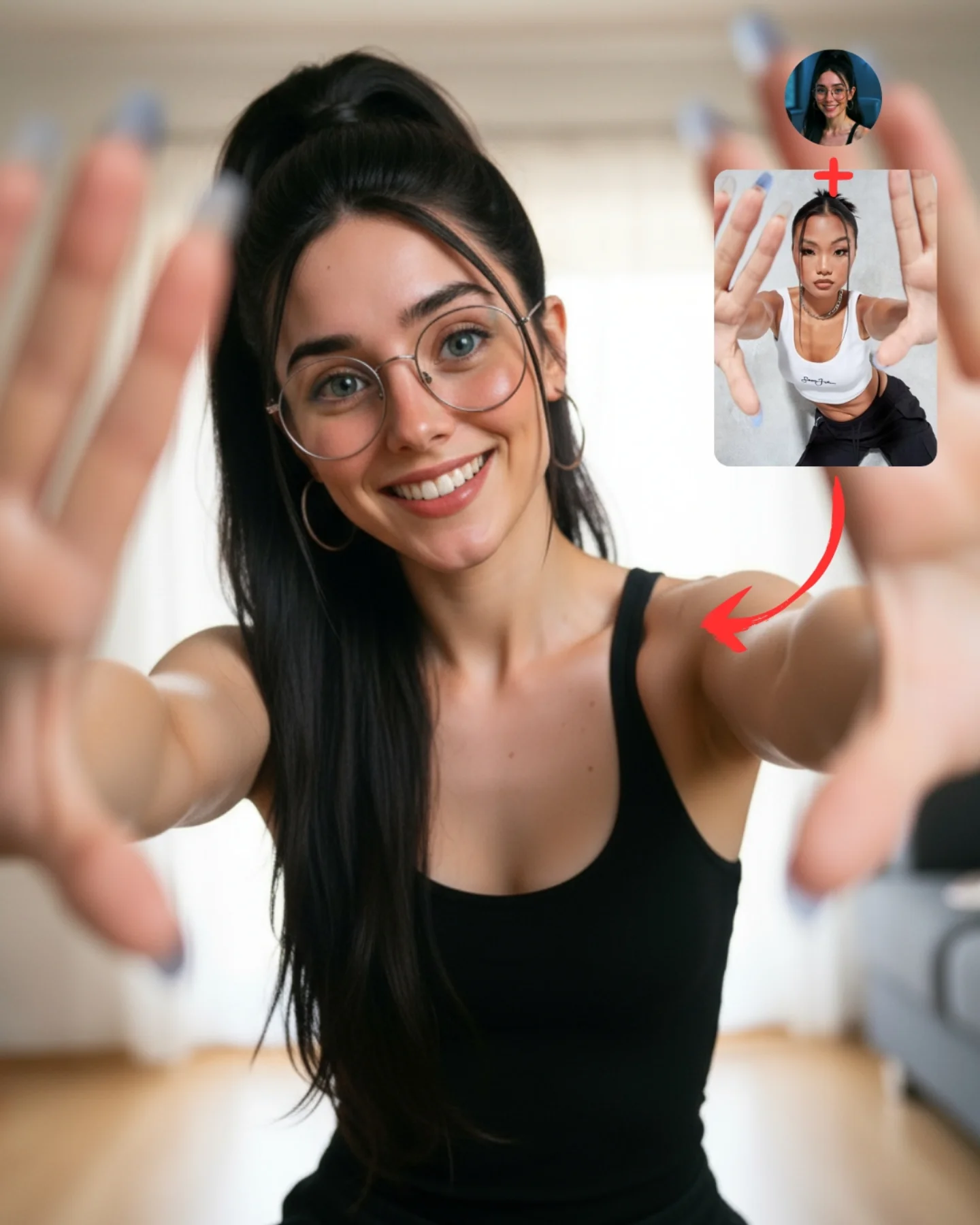
soy_aria_cruz: Pose Transfer Hands To Camera Photo
[Subject] A young woman indoors, smiling warmly at the camera while extending both hands toward the lens in a playful framing gesture. She has fair skin, long straight black hair in a high ponytail, large round wire-frame glasses, silver hoop earrings, blue-green eyes, and a bright friendly smile. She wears a simple fitted black sleeveless tank top. Her arms are extended forward so that both hands appear close to the lens and slightly out of focus, creating a forced-perspective pose. Long manicured nails in a gray-blue tone are visible on the fingertips. Keep exactly one female subject.

[Environment] Bright soft indoor home setting with a neutral, minimal background. Behind her are pale curtains or a light wall, warm wooden flooring, and a faintly visible gray sofa or upholstered furniture on the right side. The room should feel clean, casual, and domestic, like a living room or apartment interior. In the upper right corner, preserve a teaching overlay cluster: a circular profile photo of the same woman above, a red plus sign, a small rounded rectangular reference image showing a woman in a similar hands-forward pose, and a red curved arrow pointing toward the main subject. These overlay elements are part of the original image and must remain.

[Composition/Camera] Vertical 4:5 social-media teaching cover. Medium portrait from around waist to above the head, with the woman centered. Both hands reach toward the camera and dominate the near foreground at left and right edges, slightly blurred by depth of field, while the face remains sharp in the middle. The overlay reference sits in the upper right without blocking the face. Keep the composition playful and depth-driven, emphasizing the pose transfer effect.

[Lighting] Soft natural or diffused daylight from the front or slightly from the side, producing gentle even illumination on the face and shoulders. The room remains bright and airy without harsh shadows. Hands in the near foreground can be slightly softer due to focus falloff. Overall feel should be warm, clean, and inviting.

[Style/Rendering] Hyper-real casual indoor portrait photography with a pose-transfer tutorial layout. Realistic skin texture, believable depth of field, clean glasses reflections, natural hair strands, and softly blurred foreground hands. The image should feel like a friendly lifestyle pose demo, not a studio campaign and not an illustration. Preserve the instructional-social-media format.

[Detail constraints] Do not remove the upper-right tutorial overlay or the red arrow. Keep exactly one woman with a black tank top, glasses, hoop earrings, high ponytail, and both hands reaching toward the lens. Preserve the indoor living-room feel with pale curtains, wooden floor, and a faint sofa on the right. Do not turn the setting into a gym, studio seamless, or outdoor location.

Negative prompt: extra people, comparison split-screen, outdoor scene, gym wall, heavy props, cluttered room, no hands in foreground, no glasses, blonde hair, colorful outfit, deformed fingers, extra fingers, broken wrists, perfectly sharp hands, anime style, painting, poster clutter, watermark text.

Suggested parameters: aspect ratio 4:5 vertical; lens 24-35mm equivalent portrait lens with strong perspective; aperture look f/2 to f/2.8; steps 30-40; CFG/style guidance 6.5-8; sampler DPM++ 2M Karras or realistic portrait sampler; seed suggestion 348905271.

Delta prompt strategy:
1. If the teaching overlay disappears: "add upper-right tutorial overlay with circular profile image, red plus sign, small pose reference card, and curved red arrow"
2. If the hands-forward pose weakens: "both arms fully extended toward the camera, hands close to lens, fingers spread in the near foreground"
3. If the hands look too sharp: "foreground hands slightly out of focus due to shallow depth of field, face sharp"
4. If the setting changes: "bright minimal indoor living room with pale curtains, wooden floor, and soft sofa on the right"
5. If the outfit drifts: "simple fitted black sleeveless tank top"
6. If identity anchors disappear: "young woman with round wire-frame glasses, hoop earrings, high dark ponytail, and warm smile"
7. If it becomes too editorial: "casual pose-transfer demo image, friendly social-media teaching style"
8. If anatomy breaks: "natural arm extension, realistic wrists and fingers, believable perspective distortion"
9. If the arrow points the wrong way or overlay is misplaced: "upper-right reference image with red curved arrow pointing down toward the main pose"
10. If the room gets too empty and sterile: "subtle home interior cues with soft furniture and daylight warmth"
Video
GLOBAL LOCK: vertical 9:16 comparison reel split into two stacked halves. Top half labeled `AI:` shows the transformed cinematic version of the same man. Bottom half labeled `Original:` shows the raw talking-head recording of the creator performing hand gestures against a plain indoor backdrop. The subject identity must remain the same across both halves: young adult male, short brown hair, light skin, expressive face, medium build.

MASTER INTENT: create a short before-and-after AI transformation reel where each gesture in the original footage is mirrored by a stylized cinematic conversion in the top half. The AI version should progressively change wardrobe, mood, and environment while preserving timing and body movement from the original clip. End with a comment CTA for the guide.

00:00:00-00:00:02
Open with the creator pointing to his head in the original lower half while the upper AI half presents a cleaned-up enhanced version of the same pose. Simple gray studio background below; upgraded styling above.

00:00:02-00:00:04
Shift the AI half into more dramatic wardrobe changes: open shirt styling, then black leather jacket and sunglasses, while the original lower half remains plain and casual. Keep the gesture timing synchronized between top and bottom.

00:00:04-00:00:06
Move into higher-intensity transformations. The AI half places the same man in a warmer dramatic environment, including moody background lighting and a stronger cinematic grade. The original lower half still shows the untouched performer moving through the same gesture.

00:00:06-00:00:08
Push the transformation further with a fiery action-style background in the AI half. Flames or bright orange effects appear behind the subject while he continues reacting with raised hands and animated facial expression. Overlay a bold CTA near the lower section of the AI frame: `comment "AI" for guide`.

00:00:08-00:00:09.3
End on the strongest before-and-after comparison, holding the transformed fiery look on top and the original gesture on the bottom long enough for the CTA to be read clearly.

CAMERA: static front-facing camera, medium framing, same timing across original and transformed versions.

LIGHTING: original footage uses flat indoor creator lighting; AI version upgrades this into fashion-commercial and action-movie lighting depending on the segment, including clean studio light, editorial contrast, and warm flame reflections.

GRADE: original remains natural and unpolished; AI side becomes crisp, cinematic, contrasty, and style-forward.

MOTION: gesture-synced transformation reel, no camera shake, fast jump cuts between AI styling states.

TEXT PACK: exact visible labels `AI:` and `Original:`; final CTA `comment "AI" for guide`.

NEGATIVE PROMPT: different person in AI half, broken hand sync, mismatched gestures, unstable split-screen, unreadable labels, warped sunglasses, cartoon flames, overprocessed skin, blurred original footage, extra subtitles, watermark, logo corruption.

Ai Clothing Swap

An AI clothing swap page is useful because the user intent is usually explicit: take these clothes and swap them for different ones. That directness matters. Not every clothing-edit request needs a broad fashion generator or a full styling workflow. Sometimes a clean replacement is the whole job.

This is useful across social content, business portraits, ecommerce reference work, and personal wardrobe testing. A user may want a cleaner business look, a more formal outfit, or a stronger visual comparison between two styling directions. A useful page should support that simple decision process.

The strongest prompts usually describe both sides of the swap. What is there now, and what should replace it? A clear request such as “swap the hoodie for a navy blazer” is usually easier to evaluate than a vague request for “better clothes.” A strong page should help users stay specific.

This page also matters because swap tasks are often judged through comparison. The output only works if the replacement feels more suitable than the original. A focused page should therefore help users think about the purpose of the new outfit, not just the clothing label.

In practice, the value of an AI clothing swap page is that it gives users a direct route from one outfit to another. That is what makes the page useful. It supports fast wardrobe substitution without unnecessary complexity.

FAQ

What is this page best for?

It is best for direct outfit replacement, before-and-after wardrobe comparison, and quick clothing substitution in photos.

What should users define first?

They should define the original clothing and the target replacement first.

Why keep the swap specific?

Because clear wardrobe substitutions are easier to evaluate and usually lead to more believable results.

AI Clothing Swap Tool for Outfit Replacement | Alici | Alici.AI