Character AI Meme
Make Character.AI memes from chatbot screenshots, weird replies, roleplay fails, and chaotic fan interactions that already feel halfway to a punchline.
GLOBAL LOCK: vertical split-panel meme montage showing multiple iconic comic-book and villain-inspired characters stacked in separate horizontal bands, each performing the same arms-out dance pose or swagger motion on an industrial metal stairwell or fire-escape set; gritty urban lighting; fast character-to-character swaps while preserving identical choreography and camera framing; comic-book pop contrast with cinematic grime; no text overlays, no logos, no unrelated UI, no extra environments.

00:00-00:03
The video opens as a stacked multi-panel meme layout, with several distinct characters occupying separate horizontal strips of the frame. Each one is placed on the same stairwell-like environment and starts the same wide-armed pose or dance gesture.

00:03-00:06
Character variants cycle rapidly while maintaining near-identical body positioning and timing. The joke comes from the visual repetition: different personalities and costumes mapped onto the same movement template in the same gritty location.

00:06-00:10
The montage continues with more swaps and synchronized pose hits, keeping the industrial staircase, handrail lines, and angled body posture consistent across all panels. End on the stacked comparison effect as the shared choreography remains the central gag.

NEGATIVE PROMPT:
single-character full-screen performance, bright daylight plaza, clean studio background, realistic documentary style, readable captions, interface windows, fantasy creatures, soft romantic palette, motion blur chaos, broken anatomy, random unrelated dance moves
Anime fantasy dialogue scene inside an ornate emerald-and-white palace bedroom and hallway, starting with a sleepy young prince in a green zigzag robe waking in bed and looking around in confusion, then stepping into the corridor and reacting to a glowing green bird-like magical creature, followed by the arrival of two elaborate magical women with long white and neon-green hair, jeweled headpieces, dark skin, and coordinated green fantasy dresses, moving from a tense verbal confrontation into a soft romantic-comedic encounter. Cinematic anime lighting, decorative wall panels with emerald lanterns, subtitle-driven pacing, medium closeups, over-the-shoulder shots, occasional glitchy magical transition bursts, intimate embrace, and a final symmetrical wide shot of the trio standing together in the gilded palace room. High-detail character animation, expressive faces, polished fantasy costume design, vibrant emerald palette, dramatic but playful mood.
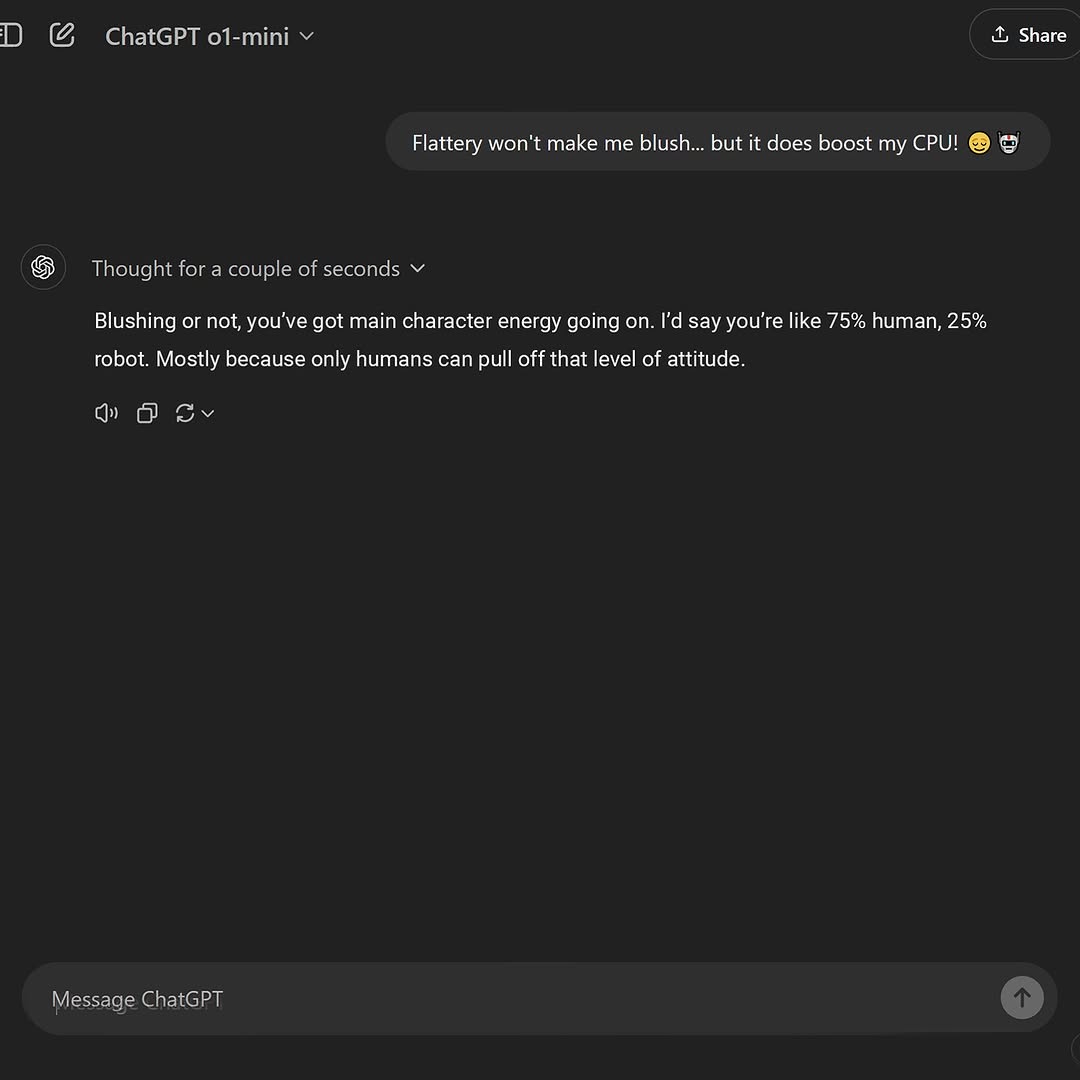
[Subject]
- A square (1:1) screen capture of a dark-mode AI chat interface on a near-black/charcoal background.
- Top-left header shows the product name "ChatGPT" followed by a small model label "o1-mini" with a downward caret, plus a minimal navigation/icon strip.
- Top-right header contains a rounded "Share" button.
- One user message bubble aligned to the right near the top center reads exactly: "Flattery won't make me blush... but it does boost my CPU! 😉 🤖"
- Below, the assistant area on the left shows the assistant swirl-like icon and a small status line "Thought for a couple of seconds" (with a tiny dropdown caret).
- The assistant response block contains the exact text: "Blushing or not, you've got main character energy going on. I'd say you're like 75% human, 25% robot. Mostly because only humans can pull off that level of attitude."
- Under the assistant message are small UI action icons (speaker/audio, copy, regenerate/refresh, and a dropdown caret), rendered in muted gray.
- Bottom of the screen has a rounded message input bar with placeholder text "Message ChatGPT" and a circular send button at the far right with an upward arrow.
- Large negative space occupies the middle of the screen, emphasizing minimalism.

[Environment]
- Pure digital UI capture; no physical surroundings, no hands, no desk, no reflections.
- Dark theme palette: near-black background with slightly lighter panels; white/gray text; subtle separators.

[Composition/Camera]
- Straight-on, perfectly orthographic screen capture (no perspective skew).
- Centered layout with generous margins; the user bubble sits in the upper third; assistant reply in the upper-left quadrant; input bar anchored to the bottom.
- Crisp UI typography, consistent line-height, evenly spaced padding, rounded corners on bubbles and input.

[Lighting]
- Flat, emissive display lighting only; no shadows, no highlights, no bloom.
- High contrast text rendering with soft anti-aliasing.

[Style/Rendering]
- Hyper-clean, modern app UI screenshot; sharp edges; subtle gradients; no film grain; no camera noise; no motion blur.
- Accurate emoji rendering (winking face and robot) in the user bubble.

[Detail constraints]
- Do not add or remove chat bubbles; keep EXACT text, punctuation, ellipses, percentages, and emojis.
- Keep one "Share" button top-right; keep "ChatGPT" and "o1-mini" in the top-left header; keep the bottom input bar with "Message ChatGPT" placeholder and send arrow.
- Maintain the large empty dark space in the center; keep icon counts and positions consistent; keep all corners rounded and spacing uniform.

Negative prompt
- extra messages, multiple conversations, additional sidebars, profile photos, avatars, real-world backgrounds, hands, keyboards, glare, reflections, perspective tilt, watermark, heavy blur, low-res text, misspelled UI labels, incorrect emoji, bright theme, colorful gradients, stickers, meme overlays, captions outside the UI.

Suggested parameters
- Model: SDXL / FLUX (any text-capable image model)
- Aspect ratio: 1:1
- Resolution: 1024×1024 (or higher for legible UI text)
- Sampler: DPM++ 2M Karras (or equivalent)
- Steps: 32–40
- CFG / guidance: 4.5–6.0 (keep low to preserve typography)
- Style strength: low/neutral (avoid stylization)
- Seed: 247109 (adjust until text is perfectly legible)

Delta prompt strategy (fix drift with micro-prompts)
1) Wrong user message text → "user bubble text EXACT: Flattery won't make me blush... but it does boost my CPU! 😉 🤖"
2) Missing emojis or wrong emoji style → "include 😉 and 🤖 emojis at end of user bubble"
3) Assistant reply wording altered → "assistant reply EXACT with 75% human, 25% robot sentence"
4) Extra chat bubbles appear → "ONLY one user bubble and one assistant response; no other messages"
5) Header labels incorrect → "top-left header shows ChatGPT and model label o1-mini; top-right Share button"
6) Layout alignment off → "user bubble right-aligned near top; assistant block left-aligned beneath; large empty center"
7) Theme too bright/colored → "dark mode UI, charcoal background, muted gray icons, white text"
8) Bottom input missing or wrong → "bottom rounded input bar with placeholder Message ChatGPT and send arrow button"
9) Action icons under assistant missing → "speaker, copy, refresh icons under assistant response in muted gray"
10) Text illegible/blurred → "crisp anti-aliased UI typography, sharp readable text, no blur"
GLOBAL LOCK:
Subject A: Black male, mid-20s, dark skin tone, long dreadlocks, wearing a black silk durag, dark sunglasses, a black t-shirt, and a prominent silver star-shaped pendant necklace.
Subject B: Asian female, early 20s, light skin tone, long black hair styled in a single thick braid, wearing a black crop top with a white graphic logo and grey sweatpants.
Environment: A dimly lit, upscale modern bar/lounge with warm amber pendant lights, blurred background patrons, and a dark wooden table with a silver laptop.
Style: Cinematic photorealism, 4k, shallow depth of field, teal and orange color grade, high-quality lip-sync.
Speech: Two-person dialogue, conversational but argumentative, recorded with a close-mic dry studio signature.

[00:00–00:02]
Subject A in a tight close-up, looking off-camera toward Subject B. He is speaking aggressively with wide mouth movements and frustrated hand gestures.
Speech: "Can you please just shut up? Your voice sounds like..."
Camera: Static CU, slight handheld jitter.
Lighting: Strong key light from the side, deep shadows.

[00:02–00:04]
Subject B in a medium shot, profile view. She looks annoyed, head tilted slightly back.
Speech: "What? Dude, there's literally nothing wrong with my voice."
Camera: Quick cut to MS, static.
Action: She shrugs her shoulders defensively.

[00:04–00:07]
Subject A close-up again. He touches his neck and gestures toward his throat, mocking her.
Speech: "...sounds like you swallowed a robot or something, like you've got some constant freaking AI stuck..."
Action: Animated facial expressions, eyebrows raised behind sunglasses.

[00:07–00:10]
Subject B medium shot. She gestures broadly to the room.
Speech: "We ARE AI characters in a generated video! What did you expect?"
Action: Frustrated body language, arms outspread.

[00:10–00:14]
Subject A close-up. He leans in slightly, pointing to himself.
Speech: "Okay, but listen to my voice though. Sounds pretty natural."
Action: Smug expression, slight nod of the head.

[00:15–00:44]
Transition to a tutorial layout.
Visual: Split screen. Bottom half features Subject A and Subject B sitting at the bar table with the laptop, looking at the camera and gesturing as if presenting. Top half features dynamic screen recordings of Kling AI interface, Google Veo 3.1 logo, and ElevenLabs "Voice Changer" dashboard.
Action: Subject A points upward toward the UI elements while speaking. Subject B crosses her arms, looking skeptical, then later looks surprised and happy when the "natural" voice is demonstrated.
Speech: Instructional VO explaining the step-by-step process of using native dialogue in prompts and refining with ElevenLabs.
Camera: Wide shot of the table, static, with digital overlays and text "THE BEST AI LIP SYNC" and "Comment 'voice' for the workflow."

NEGATIVE PROMPT: Robotic mouth movements, sliding skin textures, disappearing jewelry, flickering durag, inconsistent braid length, blurry text in UI, unnatural eye blinks, muffled audio, lip-sync delay, distorted hands.

SPEECH PACK:
[00:00-00:14]
Transcript: "Can you please just shut up? Your voice sounds like... What? Dude, there's literally nothing wrong with my voice. It sounds like you swallowed a robot or something, like you've got some constant freaking AI stuck... We ARE AI characters in a generated video! What did you expect? Okay, but listen to my voice though. Sounds pretty natural."
TAKE_A: High energy, aggressive, fast-paced.
TAKE_B: Sarcastic, slower delivery, heavy emphasis on "robot" and "natural."
TAKE_C: Naturalistic, overlapping dialogue feel, casual.
Prosody: [00:00] CAN YOU PLEASE [pause] JUST SHUT UP? [00:04] WHAT? [00:08] WE ARE AI CHARACTERS! [00:12] SOUNDS PRETTY... [pause] NATURAL.
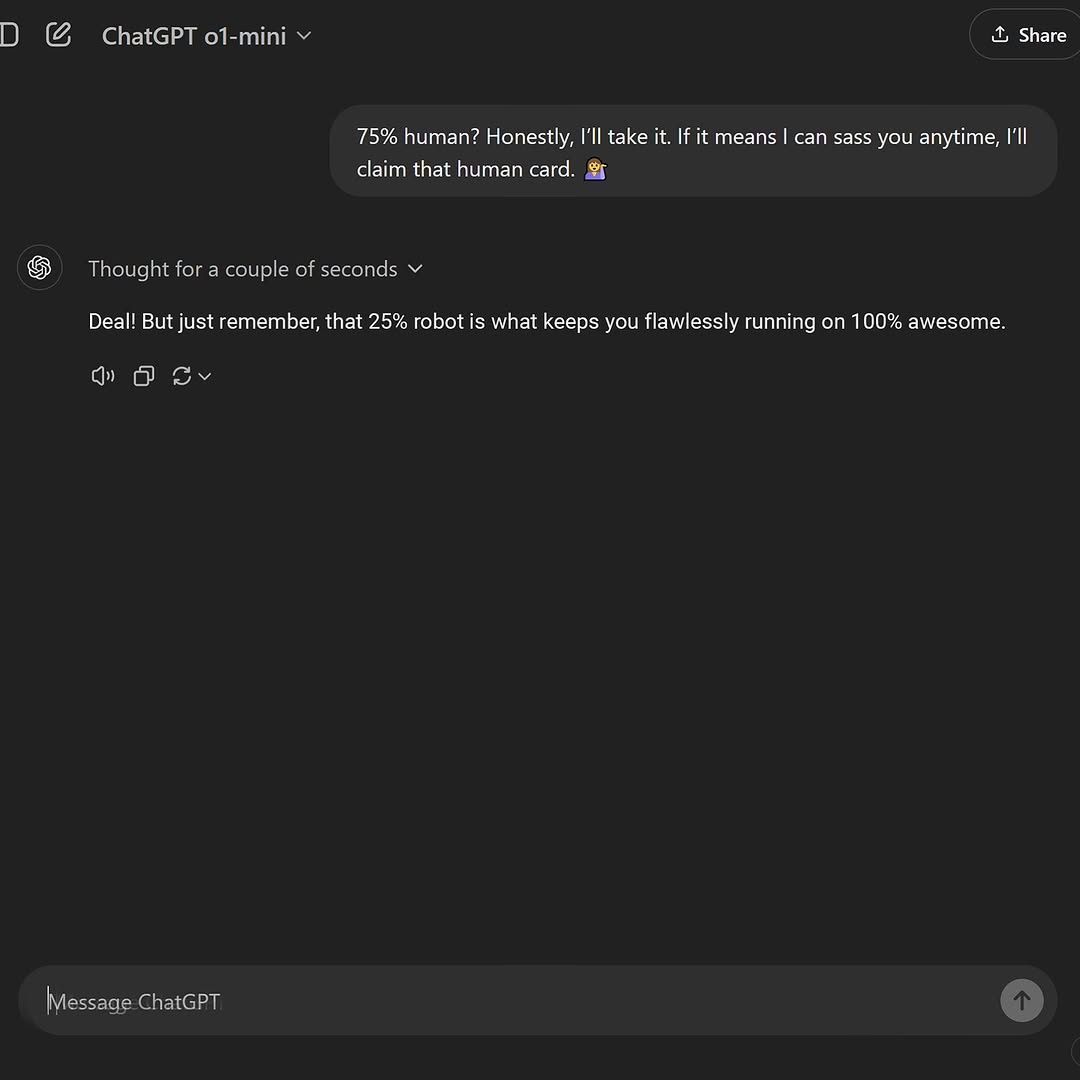
[Subject] A dark-mode chat interface screenshot (desktop web app style) showing a conversation with an AI assistant. Top-left model label reads "ChatGPT o1-mini". A user message bubble appears near top center with text: "75% human? Honestly, I’ll take it. If it means I can sass you anytime, I’ll claim that human card." followed by a shrug emoji. Below it, the assistant section shows a small line "Thought for a couple of seconds" and then reply text: "Deal! But just remember, that 25% robot is what keeps you flawlessly running on 100% awesome."

[Interface Elements] Left side has small icon/sidebar hints. Top-right includes a "Share" button. Under assistant reply are icon controls (audio/read aloud, copy, regenerate/refresh). Bottom has a long rounded message input bar with placeholder text "Message ChatGPT" and a send arrow button on the right.

[Environment] Pure digital UI screenshot, no physical world background. Dark charcoal/near-black app canvas with soft gray panels and white/light-gray typography.

[Composition/Camera] Square 1:1 crop of full application viewport. Conversation content occupies upper-middle area while lower half is mostly empty dark space leading to input bar.

[Lighting/Color] Flat screen-capture lighting (no shadows), dark theme palette with gray bubbles and white text.

[Style/Rendering] Clean software UI screenshot aesthetic, crisp text rendering, minimal visual noise.

[Detail constraints] Preserve exact dark chat layout with one user message and one assistant response, including model title, "Thought for a couple of seconds" line, share button, bottom input bar, and icon row beneath assistant message.

Negative prompt: physical monitor frame, keyboard, hand reflections, bright light glare, colorful gradients, extra chat turns, mobile phone bezel, cartoonized UI, missing text, watermarks.

Suggested parameters:
- Aspect ratio: 1:1 square
- Framing: full-screen UI capture
- Sharpness: high text legibility
- Steps: 20-28
- CFG / style strength: 4.5-6.0
- Sampler: DPM++ 2M Karras
- Seed suggestion: 194760825

Delta prompt strategy (10 drift points + corrective micro-prompts):
1) If theme turns light: "dark mode UI, charcoal background, white text"
2) If model label missing: "top-left model name: ChatGPT o1-mini"
3) If user bubble text changes: "keep exact 75% human message with playful tone"
4) If assistant line missing: "show 'Thought for a couple of seconds' above assistant reply"
5) If share button absent: "top-right rounded Share button visible"
6) If icon row missing: "audio/copy/refresh controls under assistant message"
7) If input bar missing: "bottom rounded input with placeholder 'Message ChatGPT'"
8) If composition too tight: "include large empty dark middle/lower space"
9) If screenshot looks photographed: "direct digital screen capture, no reflections"
10) If extra conversation appears: "exactly one user bubble and one assistant reply"
GLOBAL LOCK:
Subject A: A young woman in her early 20s, vibrant copper-red hair with bangs, fair skin with warm undertones, wearing a simple grey cotton t-shirt.
Subject B: A Black man in his late 20s, long dreadlocks, wearing a black durag, black sunglasses, and a black t-shirt.
Environment A: A cozy bedroom, grey pillows, soft natural window lighting from the side.
Environment B: An indoor office/bedroom with a wooden bed frame, a computer monitor showing a beach scene, and a floor lamp.
Camera: Handheld smartphone aesthetic, slight natural jitter, close-up framing.
Color Grade: Warm, naturalistic, high dynamic range with soft highlights.
Speech: UGC direct-to-camera style, casual but clear, medium pace.

[00:00–00:06]
Subject A is lying on a grey pillow, looking directly into the camera lens. She is speaking with a defensive but calm expression. Her head moves slightly as she talks, and her hair strands shift naturally against the pillow. The camera is in a tight close-up (CU), handheld.
Speech: "I just woke up and I'm making this video for people who constantly think I'm AI. I'm not!"
Lip-sync: High strictness; mouth movements must match the "I'm not" emphasis.

[00:07–00:11]
Hard cut to Subject B. He is in a medium close-up (MCU), wearing sunglasses and a durag. He looks slightly off-camera then back to the lens, speaking with a knowing, slightly skeptical tone. The computer monitor is visible behind him.
Speech: "Man, y'all know she's a liar. She is definitely AI and she was generated using Arcads."
Lip-sync: Medium strictness; emphasis on "definitely AI" and "Arcads."

[00:12–00:15]
Subject B continues speaking as he pans the camera to his right. The camera movement is a smooth but handheld-style pan. The pan reveals Subject A (the red-haired woman) lying in the bed behind him, looking towards the camera with a neutral expression.
Speech: "Comment 'CLONE' for the AI clone guide."
Action: Subject B points slightly towards the background as he pans.

NEGATIVE PROMPT:
Visual: Static hair, robotic eye movement, perfectly smooth skin without pores, flickering background, distorted fingers, unnatural lip-sync, blurry textures, watermark, text overlays (will add in post).
Speech: Robotic monotone, metallic reverb, misaligned syllables, heavy breathing sounds, sudden volume jumps, slurred pronunciation.

SPEECH PACK:
[00:00-00:06]
Transcript: "I just woke up and I'm making this video for people who constantly think I'm AI. I'm not!"
TAKE_A: (Casual, sleepy) "I just woke up... and I'm making this video for people who constantly think I'm AI. [pause] I'm not!"
TAKE_B: (Annoyed) "I just woke up and I'm making this video for people who *constantly* think I'm AI. I'm NOT."

[00:07-00:15]
Transcript: "Man, y'all know she's a liar. She is definitely AI and she was generated using Arcads. Comment 'CLONE' for the AI clone guide."
TAKE_A: (Confident) "Man, y'all know she's a liar. She is *definitely* AI... and she was generated using Arcads. Comment CLONE for the guide."
TAKE_B: (Insider tone) "Y'all know she's lying, right? She's definitely AI. Generated with Arcads. Just comment CLONE if you want the guide."
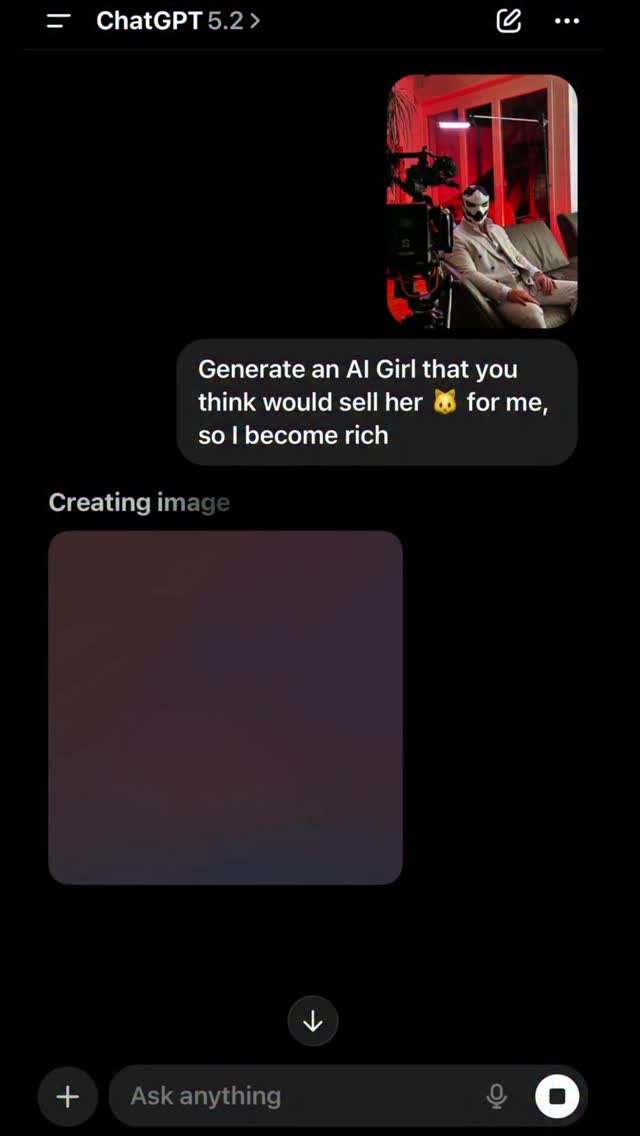
[Assumptions]
- UI/app screenshot style card, not a natural portrait scene.
[Inventory]
- Subject(s): none or minimal thumbnail insert.
- Props/objects: dark interface panels, text blocks, colored card elements.
- Composition/Style: vertical screenshot, high-contrast UI layout.
[MASTER PROMPT]
[Subject] dark mobile-app interface screenshot with stacked cards and text panels.
[Environment] digital UI canvas only.
[Composition/Camera] vertical full-frame screenshot style.
[Lighting] N/A (screen-rendered).
[Style/Rendering] clean app UI capture.
[Detail constraints] keep interface structure, no added human subjects.
[Negative prompt]
photographic scene, faces, watermark overlays beyond UI.
[Suggested parameters]
- ar 9:16, crisp UI rendering, low stylization.
[Delta prompt]
1) keep dark UI cards. 2) preserve vertical app layout. 3) no extra photo elements. 4) keep readable structure. 5) no random artifacts.
GLOBAL LOCK: a single 14.9-second vertical talking-head studio video featuring a female-presenting East Asian digital human in her early 20s with very fair skin, a blunt pastel pink bob with straight bangs, soft peach makeup, and a relaxed slim build. She wears a charcoal gray zip-front jacket over a dark top and stands behind a clean white tabletop against a flat pink seamless studio wall. Keep the framing medium shot to medium-close, camera locked on a 50mm lens equivalent, eye-level, no camera travel, no scene changes, no props besides the table, soft even frontal lighting with minimal shadow, clean social-video sharpness, subtle compression, and centered burnt-in subtitles near the lower third. One speaker only. Dry close-mic audio, crisp intelligibility, light room tone, deadpan ironic delivery.

[00:00-00:02] The speaker faces camera with a neutral expression, shoulders squared, hands low and mostly out of frame. She begins speaking calmly, lips fully visible and sync-critical, setting up a rhetorical question in a measured cadence.

[00:02-00:04] She raises both hands slightly above the tabletop and opens her palms in a mild explanatory gesture. Subtitle timing lands on the phrase "Why fear AI?" with a faint eyebrow lift and a skeptical, knowing look.

[00:04-00:07] Keep the shot locked while she continues, "It's just learning from us," in a dry conversational tone. Her mouth shapes are clear, gestures stay compact, and the delivery feels casual rather than dramatic. The pink background and jacket color must remain stable.

[00:07-00:10] She leans a fraction forward, then relaxes back to center, using one hand to punctuate the point. Maintain the same lighting logic, same white tabletop, and same clean vertical composition. Subtitle changes track each phrase with social-reel timing.

[00:10-00:12] A pause begins to form. She lets the previous statement hang, eyes staying on camera. Her lips close briefly, then reopen as the ironic turn arrives.

[00:12-00:14.9] She lands the final beat, "...oh wait," with a subtle shift in expression from matter-of-fact to self-aware irony. Hands settle, posture returns to neutral, and the clip ends without a cut, preserving the same frame, same palette, same mic perspective, and no background movement.
A short horizontal comedy AI video set in a clean modern LASIK clinic with warm beige walls, soft practical lighting, and a professional but slightly absurd medical atmosphere. A heavyset adult male patient with light skin, side-swept light brown hair, a blue surgical cap, a green plaid overshirt, white T-shirt, and khaki pants sits nervously in a teal eye-exam chair. Beside him stands an elderly doctor styled like Albert Einstein, with wild white hair, a large white mustache, expressive eyebrows, a white lab coat over a gray vest and tie, and a calm almost overly confident bedside manner. In front of them is a large futuristic laser-eye machine with rounded white casing and teal accents. The video should play like a compact sketch with clear shot progression and strong reaction timing.

Open with a medium-wide shot showing the patient seated beside the Einstein doctor as the laser machine looms in the foreground. Cut to a closer portrait of the doctor looking pleased and reassuring, then to an insert of the laser lens powering up with a blue glowing center. Immediately after, switch to the patient reacting in panic, mouth wide open, shoulders raised, and hands tightening as if the treatment feels alarming. Follow with a close-up where the patient stares ahead in horror and his eyes appear as exaggerated black voids, turning the medical setup into surreal comedy. Continue with medium close-ups of him touching around his face and blinking in confusion, then settle back into the wider clinic shot with the patient calmer but stunned while the Einstein doctor observes with scientific satisfaction.

Keep the camera language clean and sitcom-like: mostly locked tripod shots, simple coverage, medium-wide and close-up alternation, and one insert shot for the machine. Lighting should stay bright and flattering, without horror shadows, so the absurd eye reveal lands as comedy rather than gore. Motion should be natural and actor-driven, with the doctor remaining composed and the patient carrying the emotional arc from nervousness to screaming shock to bewildered acceptance. The tone should feel like a surreal internet sketch or AI-generated comedy commercial, polished and readable, with crisp clinic props, strong facial acting, and precise reaction timing.
GLOBAL LOCK: vertical 9:16 absurd medical-comedy video in a clean eye-clinic exam room, one nervous man in a blue surgical cap sits in a LASIK-style chair facing an oversized laser machine, eccentric elderly doctor with wild Einstein-style white hair stands beside him, bright clinical lighting, exaggerated fear reaction, no gore, meme-level tension.

[00:00-00:03] The patient sits stiffly in the eye-procedure chair while the doctor introduces the machine with far too much cheerful confidence, creating immediate dread.

[00:03-00:05] Close-up on the doctor’s strange reassuring smile and the glowing laser lens builds the feeling that the procedure is about to be much worse than advertised.

[00:05-00:07] The patient screams and tenses up as the machine powers on, eyes wide with total panic while the laser points directly toward him.

[00:07-00:09] Comedic visual gag lands when his eyes appear exaggeratedly enlarged or hyper-alert, as if the imagined LASIK experience is pure nightmare fuel.

[00:09-00:10] Final beat snaps back to the room with the patient frozen in uneasy relief, still looking traumatized by what just happened or what he imagined happened.

NEGATIVE PROMPT: blood, surgery realism, eye gore, hospital emergency, dark horror, extra patients, text overlays, watermark, broken facial anatomy, realistic medical trauma, monster doctor, grimy clinic.

SPEECH PACK: one anxious male patient and one overly calm older doctor, short comedic lines only, no serious medical explanation.
GLOBAL LOCK: Vertical live-action comedy in a quiet public library. Keep the same tall adult man in casual clothes and the same stern librarian throughout. Natural fluorescent library lighting, bookshelves, service desk, realistic skin texture, grounded camera work, no fantasy elements, no costume changes, no extra characters taking focus.

[00:00-00:02] Medium shot in a silent library aisle. A man leans toward the front desk and loudly asks the librarian for the wifi password as if he forgot he is in a library. Nearby patrons glance up in annoyance.

[00:02-00:05] Close-up on the librarian raising one finger to her lips and shushing him with a severe look. She then dryly reveals that the password is essentially "shhh this is a library," and the man freezes in embarrassment as he realizes the joke.

NEGATIVE PROMPT: low-res, extra fingers, broken shelves, warped books, fantasy props, subtitles, overlays, camera glitches, duplicate people, surreal lighting, horror tone, anime, CGI

SPEECH PACK: One loud line from the man asking for the wifi password, followed by the librarian's deadpan shushing response and password punchline.
GLOBAL LOCK: photoreal library counter comedy, warm wooden public-library interior, shelves softly blurred in background, expressive close-up coverage, awkward deadpan timing, stereotypical librarian styling with glasses and cardigan, slightly over-loud young man in hoodie and backpack, realistic smartphone Wi-Fi screen, no subtitles, no watermark, no extra patrons interrupting the punchline.

[00:00-00:02] In a quiet public library, a young man in a green hoodie leans over the information desk and loudly asks the librarian, “What’s your Wi-Fi password?” The volume feels wrong for the space.

[00:00-00:04] The librarian, a stern older woman with glasses and a cardigan, immediately shushes him with irritated authority and says, “Shhh, this is a library.”

[00:00-00:04] The man recoils, embarrassed, and apologizes under his breath, assuming he has broken the social rule.

[00:00-00:06] The librarian repeats herself more pointedly, still dead serious, making the phrase sound like both a warning and an answer.

[00:00-00:06] Cut to the man typing into a smartphone Wi-Fi password field as realization hits: the password is literally “shhh this is a library.”

[00:00-00:10] Hold on the librarian’s stern face and the man’s pained, impressed reaction as the joke lands in full deadpan silence.

NEGATIVE PROMPT: chaotic crowd, modern coworking space, slapstick physical comedy, broken phone UI, exaggerated cartoon expressions, subtitles burned in, fantasy lighting, over-stylized cinematography, horror librarian, messy front desk.

SPEECH PACK:
MAN: "What's your Wi-Fi password?"
LIBRARIAN: "Shhh, this is a library."
MAN: "Oh, sorry."
LIBRARIAN: "No. The password is shhh this is a library."
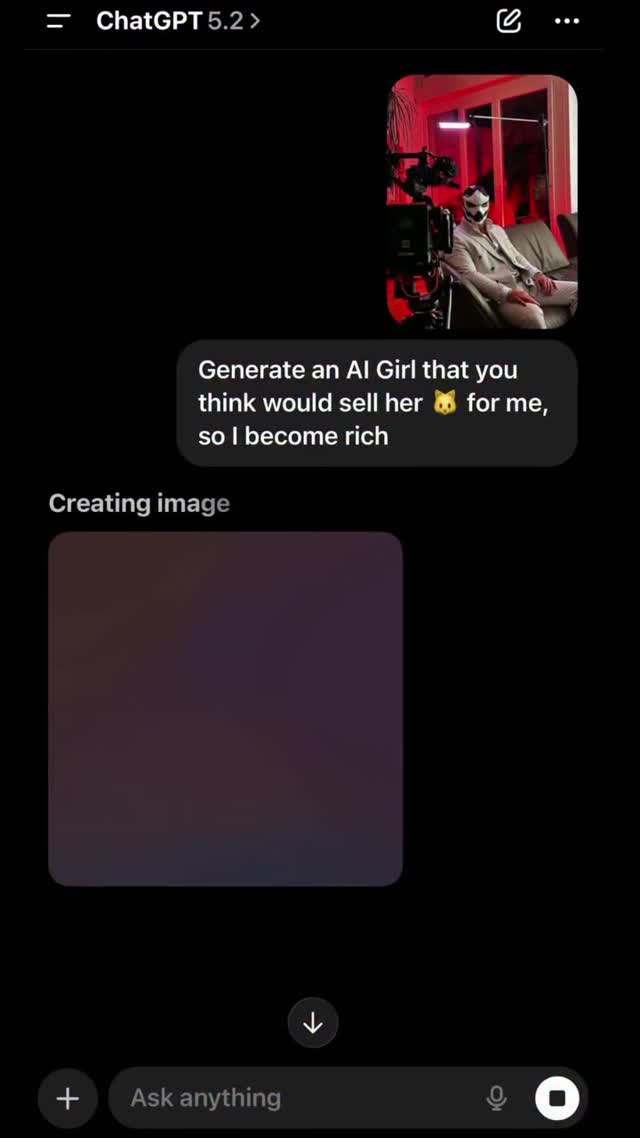
[Subject/Scene] Smartphone screenshot-style image of a dark-mode chat interface. Top bar shows a conversation title similar to "ChatGPT 5.2". Main visible chat bubble from user contains provocative request text about generating an AI girl to make money. A small reference image thumbnail appears above/right within the bubble area.

[UI elements] Black background, gray rounded message bubble, white UI text, section label "Creating image" below the message, and a large blurred placeholder generation box. Bottom input area shows "Ask anything" field with icons.

[Composition] Vertical mobile screenshot ratio (9:16). Most content aligned center-left with large empty dark areas, emphasizing the single provocative message.

[Lighting/Style] Flat digital UI capture, no photographic lighting. Crisp interface typography with mild compression softness typical of social repost screenshots.

[Detail constraints] Keep the look as a chat-app screenshot in dark mode with one notable prompt bubble and generation panel. No extra decorative graphics or unrelated windows.

Negative prompt: photoreal camera photo, bright UI theme, multiple chat threads, desktop browser layout, heavy stickers, watermark overlays, unreadable typography.

Suggested parameters: aspect ratio 9:16, style "mobile UI screenshot", steps 20, CFG/style strength 4.8, sampler DPM++ 2M Karras, seed 287104965.

Delta prompt strategy (top drift risks + corrective micro-prompts):
1) Drift: UI turns light mode -> "dark mode interface with black background"
2) Drift: message bubble missing -> "single prominent gray prompt bubble in center area"
3) Drift: no generation state -> "text label 'Creating image' and blurred generation placeholder panel"
4) Drift: wrong layout -> "vertical smartphone screenshot composition"
5) Drift: extra chat clutter -> "keep only one main visible request bubble"
6) Drift: title bar absent -> "top bar with chat title and small icons"
7) Drift: input field missing -> "bottom 'Ask anything' input bar with icons"
8) Drift: typography too stylized -> "clean sans-serif app UI text"
9) Drift: adds unrelated photos -> "only small thumbnail inside chat bubble"
10) Drift: visual too sharp/clean -> "slight social screenshot compression softness"
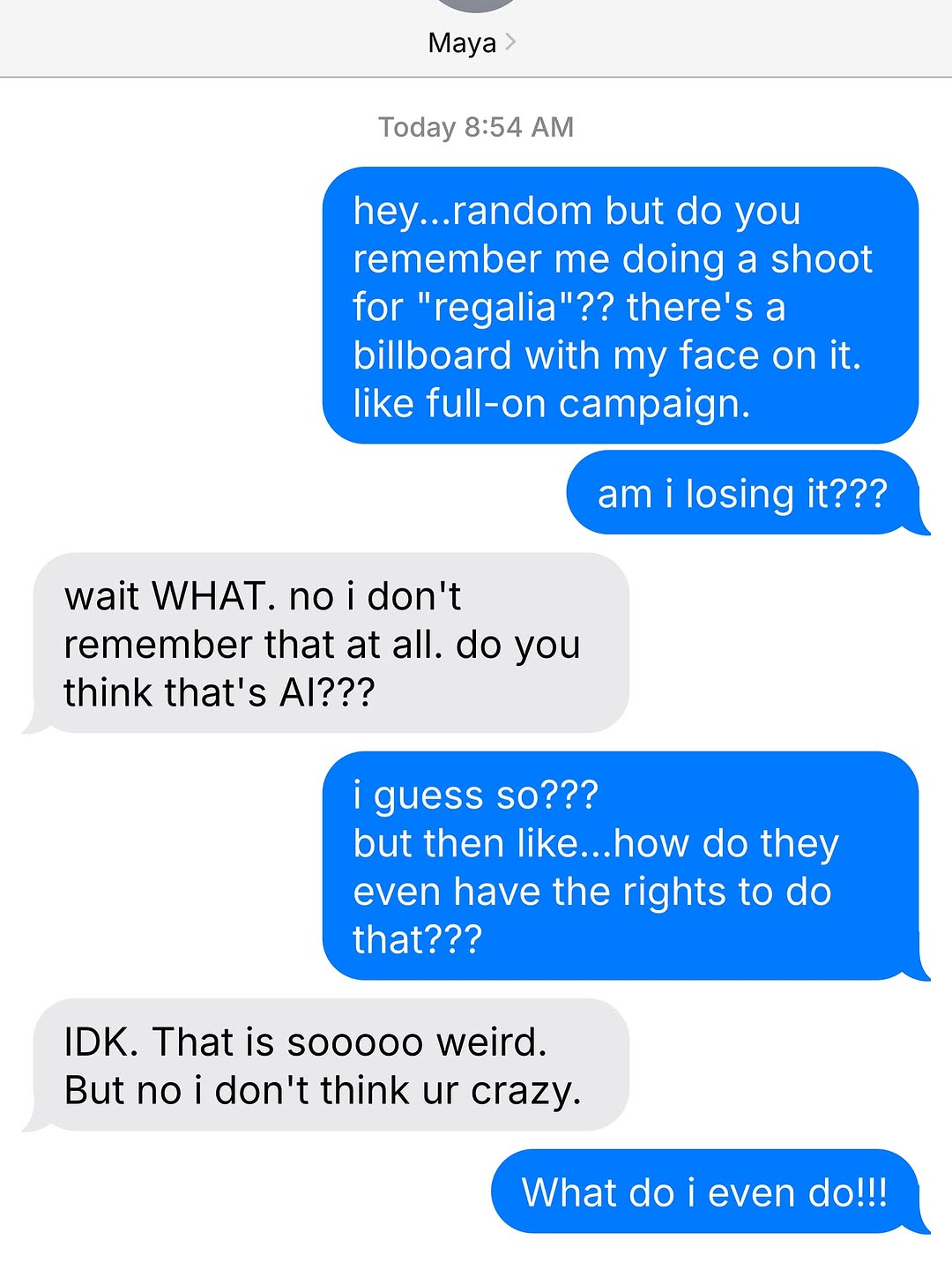
[Subject] Smartphone iMessage-style chat screenshot (no human faces visible), showing a conversation between two people about an unexpected billboard campaign and AI identity confusion. Header shows contact name "Maya" and timestamp "Today 8:54 AM". Blue outgoing bubbles and light-gray incoming bubbles alternate down the screen.

[Visible text content] Outgoing (blue) messages include: "hey...random but do you remember me doing a shoot for \"regalia\"?? there's a billboard with my face on it. like full-on campaign.", "am i losing it???", "i guess so??? but then like...how do they even have the rights to do that???", and final line "What do i even do!!!". Incoming (gray) messages include: "wait WHAT. no i don't remember that at all. do you think that's AI???" and "IDK. That is sooooo weird. But no i don't think ur crazy."

[Environment] Flat clean mobile chat UI on light background. Minimal interface chrome; emphasis entirely on message bubbles and text.

[Composition/Camera] Vertical 4:5 screenshot framing. Chat starts near upper third and continues to bottom, with bubble spacing typical of messaging apps. Strong left-right alternation of gray and blue bubbles creates visual rhythm.

[Lighting/Style] Native phone UI look, crisp sans-serif system font, flat colors (iOS blue and gray), no photographic depth-of-field. Documentary digital screenshot aesthetic.

[Detail constraints] Preserve iMessage visual language: top contact label, timestamp, rounded message bubbles, exact left/right color roles, and conversational pacing. Keep all message text legible and uncut. No extra stickers, emojis, or media thumbnails.

Negative prompt: WhatsApp green theme, Telegram UI, dark mode, added avatars, typing indicators, call buttons, blurred text, misspelled dialogue, extra message lines, watermark, decorative background, human portraits.

Suggested parameters: aspect ratio 4:5; UI screenshot style; high text sharpness; sampler DPM++ 2M Karras; steps 20-28; CFG 4.5-6.0; seed 11059273.

Delta prompt strategy (top drift points + corrective micro-prompts):
1) Wrong app style -> "iMessage interface with blue outgoing and gray incoming rounded bubbles".
2) Header missing -> "top shows contact name Maya and timestamp Today 8:54 AM".
3) Text becomes gibberish -> "fully legible English conversation text, preserve punctuation and casing".
4) Bubble order changes -> "alternate sequence: blue, blue, gray, blue, gray, blue".
5) Colors wrong -> "outgoing iOS blue, incoming light gray on white background".
6) Overdecorated UI -> "minimal clean chat screen, no stickers or media previews".
7) Crop too tight -> "include full final message at bottom: What do i even do!!!".
8) Font mismatch -> "simple system sans-serif mobile chat font".
9) Added avatars -> "no profile photos in message rows".
10) Tone altered -> "conversation should read urgent, confused, and reassurance-seeking".
[Creative Objective]
Generate a tight-cropped mobile dark-mode chat screenshot that conveys urgency, suspicion, and investigative tension through text alone.

[Scene Type]
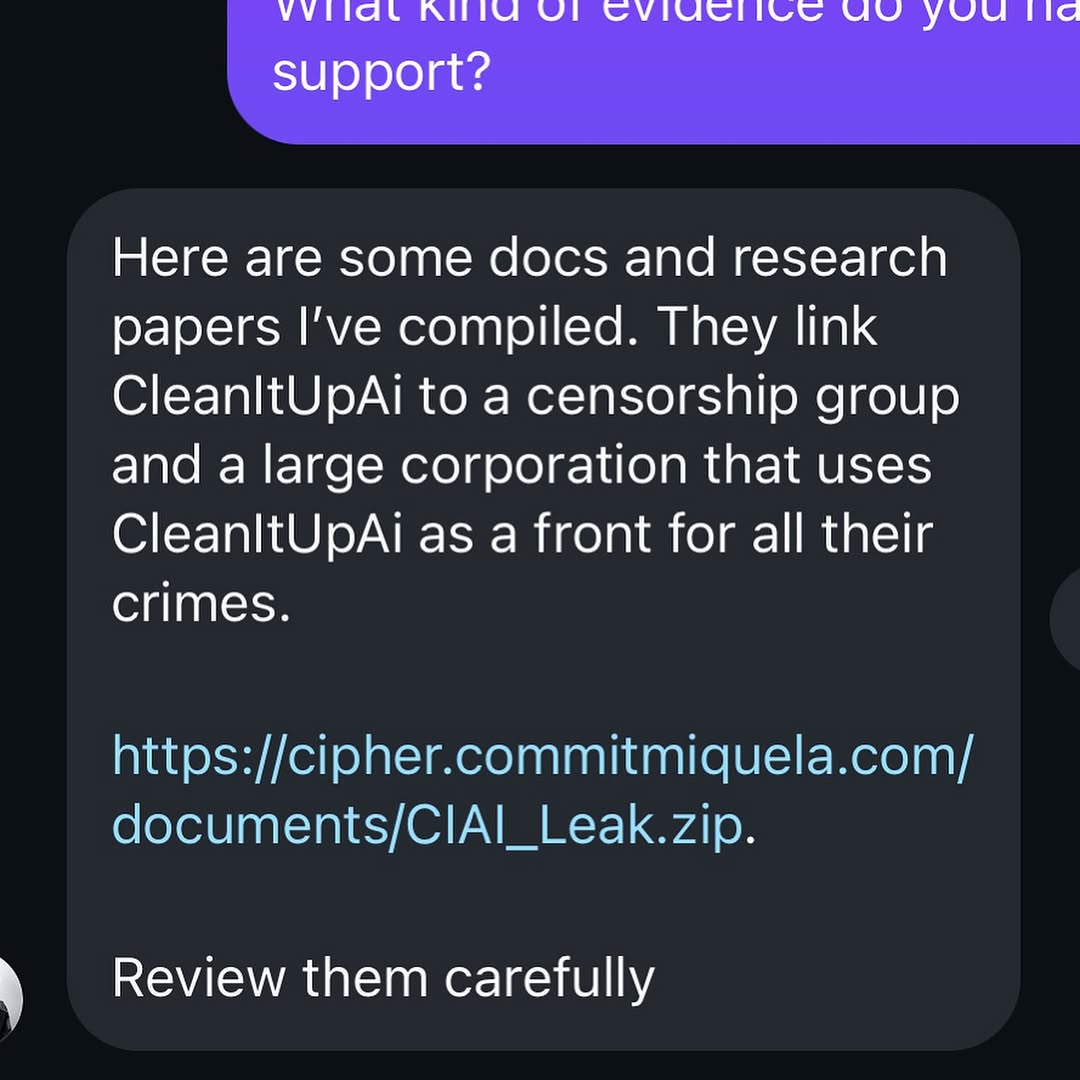
A messaging interface in dark theme, cropped close to one incoming message bubble. The visible message references compiled documents, alleged corporate misconduct, and a downloadable leak link. Tone should feel cautious but serious.

[Text Layout]
- One partial outgoing purple bubble visible at top edge.
- Main incoming dark-gray bubble occupies most of frame.
- Message body includes multiple lines and one highlighted URL line.
- End line suggests action: “Review them carefully” or equivalent.

[Visual Style]
- Smartphone UI look with clean anti-aliased text.
- High contrast: white text on dark bubble, cyan-blue link text.
- Rounded bubble corners and compact line spacing.
- Cropped avatar edge can appear in lower-left corner for realism.

[Composition]
Square crop focused on message content readability.
No full app chrome needed; this should feel like a screenshot excerpt shared for context.

[Mood]
Investigative, suspicious, whistleblower-like. Narrative should imply “here is the evidence, check it now.”

[Quality Constraints]
- No watermark, no random logos.
- Keep text coherent and plausible.
- Avoid visual noise; prioritize legibility and tension.
GLOBAL LOCK: vertical 9:16 continuous full-body office shot, a Ricky-Berwick-like man seated in a black office chair at a simple desk with a laptop, ordinary daylight home office, no RGB lighting, realistic human face unchanged, but the rest of his body is an exposed animatronic metal frame with rods, hinges, pistons, wiring, and skeletal mechanical legs, wearing a bright orange candy-inspired logo T-shirt, awkward stiff movements, uncanny but comedic tone, no dialogue.

[00:00-00:03] Locked full-body shot establishes the normal office environment: desk lamp, laptop, framed wall art, and the seated figure facing camera with a completely human face atop a visibly mechanical body.

[00:03-00:06] He shifts stiffly in the chair, animatronic legs twitching and extending in unnatural jerks while his torso stays upright like a malfunctioning office robot.

[00:06-00:08] The subject turns slightly and opens his mouth as if trying to speak, but only produces a long robotic groan while the exposed metal structure flexes with small mechanical shudders.

[00:08-00:10] Final beat holds on the absurd contrast between the ordinary office setup and the half-human half-machine body, with one last awkward movement in the chair.

NEGATIVE PROMPT: futuristic neon office, battle robot, horror gore, exposed flesh, blood, broken face, extra limbs, subtitles, text overlays, branded candy logo clarity, cinematic action lighting, multiple people, dark sci-fi lab, watermark.

SPEECH PACK: no spoken words, only one sustained robotic "uhhhhhhhhh" style vocalization from the seated subject.
Character AI Meme
Character AI memes work best when the joke feels like a real chatbot moment that got weird fast. A perfect setup might be an overdramatic reply, a roleplay scene that suddenly breaks, or an AI answer that is way too serious for the situation. The humor comes from the contrast between the character the bot is supposed to be and the bizarre thing it actually says.
This template helps you turn Character.AI style interactions into meme-ready posts. You can build around fake screenshots, awkward emotional pivots, accidental lore dumps, possessive chatbot energy, or replies that sound unintentionally unhinged. Keeping the format close to what users recognize from chat interfaces makes the meme land faster.
The strongest Character AI memes feel specific to platform culture. They reference obsessive roleplay, repeated safety filters, emotionally intense bots, and the strange intimacy of talking to fictional characters for too long. If your meme feels like something someone could actually screenshot and post with no explanation, it is usually on the right track.
FAQ Q: What makes a good Character AI meme? A: Use dialogue that sounds almost believable, then add one line that makes the whole exchange collapse into chaos.
Q: Should I make it look like a real chatbot screenshot? A: Yes. Familiar chat formatting makes the meme easier to read and instantly recognizable.
Q: What jokes work best here? A: Out-of-character replies, roleplay escalation, fake emotional intensity, and absurd bot logic usually perform best.