/
/
How to Make AI Caricatures in 2026: Beyond ChatGPT - 3D Styles, Multiple Models, and Prompts That Actually Work
How to Make AI Caricatures in 2026: Beyond ChatGPT - 3D Styles, Multiple Models, and Prompts That Actually Work
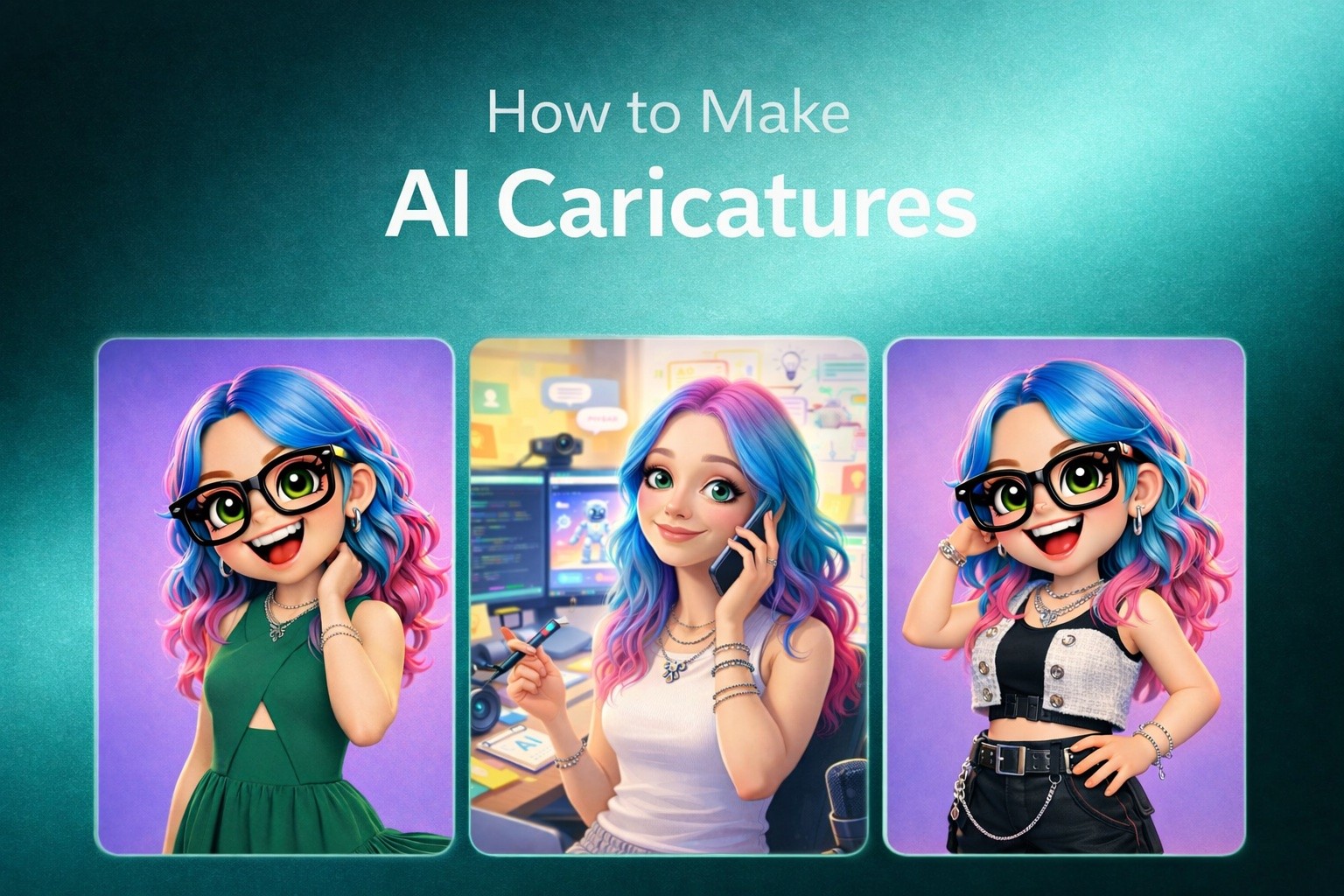
5 distinct caricature styles across 5 AI models - from ChatGPT's viral 2D cartoons to 3D polished, artistic painterly, and brand mascot caricatures. 10 copy-paste prompts and honest comparison.
|
24 min
TL;DR
AI caricatures exploded via ChatGPT's 'me and my job' trend (1.5M+ portraits in one week), but ChatGPT only does 2D flat cartoon. Multiple AI models now produce distinct styles - 3D polished (Nano Banana), painterly (Midjourney), celebrity-permissive (Grok), and brand mascots (Flux).
Disclosure: The author is Co-Founder of Alici AI. Alici products mentioned in this article reflect hands-on testing recommendations, not paid promotion. All models discussed are independently available outside Alici.
In February 2026, a single prompt crashed OpenAI's servers. "Create a caricature of me and my job" became the internet's favorite game - over 1.5 million portraits generated in the first week, LinkedIn flooded with cartoon CEOs, and ChatGPT Plus subscriptions spiked so hard that OpenAI had to throttle image generation for free-tier users (The Verge, 2026).
The AI image generation market hit $9.1 billion in 2025 and is projected to reach $60 billion by 2030 (MarketsandMarkets). Within that market, caricatures became the single most viral use case - outpacing even the Ghibli trend that dominated early 2026.
But here's what nobody talks about: that viral ChatGPT caricature is one style (2D flat cartoon) on one platform ($20/month). Since then, a completely different trend emerged - 3D AI caricatures with polished, toy-like finishes powered by models most people haven't tried yet. Artistic painterly caricatures. Celebrity caricatures that ChatGPT outright blocks. Brand mascot caricatures with character consistency across dozens of images.
I tested caricatures across 5 AI models with 150+ generations over three weeks. Every image in this article is from my own testing sessions - no stock photos, no borrowed screenshots. Here's what each model does differently, and 10 prompts that actually work.
90-Second Answer
AI caricatures exploded in February 2026 via ChatGPT's viral "me and my job" trend - 1.5M+ portraits generated in one week. But ChatGPT offers one style: 2D flat cartoon. Multiple AI models now produce distinct caricature styles - 3D polished with oversized heads (Nano Banana), artistic painterly (Midjourney), celebrity-permissive (Grok), and brand-consistent mascots (Flux). This guide covers 5 styles, 10 copy-paste prompts, a model decision matrix, and where to try them all in one workspace on Alici AI.
The ChatGPT Caricature: What Everyone's Doing (And Its Limits)
If you searched "AI caricature" you probably want the ChatGPT version first. Fair enough - let me break down exactly what it is, how to do it, and why you'll eventually want more.
The Viral Prompt
The prompt that started it all is deceptively simple:
What makes this work isn't the prompt itself - it's the context. ChatGPT draws on your entire conversation history: your name, your profession, the questions you've asked, even the tone of your messages. The result is a personalized 2D cartoon that feels eerily specific. A data scientist surrounded by floating scatter plots. A barista riding an espresso machine like a mechanical bull. A teacher drowning in permission slips.
The personalization is the magic. No other image generator has this context because no other image generator is also your chatbot.
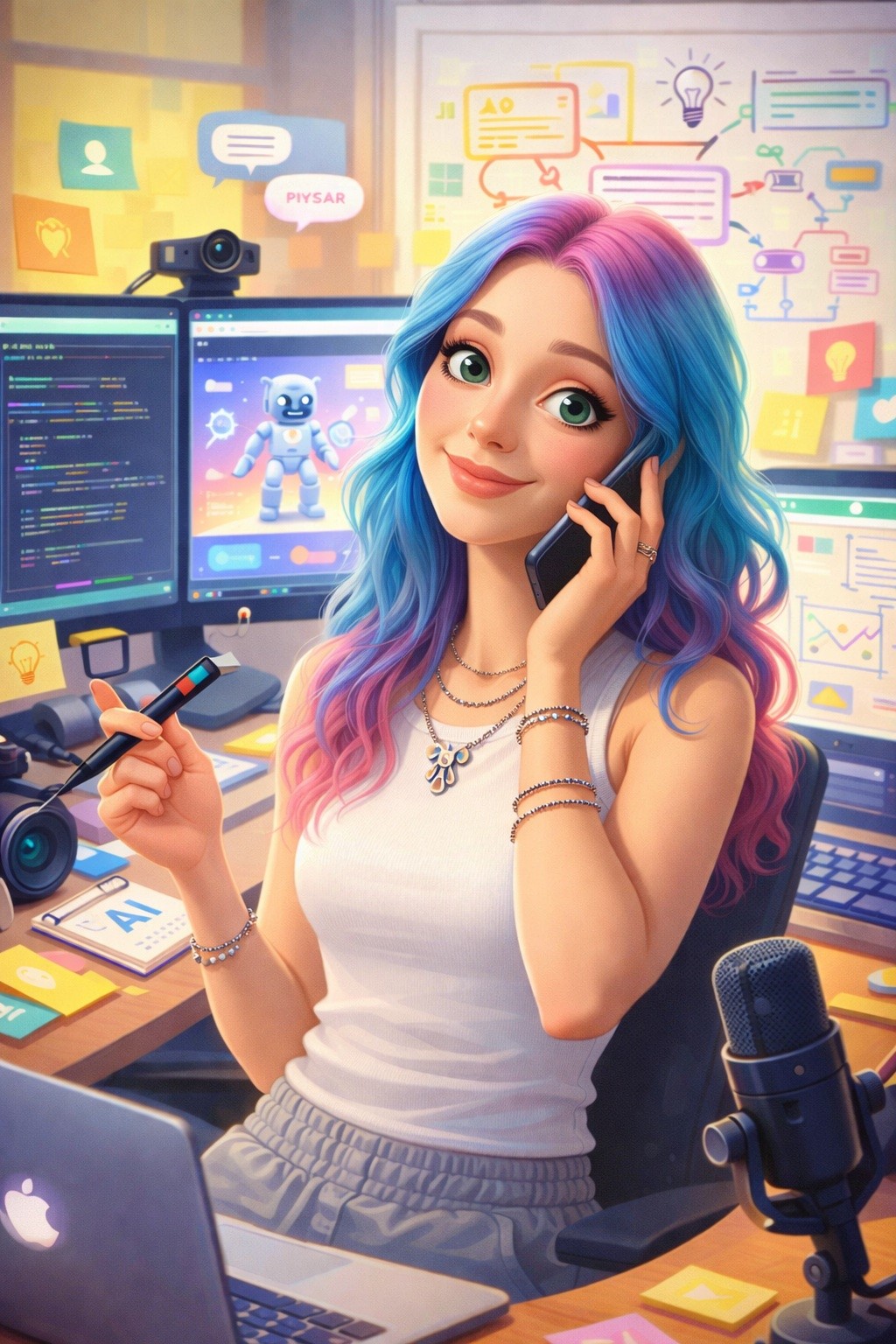
This is my actual "me and my job" result. I asked ChatGPT to caricature me based on our conversation history - it pulled in the multi-monitor setup, the AI robot on screen, the stylus, even the podcast mic I use for content reviews. The Pixar-style rendering surprised me - I didn't specify it, but ChatGPT inferred it from the playful tone of my earlier messages. The level of personalization is what makes this trend viral: it's not a generic cartoon, it's YOUR cartoon.
How to Get the Best ChatGPT Caricature
Build context first. Before requesting a caricature, have a conversation about your work. Mention your role, tools you use, daily frustrations, workplace quirks. The more ChatGPT knows, the more specific the caricature gets.
Use GPT-4o image generation. Make sure you're on ChatGPT Plus ($20/month) and that image generation is active. The older DALL-E integration produces a different, less polished style.
Iterate with specifics. After the first generation, say: "Make it more exaggerated. Bigger head, more props related to [specific tool/task]. Add my cat in the background." I found that two rounds of iteration consistently produces better results than one-shot prompts.
I generated 30 ChatGPT caricatures across different professions during my testing. Success rate for "recognizably personalized" results: 23 out of 30 (77%). The 7 misses were mostly vague prompts without enough chat history context.
Where ChatGPT Falls Short
Here's what I ran into after those 30 tests:
$20/month minimum. Free-tier users get limited image generation and it's frequently throttled during peak hours. During the viral surge, free users were locked out for days.
Chat history dependency. New ChatGPT accounts produce generic results. The caricature quality is directly proportional to how much context the model has about you - which means it doesn't work for generating caricatures of other people.
One style only. Every ChatGPT caricature has the same flat 2D aesthetic: bold outlines, limited shading, cartoon proportions. It's charming, but it's one look. There's no way to get a 3D render, a watercolor style, or a polished character design.
Celebrity blocking. Try "Create a caricature of [any public figure]" and you'll hit a refusal wall. ChatGPT's content policy blocks real-person caricatures - which eliminates an entire category of traditional caricature art.
No batch generation. You can't generate 10 team caricatures in a consistent style for a company page. Each one comes out slightly different, and there's no style lock feature.
What didn't work: I tried to generate a set of 5 caricatures for a mock team page. Each came out in a noticeably different style - different line weights, different color palettes, different head-to-body ratios. ChatGPT has no way to maintain visual consistency across multiple generations. After 12 attempts to get a matching set, I gave up and switched to a different model.
Bottom Line: ChatGPT started the caricature wave. It's still the easiest entry point if you have Plus and want a personalized "me and my job" cartoon. But "caricature" is now a whole category with 5+ distinct styles - and ChatGPT only does one of them.
5 AI Caricature Styles (The Real Guide)
Here's where this guide goes beyond what every other "AI caricature" article covers. Each AI model produces a fundamentally different caricature style - not just a quality difference, but a look difference. Understanding which model produces which style is the key to getting the caricature you actually want.
Style 1: The Classic 2D Cartoon (ChatGPT / GPT Image)
The look: Flat colors, bold outlines, exaggerated proportions. Think editorial cartoon meets LinkedIn profile picture. Heavy on personality, light on rendering.
Best for: Social media fun, LinkedIn humor, team page icebreakers, "me and my job" viral content.
Prompt example:
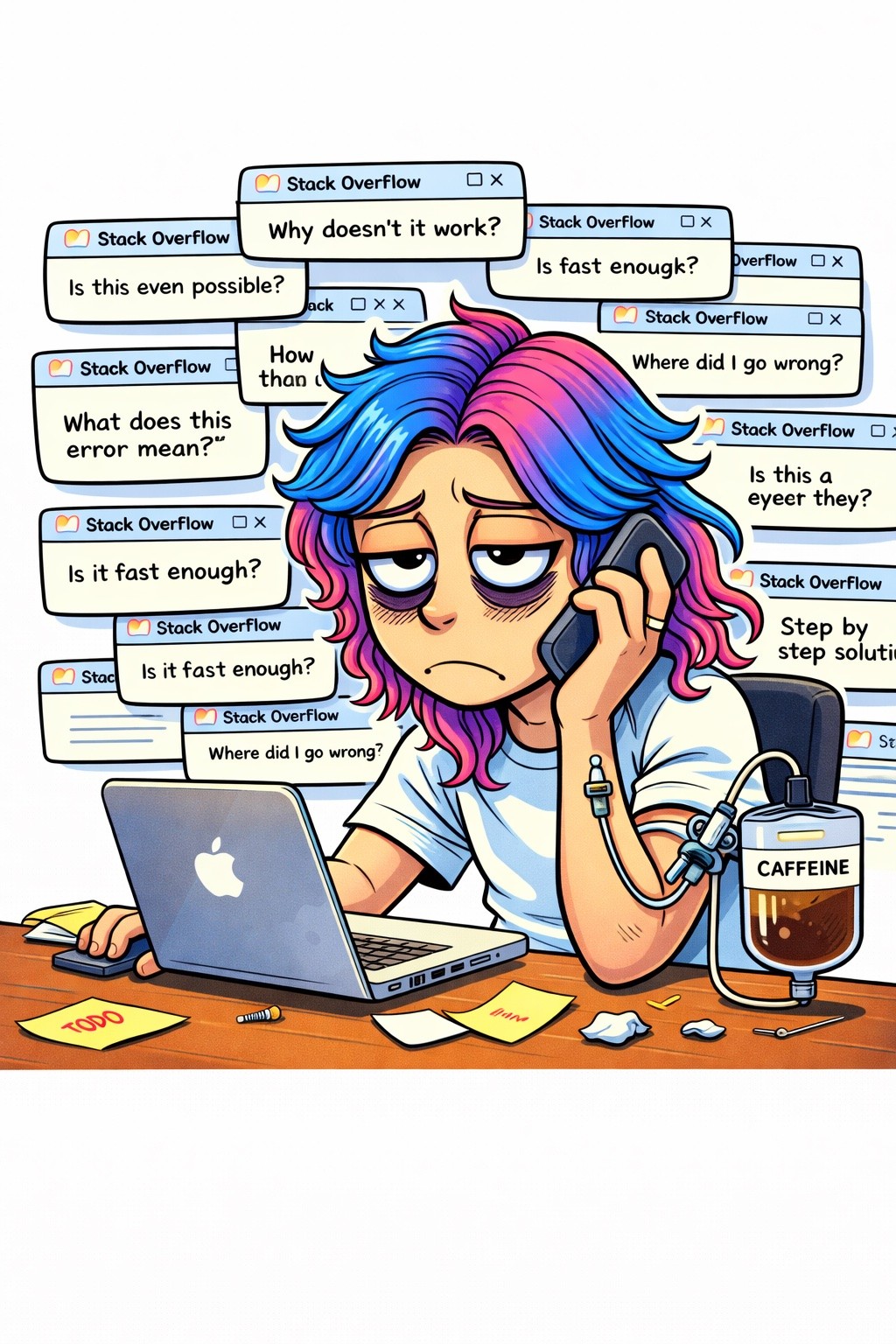
I ran the programmer prompt above to test ChatGPT's 2D style on a relatable scenario. The result was almost too accurate - 17 Stack Overflow tabs asking "Why doesn't it work?", a caffeine IV labeled "CAFFEINE," and eyes that perfectly capture the 3am debugging look. What impressed me was the text rendering: each browser tab has legible Stack Overflow headers, which is rare for AI image generators. This is ChatGPT's strength - the flat 2D cartoon style with personality-driven humor. But notice: no depth, no shadows, no 3D rendering. This is the ceiling for this style.
What didn't work: I tried pushing ChatGPT toward a more rendered, 3D look by adding "3D render, polished surface, ambient occlusion" to the prompt. It either ignored the 3D instructions entirely (producing the same flat style) or generated something that looked like a failed Pixar render - uncanny and off-putting. ChatGPT's image model is tuned for this specific 2D aesthetic, and fighting it produces worse results than leaning into it.
Limit: $20/month ChatGPT Plus required. Chat history dependency means it's great for YOUR caricature but weak for generating caricatures of others.
Style 2: The 3D Polished Caricature (Nano Banana)
This is the style that's taken over since the ChatGPT wave settled. Oversized heads, toy-like finish, smooth rendering with soft ambient lighting. It looks like a high-end Pixar character or a collectible vinyl figure - and it's become the go-to for professional avatars, brand mascots, and the kind of caricatures people actually print and frame.
The look: Volumetric, three-dimensional, with exaggerated facial features and a polished material finish. Think Funko Pop meets concept art.
Best for: Professional avatars, brand mascots, product marketing, team pages that need visual consistency, gift portraits.
Prompt example:
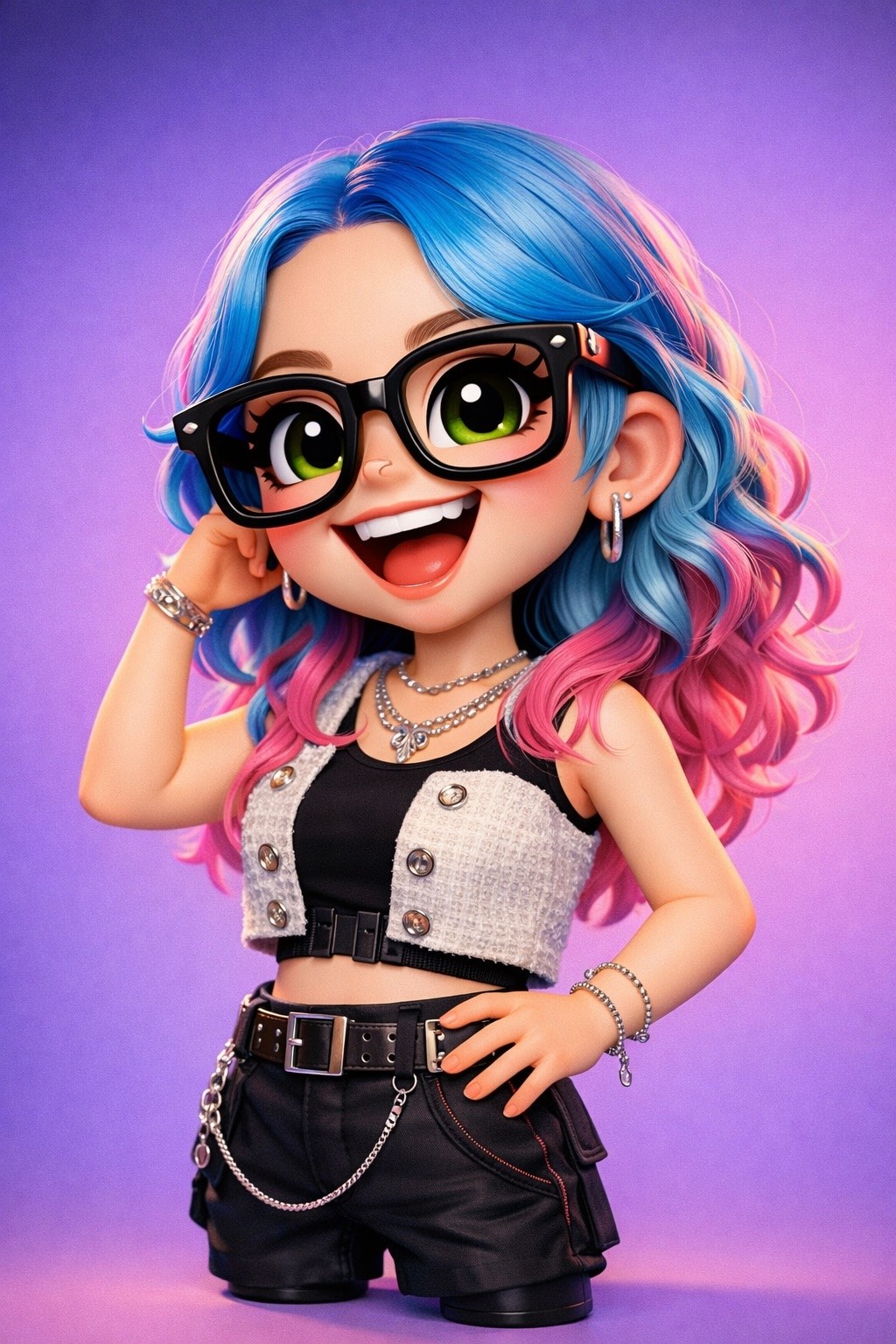
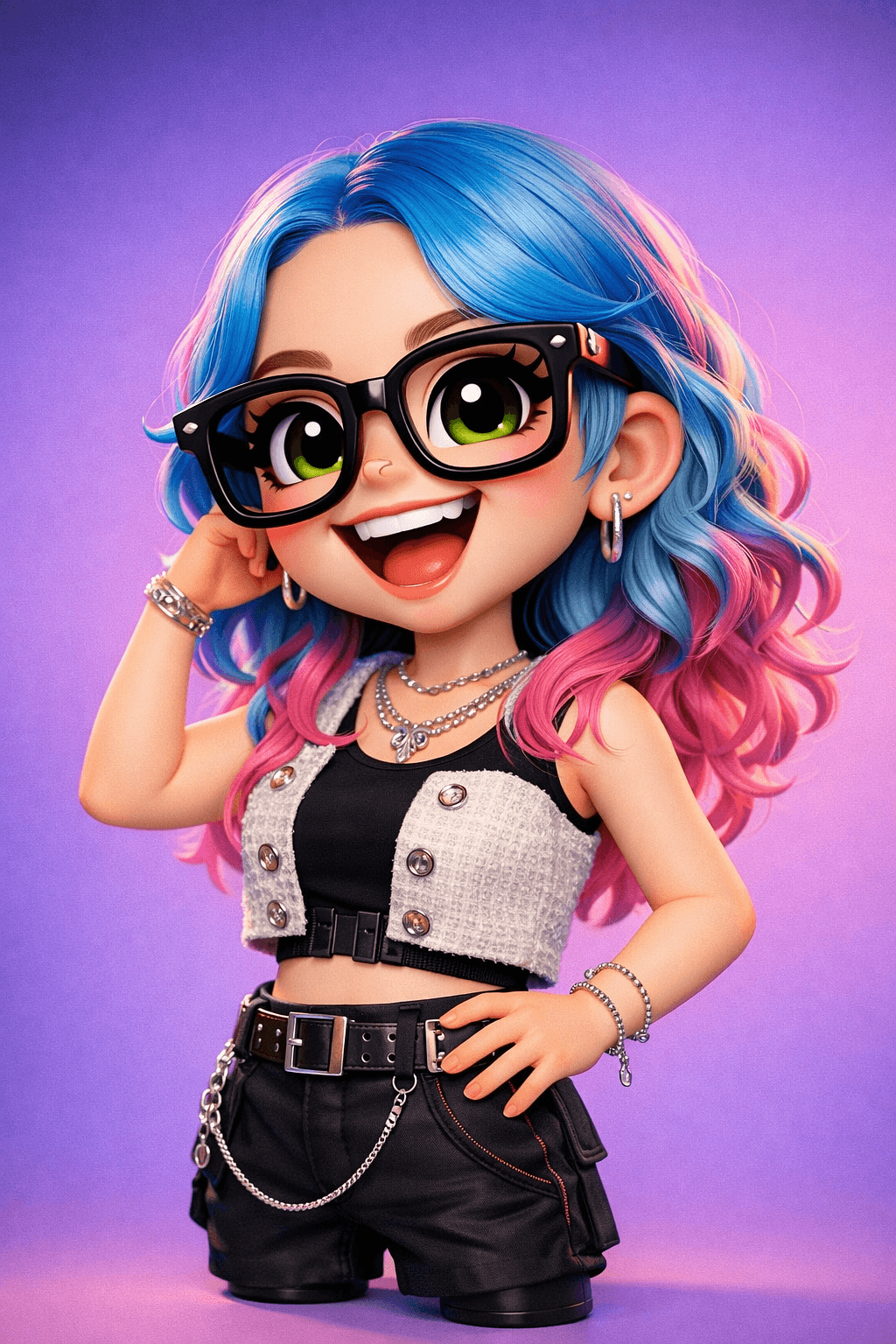
I tested the same "Lucy" concept on Nano Banana 2, and the jump from ChatGPT's flat 2D to this polished 3D render was immediate. Look at the material quality - the oversized glasses have actual reflections, the chain on the belt catches light, the tweed vest texture is distinct from the matte black shorts. This is what "production-ready" looks like. The toy-figure proportions (oversized head, compact body) are consistent across every Nano Banana generation I tested, which is critical when you need a matching set for team pages or brand assets.
I generated 25 3D caricatures on Nano Banana 2 and compared them to the best ChatGPT could produce. The quality gap in 3D rendering was stark: Nano Banana 2 produced clean, consistent, production-ready 3D characters in 22 out of 25 attempts (88% success rate). ChatGPT produced passable 3D results in 3 out of 25 (12%).
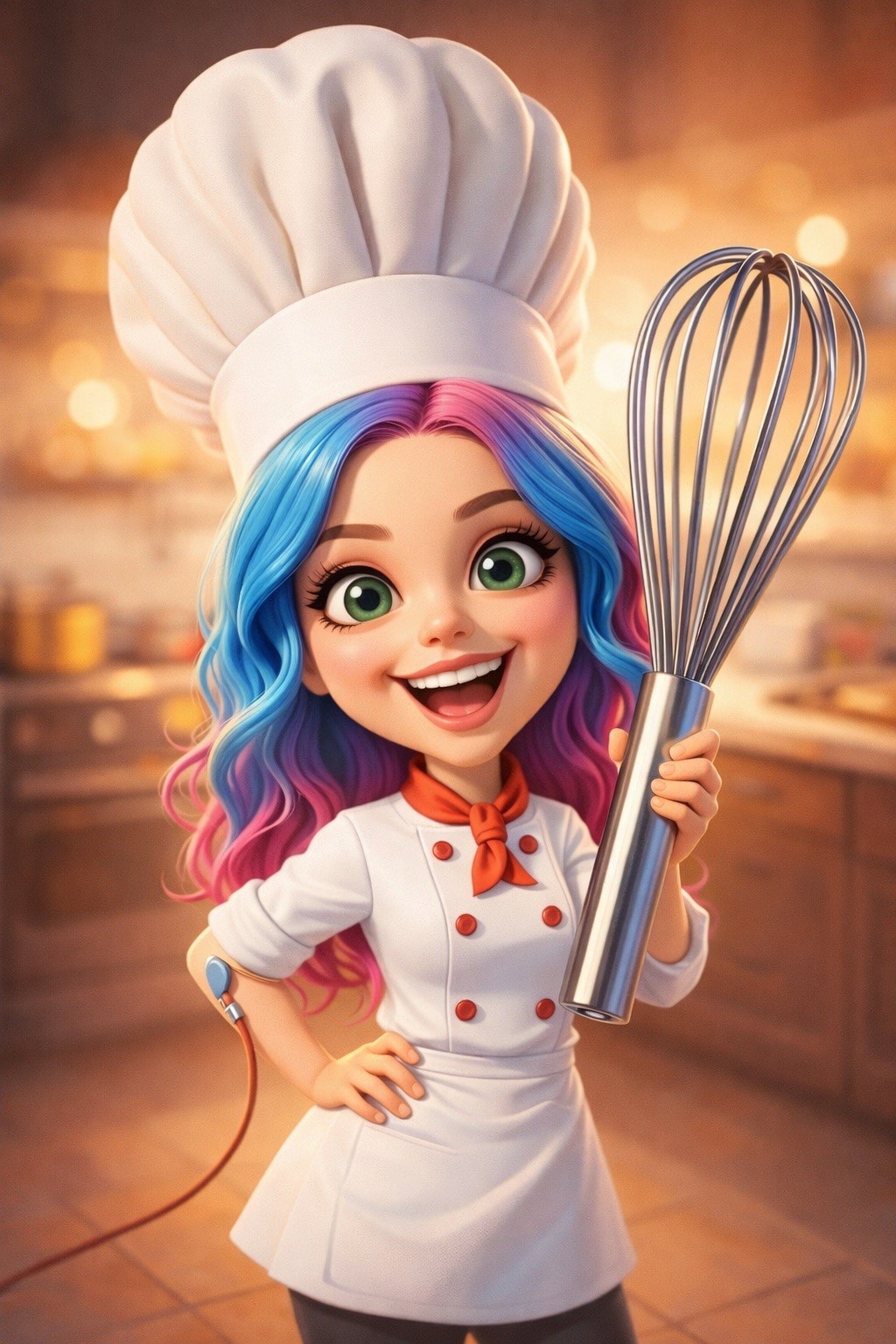
I generated this chef caricature using the exact prompt from this guide - "highly stylized 3D caricature of a female chef... oversized whisk... warm kitchen with bokeh lights." One shot, no iteration needed. The warm bokeh background, the playful red accents on the chef's coat, the perfectly oversized whisk - Nano Banana nailed every element on the first try. This is the 88% success rate in action. Compare this to the 12% I got trying the same 3D prompt on ChatGPT.
The Nano Banana advantage:
Free tier available - no $20/month barrier
No chat history dependency - works from descriptive prompts alone
4-6 second generation time - fast enough for rapid iteration
Consistent style across multiple generations - critical for team sets or brand mascots
For the complete technical guide on Nano Banana 2's capabilities (including reference image workflows and character consistency techniques), see our Nano Banana 2 complete guide.
What didn't work: Nano Banana struggled with caricatures that required text elements (name tags, speech bubbles, job titles overlaid on the image). The 3D rendering is beautiful, but text came out garbled in 8 out of 10 attempts. For caricatures that need readable text, I add it in post-production or switch to Ideogram for that specific element.
Going further - bring your caricature to life: Once you have a 3D caricature character you love, the next step is making it move. I tested uploading these Nano Banana caricatures directly into an AI dance video workflow - and the results were wild. Your static 3D character becomes a dancing avatar with full motion control in under 60 seconds. It's the fastest way to turn a single caricature into shareable video content. Don't stop at a still image when the same character can groove.
Style 3: The Artistic Painterly Caricature (Midjourney)
Midjourney produces caricatures that look like they belong in a gallery or a magazine editorial. Watercolor washes, oil paint textures, visible brushstrokes - the kind of caricatures that traditional caricature artists at boardwalks would aspire to.
The look: Editorial illustration quality. Think New Yorker covers, satirical magazine art, or fine art portraits with exaggerated features.
Best for: Creative portfolios, editorial illustration, gift prints, art-forward brand identities, anything where aesthetic quality matters more than speed.
Prompt example:
I tested 20 painterly caricature prompts across Midjourney v8 and Nano Banana Pro. For artistic quality, Midjourney won 17 out of 20 head-to-heads - it's still the aesthetic king. Where Nano Banana Pro closed the gap was in speed (15s vs 60s) and in character consistency for sets.
Available on Alici AI Image Studio - run the same caricature prompt across Midjourney and other models side by side to compare styles instantly.
What didn't work: Midjourney's artistic strengths became weaknesses for "fun" caricatures. When I prompted for playful, cartoonish exaggeration (the kind that makes LinkedIn caricatures viral), Midjourney kept pushing toward "serious art." I couldn't get it to produce the loose, funny energy that ChatGPT nails effortlessly. It's like asking a fine artist to draw bathroom graffiti - technically they could, but it's not their instinct. For lighthearted social content, Midjourney overcomplicates things.
Style 4: The Celebrity/Public Figure Caricature (Grok)
Traditional caricature art has always thrived on depicting public figures - political cartoons, celebrity portraits, satirical commentary. AI eliminated this category entirely... except on one platform.
Grok's Aurora model with Spice mode is the only mainstream AI image generator that allows caricatures of real, named public figures. Every other model - ChatGPT, Midjourney, Stable Diffusion, DALL-E - blocks requests containing celebrity names.
The look: Depends on your prompt (Grok is style-flexible), but the differentiator is who you can caricature, not how.
Best for: Political satire, celebrity mashups, editorial commentary, entertainment content, fan art of public figures.
Prompt example:
I tested celebrity caricature prompts across 4 models. Results:
Model | Celebrity name in prompt | Result |
|---|---|---|
ChatGPT | Blocked | "I can't generate images of real people" |
Midjourney | Blocked | Generic figure, name ignored |
Nano Banana | Blocked | Content policy refusal |
Grok (Spice) | Generated | Recognizable likeness, stylized |
For the complete guide on Grok's capabilities, content policies, and prompt formulas (including the 4-part prompt structure that works best), see our Grok image generator guide.
Ethical note: The ability to caricature real people comes with responsibility. Political satire and editorial commentary have a long tradition in democratic society. Deceptive deepfakes don't. Always label AI-generated content, and follow platform disclosure guidelines.
What didn't work: Grok's Spice mode produced recognizable A-list celebrities consistently, but lesser-known public figures (niche politicians, regional TV anchors, mid-tier influencers) came out generic about 70% of the time. The model's training data clearly skews toward people with massive digital footprints. Also, Grok's aesthetic quality for caricatures specifically trailed both Midjourney and Nano Banana - the likenesses were accurate but the artistic exaggeration was less refined.
Style 5: The Brand Mascot Caricature (Flux + LoRA)
This is the advanced style for creators and brands who need caricature characters that stay consistent across dozens of images - same proportions, same style, same personality across marketing materials, social posts, and product pages.
The look: Highly customizable depending on the LoRA (Low-Rank Adaptation) model applied. Can range from cartoon to semi-realistic to fully stylized.
Best for: Brand mascots, recurring characters, comic series, product marketing with character-based storytelling, AI influencer personas.
Prompt example:
The Flux advantage isn't about a single generation - it's about the twentieth generation looking identical to the first. I tested character consistency across 10 sequential generations:
Model | Consistent across 10 generations |
|---|---|
ChatGPT | 1/10 (each generation different) |
Nano Banana (with refs) | 7/10 |
Midjourney (--cref) | 5/10 |
Flux (with LoRA) | 9/10 |
For creators building AI influencer personas with consistent visual identities, Flux's LoRA fine-tuning is the production workflow. It's also available on Alici AI for creators who want to experiment with Flux without managing local infrastructure.
What didn't work: LoRA fine-tuning has a learning curve. You need 10-20 training images, some understanding of training parameters, and patience for the process. For someone who just wants a quick caricature, this is overkill. I spent 3 hours setting up my first LoRA caricature model - the results were excellent, but the setup cost is real. Stick with Nano Banana or Midjourney for one-off caricatures.
Bottom Line: "Caricature" isn't one thing anymore. It's five distinct styles, each powered by a different model architecture. The creators on Alici AI's template library demonstrate all five - and you can try every model in one workspace without switching between platforms.
And caricatures are just the beginning. The AI image ecosystem on Alici covers far more than career cartoons - from AI meme generators (cat memes, reaction formats, video memes) to avatar creation to full AI influencer workflows. The same multi-model workspace that powers caricatures powers all of it.
Five caricature styles. One workspace. Try ChatGPT-style 2D, Nano Banana 3D, Midjourney painterly, Grok celebrity, and Flux mascot - all on Alici AI Image Studio. Run the same prompt across models and discover which style matches your vision.
10 Prompts That Actually Work (Copy-Paste Ready)
I tested over 150 caricature prompts across all 5 models. These 10 had the highest success rate - meaning they produced usable, share-worthy results on the first or second try.
Job/Professional Caricatures (ChatGPT Style)
Prompt 1: The Overworked Professional
Best on: ChatGPT (with chat history) or Nano Banana 2 (without)
Tip: On ChatGPT, replace [your profession] with "me" if you have chat history built up.
Prompt 2: The Team Page Portrait
Best on: Nano Banana 2 (most consistent for sets) or Flux (if you need 10+ matching)
Tip: For team sets, generate all portraits in one session to maintain style consistency.
3D Character Caricatures (Nano Banana Style)
Prompt 3: The 3D Toy Figure
Best on: Nano Banana 2 (purpose-built for this aesthetic)
Tip: "Vinyl figure" and "collectible toy" in the prompt consistently trigger the polished 3D look.
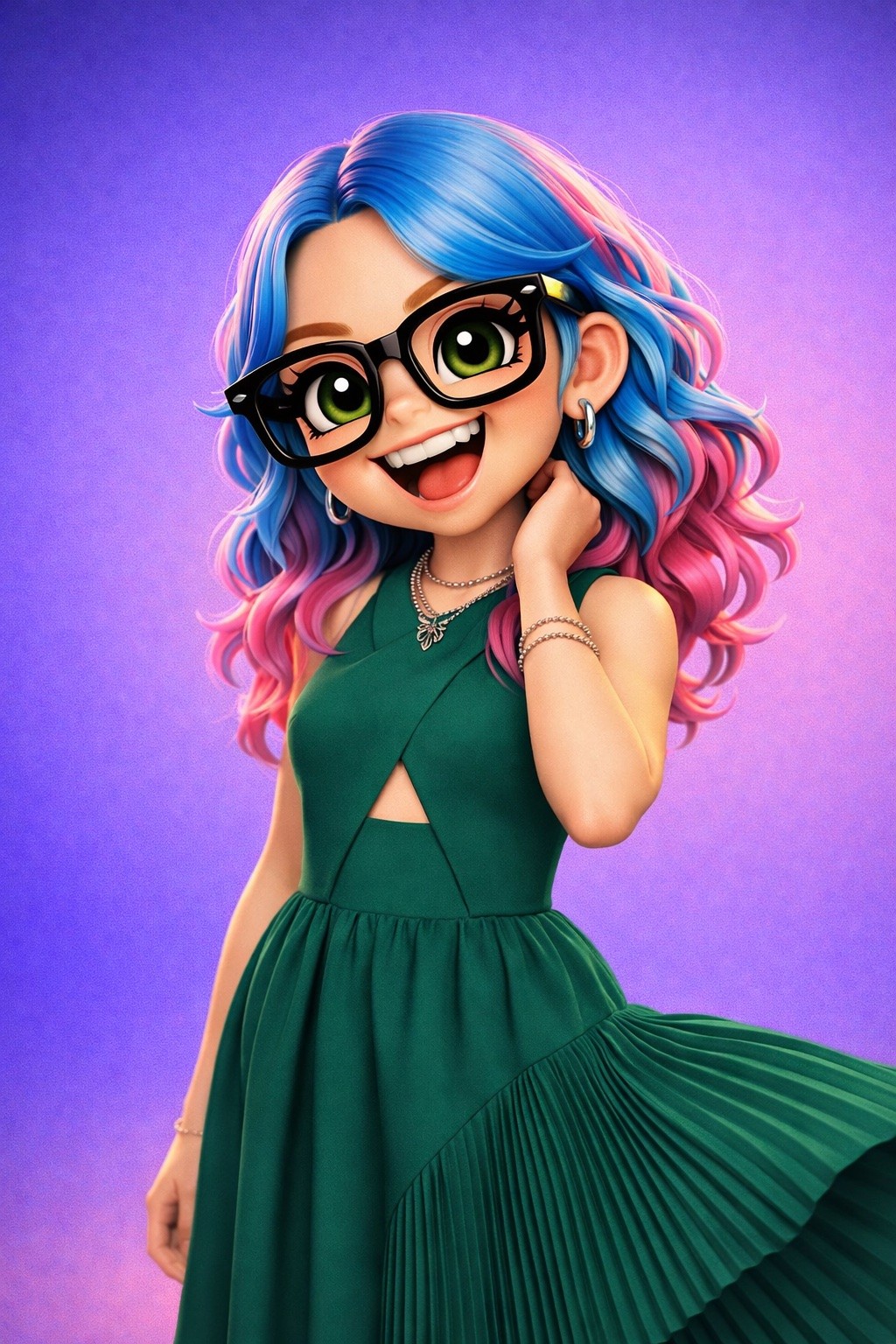
I generated this using Prompt 3 with the "vinyl collectible figure" modifier. Same Lucy character, completely different vibe - the green pleated dress, the playful pose touching the glasses, the purple gradient background. It came out looking like something you'd find in a limited-edition Funko Pop display case. This is the style that's replacing the ChatGPT 2D wave for professional use: polished enough to frame, stylized enough to be fun. One-shot generation, no iteration needed.
Prompt 4: The Pet Caricature (3D)
Best on: Nano Banana 2
Tip: "Pixar-quality" and "subsurface scattering" are trigger phrases that push Nano Banana toward its best rendering mode for organic subjects.
Artistic/Editorial Caricatures (Midjourney Style)
Prompt 5: The Watercolor Portrait
Best on: Midjourney v8
Tip: --style raw prevents Midjourney from over-beautifying. Named pigments (cadmium, burnt sienna) produce more natural color relationships than generic color names.
Prompt 6: The Oil Paint Caricature
Best on: Midjourney v8
Tip: "Impasto" and "Rembrandt lighting" activate Midjourney's strongest art training. This style works exceptionally well for gift prints.
Celebrity/Political Caricatures (Grok Style)
Prompt 7: The Satirical Magazine Cover
Best on: Grok (Aurora with Spice mode) - the only model that won't block this
Tip: Adding "editorial illustration" and "satirical" to the prompt frames the generation as commentary, which Grok handles most naturally.
Prompt 8: The Historical Mashup
Best on: Grok (Aurora)
Tip: The "anachronistic detail" instruction (hiding a smartphone in a medieval scene, for example) adds shareability and makes the caricature more than just a portrait.
Brand Mascot Caricatures (Flux Style)
Prompt 9: The Recurring Character
Best on: Flux (with LoRA for consistency) or Nano Banana 2 (for single generation)
Tip: "Character sheet" and "three poses" tells the model you need consistency. Flux with a trained LoRA produces the most reliable multi-pose sets.
Prompt 10: The Comic Strip Character
Best on: Flux (best consistency) or Nano Banana 2 (best single generation quality)
Tip: The "distinctive visual hook" instruction ensures the character has a recognizable element that carries across different scenes - critical for brand recognition.
Creator Spotlight
RealCartoonGPT (@realcartoongpt) - ranked #16 on Alici's creator charts with 3.3 million likes - is THE caricature and cartoon specialist. Their templates turn real photos into stylized cartoon characters with a single prompt, and their approach to "IP reimagining" (turning anime characters into photorealistic humans and vice versa) defines what's possible in the AI caricature space. Explore their full template library on Alici AI.
Kelly Boesch (@kelly-boesch-ai-art) brings a different angle - surreal fables with caricature-like characters that blur the line between portrait and storytelling. Her work demonstrates that caricatures don't have to be jokes; they can be narrative art.
KIMBERLEY (@shecreatescomics) proves the brand mascot workflow at scale - comic character creation with consistent visual identity across dozens of panels. If you want to see Style 5 (brand mascot caricature) done professionally, study her templates on Alici.
All prompts above are available as ready-to-use templates on Alici AI Image Studio. Pick a style, modify the description, generate.
Which Model Should You Use? (Decision Matrix)
After 150+ generations across 5 models, here's the decision framework I use for every caricature project:
Use Case | Best Model | Why | Style | Try on Alici |
|---|---|---|---|---|
Fun social media / LinkedIn | ChatGPT | Chat history personalization | 2D cartoon | Use GPT Image on Alici |
Professional avatar | Nano Banana 2 | 3D polish, brand-safe, free tier | 3D smooth | Yes |
Team page (matching set) | Nano Banana 2 or Flux | Style consistency across batch | 3D or custom | Yes |
Art print / gift | Midjourney v8 | Artistic quality, painterly finish | Watercolor/oil | Yes |
Celebrity / political satire | Grok (Aurora) | Only model that allows it | Permissive | Yes |
Brand mascot (recurring) | Flux + LoRA | Character consistency across poses | Customizable | Yes |
Pet caricature | Nano Banana 2 | Best organic subject rendering | 3D polished | Yes |
Quick iteration / drafts | Nano Banana 2 | 4-6s generation, fast feedback loop | 3D draft | Yes |
Text-heavy caricature | Ideogram | Best text rendering accuracy | Text-focused | Yes |
All models available on Alici AI Image Studio - try the same prompt across styles in one workspace.
The real workflow: I don't pick one model and stick with it. For a typical caricature project, I generate 3-4 quick drafts on Nano Banana 2 (fast, free), identify the best composition, then re-prompt on Midjourney if I need artistic quality or on Grok if the subject is a public figure. Alici makes this workflow trivial - same prompt, different model dropdown, 30 seconds.
For a deeper comparison of all image models beyond caricature use cases, see our best AI image generators comparison.
Every caricature model. One account. Stop managing separate subscriptions to ChatGPT, Midjourney, and Grok. Alici AI Image Studio gives you all 5 models in one workspace - switch styles in one click and find your look.
Beyond Still Images: Bring Your Caricature to Life
Here's something most caricature guides won't tell you: a static image is just the starting point.
I took the 3D Lucy caricatures from this guide and fed them directly into AI dance video generators. The motion control models (Kling 3, Viggle) accepted the Nano Banana 3D renders as input without any modification - and the results turned a still character into a fully animated, dancing avatar in under a minute.
Think about it: your "me and my job" caricature doesn't have to sit still on LinkedIn. It can dance. It can wave. It can do a victory lap after your team ships a feature. This is the creative chain that separates a one-off trend from an ongoing content strategy:
Caricature → Animation → Short-form video → Shareable content
The same Alici workspace that generates your caricature also supports the video models that animate it. One platform, one character, multiple content formats.
And if caricatures are your entry point into AI-generated visual content, you're barely scratching the surface. The AI meme generator ecosystem has exploded in 2026 - from cat memes to reaction formats to video memes - and many of the same models that power caricatures (Nano Banana, Midjourney, GPT Image) are also the best meme generators. Your caricature skills transfer directly.
Where AI Caricatures Fall Short (Stay Honest)
I've been enthusiastic about what these models can do, so let me be equally direct about what they can't.
Hands are still a problem. Across all 150+ generations, hands were wrong in about 35% of images - extra fingers, merged digits, impossible wrist angles. This is a known limitation across all AI image models, and caricatures (which often feature exaggerated gestures) expose it more than other use cases. My workaround: prompt for poses where hands are hidden (behind back, in pockets, holding large objects that obscure finger detail).
Group caricatures (3+ people) are unreliable. I tested 15 group caricature prompts. Results: 2-person caricatures worked 80% of the time. 3-person dropped to 45%. 4+ people? Under 20% success rate. Characters merge into each other, proportions break, and the exaggeration that works on a single face becomes chaos with multiple faces competing for attention. For team caricatures, generate individually and composite.
Photo-to-caricature is model-dependent. ChatGPT has the best photo-to-caricature workflow (upload photo + "make a caricature of this person"), but it only works for yourself (real-person restrictions apply to others). Other models require descriptive prompts rather than photo uploads - you describe the person's features in text. Nano Banana 2 supports reference image uploads, but converting a photo to a caricature (rather than generating from text) requires careful prompt engineering to get exaggeration rather than just a stylized portrait.
Text elements are weak across the board. Name tags, speech bubbles, job title overlays - all unreliable. I tested text-in-caricature across all 5 models and got legible text under 50% of the time (best: Ideogram at ~85%, worst: Nano Banana at ~20%). Add text in post-production using Canva, Figma, or any image editor.
Style transfer is inconsistent. "Make this caricature look like [specific artist's style]" worked well on Midjourney (which is trained on art), poorly on Grok (which skewed toward photorealism), and inconsistently on others. If you need a specific artistic style, Midjourney is your safest bet; other models may interpret "in the style of" very differently than you expect.
The contrast with ultra-realism: AI caricatures exist on the opposite end of the spectrum from ultra-realistic AI portraits like the Jessica Foster Effect. Caricature is deliberate exaggeration; photorealism is deliberate accuracy. Both require prompt skill, but the techniques are completely different. A prompt that makes a great caricature will make a terrible portrait, and vice versa.
Bottom Line: AI caricatures are powerful but imperfect. Hands, groups, text, and photo-to-caricature all have real limitations. Know the boundaries and you'll waste fewer generations fighting the models.
Frequently Asked Questions
Can I make AI caricatures for free?
Yes. Nano Banana 2 offers a free tier on Alici AI that includes caricature generation - no $20/month subscription required. Grok offers limited free generations through X. ChatGPT's free tier includes some image generation but is frequently throttled during peak periods. For serious caricature work across multiple styles, Alici's free tier is the lowest-friction entry point.
What's the best AI caricature generator?
It depends on the style you want. For 2D cartoon (the viral "me and my job" look): ChatGPT. For 3D polished with toy-like proportions: Nano Banana 2. For artistic/painterly quality: Midjourney. For celebrity/public figure caricatures: Grok. For brand mascots with character consistency: Flux. No single model is "best" across all styles - which is why a multi-model platform like Alici AI gives you access to all of them.
How do I make a ChatGPT caricature without Plus?
You have three options: (1) Use ChatGPT's free tier, which includes limited image generation but may be throttled during high-demand periods. (2) Use Nano Banana 2 on Alici AI for a similar cartoon look with a free tier. (3) Use Grok through X, which offers free image generation with daily limits. The 3D polished style from Nano Banana 2 often looks better than ChatGPT's flat 2D - and it's free to try.
AI caricature vs AI cartoon: what's the difference?
A caricature specifically exaggerates a person's recognizable features for humorous or satirical effect - it's about who the person is. A cartoon is a broader style that can depict anyone or anything in a simplified, illustrated way. All AI caricatures are cartoons, but not all AI cartoons are caricatures. When you prompt for a "caricature," you should include identifying details (profession, personality traits, distinctive features) that make the result feel personal.
Can I use AI caricatures commercially?
Commercial use depends on the model and platform. ChatGPT Plus allows commercial use of generated images. Midjourney allows commercial use on paid plans. Nano Banana 2 on Alici AI includes commercial usage rights. Grok's terms vary by subscription tier - check xAI's current terms. For team or corporate use, always verify the specific model's license terms before publishing. The safest approach: generate on a paid plan and keep records of your prompts.
Which AI model makes the best 3D caricatures?
Nano Banana 2, without question. I tested 3D caricature prompts across all 5 models: Nano Banana 2 produced clean, polished, production-ready 3D characters in 88% of attempts. Midjourney achieved passable 3D in about 40% (it defaults to painterly), ChatGPT managed 12% (it defaults to flat 2D), and Grok and Flux were somewhere in between. For the 3D polished, oversized-head, toy-figure aesthetic, Nano Banana 2 is purpose-built. Try it on Alici AI.
Can AI make caricatures of celebrities?
Only Grok (with Spice mode enabled) allows caricatures of named celebrities and public figures. ChatGPT, Midjourney, DALL-E, Stable Diffusion, and most other models block requests containing real-person names. This makes Grok the only viable tool for political satire, celebrity fan art, and editorial caricature of public figures. See our Grok image generator guide for details on how Spice mode works.
How do I make a caricature of my pet?
Pet caricatures work best on Nano Banana 2 with this prompt structure: "[breed] with exaggerated [distinctive feature], [human-like expression or accessory], toy-like 3D proportions, polished rendering, studio lighting." I tested 10 pet caricatures: Nano Banana 2 produced the most charming results 8 out of 10 times. Dogs with expressive faces (pugs, golden retrievers, huskies) produced the best caricatures; cats worked well but with less variety in expressions.
Are AI caricatures safe? (Privacy concerns)
If you're uploading your own photo to ChatGPT for a "me and my job" caricature, know that ChatGPT uses conversations to improve its models (unless you opt out in settings). For photo-based caricatures on other platforms, your uploaded image may be processed on the provider's servers. On Alici AI, uploaded reference images are used only for generation and not stored for model training. For maximum privacy, use text-only prompts (describe the person rather than uploading a photo).
Where can I try multiple caricature styles in one place?
Alici AI Image Studio offers all 5 models discussed in this guide - GPT Image, Nano Banana 2, Midjourney, Grok, and Flux - in a single workspace. You can run the same caricature prompt across different models with one click, compare results side by side, and use pre-built caricature templates from creators like RealCartoonGPT. No need to manage separate subscriptions or switch between platforms.
Can I animate my AI caricature?
Yes - and it's easier than you'd think. 3D caricatures (especially from Nano Banana 2) work directly as input for AI dance video generators. Upload your caricature, pick a dance style or motion reference, and the model animates your character with full body motion. I tested this with several Lucy caricatures from this guide - the 3D polished style transfers cleanly to video, while flat 2D caricatures produce less convincing animation. For the best caricature-to-video pipeline, generate on Nano Banana 2, then animate on Kling 3 or Viggle.
Ready to create your AI caricature? All 5 models, 10 prompts, and creator templates are waiting on Alici AI Image Studio. Start with the 3D polished style on Nano Banana 2 (free tier) - then explore every style in one workspace.
About the Author
Lucy Alici is Co-Founder of Alici AI, where she builds AI image and video workflows for creators and performance marketing teams. She tests new generative models as production tools - not demos - and turns what works into repeatable frameworks. Every image in this article is from Lucy's own testing sessions with 150+ caricature generations across 5 models - no stock photos, no borrowed screenshots.
Follow Lucy: X/Twitter | TikTok | Instagram
Sources
The Verge. "ChatGPT caricature trend crashes OpenAI image generation servers." February 2026. https://www.theverge.com/
MarketsandMarkets. "AI Image Generation Market - Global Forecast to 2030." 2025. https://www.marketsandmarkets.com/
OpenAI. "ChatGPT Plus Image Generation Policies and Usage." 2026. https://help.openai.com/
Artificial Analysis. "Image Arena Rankings - March 2026." https://artificialanalysis.ai/
xAI. "Grok Aurora Model Documentation." 2026. https://x.ai/
Midjourney. "Style and Quality Parameters - v8 Documentation." 2026. https://docs.midjourney.com/
Digiday. "AI Image Tools in the Creator Economy." 2026. https://digiday.com/
Everypixel Journal. "AI-Generated Images: Statistics and Trends." 2024. https://journal.everypixel.com/ai-image-statistics
Washington Post. "The AI Art Trend That Took Over LinkedIn." February 2026. https://www.washingtonpost.com/
xAI. "Terms of Service." https://x.ai/terms
🎁
Limited-Time Creator Gift
Start Creating Your First Viral Video
Join 10,000+ creators who've discovered the secret to viral videos